
Unlocking Your Workflow with AI for Meeting Notes
We’ve all been there: the meeting ends, and you’re left staring at a blank page, trying to piece together crucial decisions and action items from memory. This is where AI for meeting notes comes in. Think of these tools as a dedicated assistant who sits in on every call, captures everything perfectly, and hands you organized, useful notes the moment you’re done.
Why Manual Note-Taking Is Holding You Back
Let's be honest, the days of frantically trying to type while also listening and contributing to a conversation are numbered. It’s just not an effective way to work. When you're trying to be the designated scribe, you’re forced to split your attention, which means you’re not really excelling at listening, speaking, or writing.
The result? Important details slip through the cracks, action items get forgotten, and your notes end up a jumbled mess that takes more time to decipher later. It’s a huge drain on productivity. A recent Microsoft study found that people who used AI-generated recaps felt significantly more productive, especially when catching up on meetings they missed or juggling a packed schedule.
The Real Advantage of Automation
Using AI for meeting notes completely changes the dynamic of a meeting. Instead of one person being relegated to the role of a passive scribe, every single participant can be fully present and engaged in the discussion. The AI just works quietly in the background, capturing every word with remarkable accuracy.
This simple shift allows your team to stop focusing on administrative chores and start focusing on actual collaboration and problem-solving. When no one is burdened with taking notes, meetings naturally become more creative and interactive. The AI handles the "what was said," so your team can focus on "what we'll do next."
And this isn't just about recording a conversation—it's about making that conversation immediately useful. Within minutes of a meeting ending, you get a complete transcript, a high-level summary, and a neatly organized list of action items. This ensures momentum is never lost between meetings.
Manual Note Taking vs AI for Meeting Notes
To really see the difference, it helps to put the old way of working side-by-side with the new approach. The contrast is pretty stark, and it quickly becomes clear why so many teams are making the switch.
Take a look at how these two methods stack up across the metrics that matter most for productivity and efficiency.
| Feature | Manual Note Taking | AI for Meeting Notes |
|---|---|---|
| Time Spent | Hours spent taking and cleaning notes | Minutes to review an automated summary |
| Accuracy | Prone to human error and missed details | Up to 99% accuracy in ideal conditions |
| Cost | High hidden costs in employee time | Low subscription cost with high ROI |
| Actionability | Action items often lost or unclear | Automatically extracts and lists action items |
| Engagement | Divides participant attention | Allows for full, active participation |
As you can see, AI doesn’t just offer a slight improvement; it delivers a fundamentally better experience. From saving time and money to boosting engagement and ensuring nothing gets missed, the benefits are clear and immediate.
How AI Turns Conversations into Actionable Insights
Ever wonder what’s actually happening under the hood when an AI joins your meeting? It’s not just hitting "record." It's a sophisticated process that turns messy, real-time conversation into clean, structured notes you can actually use.
Think of it less like a tape recorder and more like a dedicated assistant who not only writes everything down but also organizes, summarizes, and pulls out the most important tasks for you. The whole process starts with the most basic element: sound.
From Sound Waves to Smart Summaries
It all begins with audio capture. The AI tool records the audio from your call or in-person meeting, creating the raw material it needs to work its magic. From there, it gets interesting.
First, the tool performs speech-to-text transcription. It uses sophisticated AI models, trained on countless hours of audio, to convert the spoken words into a written transcript. These systems are getting incredibly good at handling different accents, speaking speeds, and even industry-specific jargon.
Next comes a crucial step called speaker diarization. That’s a technical term for a simple but vital task: figuring out who said what. By analyzing the unique qualities of each person's voice, the AI can accurately label each part of the conversation, which is essential for making sense of the back-and-forth.
But the real game-changer is what happens last. The system uses Large Language Models (LLMs) to analyze the full transcript. This is where it goes from being a simple transcription service to a true productivity partner, generating summaries, spotting key decisions, and pulling out action items.
This diagram shows just how different the AI-powered workflow is compared to doing it all by hand.
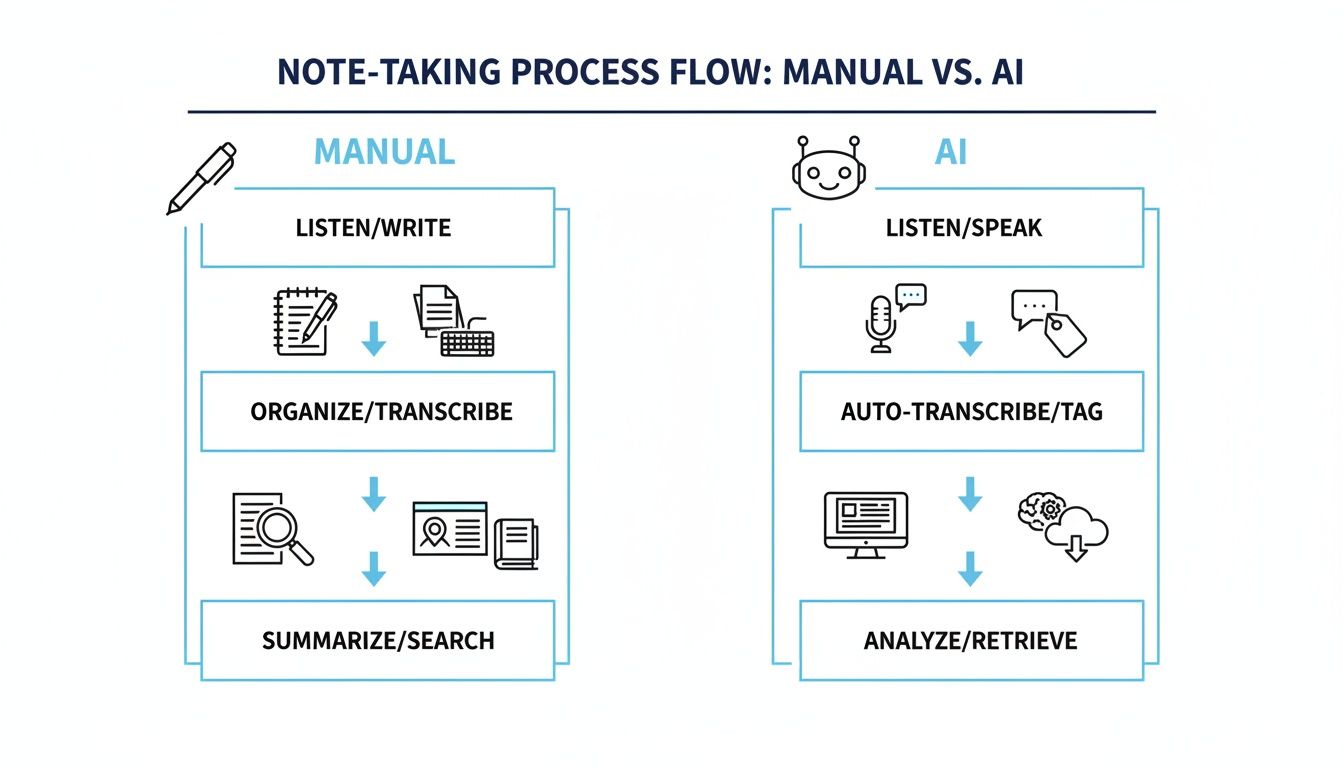
As you can see, the AI handles the most tedious parts, freeing up your team to actually participate in the meeting instead of frantically typing.
The Power of Intelligent Analysis
Once the transcript is ready and the speakers are identified, the AI’s brain really kicks in. It doesn't just see a wall of text; it reads for meaning and context. Here’s a breakdown of what that analysis looks like:
- Summarization: The AI condenses the entire discussion into a quick, readable summary. You can get the gist of a 60-minute meeting in just a few minutes. If you want to go deeper on this, you can learn more about how to summarize a meeting with AI.
- Action Item Extraction: It actively looks for commitment language, like "I'll handle that," or "The next step is to...," and automatically compiles a to-do list, often with the assigned person already noted.
- Topic Identification: The system can also chunk the conversation into major themes or topics discussed, making it simple to find specific parts of the meeting later without scrubbing through a video.
This final layer of intelligence is what turns a simple recording into a searchable, actionable knowledge base for your entire team. For more insights on how this works in practice, the team at Parakeet AI's blog has some great articles. Ultimately, it’s this analytical power that ensures no brilliant idea or critical task gets lost in the shuffle.
Real-World Wins with AI Meeting Notes
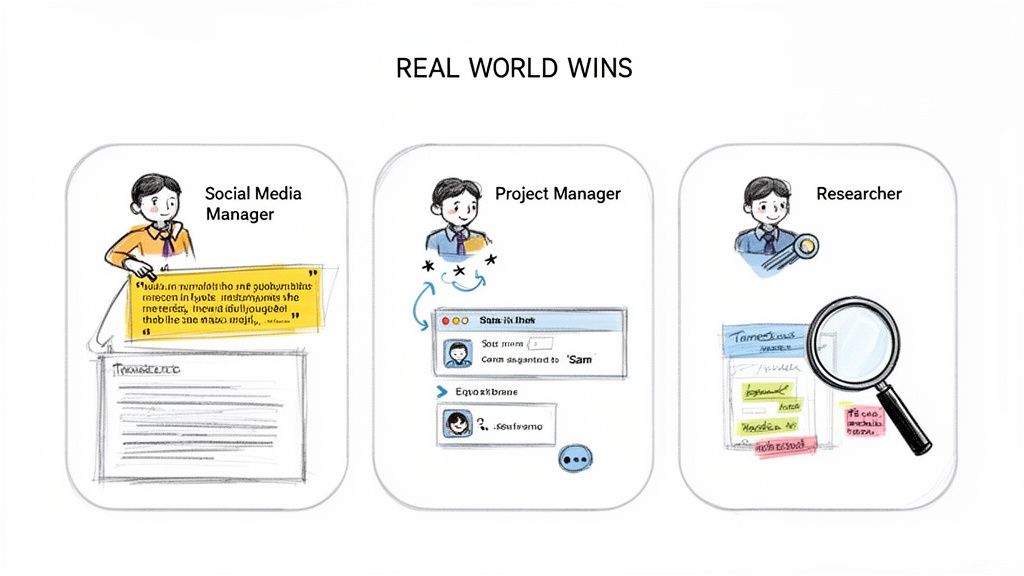
It’s one thing to talk about AI for meeting notes in theory. It’s another to see how it actually helps people get their jobs done. These tools aren't just a novelty; they solve very specific, nagging problems that professionals face every single day.
Take a social media manager. Their best ideas often come from a fast-paced, free-flowing brainstorming session—a goldmine of content. But who has time to scrub through an hour-long recording just to find that one perfect, witty quote for a social post? With an AI note-taker, they can search the transcript for keywords or scan a summary in seconds, pulling out shareable soundbites without the headache.
Project managers feel a different kind of pressure. During a client check-in, every single detail matters. Forgetting a minor piece of feedback can throw an entire project off course. An AI assistant completely changes this dynamic. It doesn't just transcribe the call; it automatically flags and lists out the action items, making sure no task ever falls through the cracks.
The real magic here is that AI lets your team stop being minute-takers and start being strategists. It handles the tedious job of documenting what was said so you can focus on what to do next.
This shift from busywork to brainpower is why the market is booming. The meeting transcription space, a core part of AI for meeting notes, is on track to jump from $3.86 billion in 2026 to a massive $29.45 billion by 2034. That explosive growth, a 25.62% compound annual growth rate, is happening because teams in our new hybrid world desperately need this kind of automation.
Applications Across Different Fields
And it's not just for corporate teams. The benefits of automated documentation are showing up in some really interesting places, especially in creative and research-heavy fields.
For the Researcher: Imagine you’ve just finished dozens of in-depth user interviews. The old way meant spending weeks manually transcribing every recording. Now, AI can do it in a fraction of the time, letting you jump straight to analyzing the data, spotting key themes, and finding those crucial insights.
For the Podcaster: A single podcast episode is a treasure trove of content waiting to be repurposed. An AI tool can instantly turn that audio file into a full blog post, show notes complete with timestamps, and a dozen different social media snippets. It multiplies the value of every recording.
For the Student: Getting ready for final exams used to mean re-watching hours of lectures. With AI-generated transcripts, students can search for specific concepts, review a professor's key points, and build study guides that are far more effective than just passively listening again.
In every case, the return on investment is clear and immediate. You save an incredible amount of time, slash the risk of human error, and start finding valuable ideas that were previously buried in your conversations. For project managers, learning to work with these AI-generated outputs is a critical new skill. To get started, check out our guide on how to use AI for action items on meeting minutes and make your project tracking seamless.
How to Choose the Right AI Note-Taking Tool
With so many AI note-takers popping up, picking the right one can feel overwhelming. It’s easy to get lost in a sea of features, but finding a tool that genuinely helps your team comes down to focusing on a few key things.
Think of it this way: you’re not just buying software, you’re hiring a new assistant for every meeting. You want one that fits in seamlessly, not one that makes you completely overhaul how your team already works. A little bit of thoughtful evaluation upfront will save you a lot of headaches later.
Core Evaluation Criteria
When I help teams choose a tool, I always tell them to start with these four non-negotiables. Getting these right is the foundation for a tool you'll actually stick with.
Accuracy and Language Support: First and foremost, how well does it actually understand what’s being said? Look for providers that boast high accuracy rates—the best ones can reach up to 99% in quiet environments. Just as important, make sure it can handle the specific languages, dialects, and accents that pop up in your meetings.
Integration Capabilities: A standalone tool is a silo. A truly great one plugs right into the software you already use every day. Does it connect with your Google or Outlook calendar? What about your meeting platforms like Zoom and Teams, or your project tools like Asana and Slack? Smooth integration isn't a "nice-to-have"; it's essential for a smooth workflow.
Security and Privacy: Your meeting recordings and transcripts are full of sensitive information. You have to be able to trust your provider. Dig into their security practices—do they offer end-to-end encryption? Are they compliant with standards like GDPR and SOC 2? Crucially, you need a firm guarantee that your data won't be used to train their AI models without your explicit consent.
Choosing the right tool is a balancing act between powerful features and rock-solid security. A platform with fancy analytics but a flimsy privacy policy is a liability waiting to happen. Always go with providers who treat your data as seriously as you do.
Must-Have Features Checklist
Once you've vetted the fundamentals, you can start looking at the features that separate the good tools from the great ones. As you compare your options, this checklist will help you spot the features that deliver real-world value.
Solutions like an AI-powered note assistant often excel by focusing on these practical details. If you want to go deeper on what a modern AI meeting note taker should offer, our guide has you covered.
Here’s what to look for:
- Speaker Identification (Diarization): This is a game-changer. The ability to automatically tell who said what (e.g., "Sarah said," "David said") is what makes a transcript clear and actionable instead of just a wall of text.
- Flexible Export Formats: Your notes need to be shared and stored. Can you easily export them to Google Docs, Word, PDF, or Markdown? The more options, the better.
- Interactive Transcripts: The best tools don’t just give you a static file. They let you click anywhere in the transcript and instantly jump to that exact moment in the audio or video recording. This makes reviewing key points incredibly fast.
- Follow-Up Questions: This is where the AI really shines. Modern platforms let you "chat" with your transcript. You can ask it things like, "What were the main action items for the marketing team?" or "Summarize John's feedback on the proposal." It turns a simple recording into an interactive knowledge base.
Here's a look at how to roll out an AI note-taker on your team. It's less about flipping a switch on a new piece of software and more about thoughtfully weaving it into your team's daily habits.
A Simple Guide to Implementing AI Note Taking
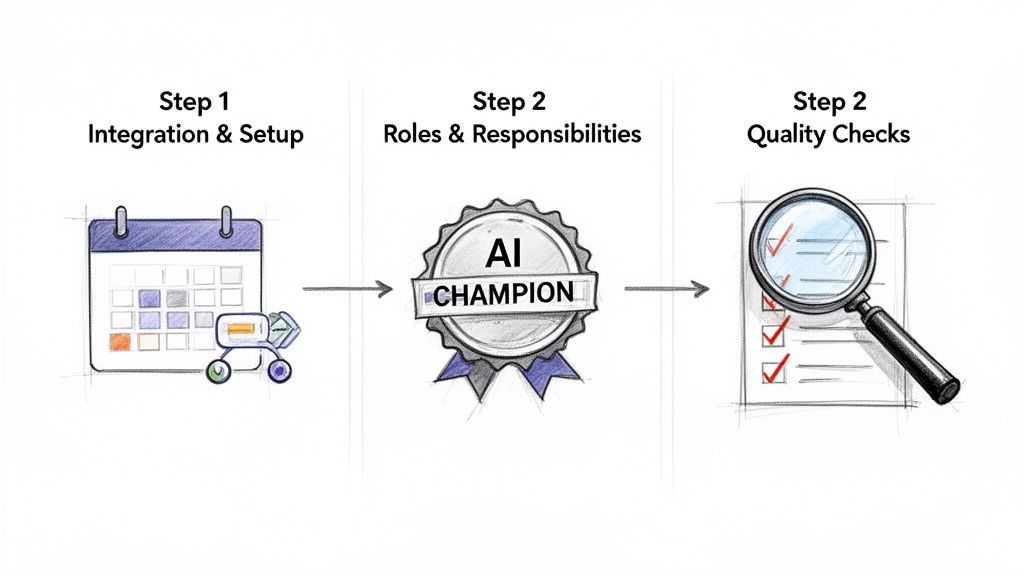
Bringing AI for meeting notes into your workflow is easier than you might think, as long as you have a clear plan. Success isn't about forcing a new tool on everyone overnight; it’s about a smooth, intentional rollout.
The first step is usually the simplest: Integration and Setup. This is just a matter of connecting the AI assistant to the tools your team already uses every day. You’ll authorize it to access your calendar and hook it up to your meeting platform, whether that’s Zoom, Google Meet, or something else. This way, the AI knows exactly when and where it needs to be.
When you get the setup right, the tool just works in the background. It shouldn't feel like yet another app to juggle. The idea is for it to be almost invisible until the moment you need those perfectly summarized notes.
The biggest hurdle in adopting new technology isn't the software—it's the people. A successful implementation focuses on building new habits and demonstrating value quickly to get everyone on board.
The demand for tools like this has exploded, especially with so many teams working in a hybrid model. It's no surprise that the market for meeting notes transcription is expected to jump from $3.86 billion in 2026 to a massive $29.45 billion by 2034. That staggering 25.62% annual growth shows just how badly we need automated solutions that old-school manual note-taking can't provide. You can read more about these AI transcription industry trends to see where things are headed.
Defining Roles and Establishing Quality
Alright, once the tech is connected, you need a human to guide it. This is where you Define Roles and Responsibilities. The key here is to appoint an "AI Champion" on your team. This person doesn't need a technical background; they just need to be the point person who owns the process.
Their responsibilities are straightforward:
- Make sure the AI assistant is invited to all the important meetings.
- Give the AI-generated summaries a quick once-over for accuracy and clarity.
- Distribute the final notes and action items to the relevant team members.
The final piece of the puzzle is to Establish Quality Checks. Don't overthink this—it’s not a formal audit. It’s a quick, five-minute scan after each meeting. Just check that the summary actually captures the important decisions and that the action items make sense and are assigned to the right people.
This last step is all about building trust. Once your team sees the AI consistently produces reliable and useful notes, they’ll stop feeling the pressure to take notes themselves. They'll start engaging more in the conversation, which is the real goal. These small, early wins are what will make AI for meeting notes a tool your team can't imagine working without.
Common Questions About AI for Meeting Notes
Whenever I talk to teams about switching to AI for meeting notes, the same few questions and concerns always come up. It's a natural shift in how we work, so it's smart to be curious about things like privacy, accuracy, and whether a bot will ruin the vibe of your calls. Let's tackle those common worries head-on, based on real experiences.
Is My Meeting Data Safe and Private?
This is usually the first thing people ask, and for good reason. No one wants their confidential strategy sessions floating around the internet.
The short answer is yes, your data can be completely safe—but it all comes down to choosing the right tool. Reputable, enterprise-ready services are built with security at their core. Look for a clear commitment to privacy standards like GDPR and SOC 2. When you're vetting a tool, these are the non-negotiables:
- Data must be encrypted both while it's being uploaded (in transit) and when it's stored (at rest).
- The provider must have a crystal-clear policy stating they will never use your confidential conversations to train their AI models without your direct, explicit permission.
Think of it this way: A trustworthy AI note-taker treats your data with the same seriousness you do. Security isn't just another feature; it's the foundation everything else is built on.
How Accurate Is AI Transcription Really?
You'd be surprised. We're not talking about the clunky, often hilarious voice-to-text from a few years ago. Today's best AI tools can reach up to 99% accuracy under good conditions, which is often better and faster than a human transcriber.
Of course, it's not perfect. Thick accents, lots of background noise, or people talking over each other can still trip up the AI. The technology is always getting smarter, though.
The real game-changer isn't just the raw accuracy, but the combination of accuracy and speed. You get a near-perfect transcript within minutes, not hours or days. From my experience, a quick 5-minute review by a human is a great habit to get into for the most important meetings, just to catch any subtle mistakes or nuance the AI might have missed.
Will an AI Note Taker Make Meetings Impersonal?
I’ve found it actually does the exact opposite. An AI assistant can make your meetings more human, not less.
Picture your typical meeting. There's always at least one person with their head down, furiously typing, trying to capture every word. They're only half-present in the conversation. When you let an AI handle that chore, that person is free to look up, make eye contact, and actually participate.
The AI becomes a silent team member that handles the administrative work. This frees up your team's brainpower to focus on what humans do best: solving problems, bouncing ideas around, and connecting with each other. The result is better collaboration and deeper engagement, not a robotic, impersonal experience.
Ready to stop taking meeting notes and start having better meetings? Whisper AI offers instant, accurate transcriptions and summaries, so your team can focus on what truly matters. Try Whisper AI for free and see the difference it makes.


























































































