
How to Improve Workflow Efficiency: 2026 Guide
A lot of workflow advice assumes you have a team, a project manager, and enough slack in the week to redesign your systems properly. Most creators do not. The podcaster is also the editor. The social media manager is also writing captions, clipping reels, answering client messages, and fixing transcript mistakes at midnight. The journalist is still turning interviews into notes by hand because “that’s how I’ve always done it.”
Workflow efficiency typically falters in these scenarios. Not in one dramatic failure, but in dozens of tiny frictions. Downloading files. Renaming assets. Hunting for the latest version. Re-listening to audio to confirm a quote. Copying highlights into a doc that should have updated itself.
The result is not just lost time. It is lost output, delayed publishing, weaker promotion, and less energy for the work that moves your business forward.
Why Your Current Workflow Is Costing You More Than Time
A familiar pattern shows up in small creative operations. You finish recording, then the essential work starts. You export the file, upload it somewhere, wait for processing, skim a transcript, fix names, pull timestamps, draft show notes, cut social clips, write captions, and build a blog post from the episode. By the time the content is ready, you are already behind on the next one.
That kind of workflow looks busy, but a lot of it is low-value effort. It feels productive because you are moving all day. It is expensive because the movement does not produce much advantage.
The true cost appears in what does not happen. The follow-up email to a sponsor gets delayed. The second short-form clip never gets posted. The newsletter issue ships late. Good ideas die in the gap between creation and distribution.
This is why workflow efficiency matters more than personal discipline. Many do not need better willpower. They need a system that removes avoidable work, reduces rework, and protects attention for tasks that require judgment. If you want a useful mental model for that shift, this piece on how to eliminate low-value work is worth reading because it frames efficiency as a resource allocation problem, not a motivation problem.
Small teams feel this pain faster than larger ones. Enterprises can hide bad process under headcount. Solopreneurs cannot. If your workflow is clumsy, you feel it in missed deadlines, inconsistent quality, and the constant sense that the backlog is growing faster than you can close it.
How to Diagnose Your Workflow Bottlenecks
Many attempt to improve workflow efficiency by buying a new tool too early. That usually creates another layer of complexity on top of a messy process.
Start with an audit. You need to know where work slows down, where it loops back, and where your time leaks out in small chunks.
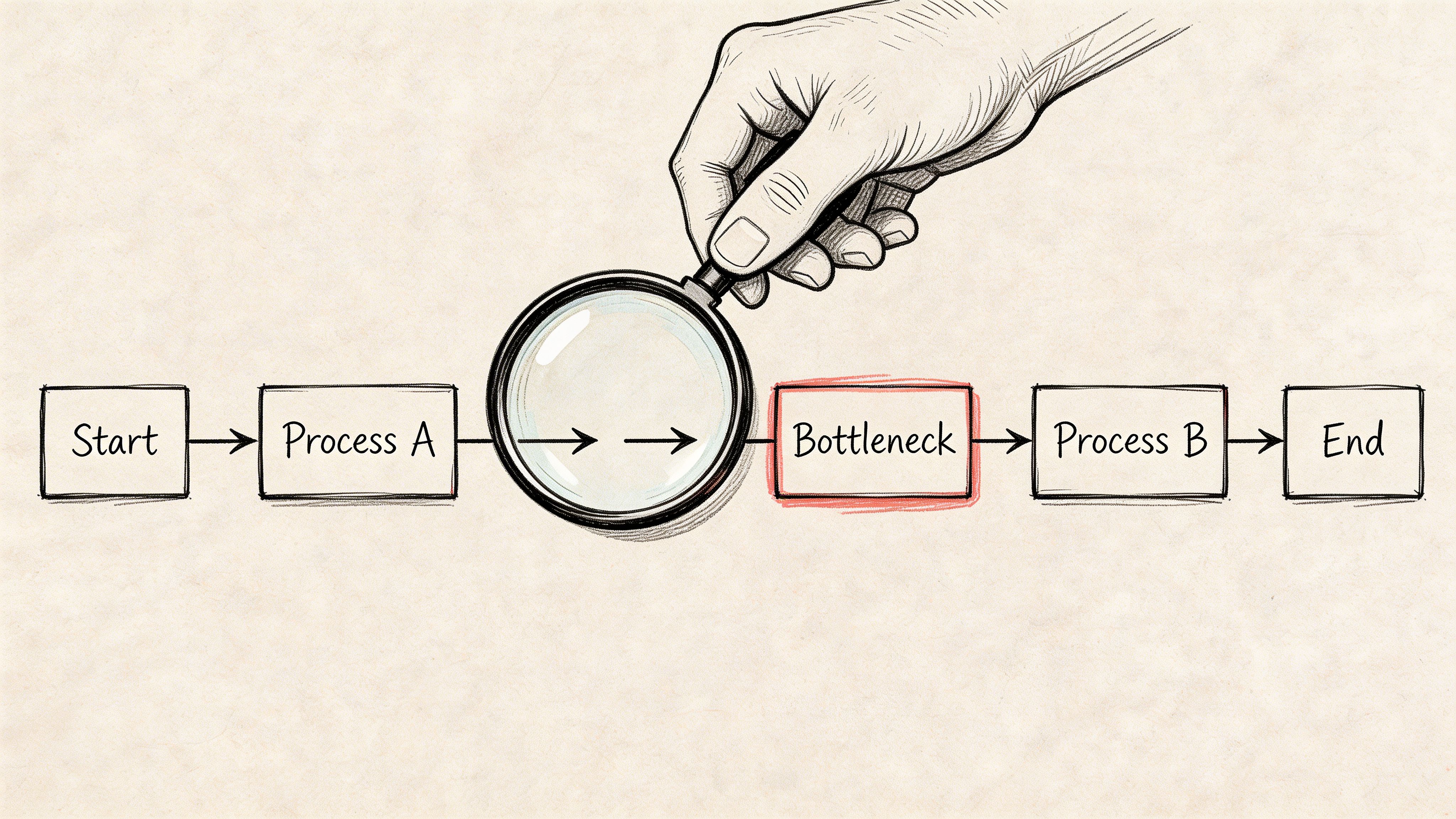
Map one workflow end to end
Do not audit your whole business at once. Pick one repeatable workflow with clear output, such as:
- Podcast post-production: From recording to published episode, captions, and social clips.
- Client interview processing: From raw audio to transcript, summary, action items, and archive.
- Weekly content repurposing: From one long-form asset to newsletter, blog draft, and short clips.
Write every step in order. Include the tiny ones people usually skip over.
A podcast workflow might look like this:
- Record audio
- Export file
- Rename and store
- Upload for transcription
- Review transcript
- Correct speaker labels
- Pull key quotes
- Draft show notes
- Create captions
- Cut clips
- Write social copy
- Schedule promotion
That list matters because bottlenecks often hide in “small” transitions, not only in major tasks.
Track time accurately
For one week, log how long each step takes. Not how long it should take. Not how long you tell clients it takes.
The benchmark is sobering. McKinsey estimates that many employees could save a significant portion of their time through automation, and Formstack reports that 51% of workers spend at least two hours daily on repetitive manual tasks. Managers spend a full workday per week on manual data handling (Formstack).
For small teams, the issue is not abstract. Two wasted hours a day usually means one less deliverable shipped that week.
Use a simple note, spreadsheet, or timer app. Capture:
- Elapsed time: Total time from start to finish
- Hands-on time: The minutes you actively work
- Waiting time: Uploads, approvals, rendering, replies
- Rework time: Fixing mistakes, reformatting, repeating tasks
Tip: A task that takes ten minutes but forces you to stop and restart your focus several times is often a bigger bottleneck than a single one-hour block.
Use the Five Whys
When you find a slow step, ask why it happens. Then ask again until you hit the root cause.
Example:
- The transcript review takes too long.
- Why? You keep correcting names and speaker turns.
- Why? The original audio has inconsistent labeling and no shared naming convention.
- Why? Guests submit files in different formats and your intake process is loose.
- Why? There is no standard pre-production checklist.
The bottleneck was not “bad transcript review.” It was a weak intake process upstream.
Mark tasks by value
Once the map is visible, tag each step with one of three labels:
| Task type | What it means | What to do |
|---|---|---|
| High value | Directly improves the final output | Protect and standardize it |
| Necessary support | Needed, but not a differentiator | Simplify or template it |
| Low value | Repetitive, manual, or avoidable | Eliminate, automate, or batch it |
Many creators gain clarity quickly at this point. They discover they spend prime working hours on file wrangling, formatting, and copying information between tools.
Watch for common bottleneck patterns
The same problems show up repeatedly in creator workflows:
- Too many handoffs: Work moves between apps or people too often.
- No single source of truth: Transcript in one place, notes in another, tasks somewhere else.
- Approval lag: Content sits waiting because no one knows who signs off.
- Manual conversion work: Turning one asset into several formats by hand.
- Late quality checks: Errors get caught at the end, when they are harder to fix.
If you want to know how to improve workflow efficiency, this is the turning point. Stop optimizing your to-do list and start diagnosing the process that generates the to-do list.
Setting Meaningful Efficiency Goals and KPIs
Once you know where the friction is, define what better looks like. At this stage, many teams become complacent. They set a vague goal like “be faster” and then wonder why nothing changes.
Good efficiency goals are specific enough to guide decisions, but broad enough to reflect real business value. Speed matters, but speed alone can create sloppy output, more revisions, and more stress.
Measure more than speed
A healthy workflow scorecard usually covers three areas:
- Time: How long key tasks take
- Quality: How often errors force rework
- Capacity: How much output you can handle without overload
This consideration is important: automation should not only make work quicker. It should also make it more reliable. Automated workflows can produce an 88% increase in data accuracy and a 90% reduction in manual errors, while 44% of businesses identify repetitive errors as a top bottleneck (Anchor Group).
For creators, that shows up in fewer transcript corrections, fewer caption mistakes, and less time spent checking whether the summary missed the actual point.
Example Efficiency KPIs for Content Creators
| Metric Category | Example KPI | How to Measure |
|---|---|---|
| Time | Reduce turnaround from raw interview to usable notes | Track elapsed time from upload to finished draft |
| Quality | Lower transcript correction workload | Count edits required per finished transcript |
| Capacity | Increase number of repurposed assets per recording | Compare outputs created from each long-form asset |
| Consistency | Publish on schedule more reliably | Track planned vs actual publish dates |
| Focus | Reduce time spent on admin-heavy production work | Review weekly time log by task type |
A good KPI should help you choose between actions. If transcript cleanup is your issue, your metric should expose that. If content repurposing is the problem, your metric should tell you whether each recording is generating enough downstream assets.
Keep KPIs tied to decisions
At this stage, people often overbuild dashboards. They measure everything and improve nothing.
Start with a short list:
- One time metric for turnaround
- One quality metric for rework
- One capacity metric for maximizing output
Then review them against the actual workflow map from your audit. If a metric does not help you remove friction, drop it.
Knowledge management also matters here. If your notes, transcripts, highlights, and action items are scattered, your numbers can look fine while your team still feels disorganized. This guide to knowledge management best practices is useful because efficient workflows break when information is hard to retrieve, not only when tasks are slow.
Key takeaway: The best KPI is the one that changes behavior. If no one uses it to make a decision, it is reporting, not management.
Applying Lean and Agile Methods to Your Workflow
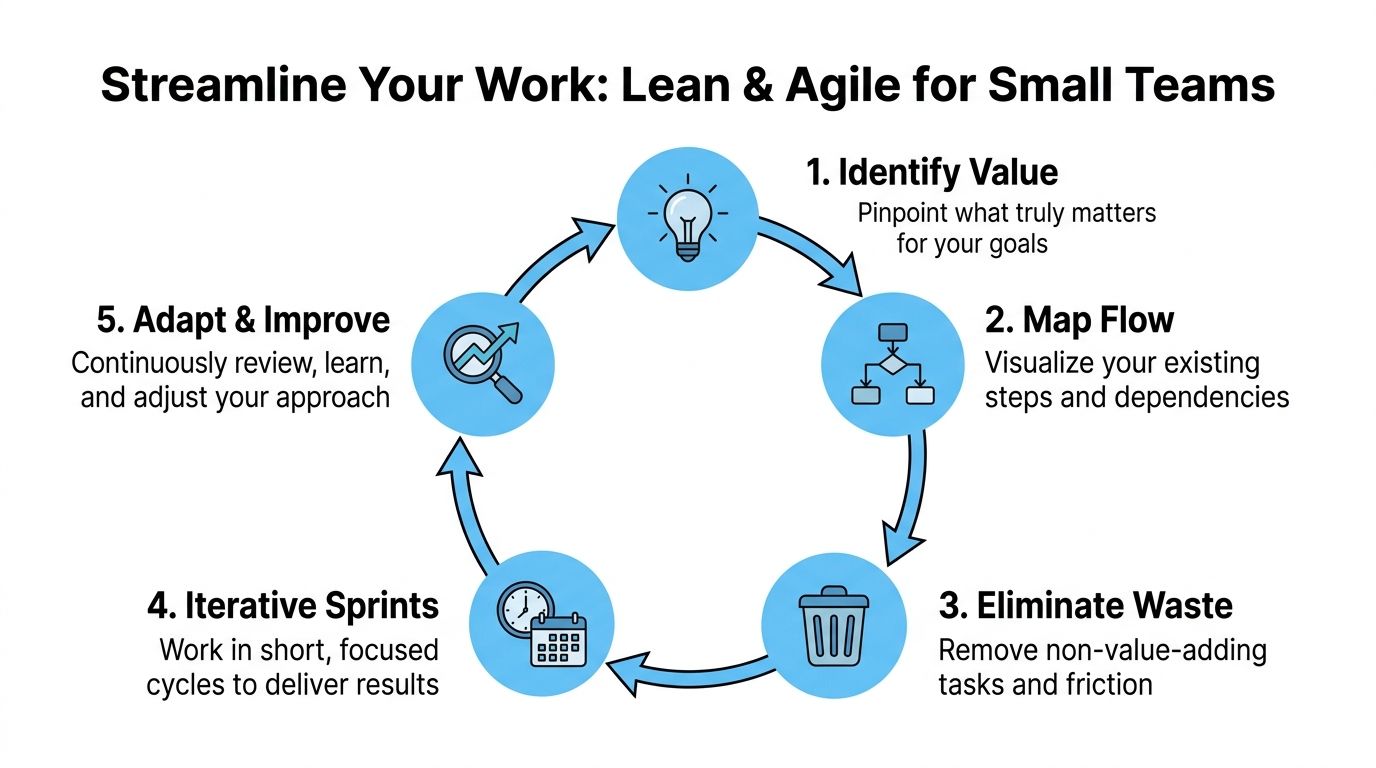
Lean and Agile sound bigger than they need to be. For a solo creator or small team, they boil down to two ideas.
Lean asks, “What in this workflow does not add value?”
Agile asks, “How can we improve this workflow in small cycles instead of waiting for a perfect redesign?”
Together, they give you a practical way to improve workflow efficiency without turning your operation into a mini corporation.
Use Lean to cut the waste
Lean is useful because it forces you to look at work from the audience’s perspective. Does this step improve the finished episode, article, report, or video? If not, it needs scrutiny.
For creator workflows, common forms of waste include:
- Waiting: Files sitting for approval, export, or review
- Overprocessing: Reformatting the same content multiple times
- Defects: Transcript errors or bad labels that trigger rework
- Motion: Switching across tools to find notes, clips, and assets
- Inventory: A pile of unfinished recordings no one has processed yet
The practical move is simple. Map the flow, then remove what does not contribute to the final outcome. Lean-based process mapping can reduce workflow cycle times by 20-23%, and pairing that with iterative improvement has helped some teams achieve up to a 21% reduction in indirect labor costs (Scribe).
That does not mean you need a consultant and a whiteboard session. It means asking sharper questions:
- Does this approval step catch real issues, or just slow things down?
- Why are we manually converting assets into formats the tool should export natively?
- Why are we fixing the same transcript issue every week?
Use Agile to improve in short cycles
Agile is the antidote to overplanning. Most small teams do not fail because they move too fast. They fail because they keep living with broken processes while waiting for time to rebuild them properly.
Run workflow improvement in short sprints. One or two weeks is enough.
A sprint can focus on one outcome:
- Week one: Standardize file naming and intake
- Week two: Clean up transcript review and summary handoff
- Week three: Build a repeatable repurposing flow for clips and captions
At the end of each sprint, review three things:
- What got easier
- What still breaks
- What should change next
Here, small teams can borrow from broader Agile and DevOps practices without copying enterprise ceremony. You do not need standups with five stakeholders. You need a short feedback loop and a willingness to adjust.
Tip: If a workflow change requires a huge training session, it is probably too complicated for a small team.
A simple Lean plus Agile model for creators
Here is a version that works in practice.
Identify value
Decide what the workflow must produce. For a podcast, that might be a publish-ready episode, clean transcript, summary, show notes, and promotional assets.
Map the current flow
Write out the actual process, including waits, handoffs, and repeated fixes.
Eliminate one category of waste
Pick one. Remove duplicate review, reduce app switching, or stop manual formatting.
Run a sprint
Test the revised workflow on a real project. Do not redesign your whole business at once.
Review and standardize
If the new version works, document it in a short checklist or template. If it does not, adjust and test again.
This combined method is powerful because it matches how creators already work. You produce, review, refine, and publish in cycles. Lean helps you strip out waste. Agile keeps you from freezing in analysis.
Using Automation and AI to Supercharge Your Workflow
Once the process is clean enough, automation starts paying off. Before that, it often just speeds up a bad system.
For small creative teams, the biggest gains usually come from tasks that are both repetitive and mentally draining. Transcribing interviews, fixing timestamps, summarizing long audio, pulling highlights, and repackaging one asset into multiple outputs all fit that description.
Start where the friction is worst
Creators often automate the wrong thing first. They build fancy posting workflows while still handling raw inputs manually.
That is backwards. Begin with the choke point closest to the source material.
For many teams, that means audio and video processing. Manual tasks in small creative operations can consume 20-30% of working time, and AI-native tools that combine transcription with auto-summarization are cutting post-production time by 50%, enabling creators to repurpose content twice as fast (KPI Fire).
That shift matters because one processed recording can feed several downstream tasks:
- Transcript creation for search, review, and reference
- Summary generation for show notes or article drafts
- Highlight extraction for social posts and promo clips
- Caption support for video publishing
- Action item capture for interviews, meetings, and research
The point is not novelty. The point is reducing the amount of time humans spend turning raw media into usable working material.
Build one source asset, then branch
The best automation setups treat the transcript as the source layer for everything else.
A practical flow looks like this:
- Upload audio or video
- Generate searchable transcript
- Create summary and bullet highlights
- Use those outputs to draft show notes, captions, or social copy
- Store the final assets where your team can retrieve them easily
This avoids a common problem in small teams. Different people creating their own separate notes from the same source. That produces inconsistency and duplicate effort.
If your work includes client calls, interviews, or internal reviews, this article on AI for meeting notes is useful because the same workflow principles apply outside publishing. The gain comes from capturing decisions and key points at the source instead of reconstructing them later.
A quick walkthrough helps if you want to see what this kind of workflow looks like in practice:
What works and what does not
Automation works well when:
- Inputs are repeatable: Similar types of audio, recurring formats, standard outputs
- The output has multiple uses: One transcript powers notes, clips, captions, and archives
- The review path is clear: One person owns final approval
Automation usually disappoints when:
- The process is still unclear: No one agrees on the workflow
- Tool sprawl gets worse: Assets scatter across too many apps
- You automate edge cases first: Rare exceptions should stay manual
Key takeaway: Use AI to remove conversion work, not to avoid thinking. Humans should still handle judgment, nuance, final messaging, and editorial calls.
Making Efficiency a Sustainable Habit
The best workflow is not the cleverest one. It is the one you will still use three months from now.
That means efficiency has to become a routine, not a cleanup project you do once when things get messy. A simple review cycle is enough for most creators and small teams.
Keep the review lightweight
Once per quarter, review three things:
- Your workflow map: Which steps still feel clumsy or repetitive?
- Your KPIs: Did the changes improve speed, quality, or capacity?
- Your tools: Which ones help, and which ones create extra friction?
Do not turn this into an all-day strategy session. A focused review is better than a perfect review that never happens.
Protect the habits that make gains stick
A few practices matter more than most:
- Document the current best version: A checklist beats memory.
- Celebrate small wins: If one change removes a weekly pain point, keep it.
- Invite friction reports: If someone says “this step is annoying every time,” pay attention.
When your workflow includes transcripts, summaries, or follow-up tasks, a simple system for review and ownership helps. This action item tracking template is a good example of how to keep outputs from disappearing after the initial work is done.
Efficiency compounds when the process gets slightly better each cycle and the better version becomes the default.
Frequently Asked Questions about Workflow Efficiency
What if my team resists workflow changes
That usually means one of two things. Either the new process adds complexity, or people do not believe it will solve a real problem.
Start smaller. Fix one pain point the team already complains about, such as transcript cleanup or asset handoff. When a change removes obvious friction, adoption gets easier.
How do I improve workflow efficiency on a small budget
Do not buy a stack of tools first. Start by mapping the process, removing unnecessary steps, and standardizing naming, storage, and handoffs.
A clean manual workflow beats a messy automated one. Once the process is stable, add automation at the bottleneck that consumes the most recurring effort.
How do I know if automation is helping
Look for three signs. The work finishes faster, the output needs fewer corrections, and you can produce or process more without adding stress.
If the team is still confused, hunting for files, or redoing the same tasks, the issue is probably not the tool. It is the workflow around it.
If you are spending too much time turning recordings into usable content, Whisper AI helps you process audio, video, and social clips into searchable transcripts, summaries, timestamps, and highlights without the usual manual grind. It is built for creators, researchers, and small teams who want cleaner post-production and faster repurposing.


























































































