
Choosing the Best Audio Recorder Device: A Practical Guide
Ever tried recording a crucial interview in a buzzing coffee shop, only to play it back and hear more of the espresso machine than your subject? I've been there, and it’s a frustrating experience. This is precisely the problem a dedicated audio recorder device is built to solve.
This isn't just another gadget. It’s a purpose-built tool laser-focused on one job: capturing pristine, clear sound. It's about freeing you from the noisy limitations of your phone’s microphone and ensuring your important conversations are captured perfectly the first time.
Why Do You Need a Dedicated Audio Recorder Device?
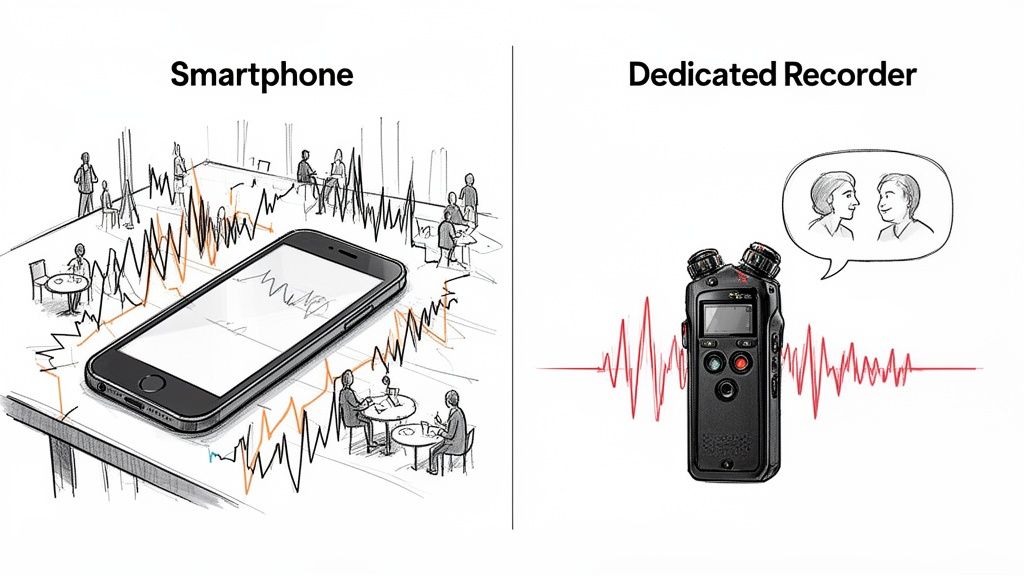
Sure, your smartphone can record audio, but its microphone is primarily designed for making phone calls in relatively quiet spaces. It’s a generalist, not a specialist. When you take it into the real world—a busy conference, a windy park, or even a room with a slight echo—its weaknesses become obvious. It's not built to isolate a speaker's voice from the ambient chaos.
This is where a dedicated recorder truly shines. The difference is like using a point-and-shoot camera versus a DSLR. Both can take a picture, but the DSLR offers far superior quality, manual control, and reliability. An audio recorder operates on the same principle, armed with better microphones, cleaner preamps, and professional settings your phone simply can't offer.
The Growing Demand for High-Quality Audio
The need for clean, portable audio has exploded. From my own experience, I've seen how creators and professionals are moving away from the "fix it in post" mindset. Why? Because you often can't fix bad audio. Starting with a clean, high-fidelity recording is simply the smartest way to work, saving you countless hours of frustrating edits.
This shift is reflected in market trends. The global market for digital voice recorders hit $1.94 billion in 2025 and is projected to reach $2.15 billion by 2026, growing at a 10.5% clip annually. This isn't just a trend; it's a fundamental change in how we work.
Based on my experience, the right audio recorder device is your first line of defense against poor sound quality. It captures the nuances of a voice, minimizes background noise, and provides a clean foundation for any project, from podcasts to professional interviews.
Ultimately, a good recorder protects your work. It ensures a humming air conditioner or nearby chatter doesn't ruin an otherwise perfect take. Once you have that pristine audio file, transforming it into written content is simple. Our guide on voice-to-text AI shows how you can transcribe and summarize your recordings in just a few minutes.
How to Match the Recorder Type to Your Workflow
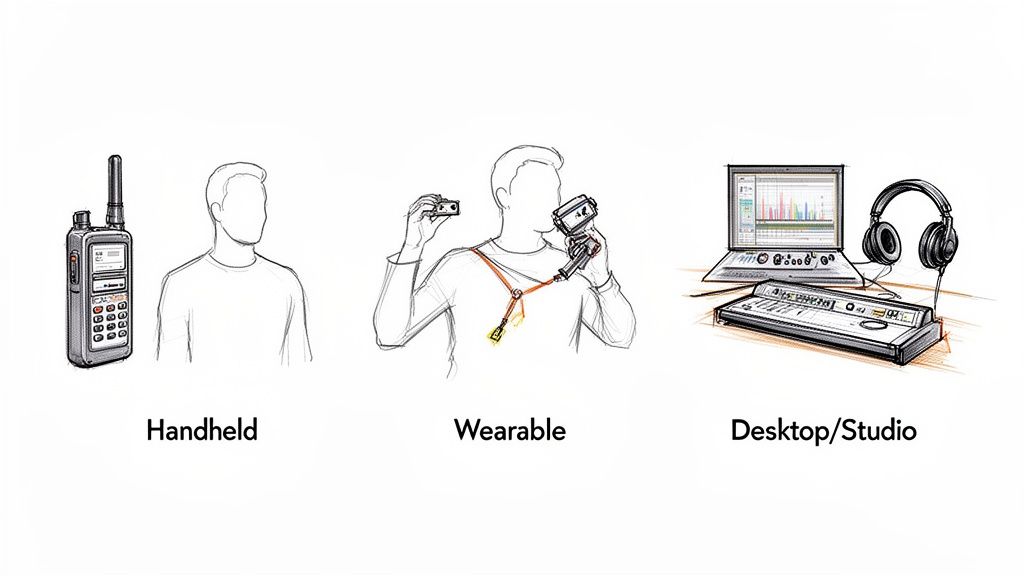
When you're looking for an audio recorder, the first question shouldn't be "What's the best one?" but rather "What's the right one for me?" The recorder a musician needs to capture every detail of a studio session is completely different from what a journalist requires for a quick interview in the field.
Think of it like choosing the right tool for a job. You wouldn't bring a sledgehammer to hang a picture frame. Every audio recorder is designed to solve a specific problem, and they generally fall into three main camps: handheld, wearable, and desktop/studio devices.
Understanding this distinction is key. It's why the market for these devices is booming—the global digital voice recorder market, valued at $2,548.4 million in 2025, is expected to surge to $6,440.04 million by 2034. That's a steady 10.8% compound annual growth rate, fueled by the specific needs of creators, professionals, and educators.
To help you find the perfect fit, let's break down the most common types of recorders and what they do best.
Comparing Audio Recorder Device Types
This table gives you a quick snapshot of how the main recorder types stack up, making it easier to see which one aligns with your goals, budget, and workflow.
As you can see, the "best" device is entirely dependent on the context. Let's dig a little deeper into what makes each one tick.
Handheld Recorders: The Versatile Workhorses
Handheld recorders are the Swiss Army knives of the audio world. For anyone who needs a reliable blend of quality, portability, and control—think journalists, podcasters, or sound designers capturing field recordings—these are often the first choice. From my own work, their most useful feature is the immediate, physical control they offer. You can adjust recording levels, apply filters, and monitor your audio in real-time with dedicated buttons and knobs, all without digging through menus. This is a lifesaver in fast-moving situations where conditions can change in a second.
Wearable Recorders: For Capture on the Move
Wearable recorders, which often look like small lavalier or "clip-on" mics, are all about freedom. They are built for anyone who needs to record clear audio while keeping their hands free. This makes them perfect for vloggers filming on the street, fitness instructors leading a class, or professors giving a lecture. By attaching directly to your clothing, they keep the microphone at a consistent distance from your mouth, ensuring your audio levels don't fluctuate wildly as you move. While dedicated hardware is great, some situations can be handled with software. If you're mainly focused on teaching, for example, you might want to check out the best recording lectures app options as a starting point.
Desktop and Studio Recorders: For Uncompromising Fidelity
When pristine, top-tier audio quality is non-negotiable, you step up to a desktop or studio recorder. These devices, more commonly known as audio interfaces, connect directly to your computer and become the central hub of your recording setup.
A desktop interface provides the clean, powerful signal path needed to capture every nuance of a performance, making it the foundation of any serious music or voice-over production workflow.
Musicians, voice-over artists, and serious podcasters depend on these units for their high-quality preamps, multi-channel capabilities, and rock-solid performance. They trade grab-and-go portability for pure power, delivering recordings with the depth and clarity required for professional post-production.
What Specs Actually Matter on an Audio Recorder?
Let's be honest, staring at a spec sheet for an audio recorder device can make your eyes glaze over. It often feels like you need an engineering degree just to figure out what you're buying.
The good news is, you don't. Just like with a camera, where you know a bigger sensor and a better lens mean sharper photos, only a handful of audio specs really move the needle on sound quality. Focus on these, and you can ignore the rest.
Bit Depth and Sample Rate: The Resolution of Your Sound
You’ll constantly run into two numbers: bit depth (like 16-bit or 24-bit) and sample rate (like 44.1kHz or 48kHz). Here’s a simple way to understand them using a photo analogy:
- Sample Rate is like the pixel count of your image. A higher sample rate means the recorder is taking more "snapshots" of the sound every second, capturing more detail.
- Bit Depth is like the color palette available for each pixel. Higher bit depth gives you a much wider dynamic range—the space between the quietest whisper and the loudest shout—without introducing noise or distortion.
My recommendation: For almost any content creator—whether you're recording podcasts, interviews, or voice-overs—the gold standard is 24-bit / 48kHz. This setting gives you fantastic, professional-grade quality with enough flexibility (or "headroom") in post-production to make your audio shine.
Microphone Types: The Right Tool for the Job
The microphones on your recorder, whether built-in or plugged in, are what actually capture the sound. Different mics are built for specific situations.
- Stereo Mics: These are your go-to for capturing a sense of space and environment. Think of recording the ambient sounds of a bustling city or the atmosphere of a live concert. They use two channels (left and right) to create an immersive feel.
- Shotgun Mics: These are highly directional microphones designed to "point" at a sound source and ignore everything else. They're perfect for filmmakers or journalists who need to isolate a single person's voice in a noisy room.
- Lavalier Mics: You've seen these everywhere. They're the small mics that clip onto a shirt, making them ideal for hands-free interviews, vlogs, or presentations. By placing the mic so close to the speaker, you get clear, consistent audio every time.
File Formats: Juggling Quality and Convenience
Finally, you need to decide how your audio gets saved. The format you choose is a classic trade-off between quality and file size.
- WAV: This is the professional's choice. It’s uncompressed and lossless, meaning it contains 100% of the original audio data. This makes it perfect for editing, but the files are huge.
- MP3: This format is compressed. It intelligently throws away some audio data to make the file much smaller and easier to share, with a slight dip in quality.
My advice? If you plan to edit the audio, always record in WAV. You can create a smaller MP3 copy later. While other formats like M4A are common, especially with Apple gear, the core principle remains: lossless for quality, lossy for convenience. If you end up with M4A files, our guide on how to convert M4A to text can be a real time-saver.
How to Choose a Recorder for Your Specific Profession
The best audio recorder isn't the one with the most features or the highest price tag. It’s the one that fits so naturally into your work that you forget it’s even there. By focusing on your daily tasks, you can cut through the marketing jargon and find a tool that genuinely makes your life easier.
For the Podcaster or YouTuber
If you're creating content, your audio quality is a huge part of your brand identity. Listeners are unforgiving of bad sound. From my experience, you need two things above all else: flexibility and control.
Look for a handheld audio recorder device with XLR inputs. This is the key that unlocks the world of professional microphones—the same kind you see in radio stations. It's a non-negotiable for getting that rich, broadcast-quality sound. Just as important is multi-track recording, which lets you record each microphone onto its own separate track. This is a lifesaver. Imagine a guest coughs over your line. With multi-tracking, you can edit their audio channel without touching yours. Once you have that perfect audio, our guide on how to transcribe a podcast to text can show you how to turn it into articles and show notes.
A podcaster’s ideal recorder is a portable studio. It needs the inputs to grow with your ambitions and the multi-track capability to handle the chaos of real conversations.
For the Journalist or Researcher
Your world is unpredictable. You have to be ready to capture a story anywhere, anytime. Your priorities are completely different from a creator in a studio. You need something that's always ready.
The most critical features are portability, a discreet design, and rock-solid battery life. A small, lightweight recorder you can slip into a pocket is essential. You absolutely cannot have your recorder die mid-conversation. Many recorders built for field use can run for over 20 hours on a single set of batteries, giving you peace of mind on long days.
For the Business Professional or Student
Whether you’re capturing meeting minutes or lectures, your goal is simple: get clear, accurate information without any fuss. You can forget about fancy microphone inputs. Your focus should be on simplicity and smart features.
One of the most helpful features I've used for this is voice-activated recording (VOR). Instead of recording dead air, the device automatically starts recording when someone speaks and pauses during silences. This not only saves battery and storage but also makes reviewing recordings a breeze—no more fast-forwarding through long, quiet gaps. Simple file organization, like the ability to create folders on the device, is another great-to-have feature for keeping your meetings and lectures neatly sorted.
A Modern Workflow: From Raw Audio to Ready Content
Getting great sound is just the first step. The real breakthrough happens when your shiny new audio recorder device teams up with smart software. This combination turns your raw recordings into polished, shareable content—faster than you might think.
The old way of handling a one-hour interview meant hours of manual transcription. Today’s workflow is a simple, three-step process:
- Record: Use your dedicated recorder to capture the cleanest possible audio. A good source file is everything.
- Upload: Easily transfer your audio file (like a WAV or MP3) from the recorder to your computer.
- Process with AI: Drop that file into an AI tool, like Whisper AI, and let it do the heavy lifting.
Suddenly, an hour of audio becomes a full transcript, a tight summary, and a list of key takeaways, all generated in minutes.
From Audio File to Actionable Insights
Modern AI transcription goes way beyond just converting words into text. These tools can now understand context, which opens up a whole new world of possibilities. This is where your choice of hardware really pays off. The first step to a smooth AI workflow is starting with a great recording.
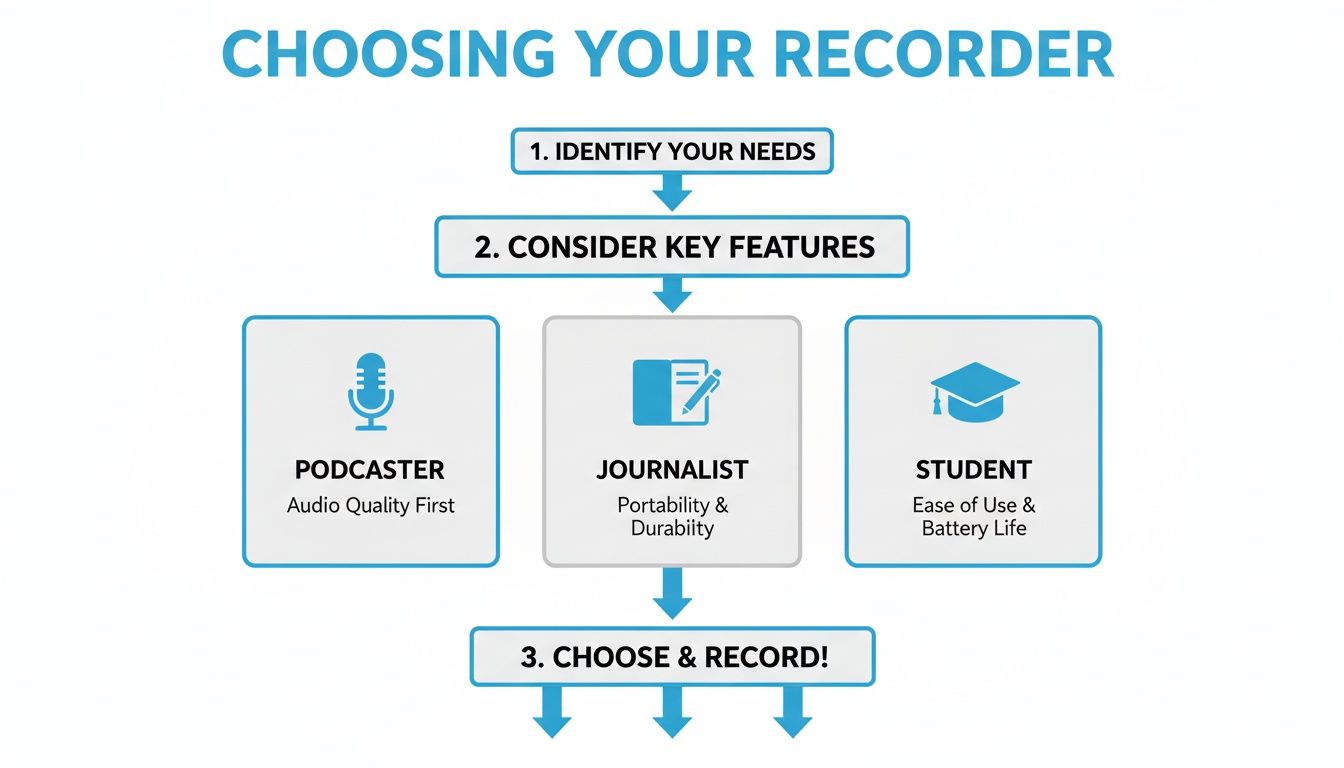
As the chart shows, finding the right recorder ensures you capture clean audio from the get-go. This directly impacts the accuracy of the AI tools you'll use later, leading to much better results.
The market trends tell the same story. The digital voice recorder market is projected to grow at a 10.3% compound annual rate through 2030, with AI tools being a huge driver. Whisper AI alone has processed over 500,000 files in more than 92 languages. These numbers prove that a good recorder is no longer just for recording—it's a core productivity tool.
How to Repurpose Your Content at Scale
Once you have a transcript and a summary, you're sitting on a goldmine of material. You can quickly turn a single recording into a wide array of content:
- Blog Posts & Articles: Edit your transcript into a full-length article or a snappy Q&A post.
- Social Media Content: Pull key quotes and stats from the summary to create dozens of posts for X, LinkedIn, or Instagram.
- Video Captions: Instantly generate accurate SRT or VTT files to make your videos more accessible.
- Podcast Show Notes: Create detailed show notes complete with timestamps, speaker labels, and key takeaways.
It’s like having a searchable database of your own conversation. You can even "ask" your transcript questions to find the exact information you need without ever having to re-listen.
From my experience, the combination of a high-quality audio recorder and smart AI processing isn’t a luxury anymore. It’s the new standard for anyone serious about creating content efficiently. It closes the gap between having an idea and sharing it with the world.
Of course, to get that final polish, you'll still want great editing tools. The best software for editing videos almost always include powerful audio suites for cleaning up and mixing your sound. This synergy between quality hardware and smart software is what a truly modern workflow is all about.
Your Top Questions, Answered
As you get started with dedicated audio recorders, a few questions tend to pop up again and again. Let's clear them up so you can choose your gear with confidence.
Can't I Just Use My Smartphone to Record?
You can, but you'll run into serious limitations pretty quickly. Your phone is a jack-of-all-trades, and its microphone is designed for calls, not for capturing professional-grade audio. A dedicated audio recorder device is built for one job: capturing clean, rich sound. Its superior microphones and internal hardware are designed to minimize background hiss and deliver a file that’s actually usable.
Think of it like this: your phone’s camera is fine for a quick snapshot, but you'd grab a DSLR for a professional photoshoot. The exact same logic applies here.
How Much Storage Do I Really Need?
This really boils down to how you record. If you’re capturing audio in a high-quality, uncompressed format like WAV (24-bit/48kHz), a single hour-long interview can take up about 1GB of space. If you switch to a compressed MP3, that same hour might only use around 120MB. For most people, a recorder with 32GB or 64GB of internal storage is a great starting point. If you find a model with an SD card slot, you’ll have plenty of flexibility for even the longest recording sessions.
How Accurate Is AI Transcription, Really?
Modern AI transcription can be incredibly accurate—often hitting 95% accuracy or even higher. But there’s a crucial catch: the AI is only as good as the audio you feed it. This is where your audio recorder makes all the difference. A clean recording from a dedicated device in a quiet space will give you a near-perfect transcript. A noisy recording from a smartphone in a busy café will leave you with a mess. A good recorder doesn't just give you better sound; it directly leads to better, faster, and more accurate AI results.
Once you have that crystal-clear recording, the next step is turning it into usable content. Whisper AI can transcribe and summarize your audio files in minutes, providing you with accurate text, concise summaries, and actionable insights. Give it a try for free and see the difference clean audio makes at https://whisperbot.ai.


























































































