
10 Effective Note Taking Formats to Organize Your Thoughts
In a world saturated with information from podcasts, meetings, and videos, simply transcribing content isn't enough. The real challenge lies in converting that raw data into structured, actionable knowledge. Many of us stick to one familiar method, like simple bullet points, unaware that different situations call for different note taking formats. This inflexibility means we're often leaving valuable insights on the table, creating disorganized notes that are difficult to review and even harder to act upon.
This guide is your resource for mastering ten powerful formats designed for specific tasks. We'll move beyond the basics to give you a complete toolkit, covering everything from the academic rigor of the Cornell Method to the agile efficiency of the Action Item Method. You won't just learn the theory; you'll see exactly how to apply each system to your work.
Each section provides a deep dive into a specific format, complete with:
- Clear definitions and core principles.
- Actionable pros and cons to help you choose the right tool for the job.
- Real-world examples tailored for meetings, podcasts, and video content.
- Practical tips for maximizing each method's effectiveness.
More importantly, this article will show you how to leverage a tool like Whisper AI to instantly transform messy audio and video transcripts into perfectly organized notes. You'll learn how to transcribe, summarize, and export your content directly into these structured formats, saving hours of manual effort. Prepare to find the perfect format for every task and elevate your note-taking from a passive chore to a strategic advantage.
1. Cornell Method
The Cornell Method is a highly systematic format for processing and retaining information. Developed by Dr. Walter Pauk at Cornell University, it divides a single page into three distinct sections: a wide right-hand column for detailed notes, a narrower left-hand column for cues or questions, and a summary section at the bottom. This structure transforms passive listening into an active process of inquiry and review.
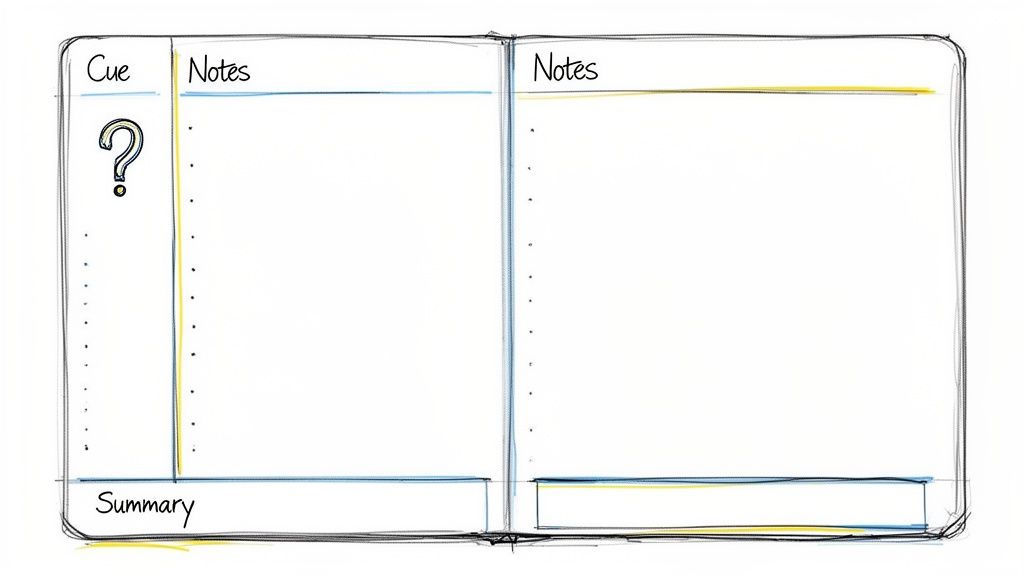
During a lecture, meeting, or while reviewing a transcript, you fill the main "Notes" column. Afterward, you pull out key ideas, keywords, and potential test questions from your notes and place them in the "Cues" column. This step forces you to engage with the material critically. Finally, you synthesize the page's content into a one or two-sentence summary at the bottom.
Why It Works for Transcribed Content
The Cornell Method is exceptionally well-suited for organizing AI-generated transcripts. The structured layout helps you distill vast amounts of text from a Whisper AI transcription into organized, actionable insights.
- Students: Can paste a lecture transcript into the "Notes" section and use Whisper AI's bullet-point highlights to generate questions for the "Cues" column, preparing for exams.
- Researchers: Can structure interview transcripts, using cues to tag themes or significant quotes for qualitative analysis.
- Business Teams: Can document meeting notes, placing action items and key decisions in the "Summary" section for quick reference.
Actionable Tips for Implementation
To get the most out of this format, export your Whisper AI transcript into a document or one of the best note-taking apps that supports column-based layouts. Use Whisper AI's timestamp feature to add specific time references next to key points in your "Notes" column. This allows you to quickly revisit the original audio or video for context. For maximum retention, complete the "Cues" and "Summary" sections within 24 hours of receiving your transcript.
2. Bullet Point Method
The Bullet Point Method is a streamlined and efficient note-taking format designed for rapid information capture. It uses a hierarchical list structure, with main ideas marked by bullets and supporting details indented as sub-bullets. This approach prioritizes speed and clarity, making it ideal for situations where you need to quickly document key takeaways without getting bogged down in detailed prose.
The core principle is simple: one bullet, one idea. By breaking down complex topics into discrete, digestible points, you create a scannable and easy-to-review document. This method is incredibly versatile and can be adapted for lectures, meetings, brainstorming sessions, or personal to-do lists. Its linear nature makes it one of the most intuitive formats to use, especially in digital note-taking applications.
Why It Works for Transcribed Content
The Bullet Point Method aligns perfectly with the output of AI transcription services like Whisper AI. The format is excellent for converting long-form audio or video into a concise summary of essential information, mirroring how Whisper AI can generate bullet-point highlights directly from a transcript.
- Content Marketers: Can quickly pull key messages and statistics from competitor YouTube videos or webinars to inform their own content strategy.
- Podcasters: Can create detailed show notes by turning a transcript into a bulleted list of topics, guest quotes, and resource links for listeners.
- Journalists: Can rapidly log crucial soundbites and facts from interview recordings, organizing them for an article outline.
- Social Media Managers: Can extract viral-worthy quotes and key takeaways from video content to repurpose into engaging social media posts.
Actionable Tips for Implementation
To maximize this method's effectiveness, start by using Whisper AI’s bullet-point highlights feature as your foundation. Paste these highlights into your document and then use the full transcript to add a layer of sub-bullets with supporting details or examples. For easy navigation, include timestamps from the Whisper AI transcript next to each main bullet, allowing you to instantly revisit that moment in the original audio or video for more context. Keep your bullets concise and review them within a few hours to ensure the context remains fresh in your mind.
3. Outline Method
The Outline Method is one of the most logically structured note taking formats, organizing information hierarchically with headings and subheadings. It uses a system of Roman numerals, letters, and numbers to create a clear, tree-like structure that shows the relationship between main topics and supporting details. This comprehensive approach is ideal for organizing complex subjects and long-form content.
This format starts with a main topic (I), which is broken down into sub-topics (A, B, C), and then further into specific details (1, 2, 3). The indentation visually represents the hierarchy, making it easy to see how ideas connect and flow. It’s a method that turns complex information into a scannable, logical framework. For those looking to apply this structured approach to larger projects, exploring a comprehensive guide to the perfect book outline template can be incredibly helpful.
Why It Works for Transcribed Content
The Outline Method excels at transforming long, dense AI transcripts into structured, digestible documents. It allows you to impose order on hours of transcribed audio from webinars, podcasts, or lectures, making the content easy to navigate and reference later.
- Educators: Can convert a detailed lecture transcript from Whisper AI into a structured lesson plan or course material, with clear modules and sub-topics.
- Researchers: Can organize long interview transcripts by thematically coding sections, placing quotes and key insights under relevant headings for analysis.
- Journalists: Can structure notes from a podcast or interview into a coherent story outline, arranging points logically to build a narrative.
Actionable Tips for Implementation
To effectively use this method with AI, start by reviewing Whisper AI's auto-generated summary to identify the main topics for your outline's top-level headings. Then, create your initial structure before pasting in details from the full transcript. Export your transcript to a Word document and use the built-in "Outline View" for digital organization, or export it to Markdown for easy use in outlining apps. Include speaker names and key timestamps from Whisper AI at each major section break to easily find the original audio context.
4. Mind Mapping Method
Mind Mapping is a highly visual, non-linear approach to note-taking that organizes information in a way that mirrors how the brain thinks. Popularized by Tony Buzan, this format starts with a central topic and branches out with related ideas, creating a diagram that resembles a tree or a web. This creative method is excellent for capturing relationships between concepts and stimulating new lines of thought.
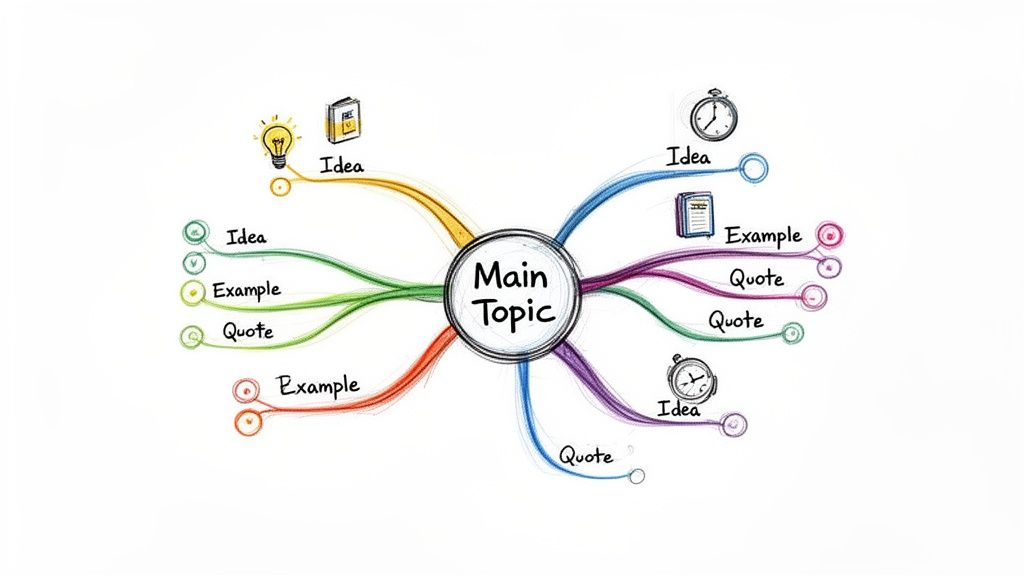
Instead of a linear list, you place the main subject in the center of the page. From there, you draw branches for major sub-topics, and then smaller "twig" branches for supporting details, keywords, and examples. This visual hierarchy makes complex information easier to digest and recall, turning passive information consumption into an active, creative exercise.
Why It Works for Transcribed Content
Mind Mapping is a powerful format for transforming dense transcripts into a clear visual overview. It helps you see the forest for the trees, revealing connections that linear notes might obscure within a long Whisper AI transcription.
- Content Creators: Can use a podcast transcript to map out a video series. The main topic becomes the central idea, and key conversational points branch out into potential episode themes.
- Marketers: Can analyze transcribed YouTube competitor reviews, mapping out product features, customer pain points, and marketing angles as distinct branches.
- Brainstorming Teams: Can visualize product feature relationships from a transcribed focus group, linking user suggestions to core functionalities.
Actionable Tips for Implementation
To build your mind map from a Whisper AI transcript, start with the AI-generated summary as your central topic. Use the bullet-point highlights as your primary branches. For those preferring visual organization, a tool like a digital online whiteboard can greatly enhance this process. Add timestamps from your transcript as small reference notes on key branches to quickly find the original audio context. To maximize retention, color-code different thematic branches and review your map within 24 hours.
5. The Charting Method
The Charting Method is one of the most organized formats for comparing multiple streams of information. It uses a table or matrix structure, with columns representing distinct categories and rows capturing specific details. This format excels at drawing parallels, contrasting viewpoints, and tracking related data points side-by-side, making it ideal for content with multiple variables or speakers.
This grid-based system transforms complex information into a visually scannable and digestible format. During a review of your source material, you define your categories (columns) and then populate the rows with corresponding information. This systematic approach ensures that you capture and categorize information consistently, preventing key details from getting lost.
Why It Works for Transcribed Content
The Charting Method is exceptionally powerful for making sense of AI-generated transcripts from multi-speaker events. It allows you to systematically organize dialogue from a Whisper AI transcription, turning a long, continuous text file into a structured analytical tool.
- Journalists: Can chart different expert opinions from an interview transcript, comparing their stances on key issues in separate columns.
- Podcast Hosts: Can track each guest's main arguments or memorable quotes in a table, simplifying the creation of show notes and promotional content.
- Business Teams: Can use Whisper AI's speaker detection to assign action items, decisions, and comments to specific team members in a meeting transcript chart.
- Researchers: Can track thematic responses across multiple interview subjects, using columns for themes and rows for individual participants to identify patterns.
Actionable Tips for Implementation
To implement this method, export your Whisper AI transcript into a spreadsheet application or a document where you can easily insert tables. Pre-define your column headers before you begin transferring notes to ensure a logical structure. Leverage Whisper AI's speaker detection feature to automatically populate a "Speaker" column, saving you time. For easy cross-referencing, include a "Timestamp" column next to key points. Color-coding rows or columns can also visually distinguish between speakers or topics, making the chart even easier to analyze at a glance.
6. Sentence Method
The Sentence Method is one of the more straightforward note-taking formats, focusing on capturing information as complete, sequential thoughts. Each key idea or piece of data is written as a distinct sentence, creating a linear, narrative-style record. This approach preserves the original context and flow of information, which is often lost when using fragmented bullet points or keywords.
Unlike methods that require a complex layout, the Sentence Method is simply about documenting each new topic on a new line. This simplicity is its strength, making it ideal for fast-paced lectures, detailed interviews, or dense content where understanding the relationship between ideas is as important as the ideas themselves.
Why It Works for Transcribed Content
The Sentence Method excels when working with AI-generated transcripts because it mirrors the natural sentence structure of spoken language. It provides a direct way to distill a complete Whisper AI transcription into a more concise, yet still comprehensive, set of notes without losing critical context.
- Journalists: Can pull key verbatim sentences from an interview transcript to build a narrative for an article, preserving the subject's original voice and intent.
- Students: Can document detailed explanations from a lecture transcript, ensuring they capture the full context behind complex theories rather than just isolated facts.
- Content Creators: Can extract powerful, quote-worthy sentences from research interviews or podcasts to use directly in video scripts or blog posts.
Actionable Tips for Implementation
For the best results, start by reviewing the full Whisper AI transcript to understand the overall narrative. Instead of rewriting, directly copy and paste the most crucial sentences from the transcript into your notes. Use Whisper AI’s timestamps to mark where major thematic shifts occur, allowing you to easily reference the original audio for tone and emphasis. Focus on capturing complete explanations and arguments. Afterward, review your sentences to remove redundancy and refine them for clarity, ensuring a polished and usable final document.
7. The Two-Column Method (T-Notes)
The Two-Column Method, often called T-Notes, is a straightforward yet powerful note-taking format that organizes information into a simple question-and-answer or topic-and-detail structure. This method divides a page into two columns, encouraging an active dialogue between you and the content. The left column is typically reserved for main ideas, keywords, or questions, while the right column contains corresponding details, explanations, or answers.
This format is particularly effective for content that naturally follows a question-and-answer flow, such as interviews, Q&A sessions, or informational webinars. By separating prompts from their detailed responses, T-Notes make it easy to quiz yourself on the material and quickly locate specific information, transforming your notes into a practical study guide or reference document.
Why It Works for Transcribed Content
The Two-Column Method is a perfect match for processing AI-generated transcripts, especially from dialogue-heavy audio or video. It excels at structuring conversations and breaking down complex topics into digestible pairs of information, making it easy to pull clear insights from a Whisper AI transcript.
- Educators: Can transcribe a lecture's Q&A segment and organize it into a study guide, placing student questions on the left and instructor answers on the right.
- Customer Service Teams: Can document support call transcripts to build an internal FAQ, listing common customer questions and standardized, effective answers.
- Content Marketers: Can structure expert interview transcripts by putting their questions in one column and the expert's detailed responses in the other, simplifying the process of writing blog posts or articles.
- Podcast Hosts: Can create detailed show notes by listing episode topics or listener questions on one side and summarizing the key answers or discussion points on the other.
Actionable Tips for Implementation
To implement this method, start by reviewing your Whisper AI transcript to identify natural questions or key topics. Use Whisper AI's bullet-point highlights to pinpoint potential questions for your left column. When documenting interviews with multiple speakers, include the speaker's name next to their answer to maintain clarity.
For quick reference back to the source, add timestamps from the Whisper AI transcript next to each answer. You can easily create this structure in a document by inserting a two-column table. During your review, cover the right-hand "answers" column and use the left-hand "questions" column to self-test and reinforce your learning.
8. Markdown Format Notes
Markdown is a lightweight, plaintext markup language that uses simple syntax to create structured, machine-readable notes. This modern approach to note taking formats uses symbols like hashtags for headers, asterisks for bold or italics, and hyphens for lists to format text. Because it's just plaintext, it's incredibly portable, future-proof, and easy to convert into other formats like HTML.
Popularized by technical communities and modern knowledge management tools like Obsidian and Notion, Markdown allows you to create highly organized notes that remain clean and readable. The focus is on structure and content, with formatting applied through simple, non-intrusive characters. Whisper AI's native Markdown export makes this format exceptionally convenient for processing transcribed audio and video.
Why It Works for Transcribed Content
Markdown is a perfect match for AI-generated transcripts because it preserves both structure and readability. It allows you to quickly organize raw text from a Whisper AI transcription into a styled, navigable document without complex word processors.
- Developers: Can export a technical interview transcript with speaker names as headers (
## Speaker 1) and code snippets in formatted blocks. - Content Creators: Can turn podcast transcripts into blog posts, using Markdown headers for sections and bullet points for key takeaways, ready for publishing.
- Researchers: Can build linked knowledge bases by creating backlinks between related concepts across multiple interview transcripts in apps like Obsidian.
Actionable Tips for Implementation
To leverage this format, export your transcript directly from Whisper AI by selecting the Markdown option. This pre-formats the text, often including speaker labels and timestamps. Use # for the main topic, ## for subtopics, and ### for specific details. You can even use Whisper AI's speaker detection to automatically create headers: ## Speaker Name - Topic. For capturing exact phrasing, place important quotes inside code blocks using backticks (```) to make them stand out.
9. Action Item Method
The Action Item Method is one of the most productivity-driven note-taking formats, designed to distill discussions into clear, executable tasks. Instead of capturing every detail, this approach focuses exclusively on decisions, responsibilities, and next steps. It transforms passive listening into an active process of identifying deliverables, making it ideal for business meetings, project kickoffs, and any scenario where the primary goal is forward momentum.
This format prioritizes clarity and accountability. Each note is a task with a clear owner and, ideally, a deadline. This direct approach cuts through the noise of lengthy discussions, ensuring that key outcomes are not lost in a sea of conversational detail. It's less about what was said and more about what needs to be done.
Why It Works for Transcribed Content
The Action Item Method is a perfect match for AI-generated transcripts, which often capture hours of conversation. It provides a framework for turning a complete record of a meeting into a concise to-do list, which Whisper AI can help generate automatically.
- Business Teams: Can use Whisper AI's action item summaries from a meeting transcript to immediately populate their project management software with assigned tasks and deadlines.
- Project Managers: Can review stakeholder call transcripts, isolating every commitment and deliverable to ensure nothing is missed and all parties are aligned.
- Sales Teams: Can convert a client call transcript into a list of follow-up actions, such as sending a proposal, scheduling a demo, or providing additional information.
Actionable Tips for Implementation
To maximize efficiency with this method, use Whisper AI's action item generation feature on your meeting transcript as a powerful first draft. Format each extracted point for ultimate clarity: Action | Owner | Deadline | Priority. For even more detail, you can learn how to effectively document action items on meeting minutes.
Use the timestamps from your transcript to link each action item back to the exact moment in the conversation it was discussed, providing crucial context if needed. Once your list is finalized, export it directly to a task management tool like Asana, Jira, or Monday.com to integrate it seamlessly into your team's existing workflow. This ensures immediate visibility and accountability for everyone involved.
10. Timestamp-Based Reference Method
The Timestamp-Based Reference Method is one of the most efficient note-taking formats for indexing audio and video content without extensive writing. Instead of capturing every detail, this approach focuses on logging key moments, topics, or quotes alongside their specific timestamps. This creates a searchable, hyperlinked index that allows you to instantly navigate back to the most important parts of the original recording.
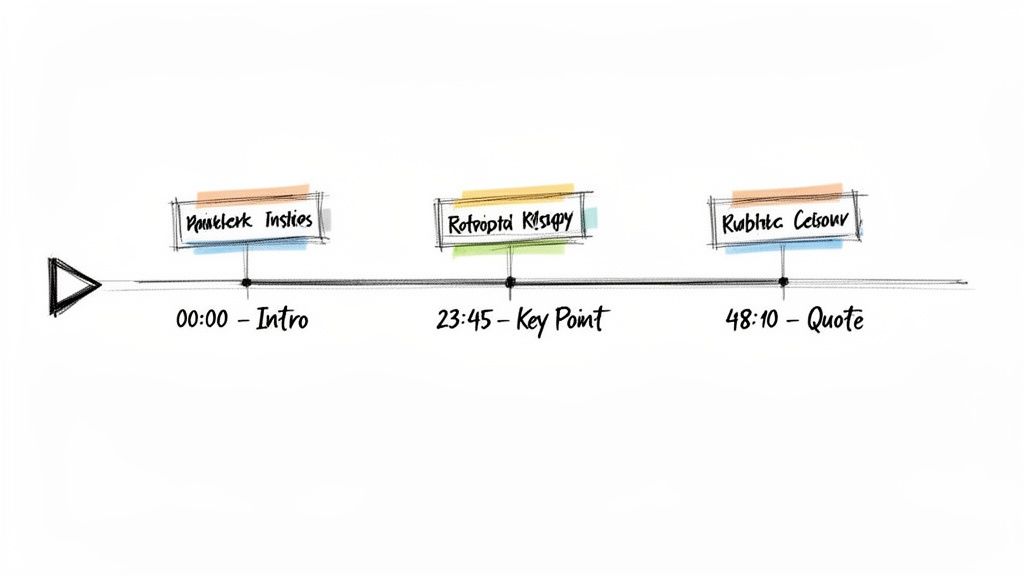
Popularized by podcasting and video platforms like YouTube, this method transforms passive listening into an active process of annotation. While watching a video or listening to a podcast, you simply jot down a brief description and the time it occurred, for example, "14:22 - Q3 financial projections discussed." This minimalist approach saves significant time while creating a highly functional and easily navigable reference guide.
Why It Works for Transcribed Content
This method is exceptionally powerful when paired with AI-generated transcripts, particularly those from Whisper AI that automatically include precise timestamps. It transforms a long, dense transcript into an interactive table of contents, allowing you to quickly locate and revisit critical segments without rereading the entire text.
- Content Creators: Can use Whisper AI's timestamped output to quickly create YouTube chapters, show notes for podcasts, or identify viral moments for social media clips.
- Students: Can mark important lecture concepts, definitions, and exam-related discussions, creating a study guide that links directly back to the professor's explanation.
- Researchers: Can document key interviewee responses by noting the timestamp, making it easy to find and cite powerful quotes during qualitative analysis.
Actionable Tips for Implementation
To implement this method, start by getting a transcript from Whisper AI with the timestamp feature enabled. Export this transcript into a simple document or spreadsheet. As you review it, create a separate, simplified list of key topics paired with their corresponding timestamps, such as 08:15 - Project Milestone Update or 32:50 - Key Client Feedback. For a deeper dive into how to leverage this, you can learn more about how to timestamp for video content effectively. Use these time-coded notes to create highlight reels, share specific moments with team members, or build an interactive agenda for meeting recordings.
Top 10 Note-Taking Formats Comparison
Choosing Your Format and Taking Action
We've journeyed through a comprehensive toolkit of ten distinct note taking formats, from the academic rigor of the Cornell Method to the creative freedom of Mind Mapping and the digital efficiency of Markdown. The central lesson is clear: there is no single "best" method for every person or every situation. The true power lies in adaptability and strategic selection.
Mastering these formats transforms you from a passive recipient of information into an active architect of knowledge. Instead of being overwhelmed by a tidal wave of data from lectures, meetings, and podcasts, you can now choose the precise structure needed to capture, organize, and act upon it. This isn't just about tidier notes; it's about deeper comprehension, better retention, and more effective implementation of ideas.
Key Takeaways and Your Next Steps
The goal is to move beyond simply knowing these methods exist and begin actively applying them. This is where the synthesis of traditional structure and modern technology creates an unbeatable workflow.
- Situational Fluency is Key: Don't get stuck on one format. A project kickoff meeting demands the clarity of the Action Item Method, while a complex academic lecture is a perfect fit for the Cornell Method. Your ability to pivot between formats is your greatest asset.
- Technology is Your Accelerator: Manually transcribing audio or video content is the biggest bottleneck in modern note-taking. Tools like Whisper AI eliminate this barrier, instantly converting spoken words into a searchable, editable text base. This allows you to focus your mental energy on the higher-level task of structuring that information, not the tedious work of transcription.
- From Passive to Active: A raw transcript is passive information. By applying a format like the Outline Method or the Two-Column Method to an AI-generated transcript, you actively engage with the material. This process of sorting, categorizing, and summarizing is where true learning and insight generation happen.
Your immediate next step is to choose one format that addresses a current challenge. Are your meeting notes a jumbled mess? Commit to using the Action Item Method for your next three meetings. Struggling to see the big picture in a dense documentary? Try using the Mind Mapping Method on its Whisper AI transcript.
The Real-World Impact of Organized Notes
Ultimately, the reason we care so deeply about note taking formats is because they are a direct bridge between information and outcome. Well-structured notes lead to aced exams, successful projects, and breakthrough creative ideas. They reduce the mental friction of revisiting complex topics, allowing you to instantly locate key facts, decisions, and next steps weeks or months later.
By combining these proven organizational structures with the speed and accuracy of AI transcription, you're not just taking better notes. You are building a personal knowledge management system that is efficient, scalable, and tailored to the unique demands of your work, studies, or creative pursuits. Stop letting valuable insights remain buried in hours of audio and video. Start structuring them for action.
Ready to supercharge your workflow and transform your raw audio into perfectly structured notes? Try Whisper AI today to automatically transcribe, summarize, and timestamp your content, giving you the perfect foundation to apply any of the note taking formats we've discussed. Unlock clarity and save hours of work by visiting Whisper AI and starting your first transcription.


























































































