
A Modern Guide on How to Do Minutes for a Meeting
Learning how to do minutes for a meeting is about capturing outcomes, not just conversations. From my experience, the real skill isn't typing fast; it's listening for the critical pieces—the decisions, the action items, and the key takeaways—and weaving them into a document that drives progress.
It’s about preparing with a solid agenda, actively listening during the discussion, and then polishing your notes into a clear, shareable record. Forget trying to transcribe every single word. The goal is to provide clarity and ensure accountability.
Why Mastering Meeting Minutes Actually Matters
Let’s be honest, taking minutes can feel like a thankless chore. It’s often seen as just another administrative task on an already long to-do list. But I’ve learned that when you get it right, meeting minutes become one of the most powerful tools for keeping a team aligned and productive.
Effective minutes turn a whirlwind of discussion into a concrete record of what was decided, who owns the next steps, and what everyone needs to remember. They create a single source of truth that stops important details from getting lost or remembered differently by different people. This guide will help you reframe minute-taking from a tedious task to a strategic skill. I'll share a modern approach that combines smart note-taking with even smarter technology, ensuring your efforts create a valuable asset.
A great starting point for this process is understanding meeting types and their necessity, as the purpose of the meeting directly influences how you should document it.
The Real Cost of Unproductive Meetings
The ripple effect of poorly run meetings is genuinely staggering. Consider this: in the United States alone, over 56 million meetings take place every single day. The ineffective ones drain an estimated $37 billion from the economy each year.
A huge part of that problem comes from a simple lack of structure. A clear agenda, which is the bedrock of good minutes, is known to boost meeting productivity for 79% of employees.
This drives home a critical point: great minutes aren't just about recording what happened. They are a tool for making the meeting worthwhile in the first place.
Here’s how they do it:
- Driving Accountability: When an action item is clearly assigned to a specific person with a deadline, it’s much more likely to get done. No more "I thought someone else was handling that."
- Ensuring Clarity: Minutes eliminate the "Wait, I thought we decided..." confusion. They provide a written record everyone can refer back to.
- Informing Absentees: A crisp, well-written summary lets team members who couldn't attend catch up in minutes, sparing them from watching a full hour-long recording.
- Creating a Legal Record: In more formal settings, like board meetings, minutes serve as an official legal document of the proceedings and decisions made.
When you shift your focus to the why—creating clarity, driving action, and providing a reliable record—the act of taking minutes becomes far more meaningful. It's not just admin; it's a vital function for the entire team.
Before we dive into the "how," it's helpful to have a clear picture of what every set of meeting minutes should contain. No matter your format or the formality of the meeting, these are the non-negotiables.
The Core Components of Effective Meeting Minutes
Think of this table as your ultimate checklist. If your minutes consistently include these five components, you're already creating a document that is infinitely more valuable than a simple transcript.
Prepare for Success Before the Meeting Starts
Great meeting minutes aren't just about what you type during the meeting; they're a direct result of the prep work you do beforehand. I see this all the time—people think of taking minutes as a purely reactive task. In reality, the work you put in before the call even starts is what separates a frantic mess of notes from a focused, strategic record.
Don't worry, this isn't about blocking off hours on your calendar. A solid 15 minutes of focused effort before things kick off can easily save you double that time in cleaning up messy notes and chasing people for clarification later. Think of it as creating a map so you know exactly what to listen for before anyone even says hello.
Align With the Meeting Facilitator
First things first, have a quick chat with the meeting's host. A brief conversation or a quick Slack message can give you crucial context that you'll never find on the formal agenda. This is all about making sure you’re both aligned on the meeting's purpose and what a "win" looks like.
Here are a few questions I always try to ask:
- The Main Goal: What's the single most important decision or outcome we need to walk away with today?
- How Detailed? Are we looking for a high-level summary of just the decisions, or do you need a more detailed record of the key discussion points?
- Hot Topics: Are there any agenda items you expect will spark a lot of debate or require a formal vote?
This simple conversation does more than just clarify your role. It primes you to anticipate the most important parts of the meeting, turning you from a passive note-taker into a strategic listener.
Use the Agenda to Build Your Outline
The agenda is your secret weapon. Don't just glance at it—use it to build the entire skeleton of your minutes before the meeting starts. Just copy and paste the agenda items directly into your note-taking document, leaving plenty of space under each one.
This one small step transforms a daunting blank page into an organized framework. As the conversation flows, you're not scrambling to figure out where a note belongs; you're simply filling in the details under the right heading. It’s a lifesaver, especially when the discussion inevitably jumps between topics.
By structuring your notes around the agenda, you’re not just taking notes—you're actively managing the information flow. This makes it far easier to identify when a discussion has strayed off-topic or when a decision has been finalized.
Getting this foundation right is half the battle. If you want to dive deeper into this, our guide on preparing meeting minutes has even more detail on setting yourself up for success. Trust me, your future self will thank you when the post-meeting cleanup is a breeze instead of a headache.
Capture What Counts During the Meeting
Once the meeting kicks off, your job isn't to be a court reporter. Trying to frantically type every single word is a surefire way to burn out and end up with a wall of text nobody wants to read. The real art of taking great meeting minutes lies in your ability to filter the conversation in real-time and pull out what actually matters.
You need to develop a laser focus on just three things: decisions, action items, and key takeaways. It’s less about what was said and more about what was resolved. The rest is just chatter that provides context but doesn't need to live forever in the official record.
A Framework for Strategic Note-Taking
To keep from getting bogged down in the details, I rely on a simple mental framework. For every single item on the agenda, I'm actively listening for the answers to these three questions:
- What did we decide? Nail down the final decision in one clear, unambiguous sentence. If a vote happened, record the outcome.
- What needs to be done? List every specific action item that was agreed upon. Vague tasks always get lost, so be precise.
- Who is responsible and by when? This is non-negotiable. Every action item needs an owner and a deadline. Without both, accountability goes right out the window.
I find it helpful to structure my raw notes with these three headings under each agenda topic. It forces me to separate the discussion from the results as I'm typing, which makes cleaning up the final minutes so much faster. A huge part of this is being able to summarize dense information on the fly. To get better at this, it's worth brushing up on techniques for reading and summarizing complex texts.
Think of your notes as the meeting's roadmap. They should show where the team started, the path they took, and exactly where they're headed next—not every pothole they hit along the way.
Let's be real, the modern workplace is a minefield of distractions. With employees facing around 275 interruptions daily and meeting lengths ballooning by 25% since 2019, just staying focused is a battle. A smart note-taking strategy is your best weapon against the 5.2 hours a week that US employees lose to unproductive meetings—a problem that great minutes can directly help solve. You can discover more insights about these meeting statistics on FlowTrace.co to see just how much the landscape has changed.
Using AI as Your Safety Net
Even the most seasoned note-taker can miss a key detail or get pulled into a side conversation. This is where technology becomes your best friend. AI transcription tools have become an incredible safety net, letting you focus on the big-picture outcomes knowing that a full, searchable record is being created in the background.
Think of an AI tool not as a replacement, but as your super-powered assistant. While you're zeroed in on capturing decisions and actions, the AI is creating a complete transcript. This is a game-changer for:
- Verifying details: Did they agree on a $5,000 budget or a $5,500 one? A quick search of the transcript gives you the definitive answer.
- Confirming quotes: When you need to capture someone's exact words, you can pull them directly from the AI-generated text.
- Identifying speakers: Modern tools can distinguish between different voices, making it a breeze to attribute comments and action items correctly.
- Timestamping moments: If you need to revisit a complex part of the discussion, the transcript's timestamps let you jump right to that point in the recording.
For instance, this screenshot shows the kind of detailed, word-level timestamps you can get from an advanced transcription model like Whisper.
This level of detail means you never have to second-guess what was said or who said it. It frees you up to concentrate on what truly matters: the outcomes. You can learn more about how to effectively use AI-powered transcription services to support your process. When you blend your strategic listening with AI's detailed recording, you create a powerful system for producing accurate, high-impact meeting minutes every single time.
Choose the Right Format for Your Meeting Minutes
Not all meetings are the same, and your minutes shouldn't be either. The way you document a formal board meeting needs to be completely different from the notes you take for a quick daily stand-up. Knowing how to do minutes for a meeting effectively really boils down to picking the right tool for the job.
Choosing the right structure is about more than just looks; it’s about making the information genuinely useful. A format that’s perfect for one situation can be totally overwhelming—or completely useless—for another. The real skill is matching your template to the meeting's purpose and what your team actually needs.
Formal Minutes for Official Proceedings
When the stakes are high—think board meetings, committee sessions, or any meeting with legal implications—you absolutely need a formal format. This style is detailed, highly structured, and serves as the official, legal record of what happened. It’s all about motions, votes, and resolutions, capturing every formal action with precision.
For example, in a formal meeting, you'd document a decision this way:
Motion: A motion was made by Jane Doe and seconded by John Smith to approve the Q3 marketing budget of $50,000 as presented.
Discussion: A brief summary of key points raised by board members regarding the allocation for digital ads.
Resolution: The motion was carried with 8 votes in favor and 2 against. The Q3 budget is approved.
This approach leaves no room for ambiguity. It creates a solid, legally sound record that stands up to scrutiny for governance and compliance purposes.
Informal Summary for Team Huddles
For the vast majority of internal meetings—weekly team syncs, project check-ins, that sort of thing—a less rigid format is way more practical. The goal here isn't to create a legal document; it's to make sure everyone is on the same page about progress, decisions, and what comes next.
An informal summary is usually a brief, scannable document that hits the highlights.
Here’s what that might look like for a weekly team huddle:
- Project Phoenix Update: The design team shared the latest mockups. Feedback was positive, but engineering noted a potential API integration issue.
- Decision: We're moving ahead with the current design. Engineering will investigate the API concern and report back.
- Blocker: The content team is waiting on the final keyword list from the SEO agency.
This style is quick to write and even quicker to read, which is perfect for keeping a team moving without getting bogged down in administrative fluff.
Action-Focused Minutes for Project Kickoffs
When a meeting is all about building momentum—like a project kickoff or a brainstorming session—your minutes need to be laser-focused on one thing: action. The conversation is important, but it’s secondary to the tasks that come out of it. An action-focused format is essentially a to-do list that assigns ownership and sets clear deadlines.
This simple decision tree is a great way to visualize how to filter information during any discussion to capture what really matters.
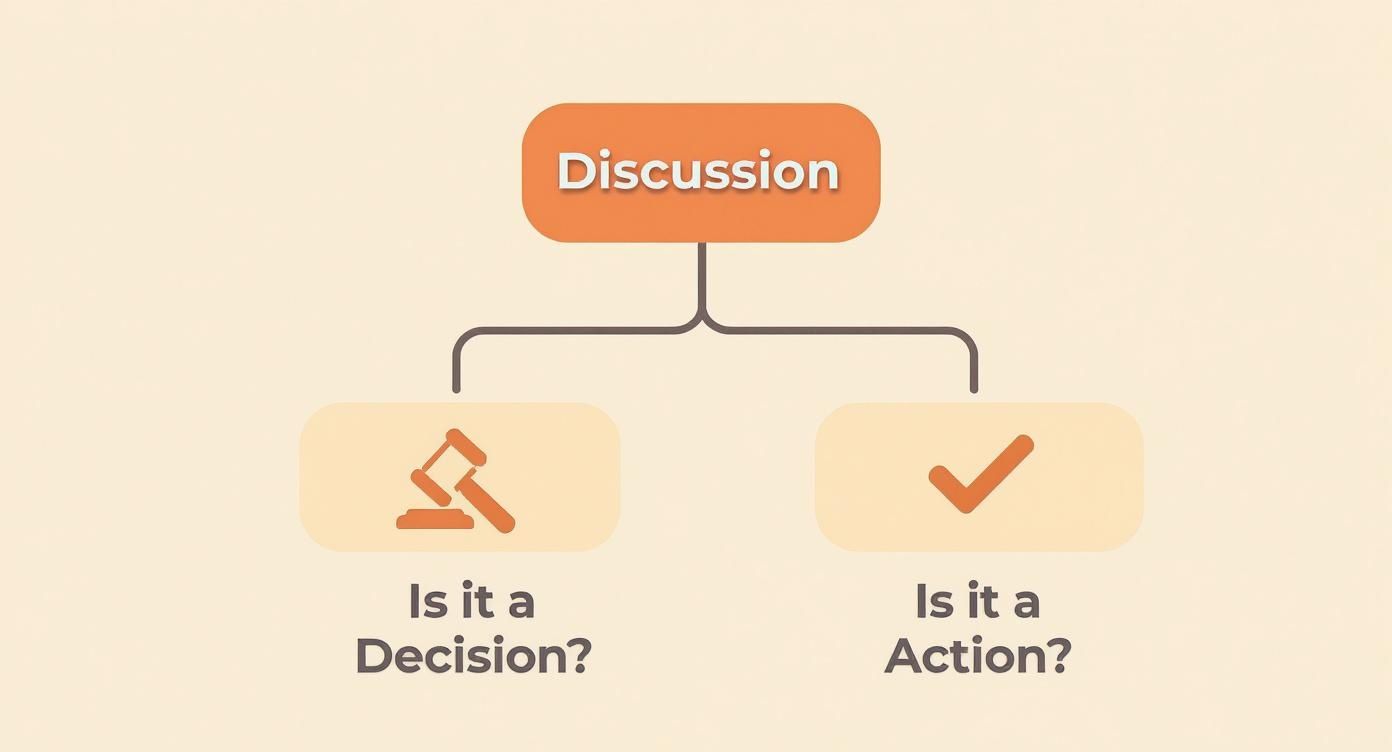
The flowchart shows that every conversation should ultimately result in either a concrete decision or a specific action item. Nothing should be left hanging.
An action-item list from a project kickoff might be structured like this:
This format cuts right through the noise. It provides a clear checklist that can be dropped directly into a project management tool like Asana or Trello. It’s the best way to turn conversation into a tangible plan and ensure the energy from the meeting translates directly into progress.
Meeting Minute Format Comparison
To help you decide at a glance, here’s a quick comparison of the three main formats and when to use them.
Ultimately, the best format is the one that serves the meeting's purpose and gives your team exactly what they need to stay informed and productive. Don't be afraid to mix and match elements to create a style that works for you.
Finalize and Distribute Minutes for Maximum Impact
The meeting might be over, but your job as the minute-taker isn't quite finished. In fact, what you do next is what turns a simple record of a conversation into a powerful tool for getting things done. If you rush this part, all that careful note-taking during the meeting can go to waste.
The trick is to move fast. Try to clean up your raw notes within a few hours. The context is still fresh in your mind, making it much easier to translate your shorthand and scribbles into clear language that anyone—even those who weren't there—can understand.
Review and Refine for Clarity
Before you hit "send" to the whole group, there's one critical quality check: send the draft to the meeting facilitator or chairperson first. This isn't just about catching typos. It's a smart move to make sure you're both aligned on the key decisions and how the action items were worded.
This quick review accomplishes a few things:
- Confirms Accuracy: The person who ran the meeting can give a final "yes, that's what happened."
- Captures Nuance: They might remember a subtle point or a bit of context that you missed in the moment.
- Clarifies Ownership: It’s one last chance to confirm the right person is assigned to each task.
This review step builds trust. When attendees get minutes that have already been vetted by the meeting leader, they're far more likely to accept the contents and jump on their assigned tasks without any back-and-forth.
Distribute With Purpose and Consistency
Once you get the green light, it's time to share the minutes. How you share them is just as important as what's inside. Don't just fire off an email and hope for the best. Put the information where your team actually lives and works.
With virtual meetings jumping from 48% to 77% between 2020 and 2022, digital delivery is the norm. But since participant attention tends to drop after the 30-minute mark, well-structured minutes are crucial for reminding the 52% of attendees who may have zoned out what was actually decided. If you're curious, you can learn more about these meeting statistics from Notta.ai and see just how hard it is to keep people engaged.
Here are a few distribution best practices I've picked up over the years:
- Pick the Right Channel: Don't let your hard work get lost in an email inbox. Post the minutes in a dedicated Slack channel, link them in the relevant Asana project, or drop them into a shared Google Drive folder.
- Stick to a Timeline: Make it a rule to send minutes out within 24 hours. When your team knows they can count on a prompt summary, it creates a reliable rhythm and keeps the project moving.
- Write a Clear Subject Line: If you are using email, something like "Meeting Minutes & Action Items: Project Phoenix Sync - [Date]" works much better than "meeting notes." For more ideas, take a look at our guide on the perfect meeting recap email template.
By creating a clear and consistent process for finalizing and sharing your notes, you ensure the momentum from the meeting doesn't fizzle out. Your minutes become less of a chore and more of a driver for real progress and accountability.
Common Questions About Taking Meeting Minutes
https://www.youtube.com/embed/cST_Q5VpLRw
Even with a solid process, taking meeting minutes can throw you a curveball now and then. Let's tackle some of the most common questions I hear, so you can handle those tricky spots with confidence.
How Much Detail Is Too Much?
This is the big one. The golden rule I always follow is to focus on outcomes, not the play-by-play conversation. Your real job is to capture the decisions that were made, the actions that were assigned (who, what, and by when), and any major takeaways that will matter down the line.
It’s tempting to write down everything everyone says, but that just creates noise.
Here’s a simple gut check: Ask yourself, "If someone who missed this meeting read these notes, would they understand the critical results?" If the answer is yes, you've nailed it.
What if People Disagree on What Was Decided?
This happens more often than you'd think, and it’s precisely why the review step is non-negotiable. Before you send the minutes out to the whole group, always get them in front of the meeting chair or a key decision-maker for a quick approval. Think of this as an alignment check, not just a proofread.
When a disagreement pops up, the meeting chair gets the final say. Your job is to document that clarification. This creates a single source of truth that puts an end to the "I thought we decided..." confusion later on.
The review process isn't just about catching typos; it's about building consensus. A quick sign-off from the meeting leader confirms the minutes are an accurate reflection of the group's decisions and commitments.
Can't I Just Let AI Take the Minutes for Me?
AI tools are fantastic assistants, but they can't quite replace human judgment yet. Where they truly shine is in creating a complete, searchable transcript. This is your safety net—perfect for double-checking a specific quote or detail you might have missed while focusing on the bigger picture.
An AI, however, often misses the subtle context of a conversation. It doesn't know that the team's off-hand comment was actually the breakthrough decision everyone was waiting for.
The best approach is a hybrid one:
- Let AI do the heavy lifting: Use a tool for the raw transcription.
- You provide the human insight: Use your understanding of the project and people to pull out what truly matters and draft the official, outcome-focused minutes.
How Quickly Should I Send the Minutes Out?
My hard-and-fast rule is to get them out within 24 hours. Any longer, and the details start getting fuzzy in everyone's minds. Sending them quickly keeps the momentum going and shows you respect everyone’s time.
Prompt follow-up makes it far more likely that people will actually start working on their action items right away.
Stop wasting time on manual transcription and focus on what truly matters. Whisper AI uses advanced artificial intelligence to create accurate transcripts, speaker labels, timestamps, and concise summaries from your meetings in minutes. Turn your conversations into actionable insights effortlessly. Get started with Whisper AI today.


























































































