
Get a Transcript From a YouTube Video: A Practical Guide
Getting a transcript from a YouTube video is surprisingly easy once you know the right tricks. The best method really depends on your goal. YouTube's built-in tool is instant for a quick quote, third-party downloaders give you a clean file for repurposing, and specialized AI services deliver the high accuracy needed for professional work.
Why Do You Need a YouTube Video Transcript?
A transcript is far more than just a block of text; it’s a powerful tool for repurposing content. If you're a creator, that single video can become the foundation for a blog post, multiple social media updates, or even a detailed email newsletter. It’s the most efficient way to maximize the effort you've already invested in production.
Beyond content strategy, transcripts are vital for accessibility. They open up your content to viewers who are deaf or hard of hearing, instantly expanding your potential audience. They also help non-native speakers who may find it easier to read along while listening.
Choosing the Right Method for Your Goal
Not all transcription methods are created equal. Your end goal is the most important factor in deciding which path to take, as it helps you balance speed, cost, and quality. Before you start, ask yourself what you truly need from the transcript.
- Speed: Do you just need to grab a quick quote or verify something that was said? YouTube’s own built-in transcript feature is your fastest option.
- A Clean File: Want to turn a video into a blog post or save a neatly formatted document? An online downloader tool is the perfect choice for this task.
- High Accuracy: Is precision non-negotiable? For any legal, academic, or professional use case, a dedicated AI transcription service is the only reliable choice.
From my experience, the biggest mistake people make is using the same tool for every job. It's like using a sledgehammer to hang a picture frame. Using a powerful AI service for a simple quote is overkill, and relying on YouTube's auto-captions for a professional report is asking for trouble. Always match the tool to the task.
This decision tree can help you visualize which path is right for you.
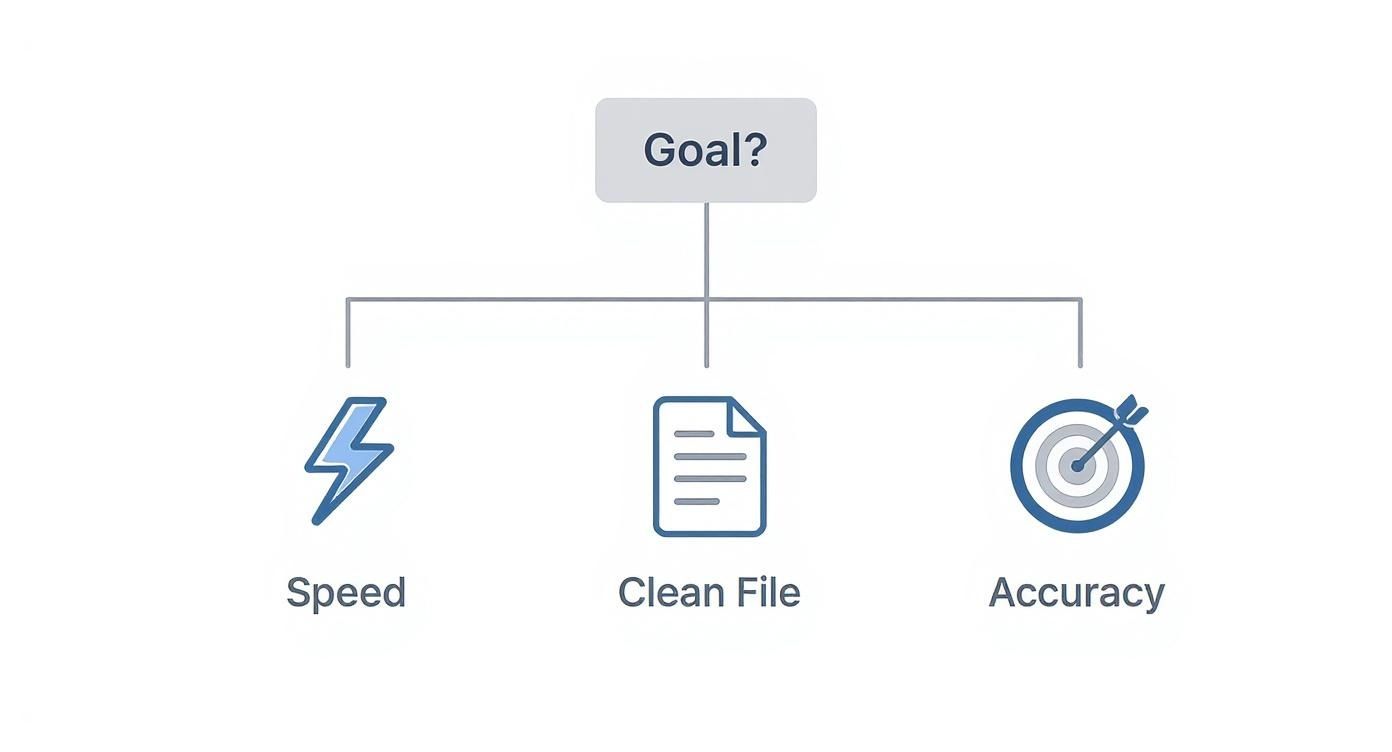
As you can see, defining your main objective first leads you directly to the most efficient solution. Taking a moment to do this can save you a significant amount of time and frustration.
To make it even clearer, here’s a quick breakdown of how these methods compare.
Comparing YouTube Transcript Methods at a Glance
Ultimately, having these three options means you are prepared for almost any scenario, from a quick fact-check to creating a polished, professional document.
How to Use YouTube's Built-in Transcript Feature
The quickest way to get a transcript from a YouTube video is already built right into the platform. It's a simple, direct method that many people overlook, and it's a lifesaver when you just need the text immediately.
This is my go-to when I need to pull a few key quotes or get the gist of a video's content without worrying about perfect accuracy.
Here’s how to find it: first, open the YouTube video you need in a desktop browser. Below the video player, you'll see the description box. Click on the "...more" button to expand it completely. If a transcript is available, you will see a button that says "Show transcript" at the bottom of the description.
Finding and Using the Transcript Window
Once you click "Show transcript," a new interactive panel will appear, usually to the right of the video. This panel displays the entire script of the video, broken down line-by-line with timestamps. You can scroll through it, click any line to jump to that exact moment in the video, and even search for specific keywords.
This screenshot shows exactly where the "Show transcript" button is located after you expand the video’s description.
It’s easy to miss, which is why it remains a little-known feature. Click it, and the full text is instantly available.
From here, you have a couple of useful options. My favorite trick is removing the timestamps. Just click the three vertical dots at the top of the transcript panel and select "Toggle timestamps." This cleans up the text immediately, creating a simple block that’s perfect for copying and pasting into another document.
The real trade-off here is speed for precision. Think of it as the perfect tool for a quick "copy, paste, and clean up" job. I use this all the time to get a rough draft for a blog post, knowing I'll need to make a quick editing pass to fix punctuation and smooth out any awkward phrasing.
Understanding the Limitations
The biggest drawback is accuracy. The vast majority of these transcripts are auto-generated by YouTube's speech-recognition AI. For a video with crystal-clear audio and a single speaker, the results can be quite good—often reaching over 85% accuracy.
However, the quality can drop significantly if the video includes:
- Multiple speakers, especially if they talk over each other
- Strong accents or very fast-paced speech
- Background music, hiss, or other ambient noise
You will almost always find missing punctuation, some strange word choices, and no speaker labels. It provides a great starting point, but it's far from a polished, ready-to-use document. What you get is a raw transcript from a YouTube video that will definitely need a human touch.
How to Download Transcripts with Online Tools
When manually copying and pasting from YouTube's interface feels clumsy and leaves you with a formatting mess, dedicated online tools are the solution. These third-party websites are designed for one purpose: to grab a clean transcript from a YouTube video using only its URL.
This is my preferred method for quick content repurposing. For example, if I need to turn a 15-minute product review into a detailed blog post, an online downloader gives me a clean text file in less than a minute. This saves me from the tedious work of removing timestamps and cleaning up strange line breaks, making it a perfect middle ground between YouTube's native feature and a full AI transcription service.

Choosing Your File Type and Tool
Most online downloaders are straightforward. You paste the YouTube link, the tool fetches the captions, and then it presents you with a few download options. The key is knowing which file format best suits your project.
- .txt (Plain Text): This is the most basic and often the most useful format. It provides a simple, unformatted block of text—no timestamps, no fuss. It’s perfect for drafting articles, creating show notes, or pulling quotes for social media.
- .srt (SubRip Subtitle): This file type is different. It includes precise start and end timestamps for every line of dialogue. This is the industry standard for creating video subtitles and is essential if you plan to upload your own captions to a video platform.
Remember that the accuracy of these tools depends entirely on the quality of the YouTube video’s original captions. If the source transcript is full of errors, your downloaded file will be too. Even so, the convenience of getting a clean file makes these tools an indispensable part of my workflow.
The real win here is efficiency. You get to skip all the manual highlighting, copying, pasting, and then cleaning out all the timestamps. It's a small shortcut that removes a major headache from the content creation process.
Comparing Popular Online Options
You will find dozens of tools that do this, but they are not all the same. Many are free but supported by ads, while others might offer extra features like translation in a paid version. When choosing one, I look for a clean interface and clear download options without too many steps.
For a deeper look at the different ways you can download YouTube subtitles and more on file formats, this article is a great resource.
Ultimately, these tools are all about speed and simplicity. They fill the gap perfectly when you need more than a quick copy-and-paste but don't require the high-level accuracy of a dedicated transcription service. If you're looking for an effective YouTube video to text converter, trying these online options is a great next step.
How to Get High Accuracy with AI Transcription
When "good enough" isn't an option, you need to look beyond YouTube's built-in tools. For things like legal depositions, academic research, or polished marketing content, every word counts. This is where dedicated AI transcription services excel, delivering a high-quality transcript from a YouTube video.
These platforms use sophisticated speech-recognition models that are far more advanced than standard auto-captioning. I've used both extensively, and the difference is remarkable. While YouTube often struggles with accents, background noise, or overlapping speakers, a specialized AI service can deliver a transcript with 95% accuracy or better from the start.
Why AI Transcription is a Step Above
The difference is in the details. These services don't just perform a simple speech-to-text conversion; they analyze audio with a much deeper level of context and structure that basic tools cannot match.
Imagine transcribing a panel discussion with multiple speakers. Trying to figure out who said what is a manual nightmare. A good AI service, however, can sort this out for you automatically.
Here are a few features that make a massive difference:
- Speaker Identification (Diarization): This is a huge time-saver for interviews or group discussions. The AI can distinguish between different voices and label each one (e.g., "Speaker 1," "Speaker 2"), which eliminates hours of tedious playback and guesswork.
- Custom Vocabulary: If your video contains industry jargon, unique brand names, or technical acronyms, you can often build a custom dictionary. This "teaches" the AI to recognize and spell those specific terms correctly, significantly boosting accuracy.
- Timestamp Precision: AI platforms offer word-level timestamps, a major improvement over the line-by-line timing you get from YouTube. This level of detail is fantastic for video editors or anyone needing to pinpoint exact moments.
The use of these powerful AI tools is growing rapidly. The global AI transcription market is projected to reach USD 19.2 billion by 2025, a significant increase from USD 4.5 billion in 2024. This growth is driven by the demand for near-instant results with accuracy rates often exceeding 90% on clear recordings.
Feature Comparison of Leading AI Transcription Services
To help you navigate the options, here's a look at some of the most popular AI transcription tools and what sets them apart. Each one has its own strengths, so the best choice often depends on your specific needs, like whether you prioritize top-tier accuracy, collaboration features, or budget-friendly pricing.
Ultimately, exploring these services will show you just how far AI has come. The ability to get a clean, well-formatted transcript in minutes is a huge productivity boost for content creators, researchers, and marketers alike.
So, When Is It Worth Paying for an AI Service?
While incredibly powerful, these services often come with a cost. You need to know when the investment is justified. I always advise people to use a premium AI tool when the stakes are high and accuracy is non-negotiable. For a deeper look at the workflow, our guide on how to get a YouTube video to text covers these advanced methods in more detail.
Here's a simple way to think about it: for a casual blog post, a free tool is probably fine. But if that transcript is going to be used as legal evidence, cited in a research paper, or serve as the basis for a major marketing campaign, paying a small fee for near-perfect accuracy is a smart move that prevents costly mistakes later on.
In the end, choosing a dedicated AI service is about prioritizing quality and reclaiming your time from endless manual corrections. When you need a transcript from a YouTube video that's not just fast but also incredibly accurate and intelligently formatted, this is the best approach.
Using Transcripts for SEO and Content Strategy
Getting a transcript from a YouTube video is just the first step. The real value comes when you realize that transcript isn't just a text file—it's the raw material for a dozen new pieces of content, all derived from a single video.
This is all about making your content work smarter, not harder. You can take one video and use its transcript to fuel your blog, social media channels, and email marketing for weeks. The most obvious and powerful move? Turning that transcript into a detailed, keyword-rich blog post.

From Video Script to SEO Powerhouse
Once you have a transcript, your video's spoken words become a searchable asset that search engines can easily crawl and index. While Google is improving at understanding video content, a well-written article is still the most reliable way to rank for competitive search terms. You can take the core ideas from your transcript, structure them with clear headings, and expand on the key points for readers.
This is a fantastic way to build your site’s authority and attract organic traffic from people who prefer reading to watching. It allows you to reach a wider audience and provide value in multiple formats.
But don't stop at just a blog post. A good transcript is a goldmine of bite-sized content just waiting to be shared.
The real mindset shift is seeing your transcript not as an endpoint, but as a content hub. I regularly pull three to five impactful quotes from a single transcript for social media, a few key bullet points for an email newsletter, and the main data points for a future infographic.
Expanding Your Content Reach
Think of your transcript as a collection of content "blocks." You can pick and choose these blocks to use across different platforms, reaching different segments of your audience where they spend their time.
Here are a few practical ways I've seen this work incredibly well:
- Create Social Media Snippets: Pull out the most compelling quotes, surprising stats, or helpful tips. Turn them into simple graphics for Instagram, X, or LinkedIn.
- Draft an Email Newsletter: Summarize the video's main points into a quick, value-packed email for your subscribers. Be sure to link back to the original video and the new blog post.
- Build an Infographic: Did your video include key data, steps in a process, or interesting statistics? Extract them from the transcript and work with a designer to visualize them in a shareable infographic.
- Develop Lead Magnets: A detailed transcript can be polished into a downloadable PDF guide, a handy checklist, or a short ebook that you can offer in exchange for an email signup.
For organizations like churches that produce a lot of video or audio content, using professional sermon transcription services can make this entire workflow much more manageable. Businesses that actively analyze their transcript data often report up to 70% higher engagement rates. By applying natural language processing to transcripts, you can pinpoint recurring keywords, popular topics, and audience sentiment—giving you powerful insights for your next content move.
What to Do When YouTube Transcripts Are Missing or Inaccurate
https://www.youtube.com/embed/DG8TXEGKbo8
Even with the best tools, you will eventually encounter issues when trying to get a transcript from a YouTube video. Knowing how to troubleshoot common problems can save you a lot of frustration.
One of the most frequent issues is the missing "Show transcript" button. You expand the video's description, and it’s simply not there. This usually means the video's creator has either disabled YouTube's auto-captions or hasn't uploaded a caption file. In this case, YouTube's built-in tool is not an option, and you will need to use a third-party service that can process the audio directly.
Getting a More Accurate Transcript
Another major challenge is poor accuracy. Sometimes the output is simply a garbled mess. In 99% of cases, the root cause is poor audio quality. Factors like heavy background noise, speakers with thick accents, or several people talking over each other can confuse an automated system.
Pro Tip: Before I send a video to a transcription tool, I sometimes run the audio through a simple noise-reduction app. It only takes a minute, but cleaning up the sound even slightly can make a night-and-day difference in the final transcript's quality.
Here are a few practical ways to get better results:
- Pick Your Battles: If you have a choice, always start with videos that have clear, single-speaker audio and minimal background noise. It’s the easiest way to ensure a good result.
- Use Advanced Tools: For more complex audio, you really need an advanced AI tool. Look for services that offer speaker identification (diarization) and the ability to add custom vocabulary. These features are designed to handle messy conversations.
- Watch Out for Multiple Languages: If you’re transcribing a video where the speaker switches between languages, ensure your tool can handle it. If it only expects one language, you'll get a transcript filled with strange phonetic misinterpretations.
What if an online downloader tool fails to work? This often happens if a video is set to private or is restricted in certain countries. The easiest workaround is to find a service that allows you to download the video yourself and then upload the file directly for transcription. This bypasses any platform restrictions completely.
Have More Questions? Let's Clear a Few Things Up
As you start transcribing YouTube videos, you'll likely have a few questions. Here are answers to some of the most common ones.
What Determines How Accurate YouTube’s Auto-Captions Are?
It all comes down to the audio quality. If you have a video with a single person speaking clearly into a good microphone with zero background noise, YouTube's own captions can be surprisingly good—sometimes hitting around 85% accuracy.
But that number drops significantly when things get complicated. The AI struggles with:
- Heavy accents or people who talk very fast.
- Multiple people talking, especially if they interrupt each other.
- Background noise, like music, an echo-filled room, or street sounds.
- Niche terminology or technical jargon that isn't in its standard dictionary.
Is It Okay to Transcribe a Video for My Own Use?
Absolutely. If you're transcribing a video for personal reasons—like taking notes for a class, doing research, or for your own accessibility needs—you're generally protected under fair use.
The line is crossed when you republish, sell, or distribute that transcript without permission from the video's creator. As long as you keep it for your own files, you should be fine.
What’s the Best File Format for a Transcript?
There is no single "best" format—the right one depends entirely on what you plan to do with the text.
If you’re turning a video into a blog post, a simple .txt (plain text) file is perfect. It's just the raw text with no formatting, which makes it easy to copy, paste, and edit. But if you need subtitles for a video editor, you'll want an .srt file. That format includes the crucial timestamps needed to sync the text with the video.
Think of it this way: a .txt file is for the content, and an .srt file is for the timing. Choosing the right one upfront saves a lot of headaches later.
Ready to get a flawless transcript from a YouTube video in seconds? Whisper AI uses advanced AI to deliver highly accurate transcripts, complete with speaker detection and timestamps. Stop wasting time with manual corrections and start creating content faster. Get started for free.


























































































