
How to Convert MP3 to Text Fast and Accurately
Turning an MP3 file into text used to be a tedious, manual task that involved hours of rewinding and typing. Today, with modern AI tools, it’s a process I can complete in minutes. You simply upload your audio, let the software do the heavy lifting, and get a full transcript back. From my experience, this is the fastest and most affordable way to make spoken content searchable, editable, and shareable.
Why Converting MP3 to Text Is a Game Changer
In a world that runs on text, raw audio files can feel like a dead end. They’re often packed with valuable insights, but you can’t search them, scan them for key points, or easily pull quotes from them. This is where transcription stops being a chore and becomes a massive strategic advantage.
Once you start thinking of transcription as a way to unlock the value trapped inside your audio, a whole new world of possibilities opens up. For podcasters and YouTubers, it's about making every single word discoverable by search engines, which can dramatically boost visibility and grow their audience.
Unlocking Content and Data
For researchers and journalists, turning hours of interview recordings into text transforms a mountain of qualitative data into something you can actually analyze. Suddenly, you can search for key quotes, spot recurring themes, and build a narrative without having to scrub through audio timelines for hours. The same goes for business meetings—a transcript ensures every action item and critical decision is captured perfectly.
The benefits are clear and impact almost everyone working with audio. To give you a better idea, here’s a quick breakdown of how different people benefit from transcribing their MP3s.
Core Benefits of MP3 to Text Conversion
Ultimately, a transcript gives your audio a second life. It’s no longer a one-and-done piece of content but a versatile asset you can use again and again.
This isn’t just a small trend, either. It’s a massive market shift. The global speech-to-text API market, the technology that powers these conversion tools, was valued at around $3.8 billion and is expected to reach $8.6 billion by 2030. You can find more details on this growth over at Grand View Research.
This explosive growth shows just how crucial it is to convert mp3 to text if you're serious about getting the most value out of your audio. We explore more ways to transform your recordings in our guide on turning audio into various content formats.
Choosing Your Transcription Method: AI vs. Human
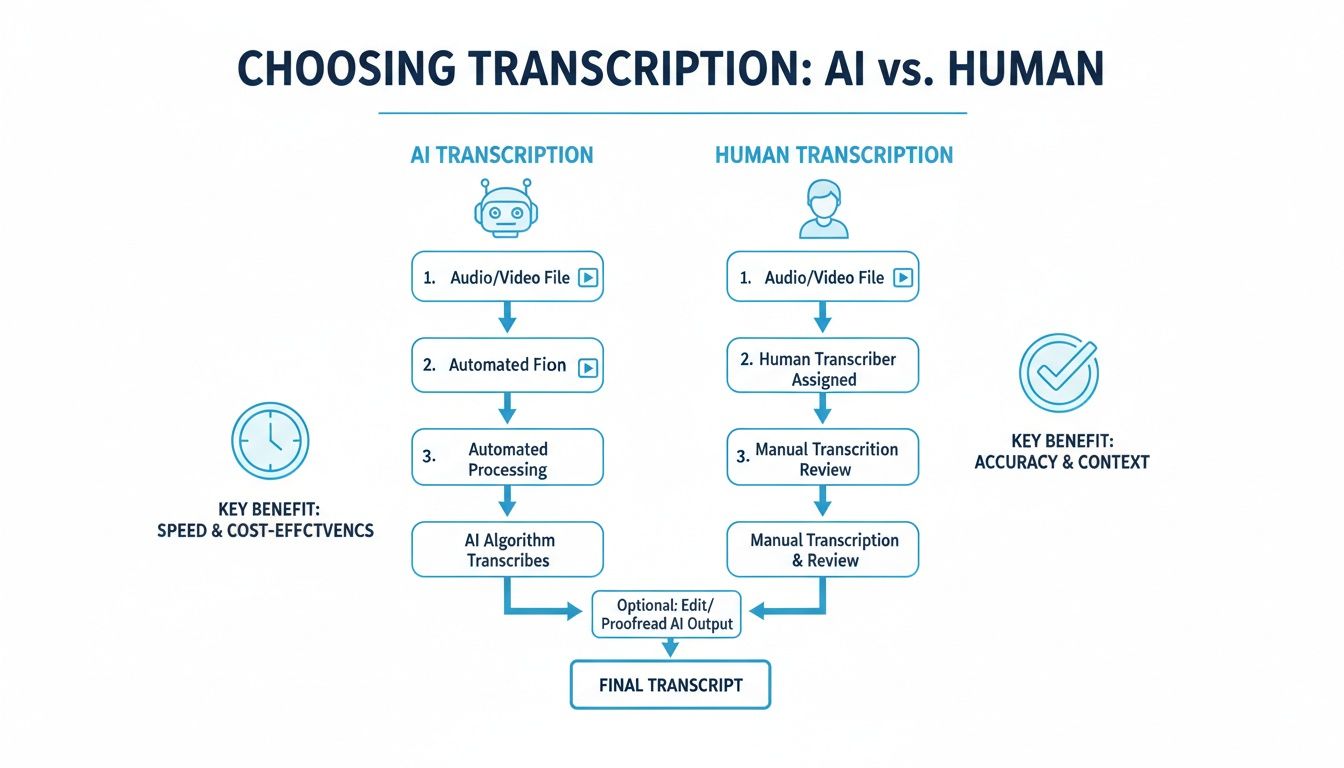
Before you even think about converting that MP3 file, you have to make a choice: do you go with an automated AI service or a traditional human transcriber? This isn't just a technical decision; it's about matching the right tool to your specific project's needs—balancing speed, accuracy, and what you’re willing to spend.
Think of it this way. If you're a journalist hot on a deadline, an AI service is your best friend. You just wrapped up a 60-minute interview and need to pull out the most compelling quotes for a story due in two hours. An AI can spit out a searchable draft in under 5 minutes. That kind of speed is a game-changer.
On the flip side, consider a legal team preparing a deposition for court. They need a certified, word-for-word transcript where every single "uhm," pause, and mumbled aside is captured perfectly. This is where a human expert shines. Their ability to decipher thick accents, legal jargon, and people talking over each other is something AI still struggles with, even if it takes a few days to get the file back.
The Deciding Factors: Speed and Cost
For most people—podcasters, marketers, students, and researchers—the sheer speed and affordability of AI make it a no-brainer. Professional human transcription can run you anywhere from $1.50 to $5.00 per audio minute. A single 60-minute podcast episode could easily set you back $90 and you might be waiting 24 hours or more.
An AI service can chew through that same file for just a few bucks and deliver the full text in the time it takes to grab a coffee. This affordability has opened up transcription for everyone, not just big-budget projects. If you want to see how different AI tools stack up, our guide on AI-powered transcription services is a great place to start.
The real trade-off isn't just about dollars and cents; it's about momentum. AI keeps your projects moving forward without the long delays and high costs associated with manual processes, empowering you to create and analyze content at a much faster pace.
Market Trends Tell the Story
The numbers don't lie. The global AI transcription market is already valued at $4.5 billion and is expected to rocket to $19.2 billion by 2034. That's a massive 15.6% compound annual growth rate.
Compare that to the broader transcription market (which includes human services), which is chugging along at a more modest 6.1% growth rate. You can dive deeper into these audio-to-text processing trends on Sonix.ai.
This isn't just a fad; it's a fundamental shift. While human transcription absolutely has its place for high-stakes, specialized work, AI is rapidly becoming the go-to for almost everything else. For most people needing to turn an MP3 into text, AI delivers an unbeatable mix of speed, accuracy, and cost.
Your Guide to Converting MP3 to Text with AI
Alright, let's get into the practical steps—actually turning that MP3 file into a clean, searchable transcript. What used to be a long, tedious job can now be done in just a few minutes, thanks to modern AI. I'll walk you through the entire workflow, focusing on the steps that get you the best results.
First, you need to get your audio file into the system. Most platforms, including those powered by Whisper AI, give you a couple of simple options. You can drag and drop the MP3 right from your desktop or, if it's already online, just paste in a link. This flexibility is a huge plus, especially if you're pulling audio from different places like cloud storage or social media.
Dialing in Your Transcription Settings for Maximum Accuracy
Once your file is uploaded, you'll see a few settings. Don't just blow past this screen and hit "transcribe." Taking a moment here is the secret to getting a much more accurate result right from the start. You're essentially giving the AI a little cheat sheet on what to expect.
For example, you’ll need to specify the language of the audio. While many tools have an auto-detect feature, I always recommend manually selecting the language from the dropdown menu. It completely removes any guesswork.
And here’s a feature that's a game-changer for interviews, podcasts, or team meetings.
Turning on speaker detection (sometimes called diarization) tells the AI to identify and label each person speaking. Instead of getting back a confusing wall of text, your transcript will be neatly organized by "Speaker 1," "Speaker 2," and so on. It’s an essential setting if you need to convert MP3 to text from any kind of conversation.
Reviewing and Polishing Your Transcript
After you’ve configured your settings and started the process, the AI does its magic. In a surprisingly short amount of time, you'll have a complete draft ready to review. This is where a good interactive editor really shines. The best tools don't just dump a plain text file on you; they present the text right alongside an audio player.
What makes this so effective is that the text is synced with the audio playback. You can click on any word in the transcript, and the audio will instantly jump to that exact spot. This makes proofreading incredibly fast. If the AI fumbled a name, a bit of jargon, or an acronym, you can listen to that specific segment in a second and type in the correction. You can also easily re-label speakers if the AI mixed someone up.
My Pro Tip: I always do one quick pass-through at 1.5x speed. It's fast enough to be efficient but still slow enough that your brain can easily catch any obvious mistakes. For a one-hour recording, this cleanup pass rarely takes me more than 10 minutes.
Exporting for Your Specific Needs
The last step is getting your polished transcript out of the system and into a format you can actually use. What you plan to do with the text will determine the best format, and a solid transcription tool will offer plenty of choices.
Here are a few common scenarios and the formats I'd recommend:
- DOCX or PDF: These are perfect for creating formal reports, sharing meeting minutes, or for academic work.
- TXT: A simple, plain-text file is ideal when you need to import the text into other software or for data analysis.
- SRT/VTT: If you're a content creator, these are the formats you need. They are specifically for generating captions or subtitles for your videos on platforms like YouTube or Vimeo.
Choosing the right format from the get-go means your transcript is ready to use immediately, saving you from another annoying conversion step later on.
Getting Your Audio Ready for a Flawless Transcription
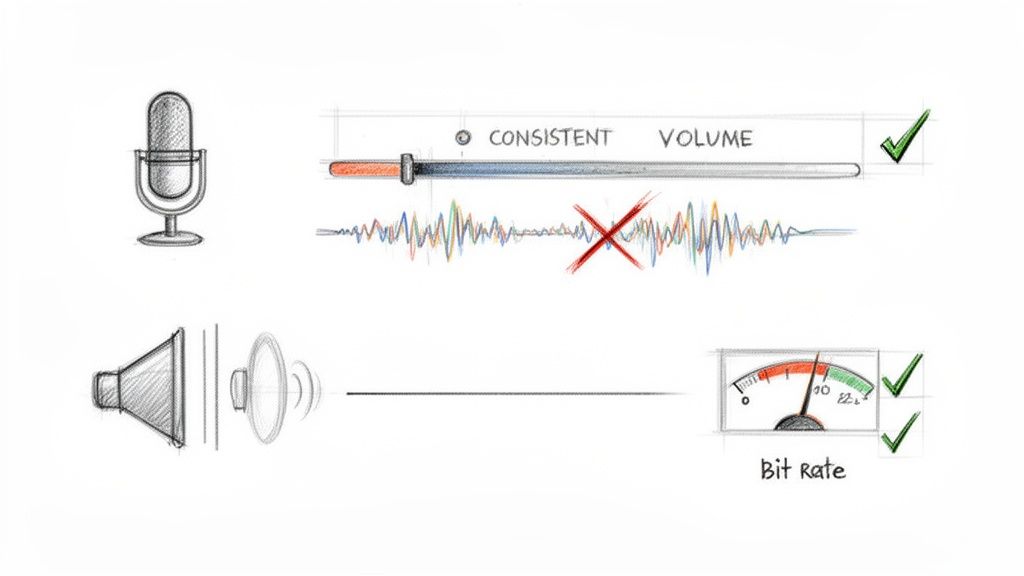
We've all heard the old saying "garbage in, garbage out," and nowhere is it more true than when you convert MP3 to text. Your final transcript will only ever be as good as the audio you feed the AI.
While grabbing a decent microphone is a solid first step, a few simple audio prep tricks can skyrocket your transcription accuracy. Think of it as a pre-flight checklist. Spending just a few minutes on this upfront is the single best way to avoid hours of painful editing on the back end.
Tame That Background Noise
Background noise is the arch-nemesis of automated transcription. The hum from an air conditioner, the clatter of a coffee shop, or even a distant siren can force an AI to guess, and it often guesses wrong.
Ideally, you should record in a quiet space from the start. A small room with soft surfaces—think carpets, curtains, even a closet full of clothes—can do wonders to kill echo and outside noise.
But what if you're stuck with a noisy MP3? All is not lost.
- Noise Reduction Tools: Free software like Audacity or professional tools like Adobe Audition have built-in noise reduction filters. A quick pass can scrub out most of that annoying background hiss.
- Isolate the Voices: Another pro-level trick is to use an equalizer (EQ). You can gently boost the frequencies where human speech lives (usually around 85-255 Hz) and cut the rumbly lows or hissy highs where most noise hangs out.
You're not aiming for a pristine, studio-quality recording. The goal is just to make the spoken words stand out clearly from everything else. That's what gives the AI a fighting chance.
Create Clear Speaker Separation
If you’re transcribing an interview or a team meeting, things can get messy when people talk over each other. Even the smartest AI gets completely lost trying to untangle a conversational pile-up.
When recording, a little ground rule goes a long way: encourage speakers to let one person finish before the next one starts. It feels a bit unnatural at first, but it’s a lifesaver for speaker detection algorithms. For the absolute best results, especially in podcasting, record each person on their own separate audio track. This lets you level out their volumes perfectly later on.
We go even deeper into this in our guide on creating a high-quality transcript.
Dial in the Technical Details
You don't need to become an audio engineer overnight, but paying attention to two small technical details—volume and bit rate—can make a huge difference.
First, consistent volume levels are key. If one person is booming loud and another is whispering, the AI can get thrown off. Use a "normalization" or "compression" tool in your audio editor to even things out. This ensures no words get dropped just because they were too quiet to register.
Second is the bit rate, which is basically the data density of your audio file. For clear speech, a mono MP3 file with a bit rate of at least 64 kbps is a good target. Go any lower, and the audio can start to sound muffled, causing the AI to misinterpret words.
Turning Your Transcript into Actionable Insights
Getting the raw text after you convert MP3 to text is really just the first step. The real magic happens when you turn that wall of words into a goldmine of useful information. Modern transcription platforms have moved way beyond simple conversion; they're now analytical tools that help you pull out key insights almost instantly.
The most immediate win is the ability to get an automatic summary. Instead of having to re-read a dense, hour-long meeting transcript, you can get a quick, concise overview in seconds. This is a massive time-saver, boiling the conversation down to the main points and decisions so you don't have to wade through everything yourself.
Here’s a look at what a summary feature might look like inside an AI transcription tool.
As you can see, the platform condenses a long discussion into clean, digestible bullet points. This makes it incredibly easy to grasp the core ideas quickly and moves your transcript from a static record to a dynamic summary of what actually matters.
Asking Your Transcript Direct Questions
Perhaps the biggest leap forward in this space is the ability to chat with your transcript. Think of it less like a document and more like an intelligent database you can ask questions directly.
For example, after transcribing a project kickoff call, you could just ask:
- "List all the action items for the marketing team."
- "What were the main concerns about the project timeline?"
- "Can you summarize John's key arguments in bullet points?"
This completely changes how you work with your audio content. The AI scans the entire text and pulls out the exact information you need, context and all. It’s a remarkably efficient way to find those crucial details that might otherwise get buried.
This growing demand for smarter post-transcription analysis is fueling some serious market growth. The AI speech-to-text tool market is projected to expand by $8.3 billion by 2029, growing at an impressive 28.8% annually. More specifically, the AI meeting transcription segment is expected to balloon from $3.86 billion in 2025 to a massive $29.45 billion by 2034. You can dig into the details of this trend and what it means for the industry by exploring the latest market analysis on Technavio.
When you use these AI-driven features, you're not just transcribing audio—you're creating a searchable, queryable, and ultimately more valuable asset. It's all about working smarter, not just faster.
Once you have your transcription, you can explore all sorts of efficient content repurposing strategies to maximize the reach of your original audio. This lets a single recording become the source for blog posts, social media updates, and more, all starting from one accurate transcript.
Got Questions About Converting MP3 to Text?
Even with great tools at your disposal, it's smart to have a few questions before you jump in. I get asked these all the time, so let's walk through the most common ones. Getting these cleared up will help you start your first transcription project with a lot more confidence.
Let's dive in.
Just How Accurate is AI Transcription, Really?
This is the big one, isn't it? The short answer is: surprisingly accurate. Top-tier AI services, especially those built on powerful models, can hit over 95% accuracy. But—and this is a big but—it all comes down to the quality of your audio file.
Think of it like this: garbage in, garbage out. Several things can affect the final transcript:
- Audio Clarity: A clean recording with little to no background noise is the single most important factor. If you can't hear it clearly, neither can the AI.
- Thick Accents: AI has gotten much, much better with accents, but a very strong or unique one can still cause some stumbles.
- Niche Jargon: If your audio is full of industry-specific terms or acronyms, you'll probably need to do a quick proofread to catch any mistakes.
Modern AI is clever enough to add punctuation and grasp the context of a conversation, which means the initial draft you get back is often remarkably good. It might not be 100% perfect every single time, but for the vast majority of projects, the blend of speed, low cost, and high accuracy is unbeatable.
Is It Actually Safe to Upload My Audio Files?
A totally fair question, especially if you're working with sensitive material. Your privacy should be a top priority, and any professional transcription service worth its salt will treat it that way.
Here's the bottom line: a trustworthy platform will use secure, encrypted connections for all your files. They don't store your audio long-term, and it's only ever used for the transcription you requested. Critically, your data should never be used to train their AI models without you explicitly opting in.
Before you upload anything, take a minute to review the service's privacy policy. If it's not clear and transparent, walk away. For confidential content like business meetings or private interviews, a trusted, paid platform is the only way to go. I'd strongly advise against using free, ad-supported tools for anything you wouldn't want the world to hear.
What About Transcribing Files with Multiple Speakers?
Absolutely. This is one of the areas where today's AI really proves its worth. Good transcription platforms have a feature called speaker detection (or sometimes diarization).
This is the magic that automatically figures out who is speaking and when. It then neatly labels the dialogue—"Speaker 1," "Speaker 2," and so on. It's a massive time-saver for anyone transcribing podcasts, interviews, or team meetings. Without it, you’re stuck with the painful task of manually separating the speakers yourself.
For the best results, look for a tool that lets you specify the number of speakers before it starts processing the file. It helps the AI work a lot more accurately from the get-go.
Ready to see it in action? Whisper AI takes all the guesswork out of the process. Just upload your MP3, and in minutes, you'll have a clean transcript complete with speaker labels, timestamps, and even a quick summary.


























































































