
Your Guide to AI Powered Transcription Software
At its core, AI powered transcription software is a tool that leverages artificial intelligence to automatically convert spoken words from audio or video into written text. From my experience helping thousands of users, I've seen firsthand how it serves as a fast, accurate, and affordable alternative to manual transcription, giving creators and professionals searchable, ready-to-use transcripts in minutes, not hours.
How Does AI Transcription Actually Work?
Have you ever wondered how software can listen to a recording and produce a near-perfect text document? It's not magic, but a sophisticated process. Think of it as a highly skilled digital assistant that can listen, identify who’s talking, and type everything out almost instantly.
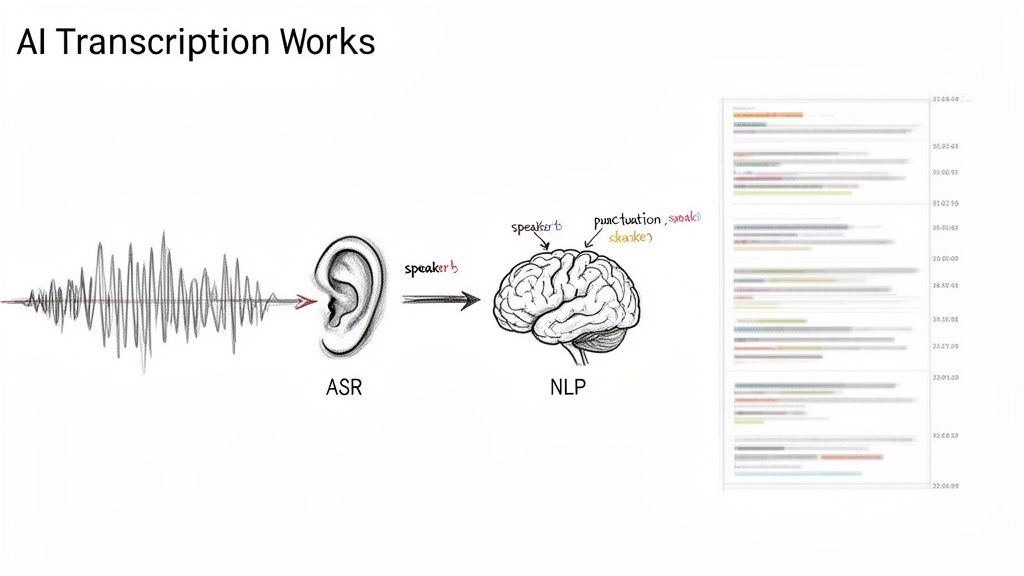
The entire process relies on two key AI technologies. The first is the "ears" of the operation: Automatic Speech Recognition (ASR). This foundational technology takes the sound waves from your file and begins the process of converting them into words.
ASR models are trained on vast datasets containing millions of hours of human speech. This allows them to break down audio into its smallest sound units (phonemes) and match those sounds to words. What you get at this initial stage is a raw stream of text—the first draft of your transcript. For those who want a deeper technical dive, understanding how to configuring speech-to-text can illuminate this first step.
From Raw Data to a Polished Transcript
Simply turning sounds into words isn't enough to create a useful transcript. The raw text from the ASR is typically a long, unformatted block of words. This is where the "brain" of the software, Natural Language Processing (NLP), steps in to add structure and context.
NLP models are designed to understand grammar and context, much like a person would. Based on my experience with these tools, this is what NLP does to refine the raw text:
- Punctuation: The AI intelligently adds commas, periods, and question marks to create coherent, readable sentences.
- Paragraphs: It breaks up the wall of text into logical paragraphs, making the content easier to follow.
- Speaker Identification: Advanced systems can distinguish between different voices and label who is speaking and when.
- Timestamps: It syncs the text with the original audio, so you can click on any word and instantly jump to that precise moment in the recording.
This diagram illustrates how your audio file is transformed from a raw recording into a structured, useful document.
This three-step workflow—input, processing, and output—is what saves people countless hours of painstaking manual work.
The Real-World Impact
This powerful combination of ASR and NLP is fueling significant growth. The AI transcription market, valued at USD 1.5 billion in 2024, is projected to reach USD 5.2 billion by 2033.
For content creators and professionals, this translates into better, more accessible tools every day. For instance, platforms like Whisper AI already help thousands of users by automatically detecting speakers and extracting highlights from long videos, securely processing over 500,000 files globally.
By combining sophisticated "listening" and "understanding" technologies, AI transcription automates a once-tedious task, freeing up professionals to focus on analysis and creativity rather than manual typing.
Imagine a podcaster uploading an hour-long interview. Within minutes, they receive a fully formatted transcript with speaker labels, ready to be repurposed into show notes, blog posts, or social media content. This is a perfect, real-world example of turning raw audio to text with minimal effort. It's this progression—from basic sound recognition to deep contextual understanding—that makes AI transcription a game-changer.
What Key Features Should I Look for in an AI Transcription Tool?
When you start evaluating AI powered transcription software, it's easy to get lost in technical jargon. From my experience, the best tools do more than just convert speech to text. They save you time, make your content more accessible, and provide a solid foundation for your work. Let's break down the features that separate a genuinely useful tool from a basic one.
A great transcription service should understand the context of a conversation, make the text easy to navigate, and integrate with the other tools you already use.
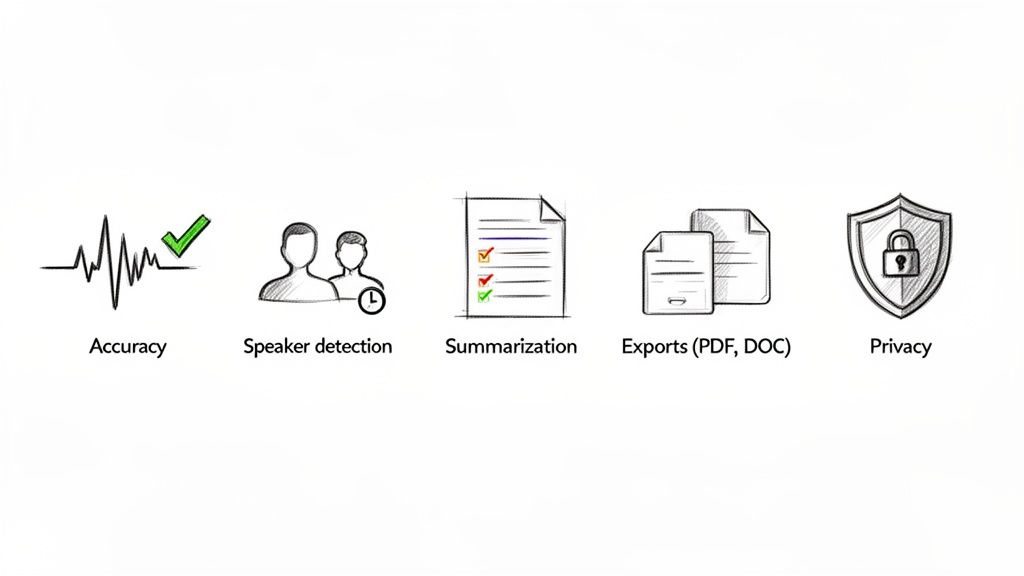
High Accuracy Across Different Languages and Accents
This is non-negotiable. Accuracy is the foundation of a good transcription tool. If you have to spend hours correcting basic mistakes, the tool isn't saving you time. The industry benchmark for top-tier tools is an accuracy rate above 95% for clear audio.
However, real-world audio is rarely perfect. A powerful tool demonstrates its value by handling challenges like multiple languages, strong accents, industry-specific jargon, and background noise. If your work involves international speakers or specialized topics, this is an essential feature.
Automatic Speaker Detection and Timestamps
Imagine receiving a 30-page transcript of a panel discussion without any indication of who said what. It would be an unusable wall of text. This is where diarization, or automatic speaker detection, is invaluable.
A good system will automatically:
- Distinguish between speakers: It identifies unique vocal patterns to differentiate each person.
- Label the dialogue: It assigns a clear label (e.g., "Speaker 1" or a name you provide) to each section of speech.
- Pinpoint the timing: Every word is linked to a precise timestamp in the original audio or video.
This transforms that wall of text into a clean, organized script. You can find quotes in seconds, jump directly to key moments, and easily follow the conversation. For video editors, journalists, and researchers, this feature is a true game-changer.
AI-Powered Summaries
Let's be practical—you don't always have time to read an entire hour-long transcript. Sometimes you just need the main points. Modern AI powered transcription software often includes summarization features that can distill a long conversation into its key highlights.
Instead of reading through pages of text, you get a concise summary, a list of bullet points, or even a set of action items from a meeting. It’s a significant time-saver, allowing you to grasp the core message of a webinar, podcast, or interview in a fraction of the time.
The goal of modern transcription isn't just to create a text file; it's to deliver actionable intelligence. Features like summarization and speaker detection transform raw data into a resource you can use immediately.
The best AI transcription tools come packed with features designed to make your life easier. Here's a quick rundown of what to look for and why it matters.
Key Features of Modern AI Transcription Software
Ultimately, these features work together to transform a simple transcription into a powerful, multi-purpose asset that you can put to work immediately.
Flexible Export Options and Integrations
Once your transcript is ready, you need to be able to use it. A good tool won't trap your text within its platform. It should offer a wide range of export options to fit your workflow.
Look for the ability to download in formats like:
- Google Docs and Microsoft Word (.docx) for editing and sharing.
- PDF for creating a final, un-editable version.
- Plain Text (.txt) for maximum compatibility.
- Markdown (.md) for easy formatting on the web.
Even better are direct integrations. The ability to send a transcript straight to your project management board or content management system eliminates extra steps and keeps your projects moving smoothly.
A Serious Commitment to Data Privacy and Security
This might be the most critical feature of all, especially if you're transcribing sensitive conversations. When you upload a file, you're placing your trust in that service. What are they doing with your data?
A trustworthy platform will be transparent about its privacy policy. The best services process your files in a secure environment and do not store your data long-term or use your private conversations to train their AI models. Always check for explicit statements on data protection and compliance with privacy laws. Your confidentiality is too important to leave to chance.
How Professionals Use AI Transcription Every Day
So, we've covered the features, but what does AI transcription actually look like in practice? It’s one thing to list technical specs, but the real value becomes clear when these tools solve real-world problems for professionals. This isn't just about converting audio to text; it's about increasing speed, uncovering insights, and discovering new ways to work.
Let's look at some practical examples of how people in different fields use this technology daily.
For Podcasters and YouTubers
Content creators are constantly working to produce and repurpose content. An hour-long interview is a goldmine, but manually sifting through it is a daunting task. AI transcription completely changes that dynamic.
Consider a YouTuber who just finished a 45-minute product review. Previously, they would be tied to their editing timeline, scrubbing back and forth. Now, their workflow is transformed. They can:
- Get Instant Captions: Upload the video and receive a timestamped transcript within minutes. They can export this as an SRT file, add it to YouTube, and instantly make their content more accessible and search-friendly.
- Create Detailed Show Notes: The AI summary provides a perfect, bulleted list of the key topics covered. They can paste this directly into the video description, complete with timestamps.
- Find Social Media Gold: Instead of re-watching the entire video, they can scan the text for a great quote or a funny moment. The timestamps tell them exactly where to find the clip for a quick Reel or TikTok post.
A task that once took an entire afternoon is now completed in under 30 minutes. It’s not just a time-saver; it’s a content multiplier, turning one recording into multiple assets.
For Social Media and Content Managers
Social media managers are always looking for fresh content. A webinar, Q&A session, or company announcement is full of valuable material, but only if they can access it quickly.
Imagine a content manager after a one-hour live webinar. The old method involved re-watching the entire event to find a few good soundbites. With AI transcription, the process is streamlined:
- Transcribe the Recording: The video file is uploaded as soon as the event concludes.
- Search, Don't Watch: Instead of listening for an hour, they can search the document for keywords, audience questions, or specific expert names.
- Lift Quotes Directly: They can copy compelling lines straight from the text and turn them into quote graphics for Instagram or thought-provoking posts for LinkedIn.
This gives them immediate access to searchable text, allowing them to capitalize on the event's momentum and share highlights while the conversation is still fresh.
For Journalists and Researchers
For journalists and researchers, interviews are the foundation of their work. For decades, the slow process of manual transcription was a major bottleneck. AI powered transcription software has eliminated that bottleneck, closing the gap between interview and insight.
For these professionals, a transcript is more than just words; it’s searchable data. The ability to instantly find key phrases, verify quotes, and analyze conversational patterns dramatically accelerates the entire research and writing process.
This shift is part of a larger trend. The global AI transcription market is growing rapidly, with projections showing an increase from USD 4.5 billion in 2024 to USD 19.2 billion by 2034. Tools built on powerful models like Whisper AI are leading this charge, processing massive amounts of audio and video and reducing manual transcription time by up to 90%. As detailed in market growth reports from market.us, this allows researchers and reporters to spend less time typing and more time analyzing.
For Business Teams and Meeting Planners
In the corporate world, meetings are where decisions are made and tasks are assigned. But often, crucial information is lost once the call ends. AI transcription turns every meeting into a permanent, searchable record.
A project manager can take a recording of a weekly team meeting and almost instantly:
- Confirm Key Decisions: No more "I thought we agreed to..."—they can simply search the transcript to find the exact moment a decision was made.
- Delegate Action Items: The AI summary can extract a clean list of tasks and who is responsible for them, simplifying follow-up.
- Keep Everyone Informed: A clean, readable transcript can be sent to anyone who missed the meeting, ensuring the entire team is aligned.
This creates a single source of truth that reduces miscommunication and promotes accountability. The meeting's value extends far beyond the time it took place; it becomes a living document for the entire project.
How to Choose The Right AI Transcription Software
With so many tools on the market, selecting the right AI-powered transcription software can feel overwhelming. The good news is that you don't need to be a tech expert to make a great choice. It comes down to matching a tool's features to your specific needs.
Forget the marketing slogans for a moment. Instead, ask yourself a few key questions. Can it handle the type of audio I work with? Is the price fair for my usage? And, most importantly, is my data secure? This approach helps you cut through the noise.
Evaluating Core Accuracy and Language Support
The first and most important test is performance. A tool is only as good as the transcript it produces. If you have to spend hours cleaning up errors, it’s not saving you any time.
Consider the audio you need to transcribe. A clean, single-speaker podcast is very different from a busy meeting with people talking over each other and background chatter. Look for software that not only claims a high accuracy rate—like 95% or better—but also proves it can handle messy, real-world audio.
Language support is just as critical. If you're dealing with global interviews or multilingual content, ensure the platform can handle every language you need without a drop in quality. A solid tool should be able to identify and transcribe different languages flawlessly.
Compatibility With Your Workflow
A great tool should feel like a natural part of your workflow, not an obstacle. Before committing to a service, verify that it works well with your existing files and platforms.
- File Uploads: Can you easily upload the audio and video formats you use most, such as MP3, MP4, and WAV?
- Link Integration: For content creators, the ability to paste a link from YouTube or TikTok is a game-changer, as it eliminates the need to download and re-upload files.
- Export Options: When the transcription is complete, can you get it in the format you need? Look for options like .docx for documents, .txt for plain text, and .srt for video captions.
Getting this right from the start ensures the software will genuinely make your life easier, not add another frustrating step to your process.
To help you systematically evaluate your options, we've put together a handy checklist. Use it as a guide to compare different tools side-by-side and find the perfect fit for your needs.
AI Transcription Software Evaluation Checklist
By walking through these criteria, you'll be able to confidently choose a service that not only delivers quality transcripts but also respects your time, budget, and data.
Understanding Pricing Models
When it comes to paying for AI transcription, you'll generally find two main approaches: pay-as-you-go (paying per minute or hour) and monthly subscriptions. Neither one is inherently better—the right choice depends on how you work.
Pay-as-you-go plans are ideal if you only need a transcript occasionally. You pay for exactly what you use, making it very cost-effective for one-off projects.
On the other hand, if you’re transcribing audio regularly, a subscription plan almost always makes more sense. You get a set number of hours each month for a flat fee, which usually brings the per-minute cost down significantly for heavy users.
When you're thinking about return on investment, look past the price tag. The real value is in the hours you get back from not having to type everything out by hand and the new ways you can use your content now that it's searchable.
For creators and professionals, understanding the different types of auto transcribe software is key to finding a model that fits both your workflow and your budget.
Prioritizing Security and Compliance
Let's be blunt: in today's world, data security isn't just a feature, it's a requirement. This is especially true if you’re transcribing sensitive client meetings, confidential interviews, or private research. You have to know how your data is being handled.
A trustworthy service will be upfront about its security measures. Look for a clear, explicit policy stating that your files are processed securely and are not used to train their AI models. It should also be obvious that your data isn't stored indefinitely and is deleted once the transcription is complete.
This is a make-or-break issue. As many academic and professional organizations warn, using a tool without vetting its privacy policies can expose you to serious risks. Always opt for a service that puts data protection front and center, so you can be confident your information stays yours.
Your First Transcription: A Step-by-Step Workflow
Theory is helpful, but seeing an AI-powered transcription software in action is what really makes it click. Let's walk through the entire process, step by step. This short guide will take you from a raw audio file to a polished, ready-to-use transcript, showing you just how easy it is to integrate this technology into your daily routine.
For this walkthrough, we'll use a tool like Whisper AI as an example because it's designed to be straightforward for everyone, from YouTubers to corporate teams. The core steps, however, are largely the same across most modern platforms.
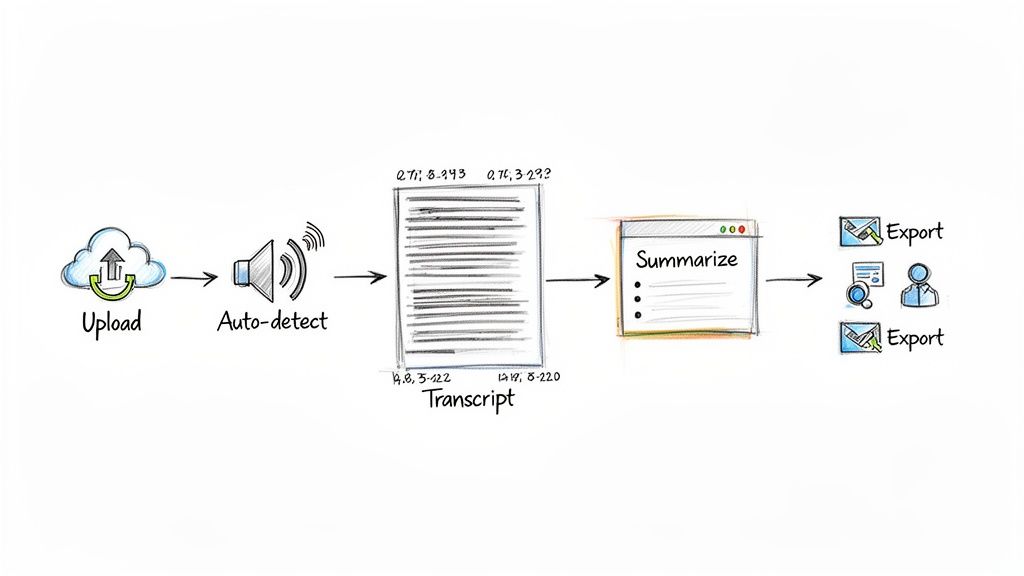
You'll be surprised how quickly you can go from a recording to a finished document. What used to take hours of tedious manual work is now a simple, three-step process that can be completed in just a few minutes.
Step 1: Upload Your Audio or Video
The first step is to get your media into the system. This is a critical part of the workflow because the quality of your original file directly impacts the accuracy of the transcript. If you're recording meetings, for instance, learning how to record Google Meet sessions with clear audio will make a significant difference.
Modern tools offer a lot of flexibility here. You’re not limited to a single file type.
- Local Files: Simply drag and drop common audio formats like MP3 and WAV, or video files like MP4, directly from your computer.
- Web Links: This is a huge time-saver for content creators. You can paste a link from YouTube or another platform, and the software will handle the rest without requiring you to download anything first.
Once your file or link is submitted, the AI takes over. A good system will automatically detect the language and other settings.
Step 2: Review and Refine the Interactive Transcript
After a few moments, you'll receive a notification that your transcript is ready. This isn't just a static wall of text. It’s an interactive document where every word is synced with the original recording.
This is your chance to quickly review the AI's work. If a word seems incorrect, you can click on it, listen to that exact spot in the audio, and make a quick correction. The system also automatically identifies who is speaking and adds timestamps, making it easy to follow the conversation.
But the real power lies in the more advanced features. Here you can:
- Generate a Quick Summary: With a single click, the AI can analyze the entire conversation and produce a concise summary or a clean list of bullet-point highlights.
- Ask Follow-Up Questions: This is where things get truly interactive. You can chat with your transcript as if it were an assistant. Ask it something like, "What were the main action items from this meeting?" and it will pull that information out for you instantly.
The point of a modern workflow isn't just to get words on a page—it's to get answers. The interactive editor turns your audio into a searchable, intelligent database you can dig into for real insights.
Step 3: Export and Repurpose Your Content
Once you’re satisfied with the transcript, the final step is to put it to use. A quality platform will offer a range of export options to fit your needs. You can typically download your file as a Google Doc, PDF, or a simple TXT file. For video creators, exporting as an SRT caption file is essential for accessibility. If you want to dive deeper into this final stage, check out our guide on creating a transcript.
This type of workflow is already having a major impact in specialized fields. For example, the AI call transcription market is projected to grow from USD 1.6 billion in 2024 to USD 5.8 billion by 2032. This growth is driven by the incredible efficiency users are experiencing. Platforms like Whisper AI, which serves 50,000 users, are helping people save 80-95% of the time they used to spend transcribing manually.
By following these simple steps, you can start saving time and getting significantly more value from your audio and video content right away.
Common Questions About AI Transcription Software
Even with the clear benefits, it's natural to have questions before adopting a new technology. When it comes to AI-powered transcription software, most questions I encounter fall into a few key areas: How accurate is it? Is my data safe? And can it handle real-world audio with multiple speakers?
Let's address these common questions directly to give you a clear understanding of what to expect.
How Accurate Is AI Compared to a Human Transcriber?
This is a crucial question. For a clean audio recording—with clear speakers and minimal background noise—the best AI tools can achieve accuracy rates of 95% or higher. This is comparable to, and sometimes even better than, an average human transcriptionist.
Where do humans still have an edge? In very challenging audio situations, such as recordings with thick accents, multiple people talking over each other, or poor audio quality. However, there's a trade-off: an AI delivers a near-perfect draft in minutes, while a human service might take hours or even days. For most professional needs, that speed is a significant advantage.
Is My Data Safe When I Upload a File?
In today's digital landscape, data privacy is non-negotiable. Any reputable AI transcription platform must be built on a foundation of security, especially when handling sensitive conversations.
The most critical thing to look for is a clear privacy policy stating that your files are not used to train their AI models. Your data should belong to you and you alone.
A trustworthy service will process your audio in a secure, encrypted environment and then delete your files from its servers after the transcription is complete. This is the only way to ensure confidential information from client meetings, research interviews, or personal notes remains private. Always choose a service that makes data protection a top priority.
How Does the AI Handle Multiple Speakers?
Fortunately, modern AI transcription software doesn't just produce a single, unreadable block of text. It uses a technology called diarization to determine who is speaking and when. The AI listens for the unique characteristics in each person's voice and separates the dialogue accordingly.
The result is a clean, organized script where the dialogue is tagged with labels like "Speaker 1" and "Speaker 2." This makes it incredibly easy to read through interviews, team meetings, or panel discussions. You can follow the conversation's flow and pull quotes from specific people without any guesswork.
What Is the Best Way to Get High-Quality Results?
The answer is simple: garbage in, garbage out. The quality of your final transcript is almost entirely dependent on the quality of your original audio. To get the most accurate results from any AI-powered transcription software, follow these best practices:
- Minimize Background Noise: Record in a quiet environment. Sounds like traffic, air conditioning, or nearby conversations can interfere with the AI's accuracy.
- Use a Decent Microphone: While your laptop's built-in microphone can work in a pinch, a dedicated external mic provides a significant improvement in clarity.
- Speak Clearly and Get Close: Encourage speakers to maintain a consistent distance from the microphone and avoid mumbling. The clearer the speech, the better the transcript.
- Avoid Talking Over Each Other: The AI is smart, but it's not magic. Taking turns in a conversation will always lead to a more accurate result.
Starting with a clean audio file is the single most important thing you can do to get a fantastic transcript, allowing you to spend less time editing and more time using your content.
Ready to stop wasting time and start unlocking the value hidden in your audio and video? Whisper AI delivers instant, accurate transcriptions complete with speaker detection, timestamps, and AI-generated summaries. Give it a try today and see just how easy it is to turn your conversations into assets you can actually use. Learn more at https://whisperbot.ai.


























































































