
A Modern Guide to the Meeting Recap Format
A solid meeting recap format is your secret weapon for turning talk into action. It boils down a messy conversation into a clear, scannable document that highlights key decisions, assigns clear action items, and puts names next to them. This simple practice creates a roadmap for what comes next, making sure everyone walks away aligned and accountable.
Why Most Meetings Fail and How Recaps Create Action
We've all walked out of meetings that felt like a black hole for productivity. A brainstorming session kicks off, brilliant ideas are flying, but the second it's over, a fog of confusion rolls in. Who was supposed to follow up on that new marketing campaign? What did we actually decide about the budget?
Without a clear record, those valuable conversations vanish into thin air.
This "meeting amnesia" isn't just frustrating; it's a massive drain on resources. Picture a marketing team leaving a strategy session pumped about new initiatives, but with no clear owners assigned. That initial energy fizzles out fast. Progress stalls simply because nobody is sure who’s supposed to do what. This is where great ideas go to die.
The True Cost of Unstructured Follow-ups
This isn't just a feeling; the numbers back it up. Recent data shows managers are spending more than 50% of their workweek in meetings—a 66% jump in just two years. Even worse, a staggering 73% of meetings produce no actionable outcomes when the notes are a mess.
But here’s the good news: when teams used a standardized format like an 'Executive Decision' recap, they saw a 94% success rate in getting those action items done. That's a huge time-saver.
A consistent recap format is your safety net. It’s not just more paperwork; it’s a strategic tool that builds alignment and accountability from the ground up.
By documenting the essentials, a recap provides a single source of truth that prevents misunderstandings and keeps momentum going long after the meeting has ended.
To get started, here’s a quick overview of the non-negotiable elements every meeting recap should have.
Essential Components of an Effective Meeting Recap
This table lays out the core pillars that turn a simple document into a powerful tool for clarity and action.
The Non-Negotiable Elements
A great recap doesn't need to be a novel. Its power is in its clarity and structure. The whole point is to move from discussion to execution.
Every recap you write should include these three things, no exceptions:
- A Brief Summary: A few sentences covering the meeting's purpose and the main outcomes. Think of it as the TL;DR.
- Key Decisions: A clean, bulleted list of any final decisions that were made. No fluff, just the facts.
- Action Items: The most critical part—what needs to be done, who owns it, and when it’s due.
By consistently using this structure, you give your team back precious time and ensure every meeting actually moves the needle. If you want to dial in your process even further, our guide on crafting a perfect meeting action items template is a great next step.
What Goes Into a Great Meeting Recap?
A truly effective meeting recap is more than just a transcript of who said what. It’s a tool for action. The whole point is to turn a conversation into a clear plan, ensuring that the momentum you built in the meeting doesn't just fizzle out.
Think of your recap as the bridge between discussion and execution. It needs to be clear enough for someone who wasn't there to understand what happened, but concise enough for attendees to quickly find what they need. By breaking it down into a few essential parts, you can create a reliable format that your team will actually read and use.
Start with a Sharp Executive Summary
Right at the top, give everyone the TL;DR. This should be a quick, two-to-three-sentence blurb that sums up the entire meeting. A busy executive or a teammate from another department should be able to glance at it and get the gist immediately.
Forget vague intros. Get specific.
This recap covers our October 26th planning session for the Q4 product launch. We locked in the go-to-market strategy, got final approval on the marketing budget, and set the tasks for the next development sprint.
An opening like this instantly provides context and signals the key outcomes, respecting everyone's time by getting straight to the point.
Document Key Decisions with Context
This is where you list the concrete agreements made. It’s not the place for lingering questions or nuance; it's a simple record of what was decided. A bulleted list is perfect for making these decisions pop.
But here’s a pro tip: always add a little context—the "why"—behind each decision, especially if it's not obvious. This small step can prevent a lot of second-guessing down the road.
- Decision: Instagram will be the primary social media platform for the "Winter Warm-Up" campaign.
- Decision: The proposed website redesign is on hold until Q1 due to current budget constraints.
- Decision: The final budget for contractor support was approved at $12,500.
Formulate Crystal-Clear Action Items
Frankly, this is the most critical part of any meeting recap. Without clear action items, the meeting was just a conversation. These are the tangible tasks that push the work forward, and they need to be assigned with absolute clarity.
Every single action item needs an owner and a due date. No exceptions. This eliminates ambiguity and creates real accountability.
Let's face it, people are drowning in meetings. With 35% of professionals juggling five to six calls a day and executives considering 67% of meetings to be failures, a well-structured recap is your best weapon against inaction. You can see how a solid format prevents actionless meetings and keeps everyone on track.
Here’s a simple, effective way to format them:
- [Maria S.] Draft the initial ad copy for the Instagram campaign. (Due: EOD Friday)
- [David L.] Send the final contractor budget to finance for processing. (Due: Wednesday, Nov 2)
- [Team] Review the draft ad copy and add feedback to the shared doc. (Due: Monday, Nov 7)
By building your recap around these three pillars—summary, decisions, and action items—you create a document that works for everyone. It gives stakeholders a high-level overview, provides a definitive record of agreements, and hands the team a clear to-do list to get things done.
Choosing the Right Recap Format for Any Scenario
There's no such thing as a one-size-fits-all meeting recap. The right format really comes down to who you're talking to, how urgent the information is, and how complex the discussion was.
Think about it: sending a formal, multi-page document after a quick five-minute daily stand-up is just plain overkill. On the flip side, a casual Slack message isn’t going to cut it for a quarterly review with key stakeholders.
Matching your format to the situation is the first step toward making sure your recap gets read and, more importantly, acted on. It’s a simple way to show you respect everyone's time and understand the context. The goal is always to deliver clarity in the most efficient way possible.
This flowchart breaks down how different meeting elements naturally flow into the core components of any good recap.
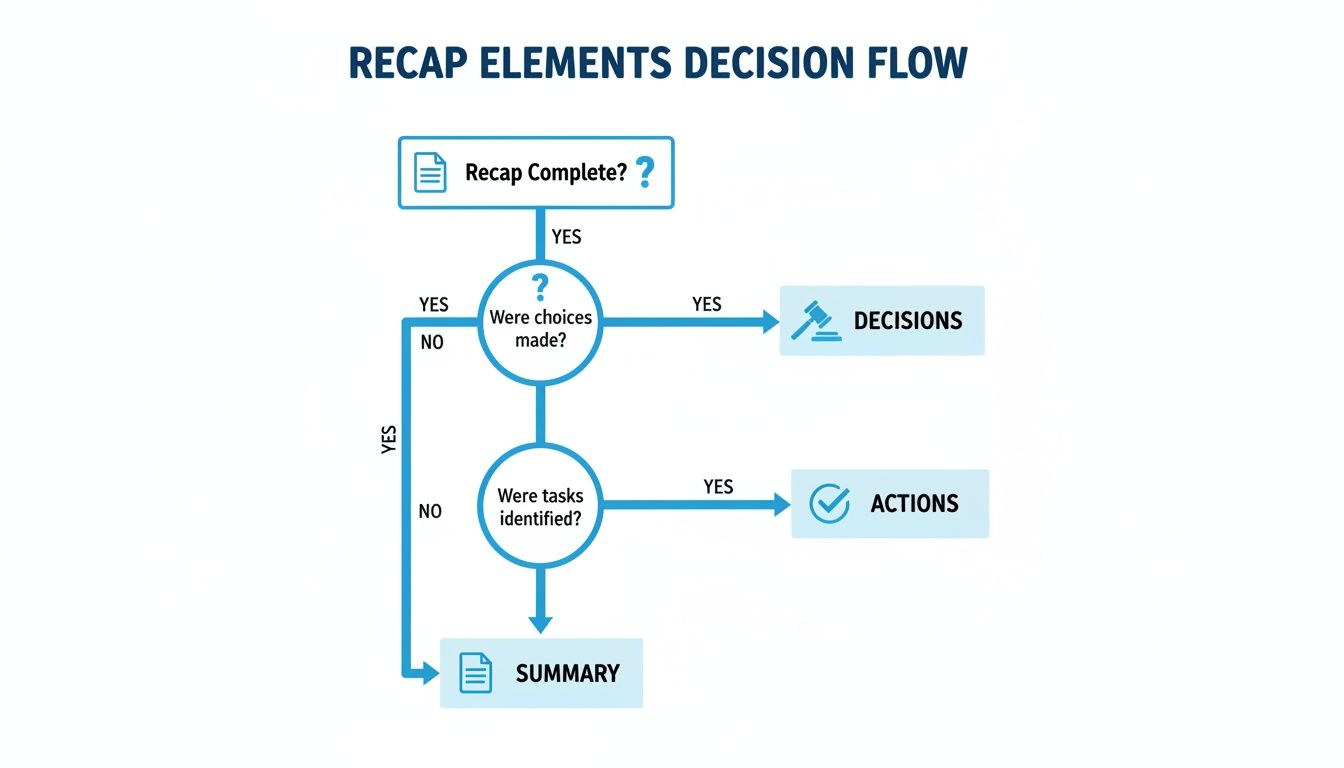
No matter what format you choose, you'll see it always boils down to three things: a clear summary, documented decisions, and actionable next steps.
When you're deciding on a format, consider the meeting's formality and the audience's communication preferences. A quick chat with your direct team has very different needs than a formal project update for leadership.
Here's a quick comparison to help you choose the right approach.
Choosing the Right Recap Format
Ultimately, the best format is the one that gets the information to the right people in a way they will actually use.
The Lean Slack or Teams Recap for Quick Syncs
For your internal team and those routine check-ins, speed is the name of the game. A quick, punchy message in a shared channel like Slack or Microsoft Teams is perfect for this. It works great for daily stand-ups, quick huddles, or agile sprint planning sessions where you just need to capture the essentials.
This approach keeps the information visible and easily searchable right where the team is already working. The structure should be super minimal—focus only on what was decided and what needs to happen next. I like to use emojis for visual cues (like a 🚀 for a launch or a ⚠️ for a blocker) and always tag individuals directly so they see their assigned tasks. It feels less like a formal report and more like part of the natural workflow.
Example Slack Recap
Project Phoenix Stand-Up: Oct 27 🚀
- Decisions: We’re moving forward with the A/B test on the new landing page copy. The test will run for 7 days.
@Christo deploy the test variant by EOD today.@Jennato set up the analytics dashboard to track results. Due: Tomorrow AM.Blocker: The design team is still waiting on final images from marketing. @Mariacan you follow up?
The Formal Email Recap for Stakeholder Updates
When you need to communicate with senior leadership, clients, or stakeholders from other departments, a more structured email recap is the way to go. It’s the professional standard and provides a permanent, official record that can be easily forwarded and filed away.
The key here is to be polished and comprehensive enough for someone who wasn't in the room to understand the context and outcomes. Start with a clear, descriptive subject line—nobody has time to guess what an email is about. Inside, use headings and bullet points to make the information scannable. Even though this format is more detailed, the goal is still clarity and brevity.
For meetings that require an even more detailed, official record, you might want to look into a meeting minutes format with action items for additional structure.
Example Email Recap
Subject: Recap & Action Items: Q4 Marketing Strategy Review (Oct 26)
Hi Team,
This email summarizes the key decisions and next steps from our Q4 strategy meeting.
Executive Summary
We aligned on the primary campaign theme, "Innovate & Elevate," and received final approval on the $50,000 media budget. The next two weeks will focus on developing creative assets and finalizing the media plan.Key Decisions Made
- The "Innovate & Elevate" campaign theme was unanimously approved.
- The media budget was confirmed at $50,000, with a 60/40 split between digital and print.
- The official campaign launch date is set for November 15th.
Action Items
- [Marketing Team] Develop initial creative concepts for the campaign. (Due: Nov 2)
- [Alex Chen] Finalize the media buy plan and submit it for review. (Due: Nov 4)
- [Samantha Lee] Coordinate with the web team to prepare the launch landing page. (Due: Nov 10)
Please review and confirm that this captures everything accurately.
Best,
[Your Name]
How to Send Your Recap for Maximum Impact
You've written the perfect recap. It's clear, concise, and hits all the key points. But that's only half the job. A brilliant summary that sits unread in an inbox is just as useless as no recap at all.
Now it's time to shift from writer to strategist. How you deliver the information is what ensures it gets seen, understood, and—most importantly—acted upon.
Match Your Tone to the Room
Think about the vibe of the meeting you just left. Was it a formal, buttoned-up review with leadership? Or was it a freewheeling brainstorm with your direct team? Your recap should reflect that.
Mirroring the meeting's tone makes the recap feel like a natural extension of the conversation, not just another piece of administrative busywork. It shows you were paying attention to the social cues, not just the content.
- For a formal meeting: "This document summarizes the key decisions and action items from our Q4 budget review."
- For a casual huddle: "Great session today, everyone! Here’s a quick rundown of what we decided and who’s grabbing what."
It’s a subtle shift, but it makes a world of difference.
Timing and Channel Selection Are Everything
When should you send it? As soon as you possibly can. The ideal window is within a few hours of the meeting's end.
This isn't about being first; it's about capitalizing on momentum. The conversation is still fresh in everyone’s mind, and the energy from the discussion hasn't faded. Waiting even a day lets context slip away and new priorities crowd in.
The channel you use is just as critical as the timing.
A common mistake is defaulting to email when your team actually lives in Slack. A daily stand-up recap sent via email will almost certainly be ignored, while a quick summary in the team's channel will get immediate attention.
For high-stakes client meetings, email is still the gold standard—it's professional and easy to archive. For an internal team sync, a shared doc or a message in your primary chat tool is way more effective. The rule is simple: go where your audience already is.
The Art of the Follow-Up
Your recap isn't a "fire and forget" missile. It's the starting pistol for action. The real work begins when you start tracking those action items.
Following up requires a bit of finesse. You need to hold people accountable without coming across as a micromanager. A gentle, public nudge is often the best approach.
A day before a deadline, try a simple message in the project's Slack channel: "Hey @[Name], just checking in on the draft copy. Let me know if you need anything!" This serves as a friendly reminder, keeps the task visible to the team, and offers support all at once.
Thinking about the recap as part of your team's wider communication system is key. It helps to brush up on business communication best practices to ensure your follow-ups feel supportive, not demanding. Ultimately, you want the recap to become a welcome tool that helps everyone get things done.
Using AI to Automate Your Meeting Recaps
Let's be honest: trying to lead a meeting while also taking detailed notes is a fast track to doing both poorly. You're either half-listening or half-writing, and crucial details inevitably slip through the cracks. This is exactly where AI tools have become a lifesaver, completely changing how we handle the meeting recap format.
This isn’t just about saving a bit of time. It's about creating an objective, comprehensive record of what was actually said and decided. When you offload the grunt work to technology, you can stay fully engaged with the human beings in the meeting.
How AI Transcription and Summarization Work
Think of modern AI platforms as a silent attendee in your meetings. They join the call, record everything, and transcribe the entire conversation as it happens. But the real magic kicks in once the meeting is over.
Within just a few minutes, the AI takes that raw transcript and turns it into a structured, easy-to-read summary. It’s been trained to pick out the most important stuff, like:
- Key Decisions: It identifies specific agreements and approvals made during the call.
- Action Items: The AI automatically flags tasks, links them to the right person, and can even suggest due dates.
- Core Topics: It can break a long, rambling conversation into clean, themed chapters, so you can jump right to what you need.
So, instead of you spending the next 30 minutes trying to make sense of your messy notes, the AI hands you a polished recap. All you have to do is give it a quick review and hit send.
Automating the note-taking and summary process ensures nothing critical gets lost. AI captures the specific phrasing and nuance a human might miss, creating a much more reliable source of truth for the entire team.
If you want to get a better handle on the tech, you can learn more about how to summarize a meeting effectively with these tools and see how to fit them into your workflow.
A Real-World Scenario
Picture a product manager running an hour-long feedback session with a key customer. The conversation is gold—packed with subtle insights, feature ideas, and a few complaints. Trying to jot all of that down while asking insightful follow-up questions would be a nightmare.
With an AI tool running in the background, the whole session gets transcribed perfectly. Moments after the call ends, the product manager has a summary that highlights the top three user pain points, a bulleted list of all feature requests, and clear action items for the dev team. It turns a messy, qualitative conversation into actionable data in a fraction of the time.
The foundation of a great AI recap is a solid transcript. For example, many podcast transcription services have mastered turning spoken words into clean text, which is the essential first step before any AI can work its magic on summarizing.
Answering Your Top Questions About Meeting Recaps
Even with the best templates in hand, you'll probably run into a few questions once you start sending out recaps regularly. That's perfectly normal. Working through these common sticking points is the last step to really locking in your process and making recaps a natural part of how your team works.
Let's clear up some of the most common questions I hear.
How Long Should a Meeting Recap Be?
This is easily the most frequent question, and for good reason—nobody wants to send an essay that immediately gets archived.
The sweet spot is almost always brevity. For a typical 30- to 60-minute meeting, your recap should be something a busy teammate can scan and understand in under two minutes. That usually lands you in the 150-300 word range.
Think of it this way: a daily stand-up recap might just be a few bullet points in Slack, while a big quarterly planning session will naturally need a bit more detail. The key is to highlight the outcomes, not to give a play-by-play of the entire conversation.
Here's a quick gut check I use: "Can someone who missed the meeting grasp the key decisions and their own to-dos in 90 seconds?" If the answer is yes, you've nailed the length.
Who Is Responsible for Sending the Recap?
In most cases, the person who organized the meeting is the one who sends the recap. It just makes sense.
But I've seen a lot of teams have success by rotating this responsibility among everyone who attends. It’s a great practice for a few reasons:
- It builds good habits: Everyone gets practice listening for key outcomes and learning how to phrase clear action items.
- It shares the load: The task doesn't become a permanent chore for one person (usually a manager or project lead).
- It keeps people focused: When you know it might be your turn to write the recap, you tend to listen a little more closely.
For really important meetings, like a project kickoff or a major client call, it's smart to assign a dedicated note-taker ahead of time. The number one rule is simply to make sure someone is clearly responsible so it doesn't fall through the cracks.
What if Someone Disagrees with the Recap?
First off, don't panic. This is actually a good sign! It means people are reading your recaps and are invested enough to want to get it right.
The best way to handle this is to encourage people to reply directly to the recap (whether it's an email thread or a Slack message) with their correction. This keeps the conversation transparent and helps create a more accurate record for everyone.
If it's a minor fix, like a wrong date, just send a quick follow-up. If the disagreement points to a bigger misunderstanding, that’s your cue to schedule a quick 10-minute chat to get everyone aligned. After all, the recap is supposed to be the source of truth, so making sure it's accurate is what matters most.
Ready to stop wasting time on manual note-taking and start creating perfect recaps instantly? Whisper AI transcribes and summarizes your meetings with incredible accuracy, so you can focus on the conversation, not the keyboard. Try it for free and see how much time you save. Visit us at https://whisperbot.ai.


























































































