
The Ultimate Google Meet Note Taker for Peak Productivity
Trying to join a discussion on Google Meet while frantically typing notes is a balancing act that, in my experience, almost never works. You end up doing a poor job of both. A dedicated Google Meet note taker fixes this by capturing everything for you, letting you actually participate in the meeting instead of just documenting it.
This guide comes from my own journey of trying to solve this problem. I’ll walk you through how to use a powerful tool like Whisper AI to get perfect notes from your meetings—complete with accurate transcripts, speaker labels, and even summaries.
Why Manual Google Meet Notes Are Holding You Back
Have you ever left a meeting and realized your notes are a mess of half-finished sentences and typos? You’re not alone. When you try to keep up manually, you're almost guaranteed to get incomplete notes that don't capture the exact phrasing of key decisions. This just creates more work later as you try to piece together what was actually said.
The fundamental issue is divided attention. I found it’s incredibly difficult to listen, think, and type all at the same time.
From my experience, trying to juggle all of that at once usually results in:
- Missed Details: You get the gist, but you miss the critical stat or the subtle context that changes everything.
- Inaccurate Quotes: You end up paraphrasing to keep up, which can accidentally alter the original meaning.
- Less Participation: With your head down typing, you’re not asking questions, challenging ideas, or contributing your own expertise. You're just a scribe.
What are the limits of Google Meet's built-in tools?
Sure, Google Meet has its own transcription feature, but let's be honest—it's pretty basic. It's convenient that it saves transcripts right to Google Drive, but the accuracy just isn't there for serious professional use.
Google's own Automatic Speech Recognition (ASR) usually lands somewhere between 79% and 86% accuracy. For anyone who needs reliable records—journalists, product teams, legal professionals—that accuracy gap is a huge problem. You can read more about Google Meet's transcription accuracy on verbit.ai.
This is exactly where a specialized AI tool comes in. Something like Whisper AI is built from the ground up for high accuracy and can handle the messy, overlapping reality of human conversation.
After being trained on over 60,000 hours of media in more than 92 languages, it excels at identifying different speakers, adding precise timestamps, and generating instant summaries. It transforms a messy meeting recording into a searchable, organized asset for your entire team.
How does an AI Note Taker compare to taking notes by hand?
It's helpful to see a direct comparison to understand just how much changes when you switch from manual to automated note-taking. This table breaks down what I've found.
The difference is clear. While manual notes have their place for quick personal reminders, an AI note taker provides a complete, objective, and immediately useful record of the entire conversation.
How to Set Up an Automated Note Taking Workflow
The whole point of a Google Meet note taker is to build a hands-off system that actually lets you focus on the conversation. Instead of frantically typing, you can set up a workflow that captures every word, every nuance, without you lifting a finger.
So, how do you actually do it? In my testing, you've got two main paths you can take.
The first, and most straightforward, is to process the meeting after it’s over. Just hit record in Google Meet. When the call is done, you’ll have a video file (usually an MP4) that’s ready to be transcribed. This is the go-to method for reliability and getting the highest quality results.
The second path is a bit more advanced: capturing the audio live for real-time processing. This is fantastic when you need insights on the fly, but it does take a little more technical fiddling to get your computer's audio routed correctly into the transcription tool.
Why does clean audio matter for good notes?
No matter which route you choose, remember this: the quality of your notes is directly tied to the quality of your audio. Garbage in, garbage out. If the audio is fuzzy, full of echo, or has people talking over each other, your transcript and summary will be a mess.
Here are a few simple ground rules I always try to follow to get the best source material:
- Headsets are non-negotiable. Ask everyone to use a headset with a real microphone. It makes a world of difference in cutting out echo and background chatter compared to built-in laptop mics.
- Good mic etiquette is key. A simple "mute yourself when you're not talking" policy cleans up the audio feed more than you can imagine. It prevents those little coughs and keyboard clicks from muddying the recording.
- Find a quiet spot. This one’s obvious but often ignored. Taking a call from a quiet room will always beat a loud coffee shop or a noisy open office.
This diagram really drives home the difference between a messy manual process and a clean, automated one.
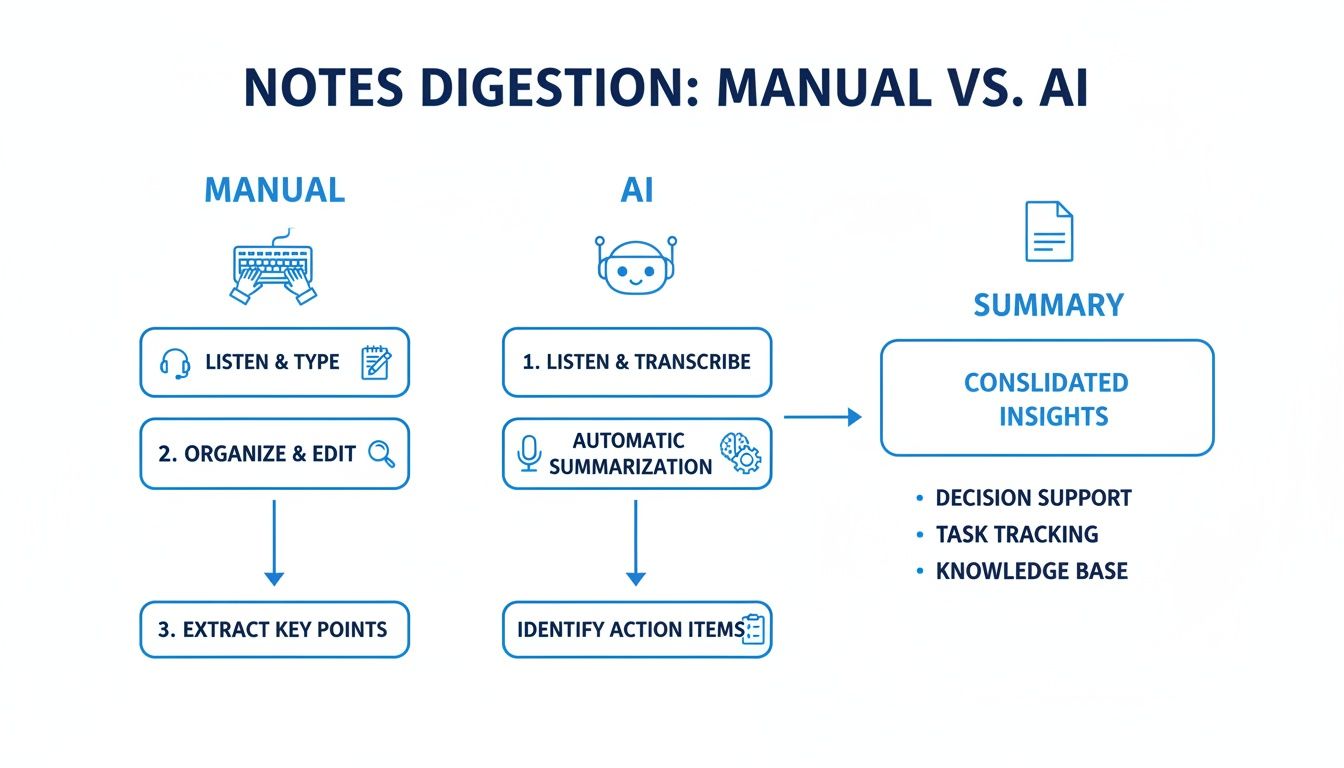
You can see how an AI-powered system just streamlines everything, turning a jumble of tasks into one smooth process that ends with a perfect summary.
How to use Whisper AI to take notes for you
Okay, you’ve got your high-quality recording. Now for the easy part.
You can upload that audio or video file directly to a platform like Whisper AI. Or, even easier, if your recording is already in the cloud (like on Google Drive), you can often just paste in the shareable link.
From there, the system takes over. It transcribes the entire conversation, figures out who said what, and then boils it all down into a tight summary with clear action items. In just a few minutes, your hour-long meeting becomes a structured, searchable document.
This kind of automation isn't just for general meetings, either. It’s popping up in highly specialized fields. For instance, tools like AI legal software are completely changing how professionals in that space handle information.
The core idea is always the same, whether it's a team check-in or a legal deposition: let the tech do the grunt work so you can focus on what matters. This is how you build a system that delivers perfect notes, every single time.
Turning Raw Transcripts Into Actionable Insights
Let's be honest, a raw transcript is a great starting point, but it's not the finish line. A wall of text is just data; the real magic happens when you turn that data into something you can actually use. This is where a modern Google Meet note taker evolves from a simple dictation tool into a powerful analytical partner.
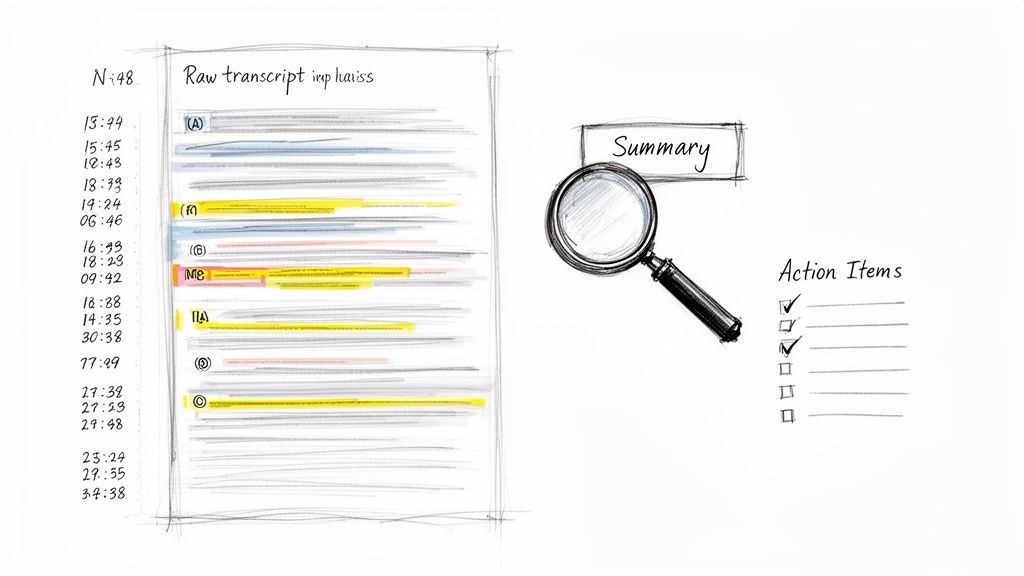
The first step in that transformation is taming the chaos. An hour-long meeting transcript can feel like an endless scroll. That’s why features like automatic timestamps and speaker labels are non-negotiable. They add structure, letting you jump straight to a key moment or see exactly who said what, when.
No more hunting for that one critical decision buried in the conversation. You can just scan the timeline or filter by a specific person. This simple organization saves a ton of time and turns a static document into an interactive record of your meeting.
How does an AI create a meeting summary?
With your transcript properly structured, the next layer of value is the summary. No one on your team has the bandwidth to read a 10,000-word transcript for every single meeting. An AI-powered summary boils the entire conversation down to its most critical points, giving you the gist in seconds.
And this isn't just about making the text shorter. A truly smart summary tool can:
- Pinpoint Core Themes: It identifies the main topics of discussion, even if they popped up at different times during the call.
- Extract Key Decisions: It isolates the moments where the team reached a consensus or agreed on a specific plan.
- Highlight Critical Metrics: If anyone mentioned important numbers or data points, a good summary will pull those out for you.
The demand for this kind of efficiency is exploding. The market for AI meeting transcription is set to rocket from $3.86 billion in 2025 to a massive $29.45 billion by 2034. Why? Because almost 60% of remote workers struggle to remember key information from meetings without good notes. AI tools are closing that gap, with 90% of users reporting they save a significant amount of time.
Can you ask the transcript follow-up questions?
Yes, and this is perhaps the most powerful feature of a modern Google Meet note taker. It's the ability to chat with your transcript. Think of it as having a conversation with your meeting after it’s over. Instead of manually digging through the text, you just ask the AI questions in plain English.
This interactive Q&A transforms your meeting archive from a dusty, passive library into an active, on-demand assistant. It’s the difference between searching for a needle in a haystack and having a magnet pull the needle right out for you.
For example, you could ask things like:
- "What were the final budget numbers we agreed on for the Q4 campaign?"
- "List all action items assigned to the marketing team."
- "What were the main concerns raised about the new product feature?"
This is a complete game-changer. You can pull out precise information without re-reading a single line of the transcript. When you can get targeted answers instantly, you unlock a level of productivity that manual note-taking could never touch. For more on this, you might find our guide on how to summarize a meeting useful. It's all about turning every meeting into a valuable, searchable asset.
Advanced Strategies For Power Users
Once you're past the basics of just recording meetings, a smart Google Meet note taker can become the engine driving your team's productivity. It's not just about capturing what was said; it's about turning that conversation into your next big move. Different people on your team can use these automated notes in some seriously high-impact ways.
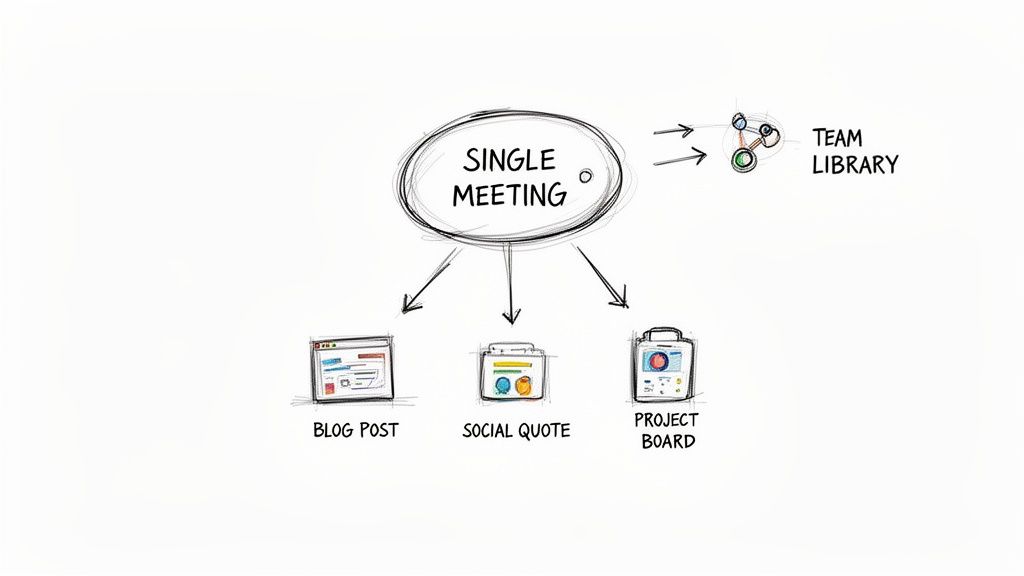
This is the point where you stop thinking about notes as simple records and start seeing them as raw material for creation and management, plugging them right into your core workflows.
How to repurpose meeting content with ease
If you're a content marketer, a recorded Google Meet is a goldmine. A one-hour interview with an expert or a great team brainstorm can fuel your content calendar for weeks. Forget trying to jot down killer quotes in the moment—just let the AI transcript do the heavy lifting.
This completely changes the content creation game:
- Generate Blog Posts: Tell the AI to summarize the core arguments from the call. Boom—you have a perfect outline for a new article.
- Create Social Media Quotes: Quickly scan the transcript for those memorable one-liners or expert takeaways. They’re ready-made for quote graphics on LinkedIn or X.
- Identify Video Clips: The timestamps are your map to the best parts of the conversation. Find those moments, clip them, and you've got engaging short-form videos for YouTube Shorts or Instagram Reels.
Suddenly, one meeting isn't just one meeting. It’s the starting point for an entire content campaign, and you never have to re-watch the whole thing.
How to streamline project management workflows
For project managers, the biggest headache is turning talk into action. A "we should do that" comment in a meeting is useless until it becomes a real task, assigned to a real person, with a real deadline. An AI note taker handles that handoff for you.
You can build a direct pipeline from your meeting's conclusions into your project management software.
Instead of manually copying action items over, the AI's summary can be used to instantly create tasks in tools like Asana, Trello, or Jira. This closes the gap between conversation and execution, making sure nothing gets dropped.
This integration means action items are captured as they happen, assigned correctly, and tracked in the systems your team is already living in. It’s a simple bit of automation that radically improves accountability and keeps the momentum going.
How to build a searchable team knowledge base
Now, let's think bigger than just a single meeting. Over time, that growing archive of transcripts becomes an incredibly valuable, searchable knowledge base for your entire company. Imagine a new hire getting up to speed on a project's history just by searching through past meeting notes.
By creating a central library for transcripts—maybe organized by project, team, or date—you build a single source of truth. Anyone can find the "why" behind a decision without having to track someone down. It's how you build real institutional memory and make the whole team more self-sufficient.
Navigating Privacy, Security, And Compliance
Trust is everything when you're using a tool to handle your team's conversations. When you plug a Google Meet note taker into your workflow, you're giving it access to sensitive information—everything from future product roadmaps to confidential client details. Because of this, digging into its privacy and security practices isn't just a box to check; it's absolutely critical.
The first thing I always look for is a crystal-clear policy on how they handle my data. A service you can actually trust, like Whisper AI, usually operates on a "no-storage" principle. This is a big deal. It means your audio or video file is only used for the immediate task of transcription and summarization, and then it's gone for good. The service doesn't keep a copy, and its employees can't snoop on your conversations.
What should you look for in a privacy policy?
You have to move past the shiny marketing claims and find solid, concrete commitments. A strong privacy stance isn't just about words; it's about verifiable practices that give you peace of mind.
Here’s my personal checklist:
- Data Encryption: Is the service using strong encryption, like AES-256, for your data both in transit and during processing? This is non-negotiable.
- Compliance Certifications: Look for recognized standards like SOC 2. This certification means an independent auditor has thoroughly vetted the company's systems for security, availability, and confidentiality.
- Clear Data Deletion Policies: The privacy policy should explicitly state that your files are permanently deleted right after processing. No ambiguity.
This whole focus on security is only getting more important. The more we rely on remote work tools, the bigger the risks become. It's predicted that by 2026, real-time speech translation in Google Meet will be commonplace. Yet, privacy remains a top concern for 73% of businesses, who are actively seeking secure alternatives. A tool like Whisper AI, with its no-storage policy and support for over 92 languages, is built to address these exact fears, turning meeting chaos into secure, actionable intelligence.
How to be transparent with your team
Finally, and this is a big one, you have to be transparent with everyone in the meeting. Always let people know that the conversation is being recorded and transcribed by an AI tool.
Getting verbal consent right at the start of the call is a simple but incredibly effective habit. A quick, "Hey everyone, just a heads-up, we're using an AI note taker to capture this conversation. Is everyone okay with that?" goes a long way in building trust and respecting everyone's privacy.
This isn't just about being polite; depending on where you are, it can be a legal requirement. By picking a secure tool and being upfront about how you're using it, you get all the fantastic benefits of automated notes without putting your team's trust or your company's compliance at risk.
You can learn more about the specifics of the technology in our deep dive into Whisper AI.
Answering Your Top Questions About Google Meet Note Takers
Whenever you bring a new tool into your workflow, you're bound to have questions. I certainly did when I first started using a Google Meet note taker. Getting those questions answered is the fastest way to feel confident and get the most out of it.
So, let's walk through some of the most common things people ask when they're just getting started. These answers come from hands-on experience and are designed to get you up and running without any guesswork.
Can I use a Google Meet note taker if I'm not the host?
Yes, absolutely. This is one of the best parts about using a tool like Whisper AI for post-meeting processing. As long as you can get your hands on the meeting recording, you can transcribe it.
It doesn't matter if it's an MP4 file you downloaded or a shareable link from Google Drive. You don't need any special host permissions. While some tools offer live transcription that might need to be installed by the host, just using the recording after the meeting is usually the simplest and most accurate route. The AI gets to analyze the entire conversation in one go, which often leads to a cleaner result.
How accurate is the speaker labeling?
Honestly, it's a massive step up from basic transcription. Good AI note takers use voice recognition to tell speakers apart based on their vocal signatures. The accuracy is surprisingly high, especially if your meeting has decent audio quality without a lot of background noise.
The tool will initially assign generic labels like "Speaker 1" and "Speaker 2." The real magic is in the platforms that let you easily click and rename those labels to actual names, like "Sarah" and "David." This is a huge advantage over native tools that just give you a wall of text, leaving you to guess who said what.
Labeled speakers are essential for context. It’s the difference between knowing what was said and knowing who committed to a specific action item. No more guesswork.
What's the best way to export and share the notes?
The "best" way really comes down to your team's workflow and what you need the notes for. A solid Google Meet note taker should give you a few different export options.
Here’s a quick rundown of how I choose:
- Team Collaboration: If we need to add comments or edits, I export to Google Docs. It’s perfect for working on the notes together.
- Official Records: For a final, unchangeable version to send to a client or for archiving, a PDF is the way to go. It looks professional and is read-only.
- System Integration: If I’m plugging the notes into a project management tool like Asana or a knowledge base like Notion, TXT or Markdown files are my go-to. They're simple, lightweight, and play nicely with other apps.
Look for a tool that offers this kind of flexibility. It makes sure your meeting insights actually get used instead of just sitting in a folder somewhere.
Does this work for languages other than English?
It does, and this is where a powerful engine like Whisper AI really shines. It supports over 92 languages, which is a lifesaver for global teams or companies working with international partners.
The system is smart enough to auto-detect the main language spoken in your Google Meet recording and produce a transcript in that language. This feature is huge for inclusivity, ensuring everyone on the team has access to a clear record of the discussion, no matter their native tongue.
Ready to transform your meetings from tedious chores into valuable, actionable assets? Whisper AI gives you the power to capture every detail, generate instant summaries, and turn conversations into results. Stop just taking notes and start making moves. Try Whisper AI for free today!


























































































