
Choosing the Best AI Meeting Note Taker for Your Team
Ever felt like you need two brains in a meeting? One to listen and contribute, and another to furiously type notes, trying to catch every important detail? It’s a common struggle. You’re either fully engaged in the conversation or you’re a great note-taker, but it's nearly impossible to be both at the same time.
An AI meeting note taker is designed to solve this exact problem. Think of it as your own personal assistant for every call. It listens in, transcribes the entire conversation, figures out who said what, and then pulls out the key decisions and action items for you. This way, you can actually focus on the people and the discussion, not on your keyboard.
The End of Manual Note Taking is Here
We've all been there: staring at a blank page or a blinking cursor during a high-stakes meeting. The pressure is on to listen intently, offer smart insights, and somehow create a perfect record of everything discussed. It’s a classic case of divided attention, and something usually has to give.
This is where AI meeting note takers come in. They aren't just fancy recorders; they’re smart tools designed to completely take over the documentation work. Imagine an intelligent participant whose only job is to create a flawless, organized record of your meeting so you don't have to.
What Does an AI Note Taker Really Do?
At its heart, this software automates the whole process. Instead of you scrambling to keep up, the AI does the heavy lifting in the background. When the meeting is over, you get a clean, searchable, and actionable summary. This frees you up to think, debate, and connect with your team or clients on a much deeper level.
So, what’s happening under the hood? It usually boils down to a few key functions:
- Automatic Transcription: The tool converts everything said into written text, either as the meeting happens or from a recording you upload later.
- Speaker Identification: It’s smart enough to tell different voices apart, so the transcript clearly shows who said what. No more guessing games.
- Intelligent Summarization: This is where the magic really happens. The AI analyzes the entire conversation and boils it down to the most important points, creating concise summaries and highlights.
- Action Item Detection: It can spot when someone agrees to do something, flagging tasks and deadlines so they don't get lost in the shuffle.
The growth in this space is staggering. The market for these AI tools is blowing up, jumping from USD 450.7 million in 2023 to a projected USD 2,545.1 million by 2033. This isn't just a niche trend; it's a worldwide move toward smarter ways of working. You can dig into the numbers yourself by checking out the full research about the AI note-taking market.
Ultimately, an AI meeting note taker turns the chaos of a live conversation into a structured, valuable resource. It ensures that great ideas and critical commitments are captured and ready to be acted on, making every meeting more productive.
Manual Note Taking vs AI-Powered Notes
To really see the difference, it helps to put the old way and the new way side-by-side. The contrast shows just how much has changed.
This table makes it clear: switching to an AI note taker isn’t just a small upgrade. It fundamentally changes how you experience and benefit from meetings, moving you from a passive scribe to an active participant.
How AI Turns Conversations into Actionable Intelligence
Ever wonder what’s happening under the hood of an AI meeting note taker? It’s not just a fancy tape recorder. Think of it as a highly skilled analyst, listening in and transforming a free-flowing conversation into organized, practical insights. The magic happens through a few key steps, starting with the most fundamental one: understanding what’s being said.
The whole process kicks off with automatic transcription. This is where the AI essentially "hears" the conversation and types it out with incredible speed and precision. Using sophisticated speech-to-text models, the software captures every spoken word and converts it into a written transcript. If you're curious about the tech that makes this possible, you can dive deeper into how audio to text AI works.
This first step creates a perfect, word-for-word log of your meeting. The best tools today can achieve near-human accuracy, easily handling fast talkers, various accents, and even niche industry jargon. What you get is a searchable digital document where no detail is ever lost.
This flowchart gives you a bird's-eye view of how the automation works, taking a live conversation and turning it into a structured, useful summary.
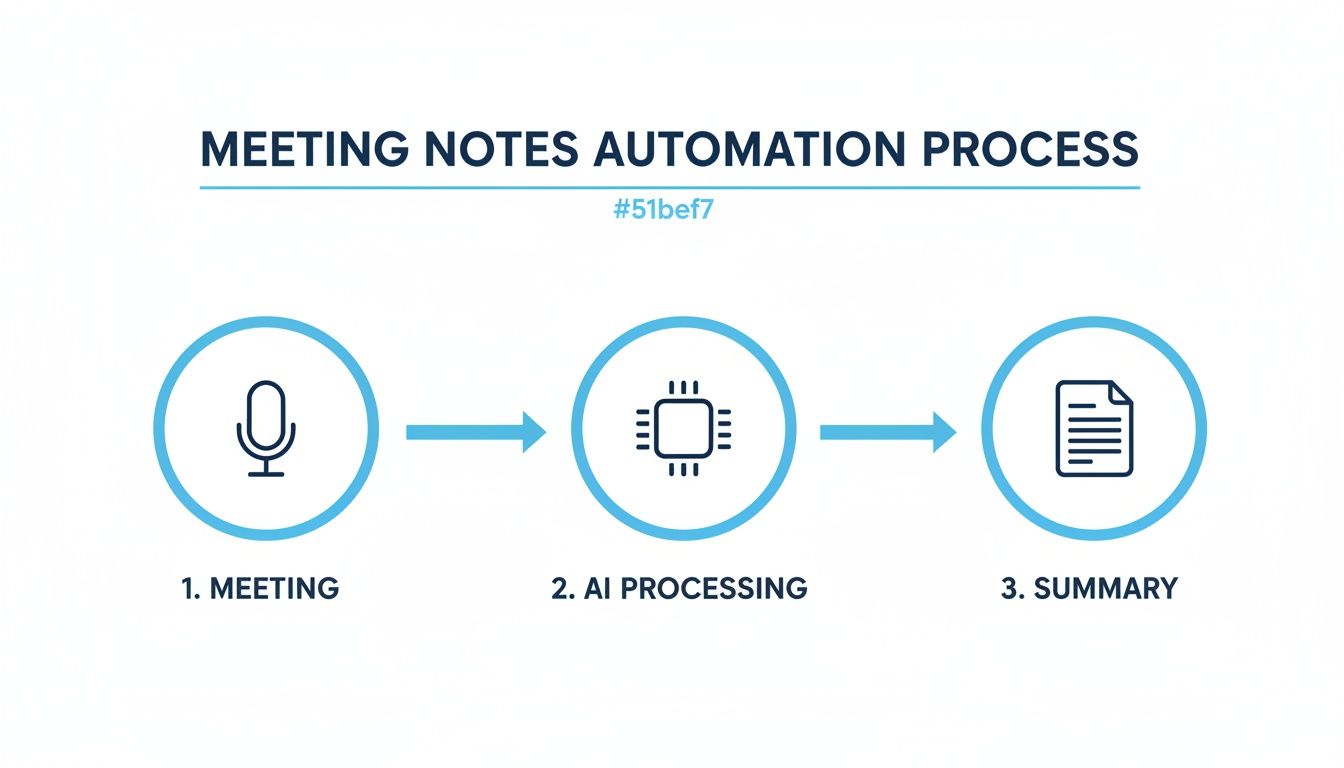
As you can see, the real power isn't just in recording the audio; it's in the intelligent processing that follows.
Identifying Who Said What
A raw transcript is great, but knowing who said what makes it infinitely more useful. This is where speaker diarization comes into play. It’s a technical term for the AI’s ability to tell different voices apart. By analyzing unique vocal characteristics like pitch and tone, it accurately assigns each part of the conversation to the right person.
This feature is a game-changer for accountability. With speakers clearly labeled, you can instantly see who committed to a specific task, who made a critical decision, or who raised a valid concern. No more "I thought you were going to do that" moments after a meeting.
Speaker diarization transforms a flat wall of text into a dynamic dialogue. It's the difference between having a script and knowing which character is speaking each line, providing the context needed to understand the flow and dynamics of the discussion.
Without it, a transcript is just a jumble of statements. With it, the conversation becomes a clear record of who contributed what and who is responsible for the next steps.
From Raw Text to Meaningful Insights
This final step is where the AI truly shines, moving from simply writing down words to actually understanding them. Using natural language processing (NLP), the AI meeting note taker sifts through the entire transcript to pinpoint the most important information. It’s like having an analyst who can read thousands of words in a few seconds and pull out the core message.
This analysis gives you two incredibly valuable outputs:
- AI-Generated Summaries: The tool distills the whole conversation into a short, sharp summary. It extracts the main topics, key decisions, and crucial takeaways, serving them up in a format you can scan in a minute. Say goodbye to wading through a 30-page transcript.
- Action Item Detection: The AI is trained to spot phrases that signal a task or commitment. It automatically flags things like "I’ll handle that by Friday" or "John will follow up with the client," then compiles them into a clean, actionable to-do list.
This intelligent processing is what saves a massive amount of time and keeps projects moving forward. It ensures the valuable outcomes of a meeting aren’t lost in the noise but are brought front and center, ready for action.
Better yet, leading platforms like Whisper AI can handle these complex tasks in dozens of different languages. This makes them essential tools for global teams, ensuring everyone gets clear, actionable notes, no matter where they are or what language they speak.
A Productivity Power-Up for Every Role
The real magic of an AI meeting note taker isn't just that it saves you from typing. Its true value comes from how it adapts to the specific needs of different jobs. It’s less of a single tool and more of a specialized assistant that understands what you need to get done.
For a project manager, it’s an accountability engine. For a sales rep, it’s a living client database. For a content creator, it’s an idea factory. It transforms spoken words into tangible assets that help you do your job better.
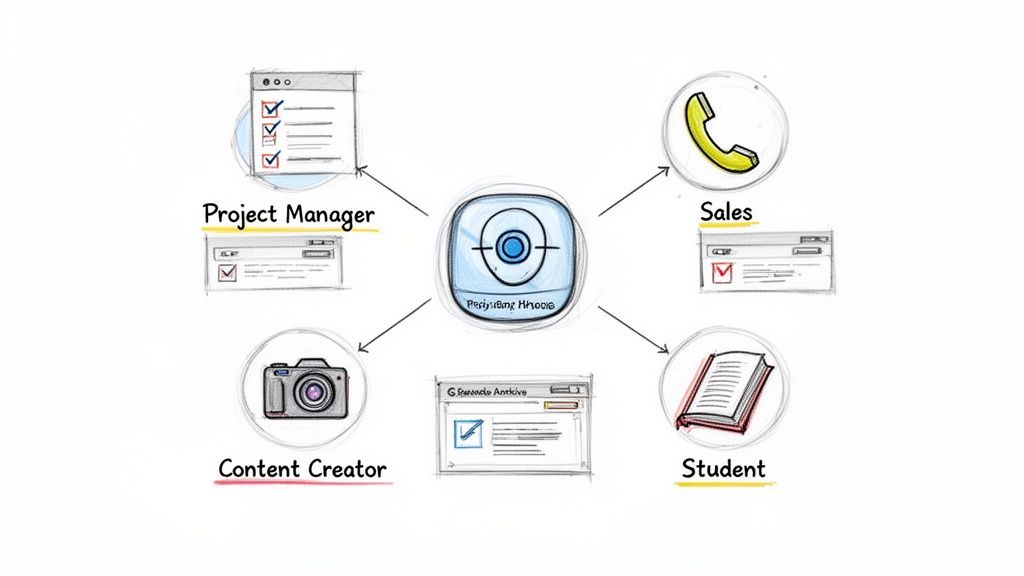
Let’s dig into how this actually works day-to-day for different professionals.
For Project Managers and Team Leads
If you’re managing a project, you know that accountability is everything. An AI meeting note taker creates an ironclad record of who said what, capturing every decision and commitment made on a call. No more arguments over fuzzy memories or what someone thought they agreed to.
Its ability to automatically flag and assign action items is a huge win. When a team member says, "I'll get the report done by Wednesday," the AI snags it, creating a clear, time-stamped task. Suddenly, your meeting transcript isn't just a passive record; it’s an active project management tool.
- Perfect Recall: Need to confirm a deadline? You can find it in seconds without searching through old emails.
- Automated Accountability: Action items are pulled out and listed, so nothing gets missed.
- Improved Focus: As a leader, you can stop worrying about the administrative details and concentrate on guiding the conversation and moving the project forward.
This kind of clarity cuts down on friction, keeps everyone aligned, and helps maintain momentum.
For Sales Teams and Client-Facing Roles
In sales, the little details from a client call can make or break a deal. An AI meeting note taker helps sales pros build an intelligent, searchable history of every client conversation, catching nuances that manual notes often miss.
Think about it: you can instantly search for a specific promise a client made three months ago or review the exact pain points they brought up in your first discovery call. That’s how you craft follow-ups that are personal and incredibly effective.
By capturing the authentic voice of the customer, sales teams can move beyond generic pitches. They can reference specific language, concerns, and goals mentioned by the client, building stronger relationships based on genuine understanding.
It's no surprise that adoption of these tools is taking off. Platforms like Otter.ai have blown past 14 million registered users, and in the business world, this trend is only picking up steam. Projections show a 50% rise in worker access to AI by 2025 as more companies get serious about AI. You can read more about the growing adoption of AI meeting assistants.
For Content Creators and Marketers
For anyone creating content—podcasters, YouTubers, marketers—a single conversation is a goldmine. An AI meeting note taker becomes a powerful repurposing engine, squeezing every last drop of value out of an interview, webinar, or brainstorm.
A one-hour podcast recording, for instance, can be instantly transcribed and spun into all kinds of new assets:
- Blog Posts and Articles: The full transcript is the perfect foundation for a detailed article.
- Social Media Clips: The AI summary can pinpoint the juiciest quotes and soundbites, making it easy to create short videos or quote graphics.
- Newsletters and Email Campaigns: Key takeaways are already pulled out for you, ready to be dropped into compelling content for your audience.
This workflow slashes production time and helps you get way more mileage out of every piece of content you create.
For Researchers and Educators
The benefits reach deep into academia and research, too. For journalists and researchers, the tool provides a verbatim transcript of every interview, ensuring 100% accuracy when quoting sources. The tedious, hours-long task of manual transcription is simply gone.
In the classroom, students can use an AI note taker to capture lectures, allowing them to focus on understanding complex ideas instead of frantically typing. Educators can then provide these accurate transcripts as study aids, making learning more accessible for everyone. It turns every lecture into a permanent, searchable knowledge base.
How to Choose the Right AI Meeting Assistant
With so many AI meeting assistants out there, picking the right one can feel a bit overwhelming. But don't worry—you don't need to get lost in a sea of features. A few practical criteria will help you zero in on a tool that actually makes your life easier.
The trick is to look past the marketing hype and focus on what really matters for your day-to-day work. It all starts with the foundation: how well the tool actually listens and understands what's being said. If the transcript is a mess, everything else the AI does will be built on shaky ground.
Evaluating Core Transcription Features
First and foremost, let's talk about accuracy. You need a tool that can consistently deliver a transcript that's at least 95% accurate in a normal meeting environment. This means it should handle different accents, people who talk a mile a minute, and even your industry's specific jargon without tripping up.
Next up is speaker identification, sometimes called speaker diarization. This is a non-negotiable feature. Without it, you just get a wall of text. A great tool will clearly label who said what, which is essential for understanding the flow of conversation and assigning action items correctly.
Finally, if you work with a global team or create content for an international audience, multi-language support is a must. The best tools don't just support a long list of languages; they can often handle meetings where more than one language is spoken. If you're curious about how this all comes together, our guide on the best AI meeting summary tools dives deeper into how these summaries are built.
Workflow and Integration Capabilities
The whole point of an AI assistant is to reduce your workload, not add to it. That's why the best tools feel like a natural extension of your existing setup, connecting with the apps you already rely on.
Think about where you and your team get work done. Are you constantly in Slack? Do you manage everything in Asana or Notion? A top-notch AI meeting note taker will let you push summaries, transcripts, and action items directly into these platforms.
A great integration is more than just a "send to" button. It’s about creating an automated bridge that moves information where it needs to go, saving you from the tedious task of copy-pasting and ensuring meeting insights are right where your team can act on them.
This turns your meeting notes from a forgotten document into a living part of your project management system.
Security and Privacy Compliance
This is a critical factor. Your meetings can contain sensitive, confidential information, and you need to be certain that it's being handled securely. This is one area where you absolutely cannot afford to compromise.
Start by checking for clear policies on data encryption, both when your data is being uploaded (in transit) and when it's being stored (at rest). Reputable companies are transparent about their security measures. If you do business in Europe, make sure the tool is compliant with regulations like GDPR.
The real differentiator, though, is how a company uses your data. Look for a provider that guarantees they won't use your conversations to train their AI models. The most secure options process your files and then delete the audio permanently, making sure your private discussions stay that way. Understanding the broader tech landscape can also help. Resources that cover the best AI tools for content creators often provide context on which companies prioritize privacy, helping you make a more informed choice.
Core Features to Evaluate in an AI Note Taker
When you're comparing different AI note-taking tools, it's easy to get bogged down in the details. This table is designed to give you a clear checklist of what to look for, helping you evaluate options based on the features that truly matter for both business and creative workflows.
Using this framework, you can cut through the noise and find an AI assistant that not only captures your meetings but also genuinely enhances how you work.
How to Fit an AI Note Taker into Your Daily Workflow
Bringing a new tool into your routine shouldn't feel like a chore. The best ones just... fit. They slide into your existing habits so seamlessly that you quickly forget how you ever managed without them. An AI meeting note taker is built to do just that, taking a tedious manual task and making it a simple background process.
The switch is easier than you might imagine. It’s not about changing how you work—it’s about outsourcing the one part of meetings nobody enjoys: frantically trying to scribble down every important detail.
Let's walk through what this looks like in practice.
Step 1: Capturing the Conversation
First thing's first: you need to get the meeting audio into the system. This is where good tools shine, offering a few flexible ways to do it without any complicated setup. The goal is to make this part effortless, especially if you already use a recording platform to capture audio and video.
Here are the most common ways to get started:
- Upload a File: Have a recording of a meeting, interview, or podcast? Just drag and drop the audio or video file right into the app.
- Paste a Link: If the content is already online—say, on YouTube or a social media site—you can usually just paste the URL. The AI does the rest.
- Connect to a Live Call: Many tools can join your live meetings on platforms like Zoom or Google Meet, transcribing everything as it happens.
This first step is all about convenience. No matter how or where your conversation takes place, you should be able to capture it easily.
Step 2: Transforming Audio into Intelligence
Once the AI has the audio, the magic happens. In just a few minutes, the system processes the entire conversation and hands you back a set of genuinely useful assets. This is far more than a giant wall of text; it's a smart, structured breakdown of your meeting.
Think of it as getting an instant, automated debrief the second your meeting ends. The AI doesn't just "hear" the words; it understands the flow of the conversation and organizes everything into a format you can actually use.
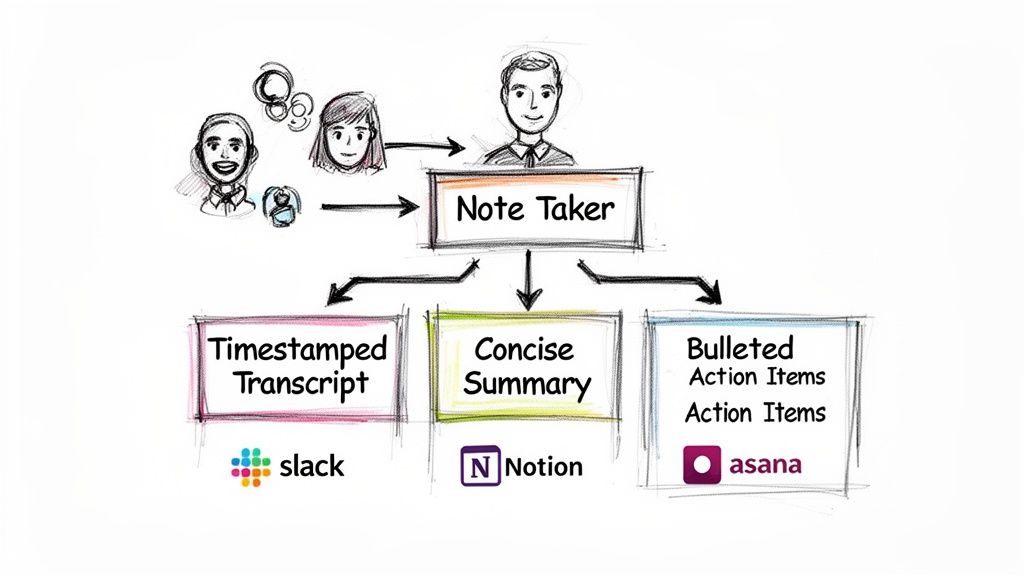
Typically, you'll get three key things:
- A Full Timestamped Transcript: Every word, from every speaker, is captured and laid out with timestamps. You know exactly who said what, and when.
- A Concise AI-Generated Summary: The entire meeting gets boiled down to its essence. You get a quick, scannable summary covering the main topics and decisions.
- Bulleted Highlights: The most critical moments, key insights, and important takeaways are pulled out into a simple bulleted list for a quick review.
Step 3: Refining and Exporting Your Insights
The process doesn't stop there. A great AI meeting note taker lets you dig deeper into the content. You can use prompts to ask specific questions like, "What were the main concerns about the project timeline?" or "Create a list of action items assigned to Sarah."
This turns the transcript from a static record into a dynamic knowledge base you can interact with. To get a better feel for how to structure these outputs for maximum clarity, it helps to look at a solid meeting action items template.
Finally, you need to get this information to where your team does their work. The best tools offer flexible export options, so you can push the transcript, summary, or action items into your favorite format—a Google Doc for collaboration, a PDF for your records, or Markdown for your company's knowledge base. This closes the loop, moving the intelligence from the call right into your daily project management flow.
Got Questions About AI Meeting Note Takers? We’ve Got Answers.
Bringing any new tool into your workflow is a big decision, and it’s smart to have questions. When it comes to an AI meeting note taker, most people want to know about the practical stuff—how accurate is it really? Is my data safe? And will it even work for my global team?
Let's cut through the noise and tackle these common questions head-on. Our goal is to give you the straight answers you need to feel confident about making the switch.
How Accurate Is the Transcription?
This is usually the first question people ask, and for good reason. If the transcript is unreliable, the whole tool is useless. The great news is that modern AI transcription has become incredibly accurate, with top-tier tools hitting accuracy rates of 95% or higher when the audio is clear.
Of course, accuracy isn't just a single number; a few things can impact it:
- Audio Quality: A good microphone and a quiet room are an AI’s best friends. The clearer the input, the better the output.
- Speaker Accents: The best systems are trained on a massive and diverse dataset of voices, so they handle a wide range of global accents with impressive skill.
- Industry Jargon: This used to be a major hurdle. Acronyms and niche terms could easily stump older models. But today, many advanced platforms let you build a custom vocabulary, teaching the AI your specific product names or technical lingo so it gets them right every time.
Bottom line: while no technology is 100% flawless, the accuracy of today's best tools is more than reliable enough for professional use. You can trust the record.
Is It Safe to Use for Confidential Meetings?
Security is everything. You can't risk sensitive client info, private strategy sessions, or company secrets. This is a make-or-break issue, and reputable AI note takers treat it that way.
The gold standard here is end-to-end encryption. This is non-negotiable. It means your data is locked down tight from the moment you upload it to the time it’s stored. Good providers are also completely transparent about their data policies and meet strict compliance standards like GDPR.
Here’s the key difference to look for: The most secure platforms will never use your private conversations to train their AI models. Your audio is processed to create the notes, and then it's gone for good. Your discussions stay yours, period.
As long as you choose a provider that puts security first, you can absolutely use an AI meeting note taker for even the most sensitive conversations without losing a wink of sleep.
Can It Handle Different Languages and Accents?
In today's world, a meeting can easily include people from three different continents. A useful AI assistant has to keep up. Fortunately, this is where modern AI truly shines.
The leading AI note-taking platforms are built on powerful models trained with thousands of hours of audio from all over the world. This means they can:
- Support dozens of languages: Top services, including Whisper AI, can accurately transcribe over 90 different languages and dialects.
- Understand a variety of accents: Because the AI has "heard" so many voices, it can easily distinguish between different regional accents, from London to Los Angeles.
- Manage conversations with mixed languages: Some advanced tools can even track a conversation where people switch between languages on the fly, transcribing everything correctly.
This global capability makes the tool a game-changer for international teams, content creators, and any organization with a worldwide footprint. Everyone gets clear notes, no matter their native tongue.
Will AI Take Over and Replace People in Meetings?
It’s a fair question, but it comes from a common misconception. An AI meeting note taker isn't here to replace people; it's here to empower them.
Think about it. The AI automates the most tedious, administrative part of a meeting—the note-taking. This frees up the humans in the room to do what they do best.
- Engage Fully: Instead of having your head down typing, you can listen, think, and contribute your best ideas.
- Think Strategically: Your brainpower goes toward solving problems, not just capturing words.
- Brainstorm Freely: The creative flow isn’t interrupted by the need to document every single point.
- Connect with Colleagues: You can make eye contact and build real rapport with the people you’re talking to.
The AI handles the busywork so that you and your team can focus on the high-value work—collaboration, innovation, and making smart decisions.
Ready to stop taking notes and start focusing on your conversations? With Whisper AI, you can get instant, accurate transcripts, summaries, and action items from any meeting, podcast, or video. Join over 50,000 users who are already saving time and unlocking more value from their conversations. Try Whisper AI for free today!


























































































