
How to Add Timestamps to YouTube: A Step-by-Step Guide
Adding timestamps to a YouTube video is surprisingly simple. You just type a list of timecodes, like 00:00 Intro and 01:30 Main Topic, directly into your video description. YouTube automatically makes these clickable, allowing viewers to jump to the exact sections they care about. It's a small effort that makes a huge difference in how people experience your content.
Why Timestamps Are a Creator's Secret Weapon
In a world drowning in content, holding a viewer's attention is tougher than ever. Timestamps are no longer just a "nice-to-have"; they've become an essential tool for creators. They turn long, intimidating videos into accessible, user-friendly guides that respect the viewer's time.
This directly taps into what modern audiences want: instant answers and control over their viewing experience. But it's not just about making viewers happy. This simple act also sends a strong signal to the YouTube algorithm that your video is well-organized and valuable, which can help its visibility.
How Timestamps Enhance the Viewer Experience
Think about how people actually use YouTube. From my experience, timestamps make a real-world difference in countless situations:
- Someone watching a detailed product review can skip straight to the performance test or your final verdict.
- A busy listener can easily revisit their favorite segment of a long-form podcast without endlessly scrubbing the timeline.
- A home cook following a tutorial can instantly jump back to the ingredient list or a specific step they missed.
In every one of these cases, timestamps remove friction and improve the experience. With over 500 hours of video uploaded to YouTube every minute, the platform functions less like a TV channel and more like a massive search engine. According to a detailed YouTube user report, viewers are looking for specific answers, and timestamps help them find those answers within your content.
Timestamps do more than just guide viewers; they communicate respect for their time. This simple act builds trust and encourages longer watch sessions because viewers know they can easily find the exact information they need.
This guide will walk you through the three best ways to add timestamps, from hands-on manual methods to a seriously fast AI-powered workflow that I personally use for my longer videos.
To help you figure out where to start, I've put together a quick overview of the different timestamping methods we'll cover. This table should make it easy to see which approach is the best fit for your workflow and content style.
Choosing Your Timestamp Method
Each method has its place, but as you'll see, the AI approach using tools like Whisper AI is a real game-changer for anyone producing longer content.
This decision tree gives you a visual way to choose the right timestamping method. It all comes down to what you're trying to achieve—whether it's perfect control, easy automation, or maximum efficiency.
The main takeaway here is that there's a method for every creator. Whether you prefer the classic manual approach or want to see how efficient things can get with Whisper AI, you'll find a workflow that fits.
Mastering the Manual Timestamp Method
Adding timestamps by hand is the tried-and-true method that gives you complete control over your video's navigation. It’s a straightforward process: you just type a list of timecodes directly into your video’s description. Honestly, anyone can get the hang of it in a few minutes.
The real trick is getting the format just right. YouTube needs the timestamps to be written as MM:SS (minutes:seconds) or HH:MM:SS (hours:minutes:seconds). So, if you want to link to a point five minutes and thirty seconds in, you’d simply type 05:30.
The Golden Rules for Making Timestamps Clickable
For your list of times to magically transform into clickable links and those slick video chapters, you have to play by YouTube's rules. I see creators get this wrong all the time, and it's almost always why their timestamps don't work.
Here’s the simple checklist I run through every time:
- Always Start at Zero: Your very first timestamp must be
00:00. This is the non-negotiable trigger that tells YouTube you're building a chapter list. - Keep Them in Order: The timestamps have to be listed chronologically, from earliest to latest. You can't have
05:10come before02:30. - Give Each a Name: Every timestamp needs a clear, descriptive label next to it. Think
00:00 - Introductionor02:45 - Unboxing the Gear. - The Rule of Three: To get the automatic chapter segments on the video player's progress bar, you need at least three timestamps in your list.
For example, a list for a simple workout video would look like this:
00:00 - Warm-Up05:30 - Main Circuit25:15 - Cool Down
Think of it this way: you're not just adding links, you're building a table of contents for your video. This little bit of effort turns a long-form video into an organized, easy-to-navigate resource that your viewers will genuinely thank you for.
You can pop into YouTube Studio on your computer or phone to add or edit these timestamps whenever you want. This is super useful for updating older videos or tweaking your chapter titles after seeing what people are searching for. Yes, it can be a bit tedious for longer videos, but there are ways to make it faster. If you need to pinpoint specific moments without re-watching the whole thing, it helps to get a transcript of your YouTube video first.
Here’s a look at where you'd actually type this list inside the YouTube Studio description editor.
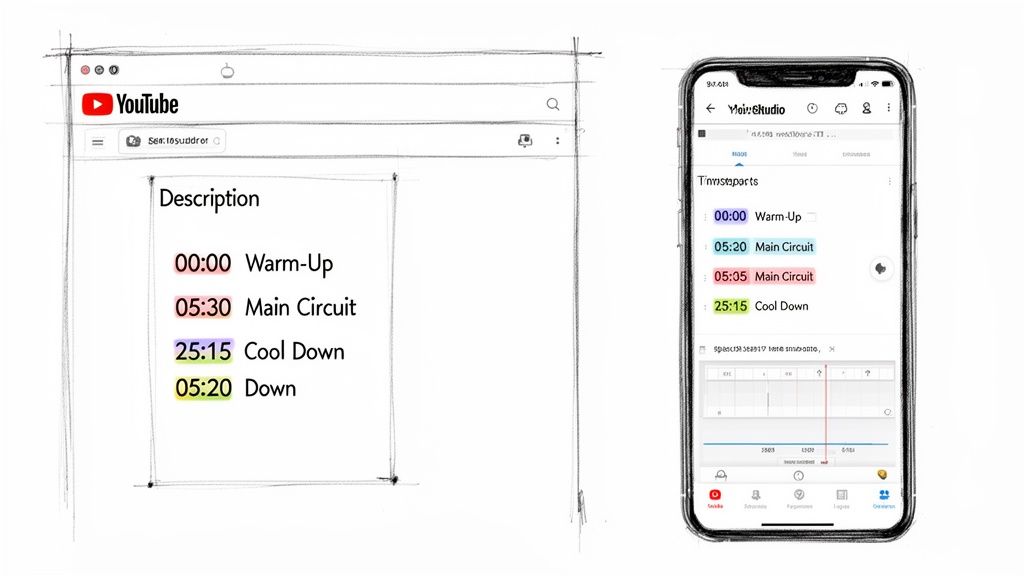
As you can see, it's really just a simple list, with each timestamp and its title on a new line. For a more detailed walkthrough on the manual process and boosting viewer engagement, check out this easy step-by-step guide on how to add timestamps on YouTube.
Turning Timestamps into Chapters for Better Navigation
Once you've got your list of timestamps in the video description, you're on the verge of activating one of YouTube's most useful features: Video Chapters. This goes way beyond simple clickable links. It transforms your video's progress bar into a visual, segmented timeline. Think of it like turning a long document into a book with a proper table of contents.

This one simple tweak completely changes how people interact with your content. Instead of aimlessly scrubbing through the timeline, they get a bird's-eye view of your video’s structure and can jump right to the part they're interested in. It's a massive win for the viewer experience.
The Rules for Activating Video Chapters
To get your timestamps to morph into those slick video chapters, you just need to stick to a few ground rules. Consider this a quick pre-flight check before your chapters take off.
- Start at zero: Your very first timestamp must be
00:00. This is the essential signal that tells YouTube you're building chapters. No exceptions here. - Three is the magic number: You need at least three timestamps in your description. Two just won't cut it to trigger the feature.
- Give them room to breathe: Each chapter needs to be at least 10 seconds long. This makes sense—it keeps the progress bar clean and prevents it from getting cluttered with tiny, useless segments.
For instance, a list like 00:00 Intro, 00:05 Tour, 00:09 Conclusion is a no-go because the segments are too short. You have to space them out to create genuinely helpful sections for your audience.
The real game-changer with video chapters is that their power extends beyond YouTube. When you enable them, Google often features these chapters in its search results as "Key Moments." This gives your video a huge SEO boost, showing searchers a direct link to the answer they need right on the results page.
How to Name Your Chapters for Maximum Impact
What you name your chapters is just as critical as where you place them. Generic titles like "Part 1" or "Next Step" are a missed opportunity. You want to use clear, descriptive, and keyword-rich titles that tell both your viewers and the YouTube algorithm exactly what each section covers.
YouTube keeps rolling out better tools for creators, acknowledging how important it is to organize longer videos. They’ve even added features like drag-and-drop markers to make placing timestamps more intuitive. It’s clear they understand how creators are using these new platform features to improve their content.
At the end of the day, turning on video chapters is one of the simplest things you can do to make your videos look more professional and rank better in search. Follow these simple rules, and your timestamps will do more than just guide viewers—they'll help your content get found.
An Automated Workflow Using Whisper AI
Let's be honest: manually scrubbing through a long video to jot down timestamps is a total drag. For any creator trying to be efficient, it’s a massive time sink. This is where an AI-powered workflow really shines, turning hours of tedious work into a few minutes of automated precision. If you value speed and accuracy, using a tool like Whisper AI is easily the smartest way to generate your timestamps.
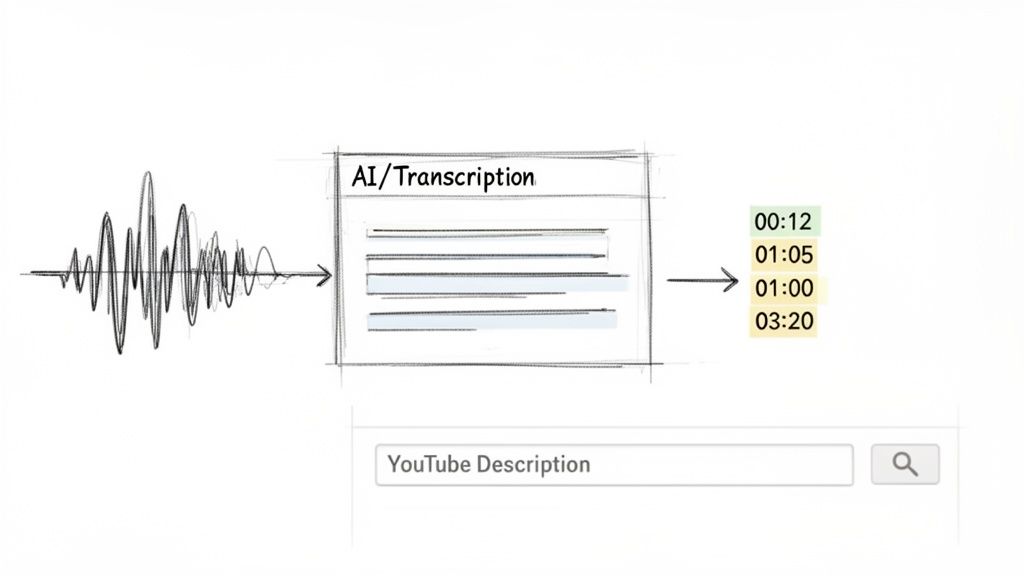
The whole process couldn't be simpler. Forget about re-watching your entire video with a notepad open. Instead, you just give Whisper AI your YouTube link or upload the video file directly. The AI takes it from there, transcribing every single word and creating a complete, perfectly timestamped transcript.
What you get back is a beautifully formatted list, ready to be copied and pasted straight into your YouTube description. The AI does all the heavy lifting, which also means you can say goodbye to the human error that always creeps in with manual timing.
Comparing Manual vs. Automated Timestamps
The difference between doing this by hand and letting AI handle it is night and day. This is especially true for longer content like podcasts, interviews, or detailed tutorials. I've found that manually creating chapters for a one-hour video can easily eat up an hour or more of focused, mind-numbing work.
With an automated workflow, that exact same job is often finished in under 10 minutes. That’s not just a small time-saver; it’s a genuine shift in how you can manage your content production.
Just look at the direct comparison:
This kind of efficiency means you can spend more time actually creating great content instead of getting bogged down in post-production busywork. It even makes ambitious projects—like adding timestamps to your entire back catalog—feel totally achievable.
The real power here is consistency. By removing the manual hassle, you're far more likely to add helpful chapters to every single video, which creates a much better and more reliable experience for your audience.
More Than Just Timestamps
The perks of bringing AI into your workflow go way beyond just a simple list of chapters. Many of the more advanced AI transcription tools pack in extra features that can seriously level up your video descriptions and overall SEO game.
Whisper AI, for example, can also deliver:
- Speaker Detection: It can automatically tell who is speaking and when. This is a lifesaver for interviews or podcasts, letting you create specific chapters like
15:22 - Sarah Explains the Core Concept. - Automatic Summaries: The AI can whip up a concise summary of your whole video. This is perfect for the first few lines of your description, giving viewers a quick, clear idea of what they're about to watch.
- Key Highlights: It can also pull out the most important topics and list them as bullet points. You can drop these right into your description to add more detail and keywords, boosting your video's discoverability.
By taking advantage of these features, you can build incredibly detailed, helpful, and keyword-rich video descriptions that work for both your audience and the YouTube algorithm. The simple task of adding timestamps suddenly becomes a core part of your content optimization strategy. To see it in action, you can learn more about https://whisperbot.ai/blog/how-to-use-whisper-ai.
Ultimately, an automated workflow for how to add timestamps to YouTube videos is about working smarter, not harder. It gives you back valuable time, ensures your chapters are always accurate, and hands you extra tools to make your content more accessible and easier to find.
Using Timestamps to Improve Your Video SEO
Knowing how to add timestamps is one thing, but actually using them as a strategic tool is what separates the pros from the amateurs. I like to think of each timestamp as its own mini-opportunity for SEO.
When you weave your target keywords directly into your chapter titles, you’re feeding YouTube and Google more context. This helps your video show up for those hyper-specific, long-tail searches that serious viewers make.
Essentially, you're turning a single video into a collection of highly discoverable moments. Imagine someone searches for "iPhone 15 Pro cinematic mode test." Instead of just finding your video, Google could point them straight to your 12:45 - Testing Cinematic Mode chapter. That direct path signals incredible relevance to the search engine, giving your video a nice little boost for that specific query.
How Many Timestamps Should I Add?
This is a question I get all the time. The honest answer? It depends entirely on your video. You need enough chapters to guide the viewer, but not so many that the progress bar becomes a cluttered mess.
Here are the general rules of thumb I've developed over the years:
- Short videos (5-10 minutes): Stick to 3-5 key chapters. Think of them as the main talking points you'd put in a summary.
- Medium videos (15-30 minutes): For tutorials or in-depth reviews, 6-10 timestamps usually hits the sweet spot.
- Long-form content (60+ minutes): For podcasts, interviews, or deep dives, don't hesitate to use 15-20 timestamps. Your audience will thank you.
The real goal is to map your timestamps to the natural rhythm of your content. Every time you switch topics or move to a new segment, that’s a potential chapter. Each one should represent a chunk of your video that someone might specifically search for.
Creative Timestamp Strategies
Your video description is incredibly valuable digital real estate. If you have a massive list of chapters for a long podcast, consider putting them in a pinned comment instead. This keeps your primary description clean, leaving room for what matters most—calls to action, affiliate links, or a compelling summary of the video.
Another smart move is to align your timestamps with product mentions. YouTube is heavily invested in e-commerce, and they're constantly improving how timestamps and shopping features work together. For instance, you can time product shelves to appear at the exact moment you're discussing an item. This creates a seamless path from discovery to purchase, which is a huge win.
Mastering these tactics transforms your timestamps from a simple convenience into a powerful engine for views and engagement. For a complete overview of ranking factors, our guide on YouTube SEO best practices is a great place to start. And if you're looking to really level up, check out the best AI SEO tools for Generative Engine Optimization (GEO) to find new ways to optimize your content.
Why Aren't My Timestamps Working? A Troubleshooting Guide
So you’ve painstakingly added your timestamps, hit save, and… nothing. The links aren't clickable, and the chapters aren't showing up on the seek bar. It’s a frustrating moment, but don't worry—the fix is usually incredibly simple.
More often than not, the problem comes down to a tiny formatting mistake. YouTube’s system is a bit picky, and if you miss one of its rules, it just ignores the entire list.
The number one culprit? A missing 00:00 start time. You absolutely have to tell YouTube where the video begins, otherwise, it won't process any of the other timestamps. Another common slip-up is not having enough chapters; you need at least three for the feature to kick in.
A Quick Diagnostic Checklist
Before you start pulling your hair out, run through this quick checklist. I’d bet one of these is the source of your problem.
- Did you start with
00:00? This has to be the very first timestamp in your list. No exceptions. - Do you have at least three timestamps? Remember, you need three or more to create chapters.
- Is every chapter at least 10 seconds long? YouTube won't create a chapter for anything shorter.
- Are they in the right order? Your timestamps must be sequential, from start to finish. You can't have
05:10appear before03:20.
Think of your timestamp list like giving directions to a very literal robot. If one step is missing or out of place, the robot gets confused and gives up. In my experience, double-checking these four points solves 99% of all timestamp and chapter issues.
Your Top YouTube Timestamp Questions Answered
Even when you've got the basics down, a few questions always seem to pop up. Let's tackle some of the most common things creators ask about adding timestamps, so you can get them right every time.
How Many Timestamps Should I Actually Add?
There isn’t a one-size-fits-all answer here, but the best approach is to add a timestamp for every key idea or section change in your video. The absolute minimum for YouTube's chapter feature to kick in is three timestamps, and you must always start with 00:00.
For a standard 10-minute video, I've found that 4-7 chapters usually hits the sweet spot. It guides viewers without being overwhelming. But if you're creating a long-form interview or a deep-dive tutorial that's an hour long, having 15-20 timestamps can be a lifesaver for your audience. The goal is to make navigation intuitive, not to clutter up the progress bar.
Can I Add Timestamps to a Video After I've Already Published It?
Absolutely. You can go back and add timestamps to any video, at any time.
Just head into your YouTube Studio, find the video, and click to edit its details. All you have to do is type your timestamp list into the description box and hit "Save." The changes usually appear on the live video within a few minutes. This is a fantastic way to breathe new life into older, popular videos that could use a navigation boost.
Do Timestamps Really Help with SEO?
Yes, they make a huge difference. When you add timestamps correctly, Google can pull them into its search results as "Key Moments."
This means someone can search for a specific question on Google and jump directly from the search page to the exact moment in your video that has the answer. It’s a powerful way to increase your visibility, boost click-through rates, and tell the algorithm your content is a great match for that query.
Plus, using good keywords in your chapter titles gives both YouTube and Google more context about what's inside your video, helping you rank for more specific searches.
Ready to stop wasting time on manual transcription and create perfect timestamps in minutes? Whisper AI uses advanced AI to generate accurate transcripts, summaries, and chapter lists from any video or audio file. Try Whisper AI for free and see how much time you can save.


























































































