
Taking Minutes in Meetings That Actually Drive Action
Taking minutes in meetings is about creating a clear, actionable record of what was decided and what needs to happen next. When done right, this process transforms conversation into a powerful tool for accountability, making sure everyone on the team knows who is doing what by when.
Why Most Meeting Minutes Fail to Make an Impact

We've all seen it happen. The project team huddles up, talks through a critical launch, and everyone walks away nodding in agreement. A week later, a dense, multi-page document titled "Meeting Minutes" lands in your inbox, and you promptly file it away, unread.
Then, weeks fly by, and suddenly the deadline is staring you down. Panic hits when you realize the marketing assets are nowhere to be found. The marketing lead assumed the product team was handling the first drafts, but the product team was waiting on final specs from marketing.
This is a classic breakdown, and the minutes are the culprit. They were treated as a passive record instead of an active tool. Instead of highlighting ownership, they became a wall of text that buried the crucial action items, leading straight to a missed deadline and a team pointing fingers.
The Hidden Costs of Poor Documentation
This isn’t just an annoyance; it's a massive drain on productivity with real financial consequences. Ineffective meetings and the vague notes that follow cost businesses a fortune. The average employee already sinks 392 hours a year into meetings, and when the outcomes aren’t captured well, most of that time is wasted.
Globally, this inefficiency adds up to a staggering $399 billion lost every year. A huge part of the problem is that 60% of one-off meetings don't even have a structured agenda, which makes the whole process of taking minutes in meetings feel like an impossible task from the get-go. You can find more of these eye-opening stats over at MyHours.com.
When your meeting notes are ineffective, they kick off a chain reaction of problems:
- Forgotten Decisions: Key agreements made in the room simply vanish, forcing the team to rehash the same conversations over and over again.
- Vague Action Items: Without clear owners and deadlines, tasks just float around. "Someone will look into the budget" isn't an action item; it's a guarantee nothing will happen.
- Lack of Accountability: When there's no single source of truth, it’s far too easy for responsibilities to slip through the cracks.
The purpose of meeting minutes is not just to document what was said, but to build a bridge between discussion and execution. If your minutes don't drive action, they are just creating noise.
Ultimately, mastering the skill of taking great meeting minutes is about more than just being organized. It's about building a culture of accountability and clarity. It’s how you ensure the valuable time everyone spent in that meeting room actually translates into real progress and breaks the expensive cycle of stalled projects and repeated conversations.
1. Setting the Stage for Success Before the Meeting
Great meeting minutes almost never happen by accident. The real work begins long before the meeting itself, with thoughtful preparation that shifts your role from a simple scribe to a strategic participant.
Jumping into a meeting cold is a surefire way to end up with vague, disconnected notes. You’ll spend the whole time playing catch-up, struggling to separate the critical decisions from the casual chatter. Real success in taking minutes in meetings is built on the foundation you lay beforehand.
When you're prepared, you can stop scrambling to figure out who's talking and start focusing on the substance—the nuance of a debate, the key points of a decision, and the specifics of who needs to do what next.
Connect with the Organizer to Clarify Objectives
Your first move should always be a quick chat with the meeting organizer. It’s a simple step, but it provides the clarity you need to understand the "why" behind the gathering.
Don't be shy; ask direct questions to get what you need:
- What's the main goal here? Are we making a final decision, brainstorming ideas, or just sharing a status update? Knowing this helps you tune your listening to what matters most.
- What does a successful outcome look like? This tells you exactly what decisions or action items you need to walk away with.
- Who are the key decision-makers? Pinpointing these individuals means you know to pay extra attention when they speak, especially when they're signaling agreement or assigning tasks.
This quick alignment ensures you’re not just recording words but are actively documenting progress toward a clear, shared goal.
A meeting without a clear objective is just a conversation. Your job as the minute-taker is to capture the journey from that objective to a concrete outcome, and that journey starts with knowing the destination.
Build a Logical and Time-Boxed Agenda
A solid agenda is your roadmap. It provides the skeleton for your notes, letting you organize information logically as the conversation flows. If the organizer hasn't made one, step up and offer to help draft it.
A great agenda does more than list topics—it creates structure. For example, assigning a time limit to each item (a practice known as time-boxing) not only keeps the meeting on track but also helps you anticipate when the conversation is about to shift. This lets you prep for the next section of your notes. Making sure everyone shows up prepared is just as important, which is where sending effective meeting reminder emails comes in handy.
Here’s a pro move: review the minutes from the last meeting. Look for unresolved action items or recurring topics. This gives you valuable context and helps you connect the dots between past decisions and the current discussion, ensuring nothing falls through the cracks.
Prepare Your Note-Taking Tools in Advance
Whether you're using a digital document or a dedicated app, get your setup ready before the meeting starts. The last thing you want is to be fumbling with software or searching for a pen when the first important point is made.
A smart, hybrid approach is becoming more common. You can set up an AI tool to capture the raw transcript—our guide on choosing an AI meeting note taker can help you find the right one. This takes the pressure off of catching every single word, freeing you up to focus on your real job: identifying and documenting the decisions and action items that move the work forward.
Here’s a simple checklist to run through before every meeting.
Your Pre-Meeting Preparation Checklist
This checklist isn't just about ticking boxes; it's about building a repeatable process that guarantees you walk into every meeting ready to capture what truly matters.
Getting these small things right beforehand makes a massive difference in the quality and clarity of your final meeting minutes.
2. Capturing What Actually Matters in Real Time
When the meeting kicks off, the real challenge begins: separating the signal from the noise. A half-hour meeting can easily spin up thousands of words, but only a small fraction of that is actually useful for moving forward. If you try to write a word-for-word transcript by hand, you’re setting yourself up for failure. You'll get lost in the details and miss the big picture.
The real skill in taking minutes in meetings live isn't about speed typing; it's about active, selective listening. Your job isn't to capture everything. It's to pinpoint the three things that truly matter: decisions, action items, and key discussion points. These are the elements that create clarity and build momentum long after the meeting ends.
Think of yourself as a journalist at a live event. You wouldn't transcribe every cough or side conversation. You'd be listening for the headlines—the final verdict on a new feature, a clear owner assigned to a task, or the core reason behind a strategic shift.
Differentiating Between Discussion and Decision
One of the most common mistakes is documenting the entire winding road of a conversation instead of just the destination. A little context is helpful, but the minutes need to be laser-focused on the outcomes.
Keep your ears open for trigger phrases that signal the conversation is shifting from brainstorming to a firm conclusion.
- "So, are we all agreed that..."
- "The decision is to move forward with..."
- "Okay, let's just confirm the plan is to..."
When you hear phrases like these, it’s time to pay close attention. That's the moment you need to capture with absolute precision. Jot down the decision itself and, if needed, a single sentence on the "why" behind it.
The most valuable skill in real-time note-taking isn't fast typing; it's selective hearing. It’s the ability to identify the exact moment a rambling discussion crystallizes into a firm decision or a clear action.
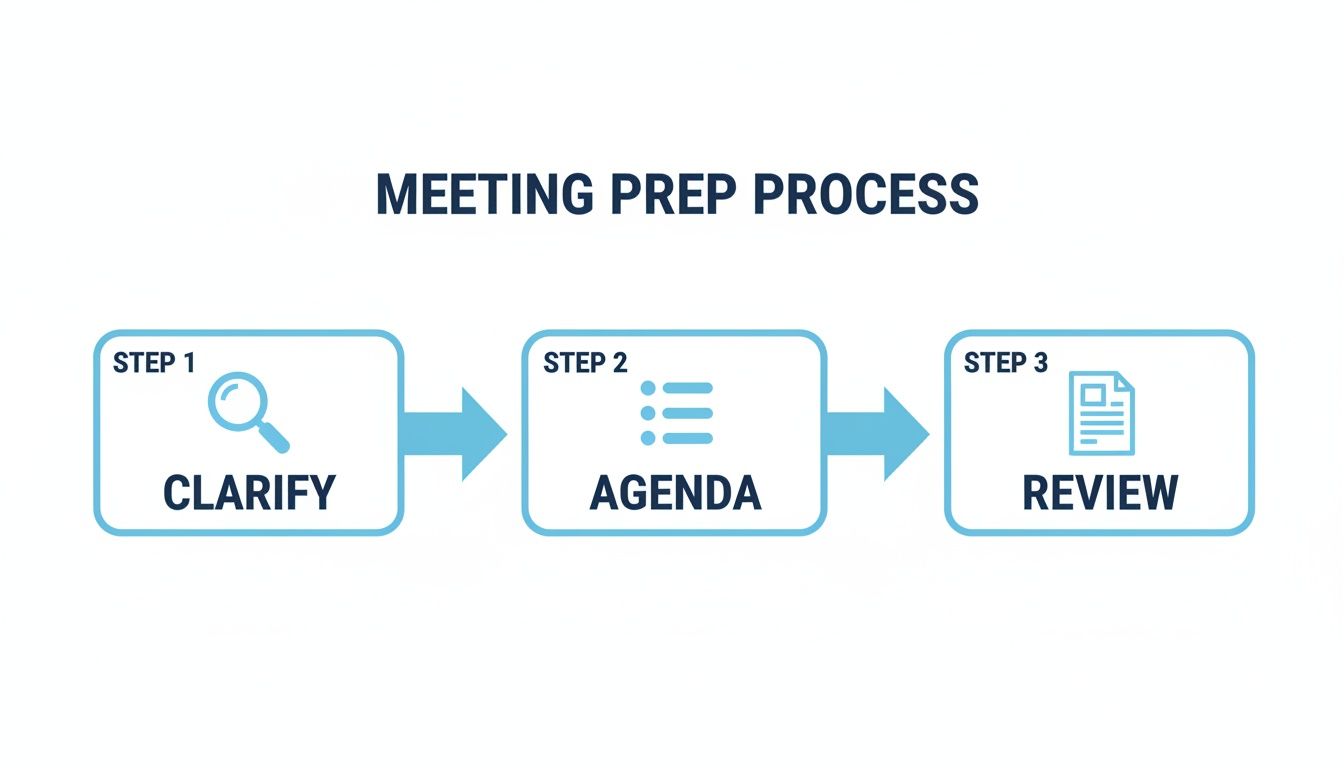
This prep work is what makes effective real-time capture possible. When you know the goals and the agenda, you're primed to recognize what's important as it happens.
The Hybrid Approach: A Modern Necessity
This is where a modern, hybrid approach to note-taking really shines. Trying to capture every single detail manually is not just stressful; it's wildly inefficient. Instead, let technology do the heavy lifting.
Using an AI transcription tool frees you from the burden of creating a complete record of the discussion. This gives you the mental space to play a much more valuable role during the meeting. While the AI is busy capturing the full dialogue, you can focus on listening, sensing when consensus is forming, and asking questions to clear up any confusion.
Your role evolves from a simple scribe to a facilitator of clarity. When you hear something that sounds like a potential action item, you can jump in with questions to lock it down.
- "Just to confirm, Alex, you'll be handling the budget analysis for this?"
- "What's a realistic deadline for that first draft, Sarah?"
- "Who needs to give the final sign-off on this design mock-up?"
Trying to do this while frantically typing is nearly impossible. The AI transcript becomes your safety net, ensuring no detail is lost while you concentrate on pinning down accountability in the moment.
A Practical Comparison: Manual vs. AI-Assisted Notes
Let's look at how this plays out in a real-world scenario. During a recent project sync, a ten-minute discussion about a marketing campaign went back and forth.
My Manual Notes (Captured Live):
- Discussion on Q3 campaign launch
- Team debated video vs blog post focus
- Budget concerns raised by Mike
- Decision: video is priority
- Someone to check asset specs
These notes get the gist, but they're dangerously vague. Who is "someone"? What exactly needs to happen next?
AI-Assisted Summary (Drafted Post-Meeting Using the Transcript):
- Decision: The team will prioritize a video-first strategy for the Q3 campaign launch to maximize engagement on social platforms.
- Action Item: Chris will create a detailed brief outlining video asset specifications and technical requirements. Deadline: EOD Friday.
- Action Item: Mike will review the allocated campaign budget and confirm if it supports professional video production costs. Deadline: Next Wednesday.
The difference is night and day. The AI-assisted summary is clear, actionable, and leaves no room for confusion. By letting the transcription tool handle the raw data capture, I was free to focus on clarifying the "who," "what," and "when," turning a meandering conversation into a concrete plan. This hybrid method is the secret to minutes that don’t just document the past but actively drive future work.
3. How to Structure Minutes for Maximum Readability
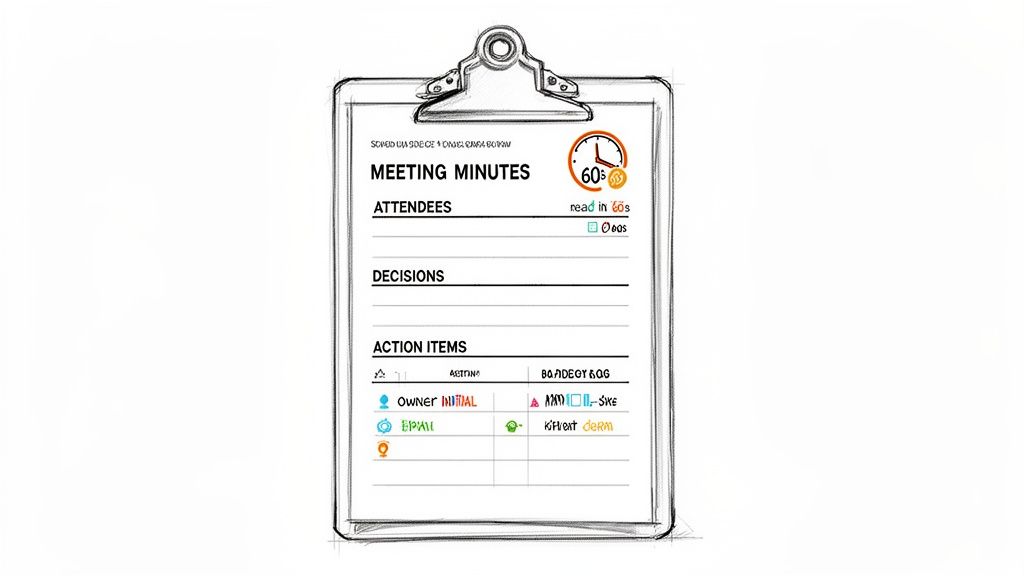
Let's be honest, raw notes are just a jumble of data. The real skill in taking minutes in meetings kicks in after the call ends. This is when you transform that chaotic brain dump into a clean, clear document that anyone—even someone who missed the meeting—can scan and understand in 60 seconds.
The point isn't just to record what was said. You're creating the official source of truth. It needs to be scannable, actionable, and impossible to misinterpret. Without a smart structure, even the most detailed notes become a wall of text that everyone ignores, completely defeating the purpose.
The Foundation: Get the Basics Right
Every single set of meeting minutes, no matter how formal or casual, needs a few non-negotiable elements. These basics anchor the document, providing the context needed for it to serve as a proper record.
Start with the logistical details right at the top. This isn't just filler; it's essential framing.
- Meeting Title: What was this meeting about? (e.g., Q4 Project Alpha Kickoff)
- Date and Time: The specific date and time the meeting occurred.
- Attendees: A simple list of who was there and, just as importantly, who couldn't make it.
- Meeting Objectives: A quick, one-sentence summary of the meeting's core purpose.
This header information immediately orients the reader before they dive into the meat of the discussion. Using a solid conference minutes template can be a huge time-saver here.
Designing for Action, Not Just Archives
With the basics out of the way, the body of your minutes needs to be organized for impact. The trick is to separate different kinds of information into their own clearly labeled sections. This simple act transforms a dense document into a skimmable resource where people can find what they need instantly.
I’ve found the most critical sections are always these three:
- Decisions Made: This is for final verdicts only. No "we discussed" or "we might." Each decision should be a short, direct statement.
- Key Discussion Points: This is where you briefly summarize the why behind the big decisions. It provides crucial context without getting bogged down in a word-for-word recap.
- Action Items: This is arguably the most important part of the entire document. It’s a dedicated log that turns talk into a tangible plan with owners and deadlines.
By keeping these separate, you make it easy for a busy executive to see the bottom-line decisions or for a team member to pull up their assigned tasks without having to read through pages of notes. If you want to dig deeper into this, we have a whole guide on how to organize meeting notes that offers more strategies.
The ultimate test of well-structured minutes is this: can someone who missed the meeting read your document and know exactly what was decided and what they need to do next? If the answer is no, the structure has failed.
Let's break down how these components work together in a practical template. The table below shows what I consider the absolute essentials for turning your notes into a tool for accountability.
Key Components of an Effective Minutes Template
Know Your Audience, Tailor Your Format
Finally, an experienced minute-taker knows that one size doesn't fit all. The structure that works for a formal board meeting would be overkill for a quick team huddle. You have to adapt.
- Formal Board Meetings: These demand a very official structure. You'll likely need to include formal motions, who seconded them, and the results of any votes. The language should be precise and objective.
- Project Stand-ups: Speed is everything. Often, a simple bulleted list of progress, blockers, and next steps is all you need. The goal is to facilitate immediate action.
- Creative Brainstorms: Here, a rigid format can kill the vibe. A mind map or a more free-flowing list of ideas might be a better way to capture the energy and flow of the conversation.
By picking the right structure for the occasion, you ensure your minutes get read, understood, and—most importantly—acted upon. That’s how you become an indispensable part of any team.
4. The Post-Meeting Workflow That Ensures Accountability
Your job isn’t over when everyone logs off. In fact, what you do next is probably the most important part of the entire process. The final steps are what turn your raw notes into a real tool that drives action and holds people accountable. This is how you make sure the meeting actually leads to something.
The biggest mistake I see people make? Letting their notes go stale. After a day or two, the context is gone, the details get fuzzy, and what seemed crystal clear during the discussion is now a total mystery. My personal rule is to get the minutes cleaned up and sent out within 24 hours, but I really aim for just a few hours after the meeting wraps.
This quick turnaround is your best chance to refine everything. You can fix typos, expand on your shorthand, and make sure the tone is objective and professional. It’s more than just proofreading—it’s about making sure the final document is a faithful record of what was decided.
Using AI Transcripts to Accelerate Your Workflow
Having an AI-generated transcript completely changes the game here. Instead of trying to piece things together from memory, you have a full, searchable record of the entire conversation. This has been a massive time-saver for me and a huge boost to the accuracy of my minutes.
My own post-meeting process is pretty straightforward:
- Scan the AI Transcript: I give the transcript a quick read, using the speaker labels to jump straight to the parts of the conversation where key decisions were made.
- Verify Key Details: If a specific number, deadline, or commitment seems off in my notes, I can find the exact phrase in the transcript in seconds to confirm it.
- Draft a Summary: I pull from both the transcript and my notes to build a concise summary. A lot of AI tools can even whip up a first draft for you, which you can then tweak to fit what your team really needs to know.
This hybrid approach helps me produce polished, accurate minutes in a fraction of the time it used to take. It gets rid of the guesswork and ensures I don’t miss a single crucial detail.
The Art of Effective Distribution
Once your minutes are ready to go, how you share them matters just as much as what's in them. Attaching a file to an email with the subject "Meeting Notes" is a guaranteed way to have it ignored. You have to frame it in a way that encourages people to act.
Always start with a direct subject line, something like: "Minutes & Action Items from Project Alpha Kickoff - 10/26." It immediately tells everyone what the email is and why it's important.
In the body of the email, don't just attach the file and call it a day. I always paste a super-brief summary right into the email so the main takeaways are impossible to miss.
Your distribution email is the final step in creating a closed loop of accountability. It should be designed to prompt a response, confirm ownership, and set the stage for follow-up.
For example, I pull the list of action items out of the document and put it front and center in the email, tagging the owners directly. This simple act of public assignment dramatically increases the chances that things will actually get done. If you want to dive deeper, you can learn more about crafting powerful action items on meeting minutes in our detailed guide.
The goal is to get people to review and confirm. I always end my email with a clear call to action, like: "Please review the attached minutes and confirm your assigned action items by EOD. Let me know if I mis-captured anything." This simple request turns passive readers into active participants, cementing the meeting’s outcomes and getting everyone on the same page.
5. Different Meetings, Different Minutes: Tailoring Your Approach
Great minute-taking isn't a one-size-fits-all skill. If you try to use a rigid, formal template for a creative brainstorming session, you'll just stifle the great ideas. On the other hand, a few casual bullet points won't cut it for a board meeting where every decision carries legal weight.
To be genuinely effective, you have to adapt your approach to the context of the meeting. This is what separates a simple scribe from a strategic contributor—understanding what each situation requires. Every meeting has a different purpose, and your notes need to reflect that.
Formal Board Meetings and High-Stakes Decisions
When the stakes are high, like in a formal board meeting, your minutes become an official, legal record. Precision and objectivity aren't just nice-to-haves; they're non-negotiable. As the folks at the BoardEffect blog point out, these documents are the permanent history of the organization and are crucial for transparency and accountability.
Your job here is less about capturing the freewheeling discussion and more about documenting the procedural steps with absolute clarity.
- Documenting Motions: Record the exact wording of a motion and who made it. For example: "Jane Doe moved to approve the Q3 budget as presented."
- Recording Votes: Note who seconded the motion and the final tally. Often, it’s enough to say, "The motion was seconded by John Smith and passed unanimously." If not, state the numbers: "The motion passed with 5 in favor and 2 opposed."
- Final Decisions: State the outcome clearly and concisely. Avoid any subjective commentary or personal observations.
For these meetings, think structured, formal, and free of jargon. You're creating a document that an auditor or lawyer might need to review years from now.
Fast-Paced Project Check-ins and Stand-ups
Project stand-ups are all about momentum. The goal is simple: quickly see what’s done, what’s stuck, and what’s next. Your notes need to be just as lean and scannable, focusing entirely on action.
A long, narrative summary is the last thing anyone wants. Instead, a simple three-part structure is your best bet:
- Progress: What got done since we last met?
- Blockers: What's getting in the way?
- Next Steps: What are the immediate to-dos before the next check-in?
This format keeps everyone laser-focused on execution. Your notes should look more like a team to-do list than a story, making it dead simple for everyone to see what they own.
For fast-paced meetings, your minutes should function like a sprinter's checklist, not a marathoner's diary. Clarity and brevity are your most powerful tools for maintaining project velocity.
Creative Brainstorming and Ideation Sessions
Brainstorming sessions are the polar opposite of board meetings. Here, your mission is to capture the chaotic flow of ideas without getting in the way of the creative spark. A rigid, linear format will kill the energy in the room faster than anything.
This is the perfect time to pull out more visual and flexible note-taking methods. I'm a big fan of using a mind map, whether it's on a physical whiteboard or with a digital tool. It lets you visually connect related ideas and show the organic, non-linear way the conversation unfolded.
When taking minutes in meetings like this, forget about perfect grammar or sentence structure. Your priority is just to get the essence of every idea down.
- Group ideas by theme as they start to emerge.
- Use keywords and short phrases—don't write out full sentences.
- Star or highlight promising concepts that the team gets excited about.
You can always organize these raw notes into a more polished summary later. But during the session, your role is to be a facilitator of thought, not a strict record-keeper. Your notes should look as dynamic and wonderfully messy as the creative process itself.
Stop letting critical meeting details slip through the cracks. Whisper AI transforms your meeting recordings into accurate, searchable transcripts and concise summaries. Our AI detects speakers, adds timestamps, and helps you generate action items in seconds, so you can focus on the conversation, not the keyboard. Reclaim your time and make every meeting count by visiting https://whisperbot.ai.


























































































