
Mastering Note Taking Systems for Modern Productivity
Finding the right note-taking system isn't just about getting organized; it's about building a reliable "second brain." It’s the difference between a random pile of sticky notes and a personal library of interconnected ideas. A good system, whether it’s the Cornell Method for students or Zettelkasten for writers, turns a firehose of information into a well-structured, easy-to-access knowledge base that you can actually use.
Why Should I Use a Note Taking System?
We’re all drowning in information. But just writing things down isn't enough. Without a proven method, my own experience has shown that notes quickly turn into a digital junk drawer—a chaotic mess of random thoughts, stray links, and half-baked reminders that are impossible to find when you actually need them.
Adopting a structured note-taking system is what separates passive information collectors from active knowledge builders.
A great system doesn't just store information; it helps you process it. It acts as a filter, forcing you to decide what’s important, and then as a connector, helping you link new ideas to what you already know. This is where real insight happens. For students, it means actually remembering what you learn for the exam. For creators, it’s the engine that sparks new content ideas. For professionals, it means no brilliant idea from a meeting is ever lost.
How to Find the Right Fit for You
There’s no single "best" system for everyone. The perfect method for you depends entirely on what you’re trying to achieve. Are you studying for a professional certification? Managing a dozen complex projects at work? Or are you just trying to keep your daily life from descending into chaos?
Your answer points to the right framework. To help you find your footing, this decision tree gives you a quick visual guide based on what you value most: organization, creativity, or academic success.
As you can see, someone who thrives on structure might gravitate toward folder-based systems, while a more free-thinking creative might prefer a networked approach. A student, on the other hand, needs something built for review and retention. The ultimate goal is to build an external brain you can count on.
The biggest mistake is focusing on finding the "perfect" app instead of mastering the underlying principles. A simple system you use consistently in a basic notebook is far more powerful than a complex one you use sporadically in a fancy app.
Which Note Taking System Is Right for You?
Here’s a quick comparison of the most popular note-taking systems to help you choose the best fit based on your primary goals and working style.
Each of these systems offers a unique way to wrangle information, and the best one is simply the one that clicks with how your brain works.
In this guide, we’ll dive deep into the most effective note-taking systems out there, from time-tested analog methods to powerful digital frameworks. We'll explore exactly how each one works, who it's designed for, and how you can start using it to bring more clarity and focus to your work. To see these concepts in action, check out these real-world note-taking examples.
What Are the Core Note-Taking Frameworks?
Jumping into the world of note-taking systems can feel a bit like learning a new language. But don't worry—each one just offers a different, powerful way to structure your thoughts. These aren't just fancy to-do lists; they're proven methods for turning scattered information into a powerful network of knowledge and a clear plan for action. Once you get the hang of their core principles, you can find a system that just clicks with the way you think and work.
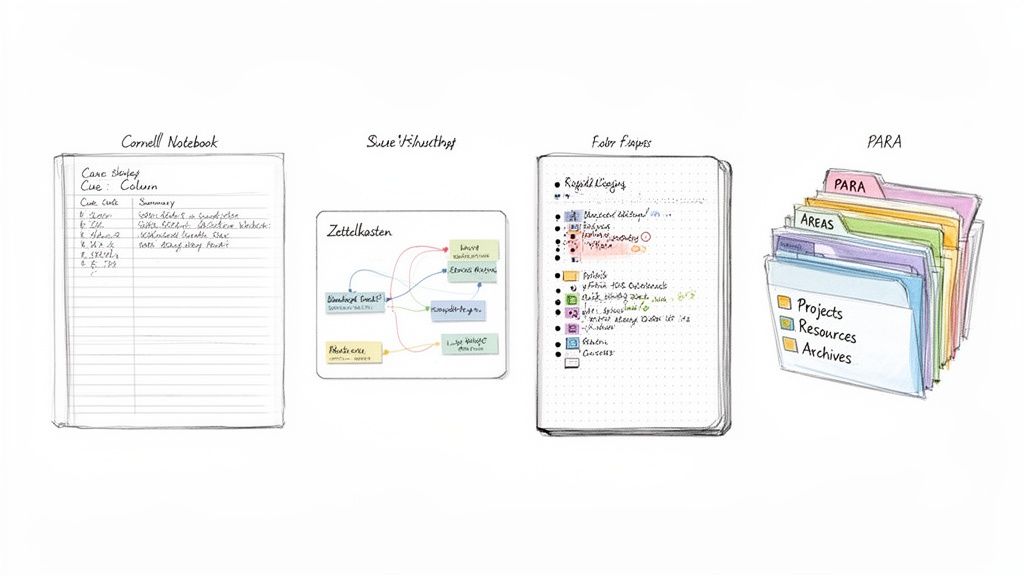
We'll start with some of the most popular frameworks out there. My goal is to use simple analogies and real-world examples to make these ideas stick, so you can start using them right away.
Zettelkasten: Your Personal Wikipedia
Imagine building your own private Wikipedia—a sprawling web of interconnected ideas that gets smarter and more valuable every time you add something new. That, in a nutshell, is the Zettelkasten method, which translates to "slip-box."
Instead of burying notes in rigid folders where they’re forgotten, you create tiny, individual notes, each one capturing a single, "atomic" idea. Then comes the magic: you link that note to other related notes.
This creates a non-linear network of knowledge that's an absolute game-changer for writers, researchers, and creative thinkers. You’re not just storing information; you’re building relationships between concepts. Over time, I’ve found that clusters of ideas emerge on their own, sparking insights I never would have found in a simple, linear list.
The Cornell Method: A Blueprint for Active Learning
Designed from the ground up for students but useful for just about anyone, the Cornell Method is a highly structured system that forces you to engage with the material. It’s less of a filing system and more of a strategic blueprint for a single page of notes.
Here’s how you set up your page:
- Main Notes Column: The large section on the right is for your raw notes from a lecture, meeting, or book.
- Cues Column: The smaller column on the left is for after the session. You review your main notes and pull out keywords, potential test questions, and other high-level prompts. This step is crucial because it makes you process the information a second time.
- Summary Section: The space at the bottom is for a quick one or two-sentence summary of the entire page, forcing you to distill the main idea.
The real power here is the built-in review process. Just cover the main notes column and try to explain the concepts using only your cues. This is active recall in action, a technique scientifically proven to lock information into your long-term memory. It turns you from a passive listener into an active learner.
Bullet Journal: The Analog System for a Digital World
The Bullet Journal (BuJo) method is a beautifully simple analog system that brilliantly combines a to-do list, planner, and diary into one customizable notebook. Its foundation is a technique called rapid logging, which uses a simple key of symbols to quickly categorize everything you write down as a task, event, or note.
The beauty of this system is its complete flexibility. You can set up monthly logs for big-picture planning, daily logs for the day-to-day grind, and custom "collections" for literally anything else you want to track—project ideas, books to read, habit trackers, you name it.
If you’ve ever felt boxed in by pre-printed planners, the Bullet Journal offers a completely blank canvas. It lets you design a productivity system that actually fits your life, not the other way around.
The true power of the Bullet Journal lies not in its structure, but in its adaptability. It’s a mindfulness practice disguised as a productivity system, encouraging you to reflect on what’s truly important each day.
Digital Frameworks: PARA and GTD
As more of our lives moved online, our notes and files did too. Two brilliant digital-first frameworks have emerged to help us manage this constant flow of information: PARA and Getting Things Done (GTD).
The PARA Method: Developed by productivity expert Tiago Forte, PARA is an incredibly intuitive way to organize all your digital files. Everything is sorted into one of four top-level categories: Projects (active, short-term goals), Areas (ongoing responsibilities), Resources (topics you're curious about), and Archives (completed or inactive items). It’s an action-oriented system that keeps the files you need for your current work front and center. You can dig deeper into how to organize your information with different note taking formats and see where PARA shines.
Getting Things Done (GTD): Created by David Allen, GTD is less about organizing notes and more about managing your life. The core idea is simple: get every single task, reminder, and idea out of your head and into a trusted system. From there, you follow a five-step process: capture, clarify, organize, reflect, and engage.
Think of it this way: PARA helps you organize your stuff, while GTD helps you manage your actions. Many people find that using them together creates a complete command center for both their knowledge and their tasks. And if you're a visual thinker, don't forget other powerful techniques; it's worth exploring the key differences between concept maps and mind maps to see if they fit your style.
Choosing Between Digital and Analog Note Taking
So, you're ready to get organized, but you’re stuck on the first big question: should you go with a trusty notebook or a sleek app? This isn't just a simple style choice. The tool you pick—whether it's a pen or a pixel—completely changes how you capture, think about, and use your ideas.
Both have their die-hard fans for a reason. Let's break down the classic debate to help you figure out which camp you belong in, or if, like many of us, you might be a bit of both.
The Case for Analog Note Taking
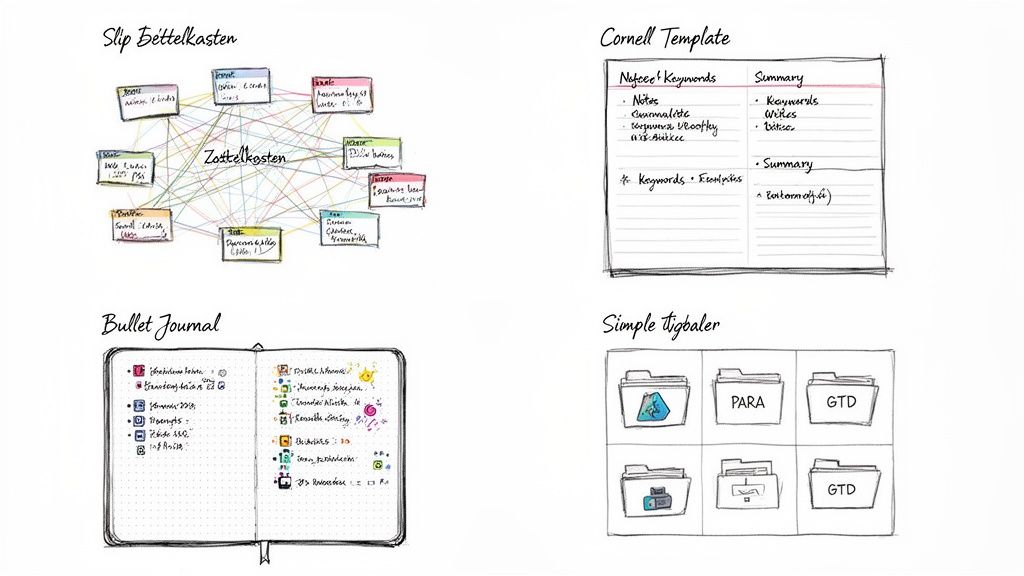
There’s a real, almost tactile, magic to putting pen to paper. It’s not just nostalgia; studies have shown that the physical act of writing helps lodge information in your memory far better than typing. Why? Because you can’t write as fast as you can type. You’re forced to actually listen, process what you’re hearing, and boil it down to its essence.
This slower, more deliberate pace makes analog systems like the Bullet Journal incredible for brainstorming sessions, daily planning, or private journaling. A notebook doesn’t send you notifications or tempt you with a million open tabs. It’s just you and your thoughts.
The greatest strength of an analog system is its intentional friction. It forces you to slow down, think more deeply, and disconnect from the constant digital noise, which can lead to clearer insights and better retention.
In a world full of digital distractions, that kind of focused space is a superpower.
The Power of Digital Note Taking
While writing by hand is great for getting ideas down, digital tools are absolute champs when it comes to organizing, searching, and scaling those ideas. Think about it: how would you find a specific thought you jotted down six months ago, buried somewhere in one of twenty notebooks? With an app, a quick keyword search brings it up in seconds.
That's where digital note taking systems truly shine. Tools like Notion, Obsidian, and Evernote give you:
- Infinite Space: You'll never run out of pages.
- Powerful Search: Instantly find any note, no matter how old.
- Effortless Organization: Drag-and-drop files, create nested folders, and use tags to categorize information dynamically.
- Seamless Integration: Link your notes to your calendar, email, and other digital tools.
Complex frameworks like PARA or Zettelkasten really come alive in a digital space. Building a sprawling, interconnected web of knowledge is just so much easier when you can create links with a click instead of manually cross-referencing page numbers.
Finding a Hybrid Approach That Works
Here’s the thing: you don’t actually have to pick a side. The most productive people I know use a hybrid system that grabs the best of both worlds. They harness the focus of analog for capture and the organizational muscle of digital for storage.
A common workflow looks something like this: use a physical notebook in meetings or lectures to sketch out mind maps and jot down key takeaways. Later, you process those notes by typing them up or snapping a photo and filing them into your digital system. This gives you a built-in review session, helping the information stick while making it searchable for the long haul.
This kind of integration is becoming more common as our work lives get more plugged in. The global note-taking app market, valued at USD 1.18 billion in 2025, is expected to explode to USD 8.89 billion by 2035. According to Business Research Insights, this growth is driven by our reliance on smartphones and the shift to remote work, where digital tools are basically an extension of our brains.
Ultimately, the best system might not be one or the other, but a smart blend of the old and the new.
Supercharging Your System With AI and Automation
The best note taking systems today aren't just digital filing cabinets. Think of them more like a partnership. You have an active assistant doing the heavy lifting, turning the tedious act of capturing information into something smart and automatic. This is where AI-powered transcription and summarization completely changes the game.
Picture this: you're in a two-hour lecture, a deep-dive client interview, or a chaotic team brainstorm. Instead of trying to type every word, you can just be present and engaged. You know that an AI tool will hand you a perfect, searchable transcript—complete with timestamps and speaker labels—minutes after the conversation ends.
This simple shift makes capturing information a background task instead of your main focus. It guarantees that you never miss a critical insight because you were distracted or couldn't type fast enough. What you get is a perfect, reliable foundation for your entire knowledge base.
From Raw Audio to Actionable Insights
The real beauty of bringing AI into your workflow is its ability to take messy, unstructured conversations and turn them into neat, usable knowledge. The time this saves is enormous. This is especially true in school and at work, where hybrid models make having clear records more critical than ever.
The market for AI note-taking tools is expected to jump from USD 450.7 million in 2023 to a staggering USD 2,545.1 million by 2033. This isn't just hype; the technology can slash the time spent on manual note-taking by up to 80%. That's a huge boost in efficiency.
This newfound efficiency feeds a simple, powerful workflow that can plug into any note-taking system you like.
- Record Everything: Capture the audio from meetings, classes, podcasts, or even just a quick voice memo on your phone. This frees you up to actually listen, ask better questions, and focus on understanding what's being said, not just writing it down.
- Get Instant Transcripts and Summaries: Just upload the audio file to an AI tool. In minutes, it spits out a full transcript and a clean summary, often pulling out key themes, action items, and major takeaways for you.
- Process Into Your System: This is where it all comes together. You now have high-quality, pre-digested material ready to be slotted right into your chosen framework.
This process removes so much of the friction that causes most people to give up on maintaining their systems in the first place.
The real power of AI in note-taking isn't just speed; it's the cognitive offloading. By automating the capture and initial processing, you preserve your mental energy for the most valuable work: thinking, connecting ideas, and creating.
An AI-Powered Workflow in Action
So what does this actually look like day-to-day? Let's walk through how you could feed these AI-generated notes into the popular systems we've already covered.
- For the Zettelkasten User: That AI summary and its list of key points are gold. They're perfect candidates for new "atomic" notes. You can grab a single interesting idea from the transcript, write a Zettel about it in your own words, and instantly start linking it to other ideas already in your slip-box.
- For the Cornell Method Follower: The full AI transcript can be dropped straight into the main notes column of a digital Cornell template. Then, you can use the AI-generated summary as a cheat sheet to quickly pull out keywords and formulate questions for the cues column, making your study and review sessions far more efficient.
- For the PARA Method Organizer: A meeting transcript about a current project is an incredibly valuable asset. You can file the transcript and its summary directly into the corresponding "Project" folder. Now, all the knowledge for that project is in one central, searchable place.
This kind of integration makes your note-taking system feel alive and much more complete. For anyone wanting to really lean into this, especially in education, this practical guide to AI for teachers shows just how much it can change learning and information management.
With the right tools, you can build a second brain that’s smarter and more responsive. To get started, check out our detailed look at what makes a great AI note taker app and how to pick one that fits you perfectly.
Practical Workflows for Students and Professionals
Knowing about different note-taking systems is one thing, but actually weaving them into your daily life is where the magic happens. A great system shouldn't feel like a chore; it should feel like an extension of your own mind. So, let’s move past the theory and build some real-world workflows that you can start using today.
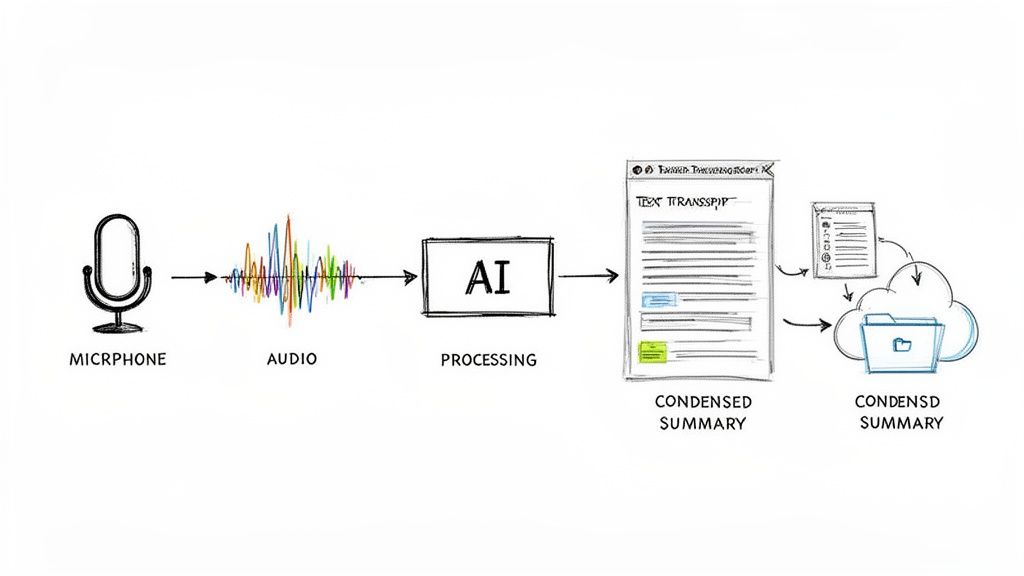
The goal here is to show you exactly how to connect these methods to your daily tasks, whether you're creating content, studying for exams, or managing a dozen different projects at work. I'll lay out the actionable steps and suggest a few tools to help you move from simply knowing about a system to truly living in it.
Workflow for Content Creators
If you're a podcaster, YouTuber, or blogger, your content is more than just a one-off piece—it's an asset you can repurpose again and again. An AI-powered workflow can turn a single recording into a whole library of content with very little manual work.
- Capture the Source: Fire up the mic and record your podcast, video, or webinar. Don’t get bogged down taking notes while you talk; just focus on having a great conversation.
- Transcribe and Summarize: Once you're done, upload the file to an AI transcription tool. In a few minutes, you’ll have a full, timestamped transcript and a neat summary of all the key takeaways.
- Blog Post: The summary and highlights are the perfect outline for a detailed article.
- Show Notes: The full transcript gives your audience comprehensive notes to follow along with.
- Social Media: Pull out the best quotes and stats from the transcript to create a week's worth of killer posts for Twitter, LinkedIn, or Instagram.
- Step 1: Capture with Cornell: During lectures or while reading, use the Cornell Method. Whether on a tablet or a classic notebook, its structure forces you to actively listen and process information right away.
- Step 2: Process into Zettelkasten: At the end of the day or week, revisit your Cornell notes. Your job is to pull out the individual, "atomic" ideas from your main notes and summary.
- Step 3: Create and Link: Turn each of those atomic ideas into a digital "Zettel" (a small, single-idea note) in an app like Obsidian or Roam Research. As you add new notes, make it a habit to link them back to existing concepts. This builds a web of interconnected knowledge that will help you spot new insights for papers and exams.
- Capture Everything (GTD): During a meeting, use a quick-capture tool to log every single commitment, idea, and action item. Don't worry about sorting it yet; the goal is just to get it out of your head and onto the page.
- File the meeting summary into the relevant Project folder.
- Move any long-term reference material, like a new industry report that was mentioned, into your Resources folder.
- Clarify Next Actions (GTD): Look at each action item you captured. What is the very next physical step you need to take? Define it, and add it to your task manager.
- Capture in the Moment: Use the Cornell Method during a lecture or webinar. Its structure is perfect for paying attention and setting yourself up for active recall later.
- Synthesize for the Long-Term: A day or two later, go through those Cornell notes and turn the key ideas into permanent, atomic notes for your Zettelkasten.
This simple process turns one hour of recording into a ton of content, freeing you up to focus on the next big idea.
The most effective content creators build systems that multiply their efforts. By automating the transcription and summarization process, you shift your energy from manual documentation to creative strategy and audience engagement.
Workflow for Students and Researchers
For anyone in academia, the challenge is always twofold: you have to capture information accurately in the moment, but you also need to connect it to everything else you've learned. A hybrid approach that mixes a classic method with a modern one works wonders here.
Think of this workflow as building a personal knowledge base that gets smarter over time.
This process transforms passive listening into an active, multi-layered learning exercise.
Workflow for Business Professionals
Professionals are constantly juggling projects, meetings, and a tidal wave of information. Combining the PARA method for organization with GTD (Getting Things Done) for action creates a seriously robust framework for staying on top of it all.
The need for these kinds of systems in the corporate world is huge. In 2024, the global note-taking market hit USD 7,951.5 million, and North America made up over 40% of that. A big driver is the 40% remote workforce in the US, where digital organization is no longer a "nice-to-have"—it's essential. You can learn more about the global note-taking market trends to see just how big this is.
Here’s how you can put these two systems to work in a business setting:
This dual-system approach ensures nothing ever falls through the cracks. PARA keeps your knowledge tidy, and GTD keeps your tasks moving.
Your Note-Taking System Questions, Answered
Diving into a new note-taking system can feel a bit like learning a new language. You're bound to have questions and maybe even a little uncertainty. Am I picking the right one? Will I ever get the hang of this?
Let's tackle some of the most common questions head-on. A little guidance here can help you sidestep the usual frustrations and really make your chosen system work for you.
How Long Does It Really Take to Get Used to a New System?
From personal experience, I'd say give it about 2-4 weeks of daily, consistent effort. That's the typical timeframe to get comfortable with a more structured method like Zettelkasten or PARA. Yes, the first few days might feel clunky, but the goal is to build a habit, not achieve perfection overnight.
The biggest tip? Don't try to migrate your entire digital life in one weekend. Start with a single, contained area instead—maybe one work project or the notes for a single class. This lets you learn the ropes in a low-stakes environment and build confidence.
The most common mistake I see is people obsessing over finding the 'perfect' app. They forget that the system's principles are what matter. A powerful method used inconsistently in a fancy app will always be less effective than a simple system used consistently in a basic notebook.
Can I Mix and Match Different Note-Taking Systems?
Not only can you, but you probably should. The best systems are the ones you bend to fit your brain and your workflow, not the other way around. Creating your own hybrid approach is where the real magic happens.
For instance, a student or lifelong learner could create a powerful hybrid workflow:
This approach gives you the best of both worlds. You get the immediate learning boost from Cornell and the long-term, interconnected knowledge-building of a Zettelkasten.
Ready to supercharge your note-taking workflow? Whisper AI makes it easy by turning your meetings, lectures, and interviews into accurate, searchable text in minutes. Stop manually transcribing and start building your second brain today. Learn more at https://whisperbot.ai.


























































































