
How to Write a Transcript of a Video: A Step-by-Step Guide
Think about all the effort you pour into creating a great video. You script it, shoot it, and edit it to perfection. But what happens after you hit publish? If you're not transcribing your videos, you're leaving a massive amount of value on the table.
From my experience, a transcript is more than just a wall of text; it's a key that unlocks your video's full potential. It makes every word you say visible to search engines and accessible to a much wider audience. This simple step can seriously boost engagement and extend the life of your content.
Boost SEO and Accessibility With Transcripts
When you convert your video's audio into text, you're essentially giving search engines a roadmap to your content. Suddenly, every phrase, keyword, and concept you discuss becomes something Google can crawl and index. This directly translates into better visibility and a higher chance of showing up in relevant searches.
But it’s not just about the bots. Transcripts are crucial for making your content accessible, ensuring you meet standards like WCAG 2.2 AA. This opens your videos up to people who are deaf or hard of hearing, instantly broadening your potential audience.
A few key benefits really stand out:
- YouTube and other major platforms have seen search rankings improve by an average of 12% for videos with transcripts.
- You can finally reach individuals with hearing or cognitive challenges who rely on text-based content.
- The text becomes a goldmine for repurposing into blog posts, social media updates, and email newsletters.
By laying out your content in a readable format, you're building a more durable asset. Your work continues to attract views and provide value long after that initial upload buzz has faded.
I've seen it time and time again: videos with transcripts can get up to 12% higher search visibility and keep people on the page 30% longer.
Why Your Audience Will Love Transcripts
Let's be honest—not everyone can or wants to watch a video from start to finish. People are busy. A transcript lets them scan the entire contents in seconds to see if it's what they're looking for.
Think about how people actually consume content today:
- They can speed-read the text, cutting their consumption time in half.
- They can read it on a noisy train, in a quiet office, or in an area with spotty internet—no headphones needed.
- They can easily copy and paste key quotes or important points to share with their network.
This flexibility caters to everyone, from the multi-tasker to the deep-dive learner. But the benefits don't stop with your audience. Transcripts are also a game-changer for your own team.
- Quickly pull quotes for blog posts or articles.
- Keep accurate records for legal or compliance purposes.
- Analyze keyword density to see what topics resonate and refine your content strategy.
Real-World Impact of Transcripts
The data backs this up. A survey conducted by the UK's Ministry of Defence looked at how 87 staff members engaged with internal videos. While 28% preferred video only, a surprising 25% just read the transcript without ever hitting play.
The findings reveal just how varied viewing habits are:
- 55% scan the transcript first to decide if the video is worth their time.
- 46% skim the text simply to save time.
- 23% actually read along while watching to make sure they catch every detail.
This shows that transcripts aren't just an add-on; they support a wide range of user behaviors. I've worked with podcast producers who use their transcripts to create incredibly detailed show notes, which in turn supercharges the SEO for their episode pages.
Maximizing Your Return
The best time to create a transcript is right alongside the video editing process. When you make it part of your standard workflow, you streamline content creation and give your marketing team a powerful tool.
With a transcript in hand, you can easily triple your content output. Pull out quotes, create highlight snippets, and generate summaries to share across all your channels.
Start transcribing your videos today. It’s a straightforward way to find new audiences and get lasting value from the content you already have.
Choosing Your Transcription Method: Manual vs. AI
So, you need a transcript for your video. The first real decision you have to make is how you're going to get it done. You're basically at a crossroads with two main paths: the old-school manual method and the modern AI-powered approach.
Which one is right for you? It really boils down to what you value most for a given project: speed, accuracy, or budget.
The Case for Manual Transcription
Doing it yourself, or hiring a human to do it, has one major thing going for it: the potential for near-perfect accuracy. A human ear can pick up on subtle industry jargon, distinguish between speakers with similar voices, and navigate background noise in a way that technology is still catching up to.
But that level of precision comes at a price—your time. It’s a painstaking process. The industry standard suggests it takes about 4 to 6 hours of focused work to manually transcribe just one hour of audio.
Think about that. If you’re a creator making a 15-minute weekly video, you're still looking at an extra hour or more of tedious work. For marketing teams with long webinars or in-depth interviews, that time commitment can seriously slow you down.
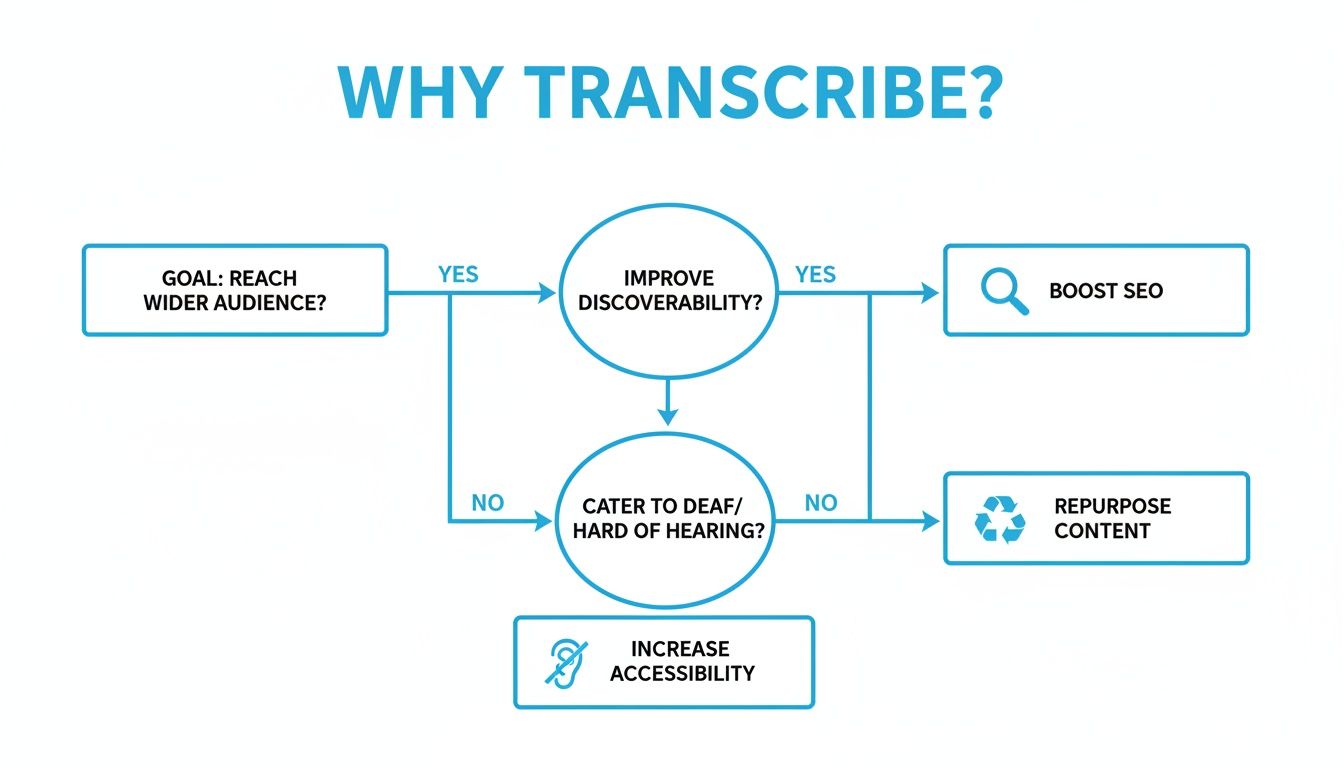
As you can see, the benefits of transcribing are huge—from SEO boosts to making your content accessible—but you have to weigh that against the grind of manual work.
The AI-Powered Alternative
This is exactly where services like Whisper AI change the game. Instead of hours spent hunched over a keyboard, you just upload your file and let the AI do the heavy lifting. A machine can churn out a full first draft of an hour-long video in under 15 minutes. It's a massive efficiency boost.
And it’s not just about getting raw text. Today’s AI tools are packed with features that used to be a huge headache to do by hand:
- Automatic Timestamps: Every word is synced to its exact moment in the video. This is an absolute lifesaver for creating captions or jumping to specific quotes.
- Speaker Diarization: The AI can intelligently detect and label different speakers ("Speaker 1," "Speaker 2"), so you don't have to guess who said what.
- Multi-Language Support: A powerful tool like Whisper AI can process over 92 languages, automatically detecting the language and transcribing it.
The real win with AI isn't just the speed. It's about changing your role from a typist to an editor. You get to spend your time polishing the final product and repurposing content, not stuck in the weeds of transcription itself.
Making the Right Choice for Your Project
To help you decide, let's break down how these two methods stack up against each other.
Manual vs AI Transcription: A Quick Comparison
This table gives you a quick side-by-side look at what to expect from each method.
For a more in-depth look, our guide on creating a transcript covers even more detail.
Ultimately, the best choice depends on your needs. If you're dealing with legal depositions or medical records where every single word must be certified as flawless, a human-first approach is probably still the way to go.
But for the vast majority of us—content creators, marketers, researchers, and students—AI transcription offers an unbeatable mix of speed, affordability, and high accuracy. It's become the go-to solution for getting transcripts done efficiently without sacrificing quality.
Using Whisper AI to Transcribe Your Video
So, you've decided to let an AI do the heavy lifting. Smart move. Honestly, what used to take me hours of painstaking, headphone-on, rewind-and-repeat work can now be knocked out in minutes. Using a tool like Whisper AI makes the whole process feel less like a chore and more like a simple background task.
Let's get practical. The first hurdle is just getting your video into the system so the AI can hear it. Don't worry, this isn't some complex technical step; it's usually as easy as dragging a file across your screen.
Getting Your Video into the System
Most modern transcription platforms, including Whisper AI, give you a couple of straightforward options. This flexibility is great because your video might be a finished file on your desktop or already live on the web.
- Direct Upload: Just drag and drop your video file right from your computer. This is my go-to when I've just finished an edit and the file is ready to go.
- Paste a URL: If your video is already up on YouTube, Vimeo, or another platform, you can just copy the link and paste it in. The tool fetches the audio for you, saving you the hassle of downloading and re-uploading.
The beauty of this is its simplicity. You don't have to sweat the file formats or conversions; the platform handles all that behind the scenes. It's built for speed and efficiency.
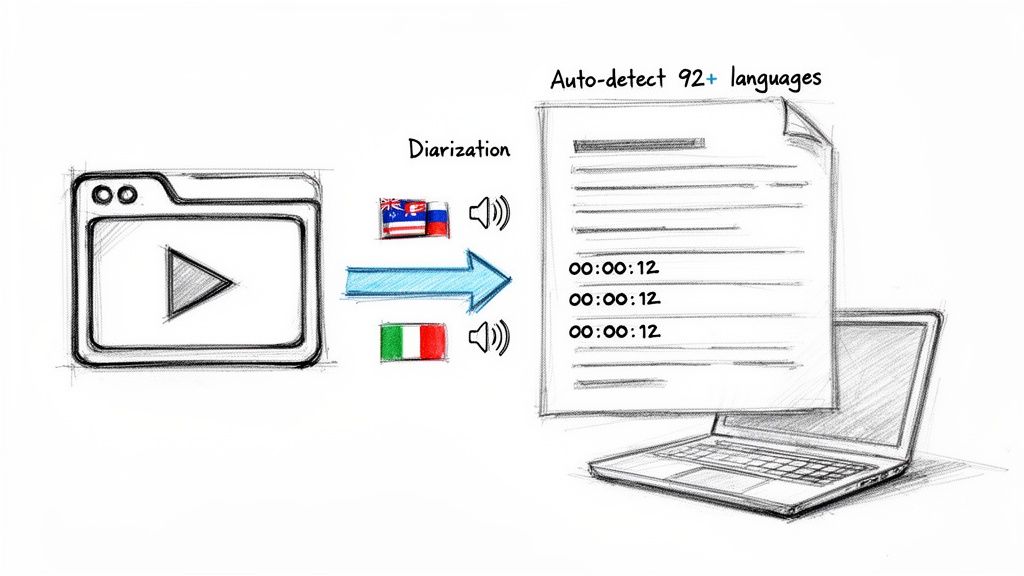
As you can see, the interface is clean and gets straight to the point—no unnecessary steps, just a clear path to getting your transcript started.
Taking Advantage of Smart AI Features
Once your video is uploaded, the real magic begins. This is far more than just a simple speech-to-text conversion. This is where you see how much time you're really saving down the line, especially during the editing phase.
A standout feature is automatic language detection. Let's say you're transcribing an interview where people switch between English and Spanish. With support for over 92 languages, Whisper AI figures this out on its own. You don’t have to manually set anything; it just identifies and transcribes both languages as they're spoken.
Then there's speaker diarization, which is a complete game-changer. This is how the AI tells different speakers apart.
Instead of a massive, confusing block of text, the AI automatically labels the dialogue with "Speaker 1," "Speaker 2," and so on. For interviews, podcasts, or panel discussions, this feature alone is worth its weight in gold.
Finally, the AI adds precise timestamps. Every single word is synced to the exact moment it appears in the video. This makes creating captions or subtitles later almost effortless, because the timing is already locked in.
If you want a deeper dive into the platform, we have a complete guide on how to use Whisper AI that walks through all the details.
From Upload to Usable Text in Minutes
The whole process is incredibly quick. For a typical hour-long video, you're looking at getting a full, timestamped transcript back in about 15 minutes.
Think about that. You no longer have to block off an entire afternoon just for transcribing. It’s now a quick, automated step you can kick off while you grab a coffee or work on something else. The AI gives you a solid first draft, and all that's left for you is to give it a quick review and polish.
Polishing Your Transcript for a Professional Finish
An AI-generated transcript is an incredible head start, often hitting accuracy rates as high as 98%. But that last 2%? That’s where a human touch transforms a rough draft into a polished, professional document. Think of the AI as your hardworking assistant—it does the heavy lifting, and you come in to add the final layer of context and nuance.
This process is really more about editing than writing from scratch. The best approach is to listen to the original audio while reading through the transcript, catching those subtle errors and ensuring the text is perfectly clear for anyone who reads it.
Correcting Mistakes and Tidying Up Punctuation
Your first sweep should be all about the words on the page. Even the smartest AI can get confused by homophones ("to" vs. "too"), stumble over thick accents, or butcher industry-specific jargon.
Play the video and keep an eye out for these common issues:
- Word-for-Word Accuracy: Did the AI get everything right? Correct any misheard words, paying special attention to the names of people, companies, or unique terms that aren't in a standard dictionary.
- Punctuation That Breathes: AI punctuation can feel a bit clunky. Go through and adjust commas, periods, and question marks to match the speaker's natural rhythm and tone. This one change dramatically improves readability.
- Clear Speaker Labels: If the AI just labeled speakers as "Speaker 1" and "Speaker 2," swap those generic tags for their actual names or roles (e.g., Interviewer:, Dr. Evans:). This small detail makes conversations so much easier to follow.
Getting the core text right is the most critical step. Once the words and speakers are locked in, you can focus on shaping the transcript for its final purpose.
The goal of a final review isn't to find fault with the AI, but to add human nuance. You're ensuring the transcript not only says the right words but also conveys the right meaning and is easy to follow.
Formatting for How It Will Be Used
A raw transcript is a lump of clay—you have to shape it for where it’s going to live. The clean, scannable format you'd want for a blog post is completely different from the strict, time-coded structure needed for video captions.
Here’s how to adapt your transcript for a few common scenarios:
- Blog Posts or Articles: For this, you'll want to strip out all the timestamps and break up long monologues into shorter, digestible paragraphs. Use bold text, bullet points, and subheadings to pull out key ideas and make the content easy to skim.
- Video Captions (SRT/VTT files): This format is all about technical precision. The timestamps generated by the AI are non-negotiable here. You’ll export the transcript as an .SRT or .VTT file, which bundles the text with the exact timing codes that platforms like YouTube need to display captions correctly.
- Internal Records or Research: In this case, you want to keep everything. The timestamps and clear speaker labels are essential for quickly referencing specific moments in an interview, meeting, or webinar. It lets you jump right to who said what and when.
Knowing how to write a transcript of a video is about more than just getting the words right. The final step is always about tailoring that text to your audience, turning an accurate file into a genuinely useful asset.
Turning Your Transcript into a Content Goldmine
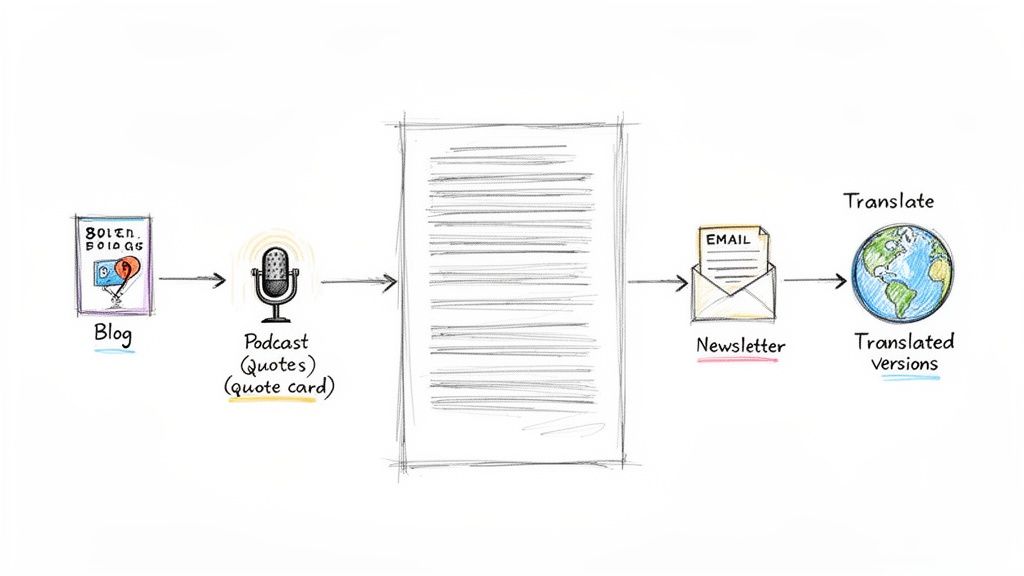
A clean, finalized transcript isn't just a file to archive. It's the starting point for a much smarter content strategy. I like to think of a transcript as raw material, a block of marble from which you can carve dozens of other content pieces. This is how you unlock the real ROI from your video, moving beyond simple accessibility to true content multiplication.
Instead of constantly brainstorming new ideas from a blank page, you can use the text from one great video to fuel your content calendar for weeks. It’s a beautifully efficient way to get more mileage out of the work you've already put in, ensuring every valuable insight reaches a wider audience in the format they actually prefer.
Create SEO-Friendly Blog Posts
One of the most powerful things you can do with a transcript is turn it into a detailed blog post. Search engines are incredible at crawling text, but they can't "watch" your video. A well-structured article based on your video content can quickly start ranking for long-tail keywords you didn't even know you were targeting.
Getting this done is pretty straightforward:
- Clean and Organize: First, strip out the timestamps and speaker labels. Then, restructure the raw text with clear headings, subheadings, and short, readable paragraphs.
- Enrich the Content: You'll want to add a proper introduction and a conclusion to frame the piece. This is also a great time to expand on key points that were only mentioned briefly in the video and, of course, embed the original video itself.
- Optimize for Search: Weave relevant keywords into your headings and body text naturally. Add internal links to your other blog posts or resources, and finish with a compelling call-to-action.
By following these steps, you're not just creating a readable version of your video. You’re building a brand-new, durable asset that can attract organic traffic for years to come. For a deeper dive, check out our guide on content repurposing strategies.
Amplify Your Message on Social Media
Your transcript is also a goldmine of bite-sized moments perfect for social media. Just scan through the text and pull out the most impactful quotes, surprising statistics, or actionable tips. These nuggets can be quickly transformed into a whole suite of engaging social assets.
From just one transcript, you could easily create:
- Quote Graphics: Design some eye-catching visuals with powerful quotes from your video for platforms like Instagram or LinkedIn.
- Twitter Threads: Take a complex topic from your video and break it down into a series of digestible tweets that are easy to share.
- Short Video Scripts: Use key segments of the transcript to create focused scripts for TikToks or Instagram Reels, driving people back to the full-length video.
The global AI transcription market soared to $4.5 billion in 2024, a clear sign of how creators are shifting their workflows. This explosion is fueled by the need to create content faster—podcasters can repurpose episodes into blog posts 70% quicker with an accurate transcript, avoiding the 4-6 hours it traditionally took to manually transcribe one hour of audio. You can discover more insights about this industry shift at Sonix.ai.
This approach keeps your social feeds fresh with valuable content and consistently drives traffic back to your core assets—the original video or your new blog post. Knowing how to write a transcript of a video is more than a technical skill; it’s the first step in building a connected content ecosystem that works smarter, not harder.
Your Top Video Transcription Questions, Answered
Getting started with video transcription always brings up a few questions. It's completely normal. I've been doing this for years, and I still remember wondering about the same things. Let's walk through some of the most common hurdles people face.
How Long Does It Really Take to Transcribe a Video?
This is the big one, and the answer completely depends on the path you choose.
If you decide to go the manual route, be prepared for a serious time commitment. A good rule of thumb is to budget 4-6 hours of your time for every single hour of video. And that's if the audio is clear! If you're dealing with background noise, multiple speakers, or thick accents, that number can easily climb.
On the flip side, a solid AI tool like Whisper AI can turn that same one-hour video into a draft transcript in about 10-15 minutes. Honestly, this massive time difference is why so many professionals have made the switch. It's a game-changer for workflow.
Can I Transcribe a Video That Isn't in English?
Absolutely. We're well past the days when transcription was an English-only game. Today's best AI platforms are built from the ground up to handle a global audience.
For example, a powerful engine like Whisper AI supports over 92 languages. The real magic is that it can often detect the spoken language automatically. You just upload your file, and it figures out whether it's Spanish, Japanese, or German, delivering an accurate transcript without you having to lift a finger.
What’s the Best File Format for My Transcript?
There’s no single "best" format—it all comes down to what you plan to do with the text. Think about the end goal and work backward from there.
- Writing a blog post? A simple text file (.txt) or a Word document (.docx) will be your best friend. They're easy to copy, paste, and edit.
- Creating video captions? You'll need a time-coded file. The most common formats for this are .SRT and .VTT.
- Archiving or sharing a final version? A PDF is a great choice. It locks in the formatting and is viewable on almost any device.
Any decent transcription service should let you export in all these formats. Flexibility is key.
Ready to see this in action and get hours back in your day? Give Whisper AI a try and get your first transcript back in minutes. You'll see just how simple it is to turn any video into searchable, shareable, and incredibly useful text. Get started with Whisper AI


























































































