
The Ultimate Guide to Your Next Meeting Note Taker
We’ve all been there. You leave a meeting feeling energized, only to look at your notes later and find a page of frantic, half-finished scribbles. What was that critical action item? Who agreed to handle the follow-up?
That sinking feeling is what happens when valuable ideas and crucial decisions fall through the cracks. It’s an information drain that silently sabotages team momentum.
Think of it this way: every meeting is an attempt to fill a bucket with your team's collective knowledge. But for most teams, that bucket is full of holes. Every forgotten task, missed detail, and decision that needs to be re-debated is another drop leaking out, lost forever.
Why Your Team Needs a Modern Meeting Note Taker
A modern meeting note taker, especially one powered by AI, is the simplest way to plug those holes for good. It’s a tool that automatically records, transcribes, and organizes every word spoken in a meeting. It’s not just a fancy recorder; it’s a digital team member that never misses a beat.
Instead of one person being heads-down, frantically typing and missing the nuance of the conversation, the AI handles the heavy lifting. This frees everyone up to actually participate in the meeting.
From Manual Chore to Automated Advantage
The real magic is in the automation this brings to your team's workflow. The hours spent transcribing, cleaning up notes, and trying to remember who said what are simply gone.
This creates a reliable source of truth for every conversation, which changes the game in a few key ways:
- Rock-Solid Accountability: Action items are captured and assigned automatically. The endless "I thought you were doing that" conversations disappear because it’s all right there in the record.
- Deeper Engagement: When your team isn't distracted by taking notes, they can fully invest in the discussion. This means better ideas, more creative problem-solving, and a bigger contribution from everyone at the table.
- A Living Knowledge Base: Every meeting becomes a searchable, organized asset. New team members can review past decisions to get up to speed in days, not weeks. Your team's history is no longer trapped in people's heads.
An AI note taker brings an objective, unblinking clarity to your meetings. By capturing exactly what was said, it removes the guesswork and ambiguity that can lead to confusion and mistrust.
Turning Talk into Action
Ultimately, the point isn't just to have better notes—it's to get better results. A reliable meeting note taker ensures the momentum from a great conversation translates directly into execution. It breaks the cycle of having the same conversation over and over again.
When you bring this kind of tool to your team, you're not just buying software. You're fundamentally upgrading how your team communicates, collaborates, and holds itself accountable. You're choosing to build a permanent, searchable library of your team's best thinking instead of letting those insights just evaporate.
Human Scribes vs. AI Note Takers
Every team has a choice to make: how do you capture the vital information that comes out of a meeting? For decades, the answer was simple—you assigned a person to take notes. But today, AI meeting note takers offer a game-changing alternative. Let's look at how this plays out in the real world.
Think about Team A. Their project manager, Sarah, is the designated note taker. She’s brilliant, but she's wearing two hats in every meeting: she's trying to contribute her own expertise while also frantically trying to capture everyone else's. Her notes are solid, but they're filtered through her own perspective. When a key stakeholder misses the meeting, they get Sarah's summary—a single, subjective version of the truth.
Now, let's look at Team B. They’ve brought an AI note taker into their workflow. The AI joins the call and works silently in the background, transcribing the entire conversation. Everyone, including the project manager, can stay 100% focused on the discussion. There's no human filter, no divided attention, and no single person stuck with the thankless task of documentation.
The True Cost of Manual Note Taking
The problem with relying on a human note taker isn't just about divided attention. In today's fast-paced environment, knowledge workers spend a shocking amount of time just trying to hunt down information they know was discussed in a meeting. This is a massive drain on productivity.
This information leakage is so common it's been called the "fifth employee" problem. Imagine hiring five people but only getting the output of four because one is always lost, searching for misplaced details. It's a hidden cost that kills momentum. Tools like Whisper AI are designed to stop the leak and give you that time back. According to recent AI note-taking statistics, this can add up to hours of reclaimed time each week.
The simple decision tree below perfectly illustrates the crossroads every team faces after a meeting ends.
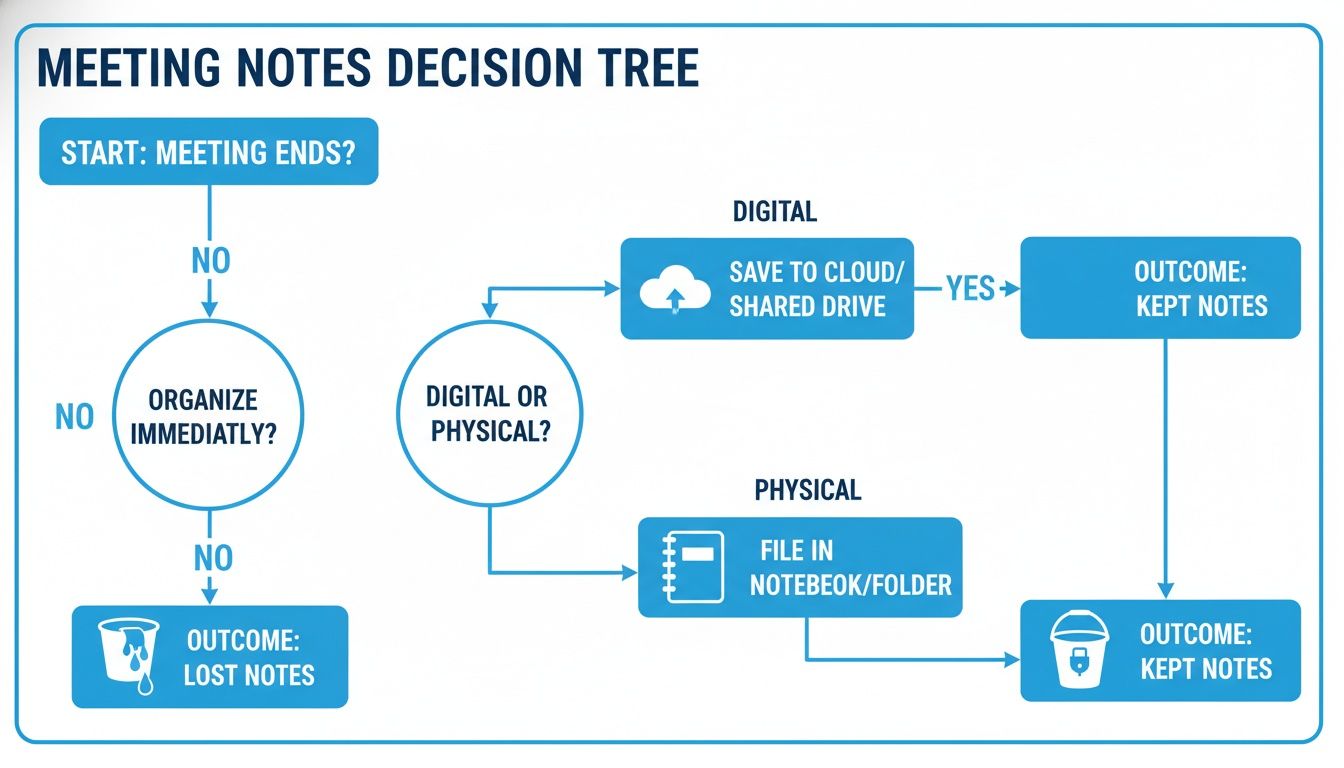
Without a reliable system, valuable insights simply vanish. With the right process, they become a permanent, searchable asset.
A Head-to-Head Comparison
So, how do these two approaches really stack up? The choice you make will directly affect your team's budget, agility, and ability to build on past conversations.
The biggest difference comes down to one thing: objectivity. A human scribe, no matter how skilled, is always providing an interpretation of the meeting. An AI provides a verbatim record, giving the entire team a single source of truth to work from.
To really see the difference, let's put them side-by-side. This table breaks down how a dedicated person compares to an AI tool across the features that matter most.
Human Scribe vs. AI Note Taker Feature Showdown
| Feature | Human Note Taker | AI Meeting Note Taker |
|---|---|---|
| Accuracy | Subjective and prone to error. Captures the gist but often misses nuance due to bias or simply trying to keep up. | Objective and highly detailed. It creates a near-verbatim transcript, capturing the entire conversation without a filter. |
| Speed & Availability | Often slow. Notes need to be cleaned up, organized, and shared manually, which can take hours or even days. | Almost instantaneous. Transcripts, summaries, and action items are ready just minutes after the meeting concludes. |
| Cost | Can be surprisingly expensive. This means paying an hourly rate or, more commonly, dedicating a salaried employee's valuable time. | Very cost-effective. A single monthly subscription usually covers the entire team for a fraction of the cost of one person's time. |
| Scalability | Extremely difficult to scale. Documenting every single meeting with a dedicated person is a logistical and financial nightmare. | Effortlessly scalable. It can record and process every meeting automatically, from quick one-on-ones to company-wide all-hands. |
| Searchability | Poor. Finding a specific detail means manually reading through old documents, assuming you can even find the right ones. | Excellent. Creates a fully searchable digital library of all conversations, making it easy to pinpoint information in seconds. |
In the end, moving from a human scribe to an AI meeting note taker isn't about replacing a person. It's about upgrading a process. You're shifting from a manual, bottleneck-heavy workflow to an automated, scalable system that empowers everyone on the team with perfect recall and complete clarity.
What to Look For in a Great AI Note Taker
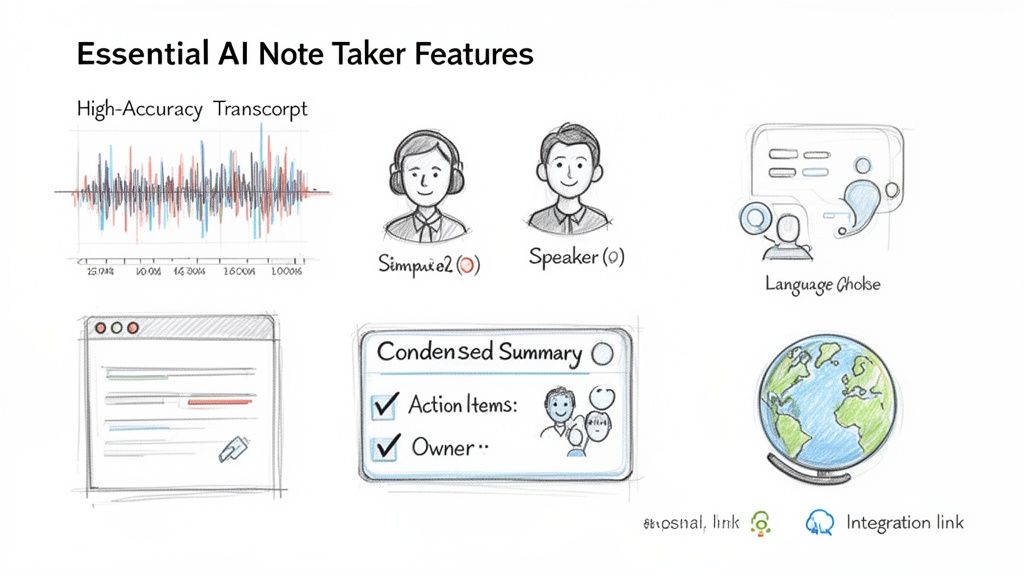
When you start looking for an AI meeting assistant, it’s easy to get lost in feature lists. But based on our experience, only a few features truly separate a fun gadget from a tool that genuinely transforms how your team works.
Think of it like this: everything starts with a high-quality transcript. It’s the raw material. If the transcript is garbage, then any summary or action list built on top of it will be, too. The entire system falls apart.
That's why high-accuracy transcription is the most critical feature, bar none. You need a tool that can consistently deliver a transcript with over 95% accuracy. Anything less just creates more cleanup work for your team, completely defeating the purpose of using an AI in the first place.
From Words to Conversation
A raw transcript is a start, but a wall of text isn't very useful. The real magic happens when the AI adds context and structure, turning that text back into a conversation you can actually follow.
This is where automatic speaker detection comes in. Knowing who said what is fundamental to understanding any meeting. A tool that can accurately label each person's contribution transforms a messy monologue into a clean, easy-to-read dialogue. It's absolutely crucial for accountability and for remembering who owns which decision.
When a meeting note taker can distinguish between speakers, you’re no longer just capturing words; you're documenting the conversation’s DNA. It clarifies commitments and ensures you can attribute ideas to the right person.
This feature is a lifesaver when you have to miss a meeting. You can quickly scan the transcript to see what key stakeholders had to say without having to guess.
Turning Data Into Action
A perfect transcript is still just data. The best tools don't just record what was said—they help you understand what it means and what you need to do next. This is the leap from simple documentation to genuine meeting intelligence.
Here are the key features that provide that intelligence:
AI-Generated Summaries: This is the biggest time-saver of all. Instead of wading through a 10-page transcript, you get a clean, concise summary of the main points. It's perfect for catching up in two minutes or sharing the outcome with people who weren't there.
Action Item Extraction: An effective meeting always leads to action. The smartest AI tools can listen for commitments like, "I'll send that report by Friday," and automatically pull them into a checklist. This simple step is a game-changer for driving accountability.
Multi-Language Support: In a global workplace, meetings aren’t always just in English. A top-tier meeting note taker should be able to transcribe and understand conversations in many languages. The best tools now support over 90 languages, making them indispensable for international teams.
Seamless Integrations: Your meeting notes are useless if they're trapped in another app. Look for a tool that can push transcripts, summaries, and action items directly to your team’s favorite platforms, like Google Docs, Word, or your project management software. A good tool fits into your workflow, it doesn’t create a new one.
Ultimately, picking an AI note taker isn't about recording audio. It's about finding a system that can capture conversations accurately, make them easy to digest, and turn those discussions into clear, measurable actions. If you focus on these essential features, you’ll find a solution that quickly becomes one of your team's most valuable assets.
How to Implement an AI Note Taker in Your Workflow
Bringing an AI note taker into your team's world isn't about flipping a switch. Think of it more like a small but meaningful culture shift. The key is to frame it as a shared upgrade that benefits everyone, not just another tool pushed from the top down. A smooth rollout puts your people first and the technology second.
Your first and most important step is getting the team on board. Before you even sign up for a trial, open up the conversation. Explain why you're exploring this—talk about freeing everyone from the pressure of taking notes, giving back valuable focus, and creating a perfect, searchable memory of every decision made.
This is also your chance to address any worries head-on. People might have questions about privacy or how their role changes. Reassure them that the goal is to make meetings more focused and productive, not to replace anyone. Explain that good tools are built with security in mind and are designed to make their work easier.
Getting Started: A Quick Tutorial
Once you have your team's support, you'll find the technical side is surprisingly simple. Most modern AI note takers are built to be incredibly intuitive, usually taking just a few clicks to get going.
Getting your first transcript is often as easy as dragging and dropping a file. Here’s a look at the typical process:
- Upload Your File: Grab the audio or video file from your computer. Just drag it right into the tool's upload window or click to select it from your drive.
- Provide a Link: Even easier, if your meeting was recorded on a platform like Zoom or Teams, you can usually just paste the meeting link. The AI handles the download.
- Let the AI Work: The tool gets to work processing the file. It’s transcribing the audio, figuring out who said what, and analyzing the conversation. This usually only takes a few minutes, even for an hour-long meeting.
- Receive Your Output: You’ll get a notification when the results are ready. What you get back is a full transcript, a clean summary, and a list of highlights or action items ready for you to review and share.
It's that straightforward. The barrier to entry is almost nonexistent, which is why a quick demo can be the most powerful way to win over any skeptics on your team. For a deeper dive, you might want to explore more ways to get the most from AI for meeting notes in your daily work.
Tips for a Smooth Team Rollout
Getting an AI note taker to stick requires a bit of strategy. A thoughtful launch ensures it’s adopted enthusiastically and doesn't end up as another forgotten subscription.
The best approach? Start small and prove the value fast.
- Run a Pilot Project: Don't try to get the whole company using it overnight. Pick a single, receptive team or a high-priority project to try it out first. Their success story and feedback will be your best asset for a wider rollout.
- Demonstrate Immediate Value: Use the tool for one critical meeting where every detail matters. When you share a perfect transcript and a clean list of action items just minutes after the call ends, the "aha!" moment happens. The benefits speak for themselves.
- Create Simple Usage Guidelines: Put together a simple one-pager that covers when and how to use the tool. It's also a good idea to include a note on etiquette, like always giving a heads-up to external guests that an AI will be transcribing the conversation.
The key is to show, not just tell. When your team sees firsthand how an AI note taker saves them from hours of tedious work and clears up confusion, they'll become its biggest champions.
Best Practices for Getting Actionable Meeting Notes
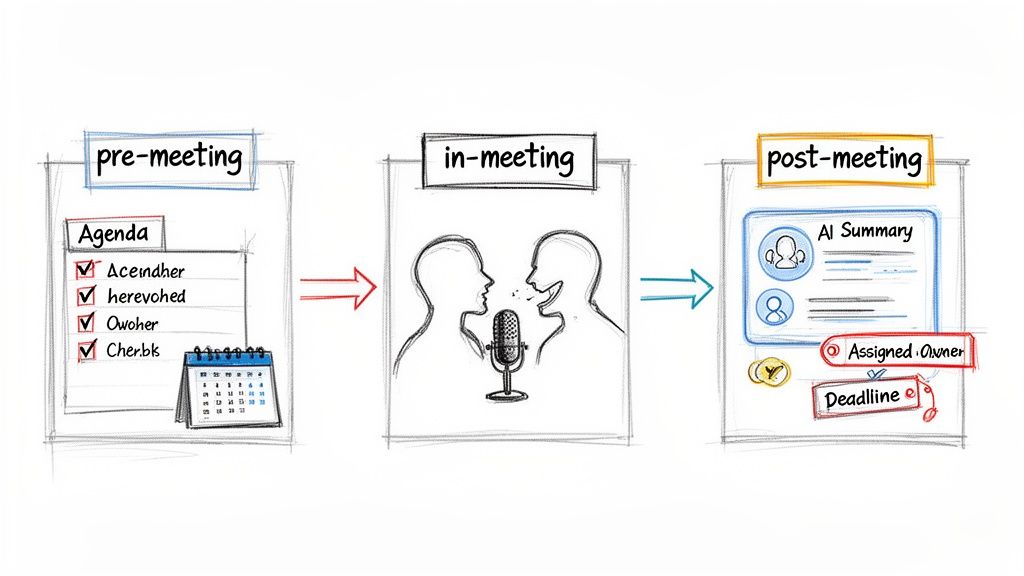
An AI meeting note taker is an incredible asset, but it can't read your mind. The truth is, the quality of the notes, summaries, and action items it produces is a direct reflection of the meeting you run. To get notes that are genuinely useful, you need to set your AI up for success—before, during, and after the conversation.
Think of it this way: your AI assistant is like a highly skilled court stenographer. It will capture what’s said with amazing precision, but it can't invent clarity or structure where there is none. If your meeting is a jumbled mess, your notes will be a jumbled mess. A little discipline goes a long way.
Set the Stage Before the Meeting
Excellent meeting notes don't start when you hit "record." They start with a bit of prep work that provides the structure your meeting note taker needs to make sense of the discussion.
Your single most effective tool here is a clear agenda. This isn't just for your team; it’s a roadmap for the AI. It helps the tool understand the key topics and the intended flow of the conversation, allowing it to better identify and prioritize important points.
A strong agenda doesn't just guide your team's conversation; it guides the AI's understanding. It's the difference between asking the AI to summarize a random chat and asking it to summarize a focused business discussion.
Master Your In-Meeting Technique
Once the meeting starts, your goal is to foster clear communication. This is just good meeting etiquette, but it also drastically improves the AI’s ability to generate an accurate transcript.
The biggest factor is getting people to speak one at a time and avoid talking over each other. While today's AI is pretty good at speaker separation, a clean audio signal always yields better results. If you’re running the meeting, don't be afraid to gently guide the conversation to keep it on track.
Here are a few simple habits that make a huge difference:
- Encourage Clear Speaking: A quick reminder for everyone to use a decent mic and speak clearly can work wonders.
- State Action Items Explicitly: Don't just say, "Someone should follow up on that." Instead, be direct: "David, will you research the new software and report back by Friday?" This gives the AI a concrete task to capture.
- Summarize Decisions Aloud: As you wrap up a topic, state the outcome. For example, "Okay, so we're all agreed. We're moving forward with Option B."
Build Trust Through Transparency
Let’s be honest: AI in meetings brings up valid privacy questions. Recent studies show that many users admit they change how they speak when they know an AI note-taker is present. To get ahead of this, always be upfront.
Start the meeting by announcing that an AI assistant is recording for note-taking purposes. This simple courtesy is quickly becoming standard practice. It builds trust and helps you avoid the "HR nightmares" that can happen when people feel they've been recorded without consent, as a recent Fortune report on the challenges of AI in meetings highlights.
Refine and Distribute After the Meeting
The AI's job is done once it delivers the summary and transcript. Now it's your turn to take that raw output and make it actionable. This final review is quick but essential.
- Verify Action Items: Scan the AI-generated task list. Are they assigned to the right person? Is the task described correctly? Make any necessary tweaks.
- Add Deadlines: The AI is great at catching what needs to be done, but it can’t set deadlines for you. Add a due date to each action item to create real accountability.
- Share with Stakeholders: Distribute the polished summary and action list to all attendees, plus anyone else who needs to be in the loop. This keeps the whole team aligned and moving forward.
Following these steps will help you get the most out of your meeting note taker, turning it from a simple transcription tool into a true productivity engine. For more tips, check out our guide on how to take effective meeting notes and make every meeting count.
Your Blueprint for More Productive Meetings
We’ve covered a lot of ground, from the familiar pain of losing great ideas after a meeting ends to finding a real solution with AI. We've contrasted human note-takers with AI assistants, pinpointed the features that actually matter, and laid out the best practices to get your team on board. Now, let’s tie it all together.
Ultimately, it comes down to a simple truth: you can win back a staggering number of hours and sharpen your team's focus by being strategic about how you document meetings. Getting a great meeting note taker is a fantastic start, but the real magic happens when you build a solid process around it. To foster a truly productive meeting culture, it helps to start with a structured framework, like these proven agenda for more productive daily standups.
A New Standard for Collaboration
It’s time to stop letting valuable conversations and brilliant insights vanish the second the video call ends. The goal is to build a system that captures intelligence, drives action, and genuinely improves how your team works together. This means creating a single source of truth that everyone can actually trust and use.
- Before the meeting: A clear agenda isn't just a formality. It gives the conversation direction and helps your AI note taker generate a much cleaner, more organized summary.
- During the meeting: Get in the habit of speaking clearly. When a decision is made or a task is assigned, say it out loud for everyone—and the AI—to hear.
- After the meeting: Take a few minutes to scan the AI-generated notes. Confirm who owns what, then share the key takeaways with the rest of the team.
Your goal isn't just to record meetings; it's to build a searchable, actionable library of your team's collective wisdom. This is how you stop repeating conversations and start building momentum.
This is your blueprint for smarter meetings, and you can start today. By combining the power of an AI meeting note taker with disciplined habits, you create a workflow that brings clarity and accountability. The result is fewer crossed wires, faster follow-through, and a team that’s perfectly aligned.
To put this into action right away, grab our detailed meeting action items template and start turning your discussions into documented, trackable tasks.
Questions We Hear All the Time About AI Note Takers
Jumping into an AI-powered workflow for your meetings can feel like a big step, and it's natural to have questions. Whenever teams consider new tech, there are always concerns about security, cost, and how well it actually works. You need to know you can trust it before bringing it to your team.
We've gathered the most common questions we get asked day-in and day-out. Our goal is to give you straightforward answers to help you feel confident about bringing an AI assistant into your meeting rooms.
Are AI Meeting Note Takers Secure for Confidential Discussions?
This is usually the first question people ask, and for good reason. The short answer is: it really depends on the tool you choose. Reputable platforms are built from the ground up with privacy in mind. They process your meeting files securely without ever storing them long-term or using your private conversations to train their models. The best companies are always transparent about how they handle your data.
One thing is non-negotiable, though: you absolutely have to tell everyone in the meeting that an AI is recording and transcribing. It’s just good professional etiquette, and it's quickly becoming the standard way to work. This simple heads-up ensures everyone is comfortable and builds trust.
How Accurate Is AI Transcription with Accents or Jargon?
The accuracy has gotten shockingly good. Modern tools, especially those running on engines like Whisper AI, often hit over 95% accuracy. They do this by running the audio through multiple layers of advanced systems that have been trained on an enormous and diverse collection of voices. This makes them surprisingly adept at handling a wide range of accents and speaking styles.
Is any system perfect? Not yet, especially when you start throwing around very specific industry jargon. But the accuracy is more than good enough to create a reliable, searchable transcript of your conversation. The biggest factor? Clear audio. A good microphone and minimal background noise will do more for accuracy than anything else.
An AI meeting note taker can't decipher a mumbled conversation any better than a human can. Clear audio is the single biggest factor in achieving a high-quality transcript.
How Does the Cost of AI Compare to a Human Note Taker?
When you put the numbers side-by-side, it's not even a fair fight. A professional human transcriptionist or note-taker might charge anywhere from $25 to $50 per hour. For a single meeting. If your team meets regularly, that cost skyrockets fast.
AI note-taking tools, on the other hand, typically use a subscription model that’s far more budget-friendly. For what you might pay for just one or two meetings with a human, you can often get a whole month of unlimited or high-volume use for your entire team. This makes AI not just a cheaper option, but a more scalable one. It means you can afford to document every meeting, not just the "important" ones.
Can an AI Tool Reliably Identify Action Items?
Yes, and this is where the magic really happens. Today's AI note takers use Natural Language Processing (NLP) to actually understand the context of the discussion. The AI is trained to listen for trigger phrases that signal a commitment, like "I'll follow up on that" or "Sarah will send the report by Tuesday."
After the meeting, the tool serves up a list of suggested action items for you to check. It's always smart to have a human give them a final once-over to confirm the details. But the AI does all the heavy lifting of finding them in the first place, ensuring those crucial next steps don't get lost and that accountability is baked right into your process.
Ready to stop losing valuable insights and start turning conversations into action? Whisper AI provides instant, accurate transcriptions and AI-powered summaries for all your meetings. Try Whisper AI today and build a searchable knowledge base for your team.


























































































