
How to Write a Transcript The Right Way in 2026
Learning how to write a transcript is no longer just about mind-numbing typing. It’s about transforming your audio and video files from passive recordings into active, searchable assets. Whether you go the old-school manual route or use modern AI tools, a great transcript always boils down to a few key things: accurate text, clear speaker labels, and helpful timestamps.
Beyond Typing What You Hear
Mastering transcription in 2026 is a whole different ballgame than it was even a few years ago. What used to be a tedious, time-consuming task is now a strategic move for creators, researchers, and pretty much any business with audio or video content. A solid transcript makes your work far more accessible, boosts its discoverability on search engines, and opens up a world of repurposing possibilities.
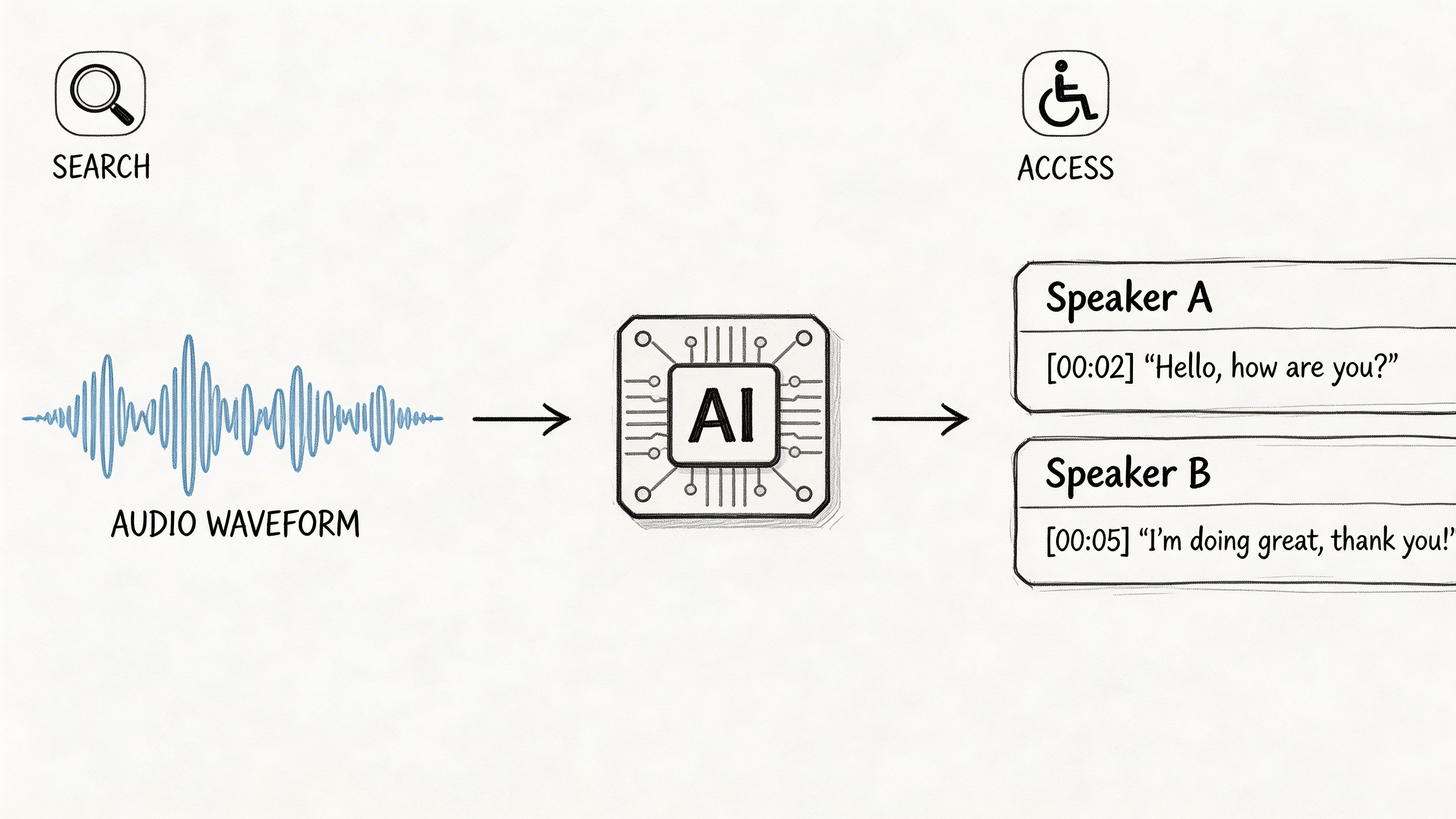
This shift is almost entirely thanks to incredible leaps in AI. From my own experience, I remember how it wasn't uncommon for a professional to spend up to 6 hours transcribing a single hour of audio. Now, AI platforms like Whisper AI have cut that time down by over 90%. We're seeing accuracy rates hit 95% or higher across more than 92 languages. It's a massive change from the practices outlined in historical resources like the Oregon Department of Transportation's guide to transcribing oral histories.
The Core Elements of a Great Transcript
A high-quality transcript is so much more than a wall of text. To make it genuinely useful, you need a few essential components that add context and make it easy to read. Think of these as the fundamental building blocks for a valuable document.
- Accurate Text: This is the absolute foundation. It means getting the words right, including all the tricky industry jargon, brand names, and proper nouns.
- Clear Speaker Labels: When you have more than one person talking, you need to know who said what. Using consistent labels (like "Host" and "Guest" or "Sarah" and "Ben") is non-negotiable.
- Useful Timestamps: Timestamps are your guideposts. Adding them at regular intervals or at the start of each speaker's turn lets you—or your audience—jump straight to a specific moment in the original recording.
- Readability and Formatting: Good punctuation, smart paragraph breaks, and notes for non-verbal cues like
[laughter]or[phone rings]are what separate a professional transcript from a messy text dump.
Effective transcription is really a practical application of Natural Language Processing (NLP). It’s not just about words, but about understanding the structure and nuances of human speech to create a coherent text.
The bottom line is that modern transcription lets you focus on your content strategy instead of getting bogged down in manual labor. Once you get these fundamentals right, you can squeeze every last drop of value from your audio and video content. This guide will show you exactly how to do it, step-by-step.
How to Prep Your Audio for a Flawless Transcription
A truly great transcript doesn't start with the transcription software; it starts with your audio. I can't stress this enough: the quality of your source file is the single biggest factor determining the accuracy of the final text. Getting this right from the beginning will save you from hours of painful editing down the line.
Think of it this way: feeding a transcription tool bad audio is like asking a chef to cook a gourmet meal with rotten ingredients. It just won't work. A high signal-to-noise ratio—meaning the voice is much louder than any background interference—can boost transcription accuracy by a staggering 30-40%.
Your Mic and Your Room Are a Team
Your microphone is your most important piece of gear. Yes, the built-in mic on your phone or laptop will work in a pinch, but a dedicated external microphone is a game-changer. The right one for you depends entirely on where and what you're recording.
- For solo recordings: A USB condenser mic is your best friend. It’s easy to use and captures crisp audio in a quiet, controlled space.
- For interviews: If you have two or more people in a room, give each person their own lavalier (clip-on) mic. This ensures every voice is captured clearly, no matter who is talking.
- For podcasts: Dynamic mics are often the go-to because they're designed to reject off-axis noise, which is perfect for capturing just your voice and not the sound of your computer fan.
I’ve learned from experience that a cheap lavalier mic in a room with a bad echo will often sound better than a fancy studio mic placed across the room. Your goal is always to get the mic as close to the sound source as possible.
Set the Scene for Success
The space you record in is just as critical as the mic you use. Background noise is the enemy of accurate transcription. An air conditioner kicking on, traffic outside, or even a humming light fixture can introduce errors and force the software (or a human) to guess.
Before you hit record, run through this practical checklist:
- Find a quiet spot. Rooms with soft furnishings—carpets, curtains, a sofa—are ideal because they absorb sound and kill echo. There's a reason the walk-in closet is a legendary DIY recording booth.
- Silence everything. Turn off phone notifications, close email tabs, and make sure any pets are in another room. A quick heads-up to family or colleagues can prevent an unexpected interruption.
- One speaker at a time. This is crucial for multi-person recordings. Make a pact: don't talk over one another. Overlapping speech is one of the toughest challenges for any transcription service, AI or human, to untangle.
For an extra layer of clarity, you can even use software like Krisp noise cancellation to clean up background sounds in real-time or before you upload the file.
Choose Your File Format Wisely
The technical format of your audio file also plays a surprisingly big role. MP3s are popular because their file sizes are small, but this comes at a cost. They use a lossy compression, meaning audio data is permanently thrown away to save space. That discarded data might be exactly what an AI needs to differentiate between similar-sounding words.
Whenever you have the choice, record and export your audio in a lossless format like WAV or FLAC. The files will be larger, but they contain a perfect, uncompressed copy of your audio. This gives the transcription engine everything it needs to produce a much cleaner first draft. To go even deeper, check out our guide on the best audio recorder devices and formats in our guide.
Choosing Your Workflow: AI vs. Manual Transcription
When you need a transcript, you’re standing at a crossroads. Do you go with the speed and affordability of AI, or the nuanced accuracy of a human expert? This isn't just about picking a service; it's about choosing a workflow that fits your project's budget, deadline, and quality standards.
Not too long ago, manual transcription was the only game in town. A trained professional would sit down with headphones, listen intently, and type out every word. This method is still around for a reason, but AI-powered tools have completely changed the equation for most people.
Services built on technology like OpenAI's Whisper have made transcription incredibly fast and cheap. For most day-to-day tasks—like turning podcasts into blog posts, getting notes from a team meeting, or creating video captions—an automated service is now the go-to choice.
When Manual Transcription Still Wins
Even with all the progress in AI, there are times when you absolutely need a human touch. These are usually high-stakes situations where even a tiny mistake can have major repercussions. An AI is fantastic at recognizing patterns, but a person understands context, emotion, and intent.
You'll want to stick with a manual transcription service in a few key scenarios:
- Sensitive Legal or Court Proceedings: When you're dealing with a legal deposition, every single word, stammer, and pause can be critical. A human transcriber can capture these subtleties and follow the strict formatting required for legal documents, something an AI often struggles with.
- Audio with Poor Quality: If your recording is a mess—full of background noise, people talking over each other, or speakers with heavy accents—an AI is going to have a rough time. A person can patiently replay a tough section over and over until they get it right.
- Complex or Niche Terminology: While AI is getting smarter, it can still stumble over highly technical jargon. A human specialist, like someone trained in medical or engineering terminology, brings deep domain knowledge that ensures every complex term is spelled and used correctly.
I've always found that the extra cost for a professional manual transcription is money well spent whenever the cost of a mistake is even higher. You just don't take chances with a machine when a landmark court case is on the line.
Why AI Is the New Standard
For the other 95% of transcription jobs out there, AI is the clear winner. The combination of speed, cost, and powerful features is simply too good to ignore. You upload your file, and in minutes, you get a transcript that’s often over 98% accurate (assuming your audio is clean).
Modern AI tools deliver much more than just a wall of text:
- Unbelievable Speed: An AI can churn through a one-hour audio file in less than five minutes. For a human, that same file would take at least four to six hours of focused work. This allows you to process content at a massive scale.
- Serious Cost Savings: AI transcription can cost just pennies per minute, while manual services will run you anywhere from $1.50 to $5.00+ per minute. This makes it accessible to everyone, from students to global corporations.
- Automatic Speaker Labeling: The software can figure out who is talking and automatically label the speakers (Speaker 1, Speaker 2), which saves a ton of editing time on interviews and meetings.
- Precise Timestamps: AI tools automatically insert timestamps, usually by paragraph or speaker change. This makes it incredibly easy to find a specific quote in your original audio or video file.
Getting great results from either method starts with great audio. This infographic shows the four key steps to preparing your audio file for the best possible outcome, which is especially important for maximizing AI accuracy.
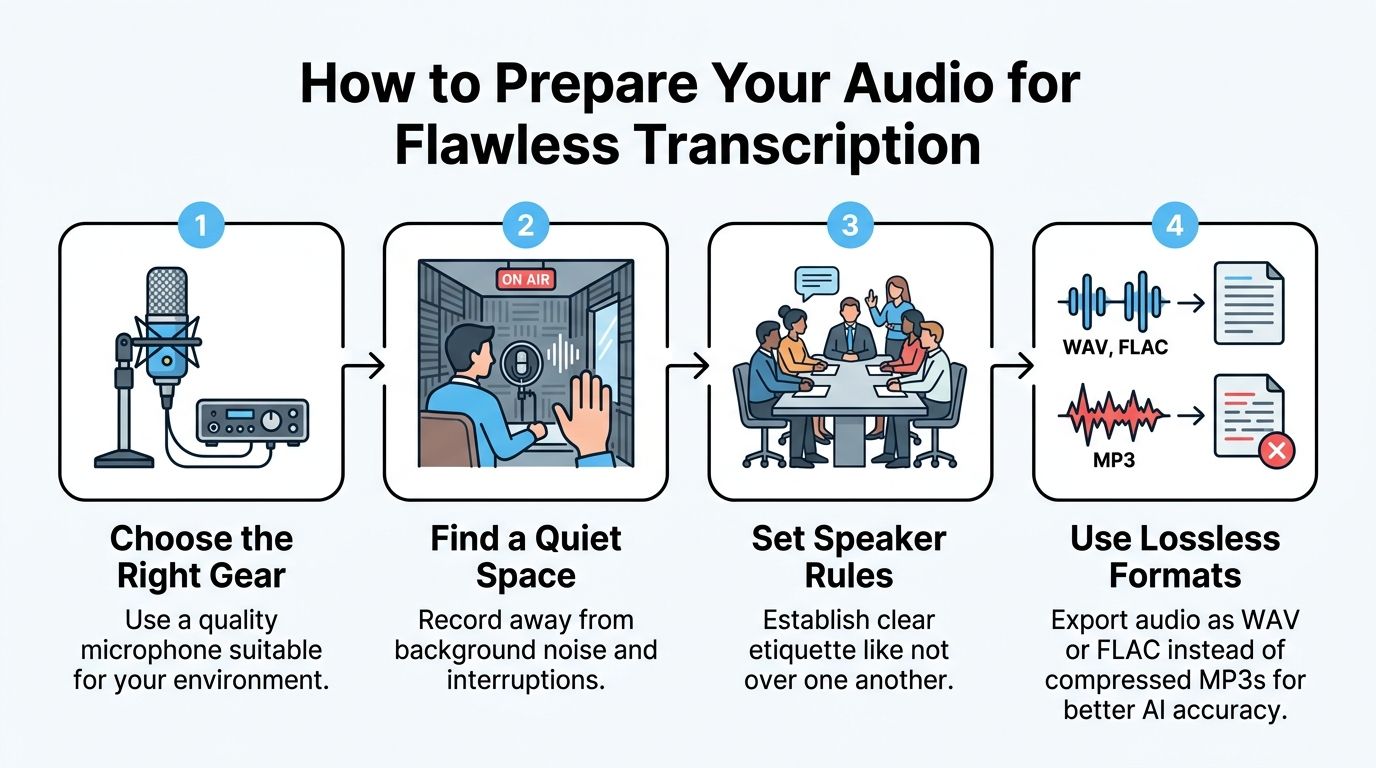
As you can see, everything from your microphone choice to your recording environment lays the foundation for a clean, accurate transcript.
Making the Right Choice: A Quick Comparison
To help you decide which path to take, it’s helpful to see a direct comparison. Think about what matters most for your specific project and use this table to find the best fit.
Manual Transcription vs. AI Transcription
| Feature | Manual Transcription | AI Transcription (e.g., Whisper AI) |
|---|---|---|
| Accuracy | Up to 99.9% with experts; excels with poor audio and accents. | Up to 98%+ with clear audio; struggles with heavy noise. |
| Turnaround Time | Typically 24-48 hours for a one-hour file. | Under 5 minutes for a one-hour file. |
| Cost | $1.50 - $5.00+ per audio minute. | $0.10 - $0.25 per audio minute, or a flat subscription. |
| Ideal For | Legal depositions, complex medical records, heavily accented interviews, and poor-quality audio. | Podcasts, meetings, interviews, video captions, academic research, and content repurposing. |
| Key Features | Human proofreading, specialized formatting, interpretation of non-verbal cues. | Automatic speaker labels, timestamps, summaries, and multi-language support. |
In 2026, writing a transcript is really about knowing how to blend these two approaches. The most efficient workflow I see people using now is a hybrid one: they generate a fast, cheap draft with an AI tool and then have a human editor give it a final polish. This gives you the best of both worlds—machine speed with a human's expert finish.
Making Your Transcript Readable and Searchable: The Formatting Rules That Matter
A raw wall of text isn't a transcript. It's a dead end for your audience and a missed opportunity for search engines. Proper formatting is what breathes life into your text, turning it into a professional, easy-to-navigate document that people and Google actually find useful.
Whether you're typing from scratch or just cleaning up an AI-generated draft, these formatting standards are what separate a high-quality asset from a useless file. Based on my experience preparing countless transcripts, following these rules is non-negotiable.
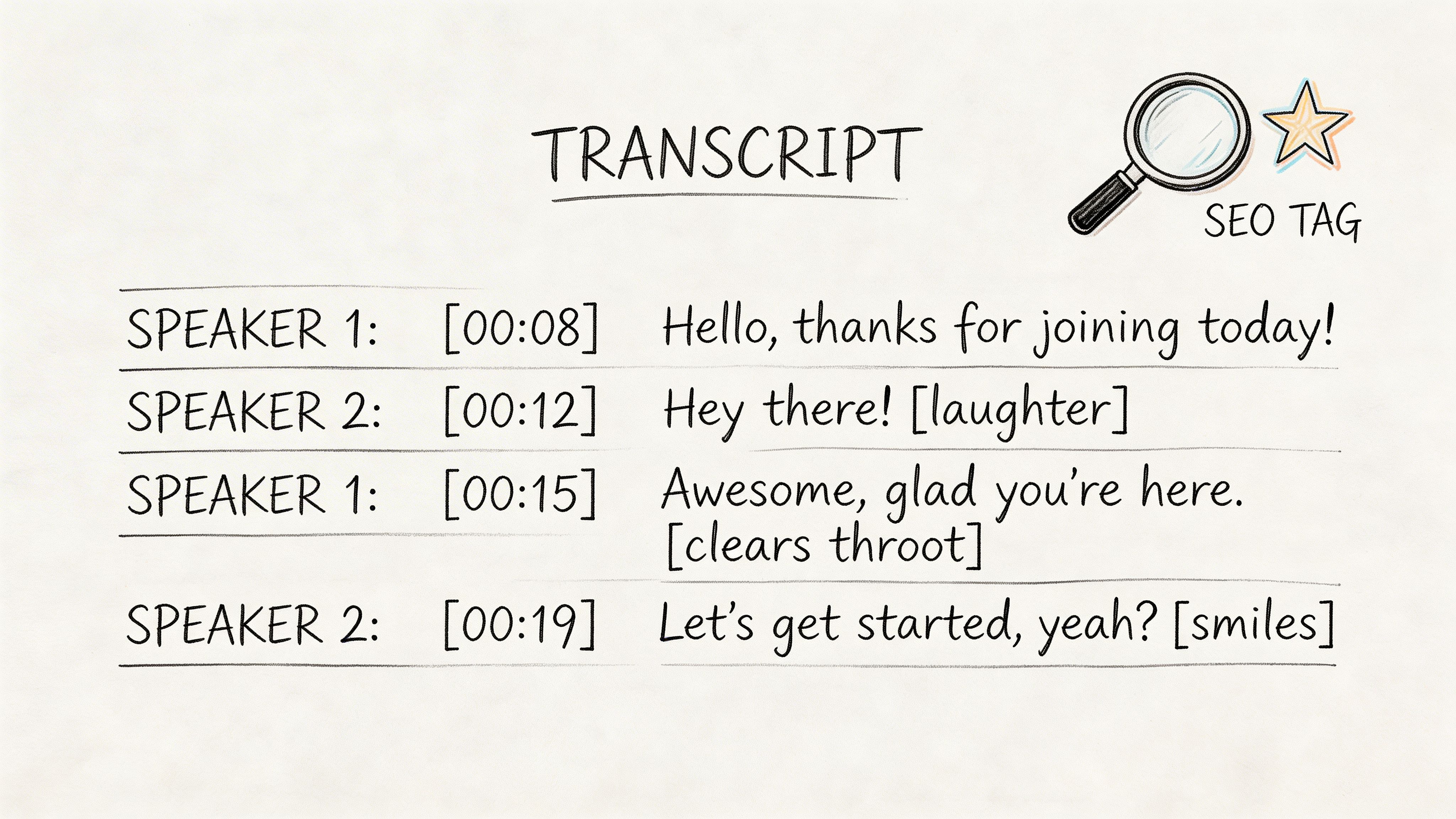
Speaker Labels Are Absolutely Essential
First things first: you have to make it crystal clear who is talking. I've seen countless interview transcripts that are just one long, confusing monologue because no one bothered to label the speakers. A transcript without speaker IDs is basically worthless.
Here are the go-to methods for labeling:
- By Name: Sarah: or David:. This is perfect for interviews and podcasts where the speakers are known. It’s personal and instantly clear.
- By Role: Host:, Guest:, or Interviewer:. This works great for more formal content or when the specific names don't add much value.
- By Number: Speaker 1: and Speaker 2:. This is a solid fallback when you don't know names or roles. Many AI tools, like Whisper AI, start with this, and you can easily clean it up later.
The golden rule here is consistency. Just pick one style and use it from start to finish. If you want to see these different approaches in a real-world document, check out this conversation transcription example.
Use Timestamps to Guide Your Readers
Timestamps are the glue connecting your text to your audio or video. They let users find the exact moment they’re looking for, which is a massive win for user experience. Don't just stick one at the top and call it a day.
For a truly scannable transcript, I always add a timestamp:
- Whenever a new person starts speaking.
- Every 1-2 minutes during a long stretch of talking from one person.
- At the start of a new paragraph to break things up.
A timestamp can be as simple as [00:15:32]. While many tools automate this, it's on you during the editing phase to make sure they're placed logically and actually help break up the text.
It's interesting to see how far we've come. Rigid 19th-century transcription rules gave way to new digital standards. The National Archives once recommended formatting in full lines instead of columns, which they found could boost keyword hits by 300%. Today, skipping timestamps is just as big of a miss for SEO.
How to Handle Pauses, Mumbles, and Background Noise
Real conversations are messy. People laugh, clear their throats, and trail off. Capturing these moments provides crucial context and makes the transcript a more accurate record of the original audio.
Here are the simple conventions the pros use:
- Non-Verbal Sounds: Use brackets to note important sounds like
[laughter],[clears throat], or[phone rings]. You don't need to log every sniffle, only the sounds that add context to the conversation. - Inaudible Speech: If you hit a word or phrase you just can't make out, don't guess. Simply type
[inaudible]and add the timestamp, like[inaudible 00:21:14]. It's always better to be honest than to be wrong. - Filler Words & False Starts: You have a choice to make here. A verbatim transcript includes every single "um," "ah," and stutter. This is vital for legal records or psychological analysis. For most content, however, clean verbatim is the way to go. It removes the fluff for a much cleaner read, which is ideal for podcasts, webinars, and interviews.
This level of detail isn't just for a niche audience; it can significantly impact your content's performance. For example, some YouTube analytics studies have shown that high-quality, well-formatted transcripts can boost video discoverability by as much as 40%. You can read more about these transcription guidelines on the National Archives website to get a sense of their historical weight.
By following these fundamental formatting rules, you turn a simple script into a powerful, searchable tool that serves both your audience and your long-term content strategy.
A Practical Guide to Editing and Reviewing Your Transcript
Let's be honest: no transcript comes out perfect on the first try. Not even with the most advanced AI in 2026. The real magic happens in the editing and review stage, where you turn a solid draft into a polished, professional document you can actually use.
Here’s a technique I’ve sworn by for years: don’t just read the text. Put on your headphones, listen to the original audio at a slower speed (around 0.75x works great), and follow along with the transcript. Your eyes will skim right over mistakes that your ears will catch instantly.
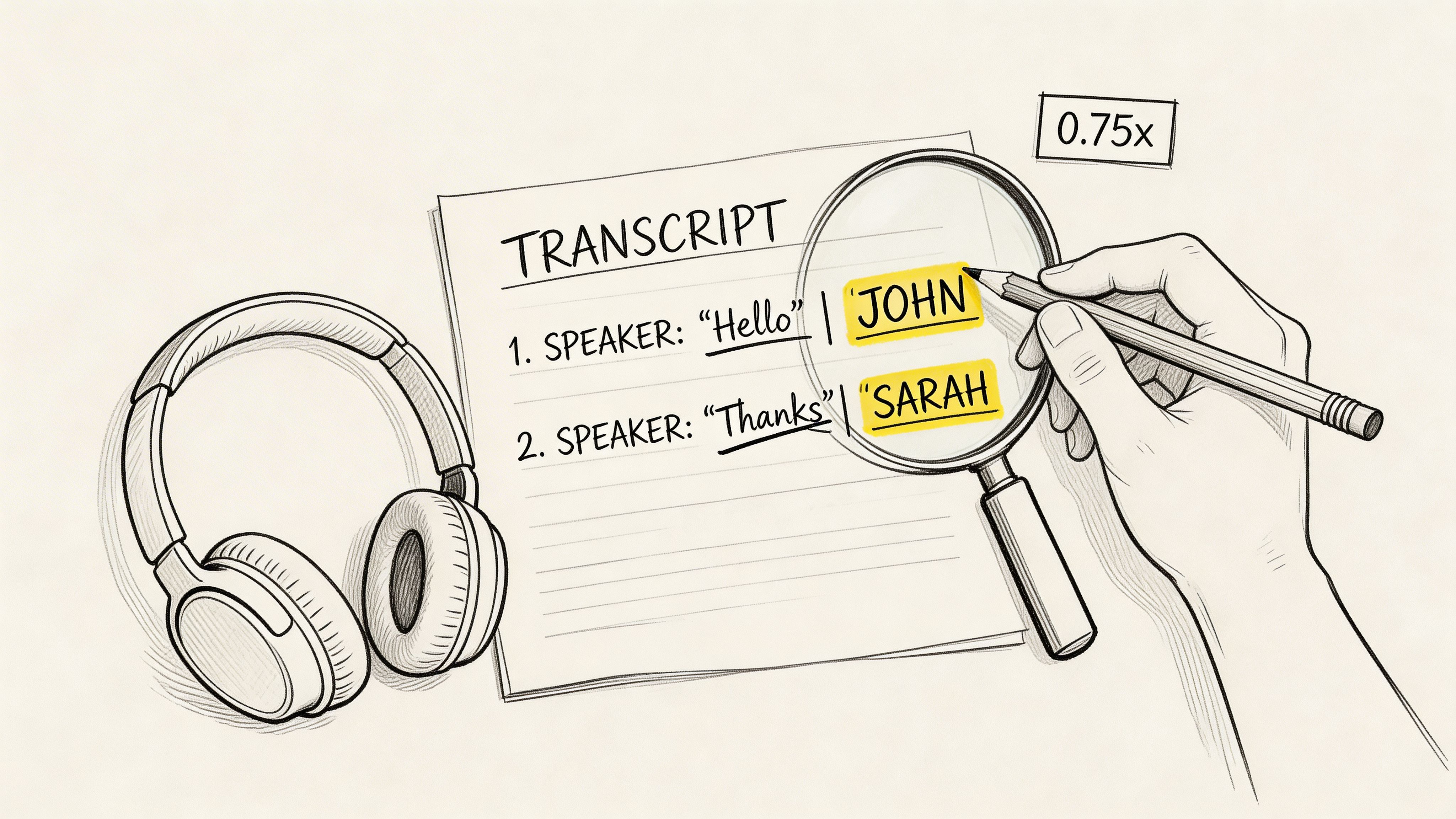
Pinpointing Common AI Errors
While today’s AI is incredibly good, it has some predictable weaknesses. Knowing what they are helps you hunt them down during your review. These are the kinds of mistakes you’ll often miss on a silent read-through.
Keep a sharp eye (and ear) out for:
- Homophones: Words that sound alike but mean different things are a classic AI fumble. We're talking "their" vs. "there," "its" vs. "it's," and "to" vs. "too."
- Proper Nouns and Jargon: An AI might not recognize the CEO's unique last name, your company's internal project codename, or industry-specific acronyms.
- Crosstalk and Low-Volume Speech: When people talk over each other or someone murmurs, the AI can get confused, miss words entirely, or assign a line to the wrong speaker.
Getting speaker labels right has always been essential. I’ve seen oral history guides from the 1980s that stressed just how crucial it is for a readable dialogue. Back then, manual transcriptionists could misidentify speakers in 25-30% of interviews with multiple people. Fast forward to 2026, and an AI like Whisper AI can auto-detect up to 10 speakers with around 98% precision. You can get a sense of transcription's long history in this helpful guide from the Ohio Memory Project.
Making the Most of Your Tool’s Built-in Editor
Thankfully, modern transcription platforms are built for this very process. A service like Whisper AI won’t just hand you a flat text file; it gives you an interactive editor that syncs the audio and text. This is an absolute game-changer for your workflow.
As you listen, you can click any word in the transcript, and the audio will jump right to that spot. This makes fixing a typo or reassigning a sentence to the correct speaker a two-second job. You can quickly correct names, add punctuation for clarity, and tidy up speaker labels without juggling multiple windows or files.
Your goal during the editing pass is to close that last 2% gap—to take a highly accurate transcript and make it 100% reliable. The built-in editor is the bridge that gets you there.
This final quality check is what separates an amateur from a pro. It’s how you create a transcript that is not only accurate but truly useful. By blending a solid proofreading system with smart tools, you ensure a flawless result every time. For a deeper dive into this final stage, check out our guide on the importance of proofreading in transcription.
Common Transcription Questions Answered
No matter how many transcripts you've done, a few tricky situations always seem to pop up. I get asked about these all the time, so I've put together some quick answers for the most common hurdles you'll face.
When you hit a patch of muffled audio or two people start talking over each other, it’s easy to get stuck. Here’s how I handle those curveballs.
What's the Difference Between Verbatim and Clean Verbatim?
This is probably the first big decision you'll make, and it all comes down to what you need the transcript for. The choice between verbatim and clean verbatim really shapes the final document.
Verbatim Transcription: Think of this as the raw, unfiltered audio in text form. It captures everything—every "um," "ah," stutter, and false start. You'll need this level of detail for legal testimony, in-depth research interviews, or usability studies where every hesitation is part of the data.
Clean Verbatim Transcription: This is what you'll use for 95% of projects, like podcasts, marketing interviews, or webinars. It involves intelligently editing out the filler words and repetitions that make text clunky and hard to read. The speaker’s message stays perfectly intact, but it's polished for clarity.
My rule of thumb is simple: If the filler words themselves aren't the data you're analyzing, go with clean verbatim. It creates a far better reading experience for your audience without watering down the speaker's original meaning.
How Should I Handle Multiple Speakers Talking at Once?
Ah, crosstalk. It’s one of the most frustrating things to deal with when transcribing. When two or more people start talking over each other, trying to capture every single word is a recipe for a confusing, unreadable mess.
Your best bet is to focus on the dominant speaker—whichever person's point is clearer or more central to the conversation. Transcribe what they're saying as best you can. Then, to account for the interruption, just add a simple tag like [crosstalk] or [overlapping speech]. This keeps the transcript clean and acknowledges what happened without creating chaos. The goal is clarity, not confusion.
What Do I Do with Inaudible or Unclear Words?
Sooner or later, you'll hit a word or phrase that’s completely indecipherable. Maybe it’s background noise, a heavy accent, or someone mumbling away from the mic. Whatever you do, never guess.
A wrong word is much more damaging to your transcript's credibility than an admission that you couldn't hear something.
The professional standard is to use an [inaudible] tag. To be extra helpful, I always add a timestamp right after it, like this: [inaudible 00:12:45]. This lets anyone reviewing your work jump straight to that spot in the audio and try to figure it out for themselves. It’s honest, accurate, and transparent.
Ready to skip the tedious parts and get a polished draft in minutes? Whisper AI uses advanced artificial intelligence to deliver fast, accurate transcripts complete with speaker labels and timestamps. Stop wrestling with inaudible words and crosstalk—let our technology handle the heavy lifting for you.


























































































