
Bullet Point Generator: A Guide to Perfect Summaries
You've got a podcast episode on one tab, a meeting recording in your downloads folder, a transcript pasted into a doc, and a half-finished summary that still reads like raw notes. That's the moment many start looking for a bullet point generator.
The problem isn't just volume. It's format. Text is easy enough to skim. Audio and video are not. A basic text-only summarizer can clean up an article, but it usually falls apart when the source is a webinar, interview, sales call, lecture, or long team meeting. You first need transcription, then structure, then a summary that's short enough to use and accurate enough to trust.
That's why this category matters now. The modern bullet point generator emerged alongside the wider consumer generative AI wave after 2023, and vendors now present these tools as free, instant utilities, which shows how quickly they've become part of mainstream content workflows, as noted by Rows' bullet point generator overview.
Why a Bullet Point Generator Is Your New Secret Weapon
A bullet point generator solves a simple but expensive problem. People don't just need shorter content. They need content they can act on.
A clean bullet list changes how fast you can work. It helps a marketer turn a transcript into a brief. It helps a producer pull highlights from a video interview. It helps a manager skim a meeting and find decisions, owners, and follow-ups. It also helps when the source is messy, which is most real-world source material.
It's no longer just a formatter
Older tools mostly helped with presentation. They turned paragraphs into lists. The newer generation does more than that. It can identify themes, compress long passages, and shape output into concise bullets that fit a specific use case.
That shift matters if your input isn't already tidy. A transcript from a live event often includes interruptions, repeated phrases, and half-finished thoughts. A useful generator doesn't just shorten it. It finds the signal.
Practical rule: If your source needs listening before it needs writing, you don't need a prettier editor. You need a workflow that can convert speech into structured notes.
The real value is workflow compression
Most users don't wake up wanting bullets. They want outcomes:
- Faster review: skim key ideas instead of replaying a full recording
- Reusable assets: turn one source into notes, outlines, summaries, and action items
- Cleaner handoff: share a short version with teammates who won't open the full file
- More consistent output: summarize every meeting, episode, or interview in a format people can read
If your source material is mostly spoken content, pairing summaries with transcription is the practical move. Teams already using AI note workflows often start there, which is why guides on AI for meeting notes have become so useful in daily operations.
A Unified Workflow for Generating Perfect Bullets
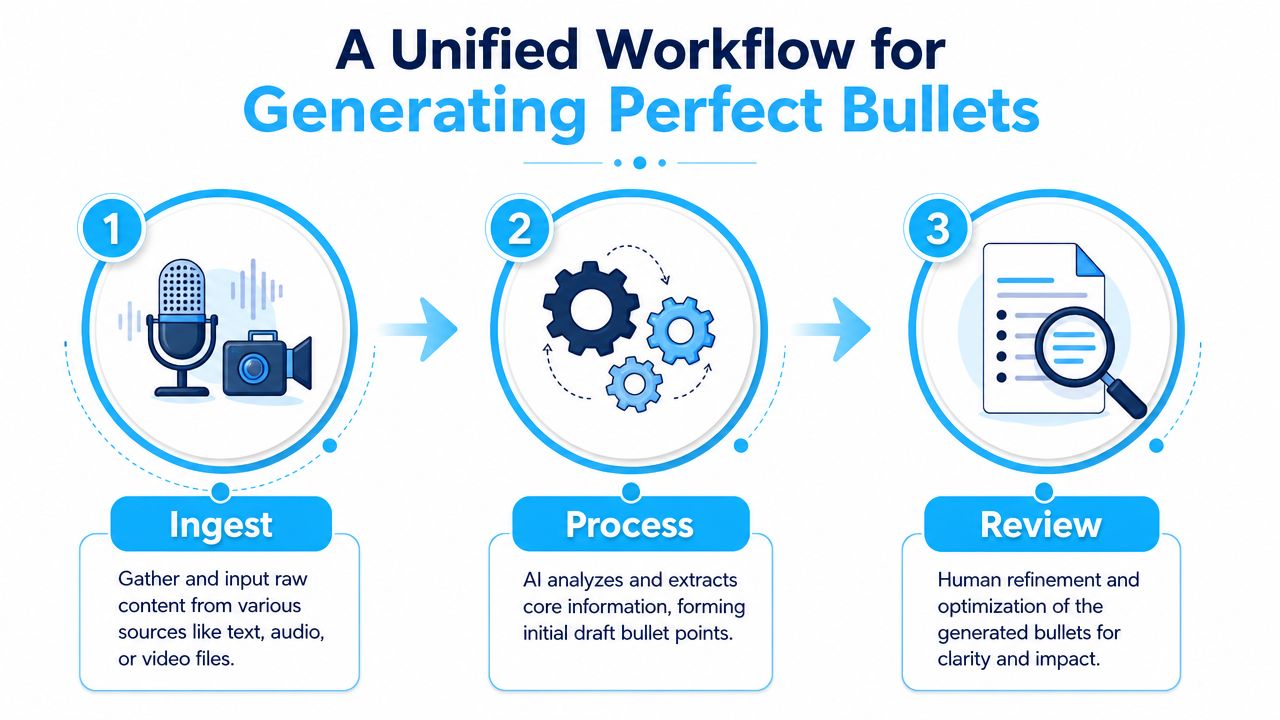
The most reliable bullet point generator process has three parts. Ingest, process, review. That's true whether the source is a pasted article, a resume draft, a call recording, or a long video file.
Ingest the right source, not just any source
Start with the cleanest version of the content you can get. If you already have text, paste it in directly. If you have a file, upload it. If the source is a video or social link, use a tool that can ingest URLs without forcing you to manually copy everything into a document first.
Don't combine unrelated materials in one run. If you drop a webinar transcript, a product brief, and meeting notes into the same prompt, the bullets usually become vague because the model has no clear target. One source, one goal, one output type works better.
A good ingest step also means choosing the right unit of input:
- For articles: use the full text or a clearly defined section
- For meetings: use the transcript, not your rough handwritten notes
- For interviews: keep speaker labels if available
- For resumes: pair the raw experience text with the target job description
Process for relevance, not just compression
The strongest tools don't just shorten text. An expert-grade workflow involves ingesting the source, extracting key entities and metrics with NLP, ranking points by relevance, rewriting them into concise bullets, and letting the user iteratively edit and regenerate variants, as described by SkillSyncer's AI bullet point generator workflow.
That matters because “shorter” is not the same as “better.” A bullet can be brief and still useless.
Use prompts or settings that force intent. Ask for one of these:
- Decision bullets for meetings
- Highlight bullets for content repurposing
- Achievement bullets for resumes
- Research bullets for source review
- Action-item bullets for operational follow-up
Review like an editor
Professional-quality output is produced. Review should answer three questions:
| Check | What to look for | Fix if wrong |
|---|---|---|
| Accuracy | Did the bullet preserve the meaning? | Compare against source text or transcript |
| Usefulness | Can someone act on it quickly? | Rewrite vague bullets into concrete statements |
| Fit | Does the style match the job? | Regenerate with a clearer instruction |
Don't ask the generator for “better bullets.” Ask for “five bullets focused on decisions,” or “rewrite for client-ready meeting notes.”
Summarizing Audio and Video with a Bullet Point Generator
Audio and video are where most workflows break. Spoken content isn't neat. People interrupt each other, repeat themselves, change direction midway through an idea, and bury the useful point under setup. A bullet point generator only works on media if the system handles that mess before summarizing it.

Start with transcription quality
For audio and video, the summary quality is tied to transcript quality. If names are wrong, speakers are merged, or timestamps are missing, your bullet list usually inherits those problems.
That's why media summaries work best when the system can do a few basic things well:
- Detect speakers: useful for interviews, meetings, and panel discussions
- Insert timestamps: useful when you need to verify or clip a moment later
- Handle long files: useful for webinars, podcasts, and lectures
- Preserve sequence: useful when the order of discussion matters
If you routinely summarize recordings, a platform like Whisper AI can transcribe audio and video, detect speakers, add timestamps, and generate bullet-point highlights from long media files or social links. That unified flow is what most text-only generators miss.
What to ask for from a recording
Don't settle for “summarize this audio.” That prompt wastes the structure already present in spoken content. Ask for a format tied to your next task.
For example:
- Podcast episode: key themes, quotable takeaways, segment-by-segment bullets
- Sales call: objections, customer pain points, next steps
- Interview: strongest claims by speaker, timeline of major topics
- Lecture: learning points, definitions, open questions
- Team meeting: decisions, blockers, owners, unresolved issues
With spoken content, bullets are most useful when they separate ideas by purpose, not just by topic.
If your source is video, it also helps to use a workflow designed for media summarization rather than generic chat prompts. A dedicated video summarizer workflow is often better at pulling highlights from long recordings than a plain text utility.
A quick walkthrough helps if you want to see the media-to-summary flow in action:
Clean bullets from messy speech
Speech needs more normalization than writing. Remove filler, collapse repeated points, and separate summary from quotation. If the speaker rambles for three minutes before making a decision, the bullet should capture the decision, not the entire path they took to get there.
For recorded content, the best bullets usually do three things at once:
| Media issue | Bad output | Better output |
|---|---|---|
| Repetition | Lists the same idea in different words | Merges repeats into one clear point |
| Speaker overlap | Attributes a point vaguely | Labels the speaker or marks it as shared discussion |
| Long context setup | Preserves unnecessary preamble | Pulls the actual conclusion or action item |
Refining Raw AI Bullets for Maximum Impact
Raw AI bullets are drafts. Treating them as finished copy is where quality drops.
That doesn't mean the draft is bad. In many cases, it's already useful. The issue is that first-pass bullets often flatten nuance, miss the strongest result, or default to task language. Vendors report that these tools can save 2–3 hours of manual writing time, but they also warn against a common failure mode: producing task lists instead of impact statements. Strong bullets should follow an action + task + quantified result formula, according to The Interview Guys' guide to AI resume bullet generation.
Fix the three most common weaknesses
The first weakness is vagueness. “Helped manage project delivery” says almost nothing. It names activity, not value.
The second is misaligned tone. A summary for internal notes can be blunt and functional. A client recap needs cleaner phrasing. A resume bullet needs proof of impact.
The third is missing evidence. If the source gives you metrics, dates, scope, or outcomes, put them back into the bullet during editing. If the source doesn't provide them, don't invent them.
A polished bullet usually gets shorter and more specific at the same time.
Rewrite task bullets into result bullets
Here's a practical editing pattern that works well:
Weak: Responsible for preparing weekly stakeholder updates
Stronger: Prepared weekly stakeholder updates that clarified project status, risks, and next actionsWeak: Worked on podcast content planning
Stronger: Organized podcast planning notes into topic, guest, and promotion bullets for faster episode productionWeak: Took notes during team meetings
Stronger: Converted meeting transcripts into decision, blocker, and owner-based bullet summaries for team follow-up
The same principle applies outside resumes. For marketing summaries, turn generic bullets into publishable ideas. For internal recaps, turn broad statements into clear operational notes.
Use follow-up prompts to sharpen the draft
The best bullet point generators are interactive. They shouldn't force you to accept the first output. Ask for variations.
Try prompts like these:
- Make these bullets more concise without losing meaning
- Rewrite for an executive audience
- Group these bullets into themes
- Keep the wording natural and less robotic
- Turn task-heavy bullets into result-focused bullets
If the output still feels stiff, a cleanup tool like Humanize AI Text can help smooth wording after you've already checked accuracy. That's useful when bullets read mechanically even though the underlying summary is sound.
Choosing Your Output Extraction vs Paraphrasing
It's often assumed the only question is how short the bullets should be. The important question is what kind of bullets you need.
Some bullets should preserve source wording as closely as possible. Others should rewrite the idea completely for clarity. Most generators don't explain that trade-off clearly, even though it matters across use cases like research, reporting, and marketing, as noted by Documind's discussion of extraction versus summary modes.

When extraction is the right call
Extraction pulls phrases or sentences directly from the source. It's the safer option when wording matters.
Use it when you're working with:
- Interview notes: where exact language may matter later
- Research material: where fidelity matters more than style
- Legal or compliance-adjacent notes: where paraphrasing can shift meaning
- Journalistic review: where you may want to trace every bullet back to source wording
Extractive bullets are often less elegant. That's fine. Their job is preservation.
When paraphrasing works better
Paraphrased bullets rewrite the source into cleaner language. They're easier to read and easier to reuse in presentations, reports, briefs, and content outlines.
Use paraphrasing when you need:
| Goal | Better choice | Why |
|---|---|---|
| Preserve exact meaning | Extraction | Lower risk of altering source intent |
| Improve readability | Paraphrasing | Cleaner, tighter wording |
| Build a content outline | Paraphrasing | Easier to structure and expand |
| Check claims against source | Extraction | Faster to verify line by line |
A hybrid approach is often strongest for audio and video. Keep extraction for quotes, commitments, and sensitive statements. Use paraphrasing for the rest. If you're comparing summary formats across workflows, an automatic summarization tool guide can help frame where each output style fits.
If someone might challenge the wording later, lean extractive. If someone needs to consume the idea fast, lean paraphrased.
Practical Use Cases and Export Workflows
A bullet point generator becomes valuable when the output lands somewhere useful. That final handoff matters more than is commonly assumed.
The category has expanded beyond generic summarizers into more specialized tools for resumes and business documents, including support for uploads like .docx and .pdf plus integrations that export to Google Sheets, Airtable, or Notion, as described by Thunderbit's bullet points generator overview. That tells you where the market has gone. Bullets aren't the final product. They're intermediate assets inside larger workflows.
Three common workflows that hold up in practice
A content marketer records a podcast interview, generates a transcript, then turns it into bullets grouped by theme. Those bullets become a blog outline, social snippets, and newsletter notes. Exporting to Markdown or Google Docs usually works best because the content is heading toward editing.
A journalist uploads an interview recording and asks for speaker-based bullets with timestamps. The exported format depends on the newsroom workflow, but searchable text or a document export is usually more helpful than a polished visual summary.
A team lead summarizes a weekly meeting into decisions, blockers, and action items. In that case, bullets belong in Notion, Airtable, or a shared doc where people can assign and track work.
Bullet Point Strategy by Use Case
| Use Case | Recommended Style | Key Refinement Focus | Ideal Export Format |
|---|---|---|---|
| Podcast to content outline | Paraphrased thematic bullets | Group by topic and trim repetition | Markdown or Google Docs |
| Interview review | Extractive or hybrid bullets | Preserve speaker meaning and timestamps | TXT, Word, or PDF |
| Team meeting recap | Action-oriented bullets | Clarify owners and next steps | Notion, Airtable, or Google Docs |
| Resume drafting | Achievement-focused bullets | Replace duties with outcomes | Word or PDF |
| Research review | Extractive bullets | Maintain factual fidelity | TXT, PDF, or notes app |
Export should match the next action
Choose export format based on what happens next, not what looks neatest.
- Google Docs or Word: best when a person will edit the summary
- Markdown: best for Notion and publishing workflows
- PDF: best for sharing a stable version
- TXT: best for lightweight archives or reprocessing
- Spreadsheet or database export: best when bullets are part of tracking or categorization
The right bullet point generator doesn't stop at summary generation. It should help the output move cleanly into the place where your team already works.
Frequently Asked Questions
Are bullet point generators safe for sensitive files
That depends on the platform, not the category. Before uploading recordings, transcripts, or documents, check how the service handles storage, retention, and access. If you work with confidential material, use a tool with clear privacy language and secure processing practices.
Can these tools handle multiple languages
Some can, some can't. For multilingual audio and video, language support matters as much as summarization quality. Check whether the platform can transcribe the language you work in before you rely on its bullet output.
Are free bullet point generators enough
Free tools are fine for quick summaries and light experimentation. They're often limited when you need long-file handling, better exports, speaker-aware transcription, or more control over output style.
What's the biggest mistake people make
They accept the first draft. The better approach is to generate, review, and refine. That's especially important for media summaries, where transcript quality, speaker context, and missing nuance can affect the final bullets.
Should I use bullets from the transcript or from the video itself
Use the transcript as the working layer, but keep the original media close by when accuracy matters. That makes it easier to verify wording, context, and tone before sharing the final summary.
If most of your source material starts as audio, video, or social clips, Whisper AI is built for that workflow. It converts media into searchable transcripts, adds speakers and timestamps, and helps you turn long recordings into usable bullet-point summaries, notes, and follow-up outputs without forcing you into a text-only process.


























































































