
A Practical Guide to AI Caption Generators
An AI caption generator is a tool that automatically creates text captions for your videos by listening to the audio and converting it into text. From my experience, it's like having a smart assistant that takes care of the tedious typing, saving me hours of manual transcription work so I can focus on creating more content.
What an AI Caption Generator Actually Does
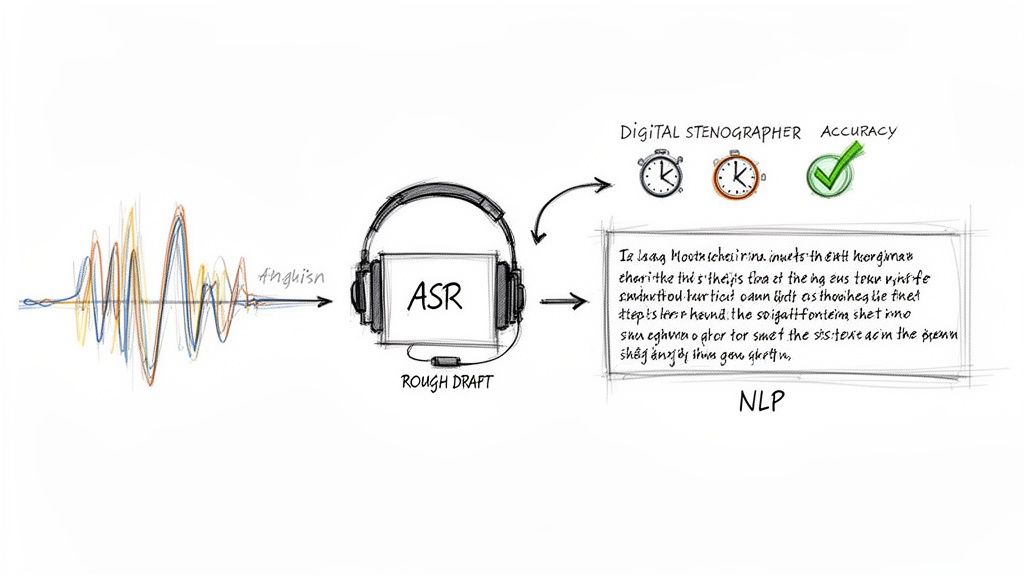
At its heart, an AI caption generator functions like a digital stenographer working at hyper-speed. Instead of you or a human transcriber sitting for hours to painstakingly type out every word, this technology can generate a full draft in minutes. But how does it manage to turn spoken dialogue into accurate, readable captions?
The process isn't a simple, one-step conversion. It relies on a clever combination of two distinct AI technologies working in tandem—one to "hear" the words and another to make sense of them.
The Two Core Technologies at Work
First, the system uses Automatic Speech Recognition (ASR). This is the "listening" part of the process. I've seen how ASR models, trained on vast libraries of audio, learn to pick out phonemes, words, and full sentences from different speakers, accents, and even noisy environments. The output is a raw, unpunctuated stream of text—a rough first draft.
Then, Natural Language Processing (NLP) steps in to handle the "understanding." This is where the real refinement happens. NLP algorithms analyze that raw text, adding essential punctuation, fixing capitalization, and structuring the words into logical sentences. It's what turns a messy wall of text into something people can actually read and understand. Many modern AI Builder tools lean on similar machine learning models to interpret complex content and make it useful.
By combining ASR for transcription and NLP for refinement, an AI caption generator delivers text that captures not just the words spoken but also their intended meaning and structure.
It’s no surprise that this technology is taking off. The market for AI-powered subtitle generators was valued at USD 817.6 million in 2025 and is expected to explode to USD 18,225.7 million by 2035. That’s a massive 36.4% compound annual growth rate, fueled by creators and businesses finally having an efficient way to make their content accessible. This shift away from manual captioning is a game-changer. For a closer look at the fundamentals, our guide on what closed captioning is and why it matters is a great place to start.
Manual vs AI Captioning at a Glance
When you put the old method side-by-side with the new, the contrast is stark. From personal experience, the table below breaks down exactly why so many creators like me are making the switch to an AI caption generator.
| Feature | Manual Captioning | AI Caption Generator |
|---|---|---|
| Speed | Hours to days per video | Minutes |
| Cost | $1.50 - $5.00+ per minute | A fraction of the cost or included in a subscription |
| Scalability | Difficult to scale; limited by human resources | Effortlessly handles large volumes of content |
| Efficiency | Repetitive and time-consuming | Frees up creators to focus on new content |
Ultimately, the choice comes down to speed, cost, and scale. While manual captioning was once the only option for high quality, today's AI tools have closed the gap, offering a powerful and efficient alternative for the fast-paced world of content creation.
Why Accurate Captions Are Critical for Growth
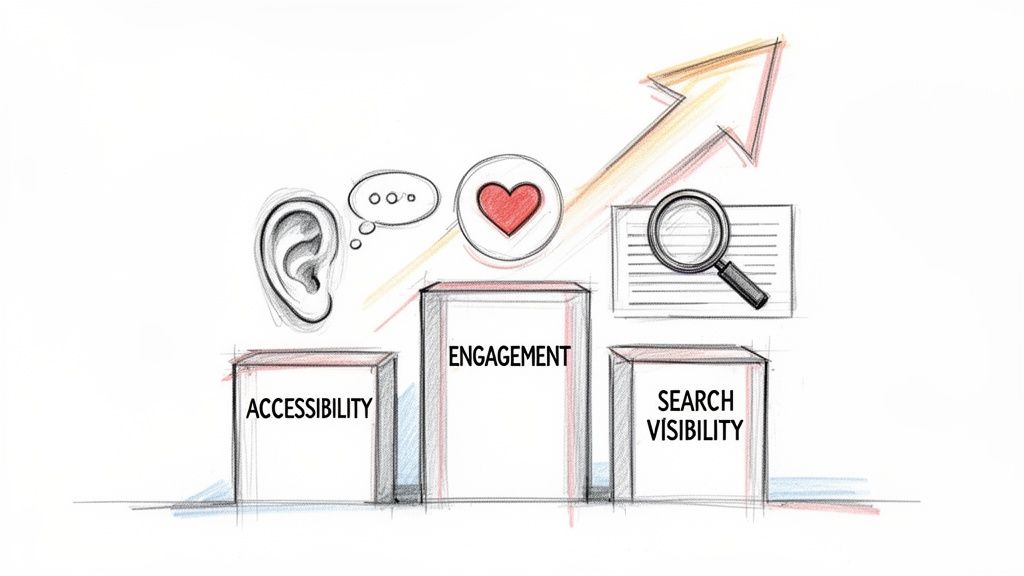
It's easy to get caught up in the cool tech behind an AI caption generator, but where the real value lies is in the tangible growth it brings to your content. Adding accurate captions isn't just a final polish; it's a strategic move that pays dividends in three key areas: accessibility, audience engagement, and search visibility.
If you think of captions as a minor add-on, you're missing the bigger picture. In my experience, they’ve become a fundamental part of a smart content strategy, helping connect with audiences and unlock opportunities that would otherwise be out of reach. Skipping them means leaving growth on the table.
Broaden Your Reach with Accessibility
The first and most direct benefit of accurate captions is making your content accessible to a wider audience. This isn't just a niche advantage; it opens your videos to a massive group of people who depend on text to understand your message.
There's a reason accessibility is a major market driver. An estimated 80% of deaf users rely on captions to watch video content. For any business, this is more than just good practice. Legal standards like the Americans with Disabilities Act (ADA) and Web Content Accessibility Guidelines (WCAG 2.1) often require captions for digital media. Failing to comply can result in hefty fines—up to $75,000 per violation—making accessibility a true business priority. You can dig deeper into this growing market on 360iResearch.
Captions transform your video from an auditory-only experience into a universally accessible piece of content, ensuring your message can be understood by anyone, regardless of their hearing ability or viewing environment.
Boost Engagement in a Sound-Off World
Think about the last time you scrolled through your social feed in a quiet office or on public transport. The reality is, a huge portion of video is watched with the sound off, especially on platforms like Instagram, Facebook, and LinkedIn. Without captions, your message is completely lost.
This is where accurate captions become a powerful tool for engagement. They grab attention immediately and let viewers follow along without audio, which dramatically impacts how long they stick around. The platforms themselves have noticed this trend.
- Increased Watch Time: Videos with captions consistently hold viewers' attention longer because people can follow the narrative silently.
- Higher Completion Rates: Viewers are far more likely to watch a video to the end if they can read what's being said, even when they're distracted.
- Improved Ad Performance: For social media managers, I've found that captioned video ads almost always outperform their non-captioned versions, leading to a much better return on ad spend.
Unlock Powerful SEO Benefits
One of the most overlooked advantages of using an AI caption generator is the significant boost it provides to your search engine optimization (SEO). Search engines like Google can't "watch" your video to understand its content, but they excel at reading text.
When you add a caption file, you're essentially handing search crawlers a full, word-for-word transcript of your video. Every keyword, topic, and important phrase you mention becomes indexable. This turns your video from an opaque "black box" into a text-rich asset that can start ranking in search results, driving organic traffic long after you hit publish.
How Professionals Use AI Captions Every Day
So, we've covered the "what" and "how" of the technology. But what does this look like in the real world? An AI caption generator isn't just a neat piece of tech; it's a practical tool that people are putting to work every single day.
For professionals under constant pressure to produce content, these tools are a game-changer. They aren't just adopting AI for convenience—it's fundamentally changing how they create and distribute their work. Let's look at how.
YouTubers and Podcasters Expanding Their Reach
Think about a podcaster who just finished a fantastic one-hour interview. In the past, manually captioning that episode would have been a full day's work. Now, my workflow looks completely different.
I upload the final video to an AI tool, and within a few minutes, I have a full, time-stamped transcript. From there, the magic really happens:
- Spot the Highlights: I can quickly scan the text to find the most powerful quotes, insightful questions, or entertaining stories.
- Clip the Best Moments: Using the timestamps, I can isolate 10-15 compelling segments, each about 30-60 seconds long—perfect for social media.
- Add Captions and Export: With a few clicks, each clip is exported as a new video with perfectly synced, burned-in captions, ready for Instagram Reels, TikTok, and YouTube Shorts.
Just like that, a single one-hour episode becomes more than ten pieces of individual content, all optimized for the silent-scrolling world of social feeds. What used to be a week of tedious editing can now be done in less than an hour.
Social Media Managers Boosting Ad Performance
Every social media manager knows the struggle: capturing attention in a crowded, sound-off feed. Captions aren't just a "nice-to-have" for video ads anymore; they're absolutely essential for getting results.
When a new campaign video lands on their desk, speed is everything. Instead of waiting on a freelancer or typing captions by hand, they run the video through an AI tool for instant results. This allows them to quickly test different versions of the ad, maybe with slightly different on-screen text, to see which one performs best.
The outcome? Higher engagement, better return on ad spend, and more time to focus on strategy. It's no surprise that major platforms, like those HubSpot details in its guides, are integrating AI to make content creation faster.
Business Teams Creating Searchable Knowledge
How many great ideas or crucial action items have been lost the moment a Zoom call ends? It's a universal problem. Smart teams are now using AI caption generators to create a permanent, searchable archive of their meetings.
By transcribing every virtual meeting, teams build an internal knowledge base. A new hire can search for "Q3 marketing budget" and instantly find the exact moment it was discussed weeks ago.
This simple workflow ensures nothing falls through the cracks. Every decision, deadline, and assigned task is documented and easy to find later. It frees people from having to be the designated note-taker and keeps the entire team aligned and accountable.
Educators Making Learning More Accessible
For teachers and professors, captioning lectures is a powerful way to support every student. An instructor can record their weekly lecture and run it through an AI caption generator to get a full transcript.
This transcript immediately makes the material accessible for students with hearing impairments. But the benefits go further—all students can use the transcript as an instant study guide, letting them search for key terms or review concepts without having to scrub through the entire video. It’s a small step for the educator that makes learning more flexible and effective for everyone.
How to Choose the Right AI Caption Generator
With so many AI captioning tools popping up, how do you actually pick the right one? It’s easy to get overwhelmed by all the options, but the secret isn't just looking at the price tag. Based on my experience testing these tools, the best one is what fits your specific workflow. You need to look at a few core features to find a platform that genuinely saves you time and delivers professional-grade results.
Think of it like choosing the right tool for a job. You wouldn't bring a sledgehammer to hang a picture frame, and you wouldn't use a basic, free app for a high-stakes global marketing campaign. It’s all about matching the tool's power to your project's needs.
Evaluate Accuracy and Language Support
The absolute most important feature is accuracy. If an AI spits out captions riddled with errors, you'll spend more time fixing them than you would have spent just typing them out yourself. That completely defeats the purpose. Look for tools that openly state their accuracy rate, ideally aiming for 95% or higher on clean audio.
Of course, real-world audio is rarely perfect. Background noise, music, and different accents can all trip up an AI. That's why a good, intuitive editing interface is non-negotiable.
Just as crucial is language support. If you're creating content for a global audience, your captions need to keep up. A generator that can accurately transcribe and translate multiple languages and dialects is a must. For instance, a platform like Whisper AI supports over 92 languages, making sure your message connects with viewers no matter where they are.
A top-tier AI caption generator should provide a high-quality first draft that only requires a quick proofread, not a complete rewrite. This blend of AI speed and human oversight is the key to an efficient workflow.
Look for Customization and Integration
Your brand has a specific voice and vocabulary, and your captions should reflect that. True customization goes beyond just fiddling with fonts and colors. It means having the ability to create a custom vocabulary. This lets you teach the AI to correctly spell your company's name, industry-specific jargon, or unique product names.
You also need to consider how a tool will fit into your day-to-day work. Does it integrate with the platforms you already use? Direct connections to YouTube, Google Drive, or your video editor are huge time-savers. Seamless integrations get rid of the clunky, old-school process of downloading a file from one place just to re-upload it to another. If you're building a more efficient workflow, you might also want to explore other AI tools that help content creators.
AI Caption Generator Evaluation Checklist
When you're comparing different AI captioning tools, it helps to have a clear checklist. This ensures you're evaluating each option based on the features that truly matter for producing high-quality, accessible content.
Security, in particular, should never be an afterthought, especially if you're working with sensitive client videos or unreleased content. Always go with a provider that has a transparent privacy policy explaining exactly how your data is managed. Secure processing ensures your files are kept private and aren't used for anything else.
Use this checklist to systematically compare your options.
| Feature | Importance | What to Look For |
|---|---|---|
| Accuracy Rate | High | 95%+ accuracy on clear audio, with a reliable editor for corrections. |
| Language Support | High | Broad support for multiple languages, accents, and dialects. |
| Customization | Medium | Ability to add custom vocabulary and edit caption styling. |
| Integrations | Medium | Connections with platforms like YouTube, Google Drive, and video editors. |
| Security | High | Secure, private processing and a transparent privacy policy. |
By focusing on these five areas, you can move past the marketing hype and choose a tool that will become a reliable asset for your content creation process.
See How Whisper AI Works in a Real Workflow
It’s one thing to talk about the theory behind an ai caption generator, but it’s another to see it in action. Let's set aside the sales pitch and walk through a real, practical example of how a tool like Whisper AI can completely change your content creation process. We're not talking about minor tweaks; this is a fundamental shift in how you get work done.
The entire process is designed to be straightforward, taking you from a raw media file to a finished, accessible asset in just a few minutes. It all begins with getting your content into the system.
Step 1: Upload Your File
Forget about wrestling with file conversions or worrying about compatible formats. A good tool works with what you have. With Whisper AI, you can just drag and drop your audio or video file right onto the dashboard.
Even better, if your content is already hosted online—say, a YouTube video or a social clip—you can simply paste the link. The system takes it from there, grabbing the media directly from the source so you don’t have to download a thing. That kind of flexibility is what a smooth workflow is all about.
Step 2: Let the AI Do the Heavy Lifting
Once your file is in, the AI takes over. This is where all the tedious work happens automatically in the background. Whisper AI immediately starts working on several tasks at once:
- Generates Accurate Captions: It transcribes the audio with impressive precision to create a working draft.
- Identifies Speakers: If multiple people are talking, the AI automatically detects and labels them (e.g., Speaker 1, Speaker 2).
- Adds Timestamps: Every word and phrase is perfectly synced to the exact moment it’s spoken.
As you can see, a clean interface organizes all the AI's output, making the entire conversation easy to follow. The clear separation of speakers and precise timing turns what was once a jumbled conversation into a structured, usable document.
Step 3: Review and Export Your Content
In just a couple of minutes, a full transcript is ready for you. You can quickly scan the text, make any small adjustments needed in the built-in editor, and then export it in whatever format you need. Whether you want a PDF for your records, a Google Doc for team collaboration, or an SRT file for your video editor, it’s all just a click away.
For video creators, this is a huge time-saver in post-production, a point often highlighted in guides like the one on Mastering Subtitles in Premiere Pro. But modern tools offer so much more than just a transcript.
Think about it: with features like AI-generated summaries and bullet-point highlights, you can transform a dense, 60-minute recording into a bite-sized, shareable summary in seconds. This makes it incredibly easy to repurpose your long-form content for social media posts or internal updates with almost no extra work.
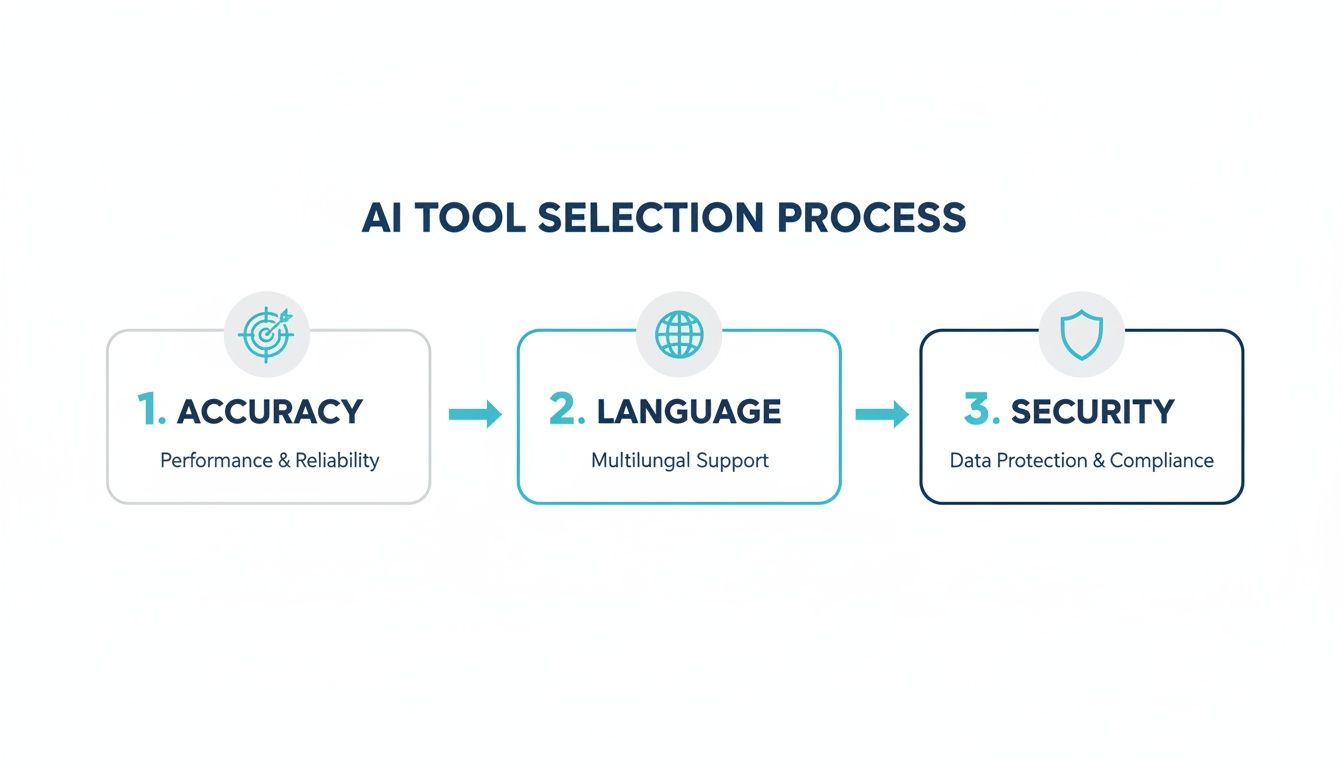
When you choose a tool, focusing on these three pillars—accuracy, language support, and security—ensures you’re getting something that’s not only fast but also reliable and safe for your content. By showing its value in a real workflow, Whisper AI proves it’s more than just an AI caption generator—it's a complete content repurposing engine.
To see it for yourself, check out our full guide on how to use Whisper AI for your own projects.
Common Questions About AI Caption Generators
Alright, so you're thinking about diving into AI captioning. It's totally normal to have a few questions swirling around before you jump in. Getting clear on the details—like accuracy, security, and specific features—is the best way to feel confident you're picking the right tool for the job.
Let's walk through some of the most common questions I hear from creators and businesses.
How Accurate Are Modern AI Caption Generators?
I get this question all the time. The short answer is: surprisingly accurate. Top-tier tools are now hitting 95-99% accuracy for clear audio without a ton of background noise. For most videos or podcasts, that's more than good enough to get a polished result with very little fuss.
Of course, no AI is perfect. Heavy accents, people talking over one another, or industry-specific jargon can trip it up. The best way to think about it is that the AI gives you a fantastic first draft. A quick proofread is all you need to catch any minor errors, which is a world away from transcribing everything from scratch.
Think of it less as a finished product and more as an incredible head start. It turns a task that takes hours into a quick five-minute review.
Can an AI Tool Handle Multiple Speakers?
Yes, and this is where the technology really starts to feel like magic. Any good AI caption generator is built to handle conversations, which is a non-negotiable feature for interviews, podcasts, panel talks, or meeting recordings.
These platforms use something called speaker detection (or diarization) to figure out who is talking and when. Instead of getting a giant, confusing wall of text, your transcript is automatically broken up by speaker. It might label them "Speaker 1" and "Speaker 2" initially, but you can easily go in and pop in the real names.
Is My Content Secure with an Online Service?
This is a perfectly valid concern, especially if you're working with sensitive client work or content that hasn't been released yet. Reputable platforms take security very seriously.
Look for services that use encrypted connections for all uploads and have clear, strict privacy policies. The best ones will state outright that your files are yours alone and won't be stored long-term or used for anything other than generating your captions. Before uploading, just take a minute to read their security or privacy page. It’s a simple step that provides a lot of peace of mind.
Are Paid AI Caption Tools Worth It?
While a free tool might work for a quick, one-off personal project, a paid subscription is one of the smartest investments a serious creator or business can make. You're not just paying for transcription; you're paying for a better, faster workflow.
Paid platforms almost always give you:
- Higher Accuracy: They run on more powerful AI models, which means cleaner text from the start.
- Advanced Features: This is where you get game-changers like speaker identification, custom vocabularies for jargon, and even AI-powered summaries.
- Better Support: No frustrating limits on video length or file size.
- Enhanced Security: You get robust privacy protections for your content.
For anyone who creates content on a regular basis, the time saved and the professional polish you get make a paid AI caption generator an easy decision.
Ready to see what this looks like in action? Discover how Whisper AI can give you fast, accurate, and secure captions in just minutes. Try Whisper AI today and turn your videos and podcasts into accessible, searchable, and shareable assets.


























































































