
Convert Audio to Text Spanish Accurately
You've got a Spanish recording that matters. Maybe it's a podcast interview with two guests talking over each other. Maybe it's a customer testimonial recorded in a café. Maybe it's field research with one speaker from Mexico, another from Spain, and a few English phrases sprinkled in because that's how people talk.
At that point, audio to text spanish stops being a simple conversion job.
What you need isn't just text. You need a transcript you can trust enough to caption a video, pull quotes from, hand to an editor, or search later without wondering whether the software turned a product name into nonsense. That's where most quick tutorials fall apart. They assume clean dictation. Real Spanish audio is rarely that cooperative.
I've found that good transcripts come from a workflow, not a button. Tool choice matters, but the bigger difference comes from how you prep the file, how you configure the transcription pass, and how seriously you take review.
Beyond Conversion The Quest for Accurate Spanish Transcripts
A producer sends over a 40-minute interview recorded in a busy restaurant. One speaker is from Bogotá, the other from Madrid. They interrupt each other, switch to English for product terms, and drop their voices when the conversation gets sensitive. The first transcript pass looks readable until you try to cut captions from it. Then the weak spots show up fast. Names are off, speaker turns are misassigned, and the quote you needed most no longer matches the audio.
That gap matters. A Spanish transcript can look clean on the page and still fail in production.
What breaks transcription quality
The main problem is not conversion. It is mismatch between real speech and what the model was trained to handle well. Spanish interviews in the wild include dialect shifts, clipped endings, borrowed English terms, room echo, and crosstalk. Any one of those can lower accuracy. In combination, they create the kind of error that slips past a quick skim.
My rule is simple. If the transcript will only support internal research or rough logging, a strong AI draft is often enough. If it will feed captions, quoted copy, legal review, publish-ready subtitles, or multilingual deliverables, plan on line-by-line review by someone who knows the speakers, the topic, and the variety of Spanish being used. A useful framework is to compare Spanish transcription services for AI and human review before choosing a workflow.
Three failure points show up constantly in Spanish media work:
- Dialect and accent variation change vowel clarity, pace, and vocabulary. A model may hear a plausible word, just not the right one.
- Code-switching breaks context. English brand names, acronyms, and technical phrases often get rewritten into Spanish words that sound similar.
- Noise and overlap hide consonants and speaker boundaries. That is where attribution errors start, which are often harder to catch than a misspelled noun.
One more trade-off gets overlooked. Spanish transcription quality is not only about word accuracy. It is also about whether the transcript keeps the meaning intact under editing pressure. If an editor cannot trust the speaker labels, timestamps, or phrasing around a quote, the transcript stops being a working asset and becomes something that needs repair before anyone can use it.
What a reliable transcript includes
A transcript that holds up in production usually has a few basic features:
- Consistent speaker identification
- Timestamps at sensible intervals or at topic shifts
- Verbatim handling where nuance matters, with light cleanup where readability matters more
- Flagged uncertainty on names, slang, and inaudible sections instead of silent guessing
That last point is a professional habit. Good systems and good reviewers mark uncertainty. Bad ones invent confidence.
Teams polishing AI drafts for publication sometimes also standardize grammar, punctuation, or readability with tools such as Humanize AI Text, but cleanup only helps after the transcript matches the audio. Accuracy comes first. Style fixes come second.
Choosing Your Transcription Method AI vs Human Services
Before you run anything, decide what kind of transcript you need at the end. That decision saves more time than any software trick.
When AI is enough
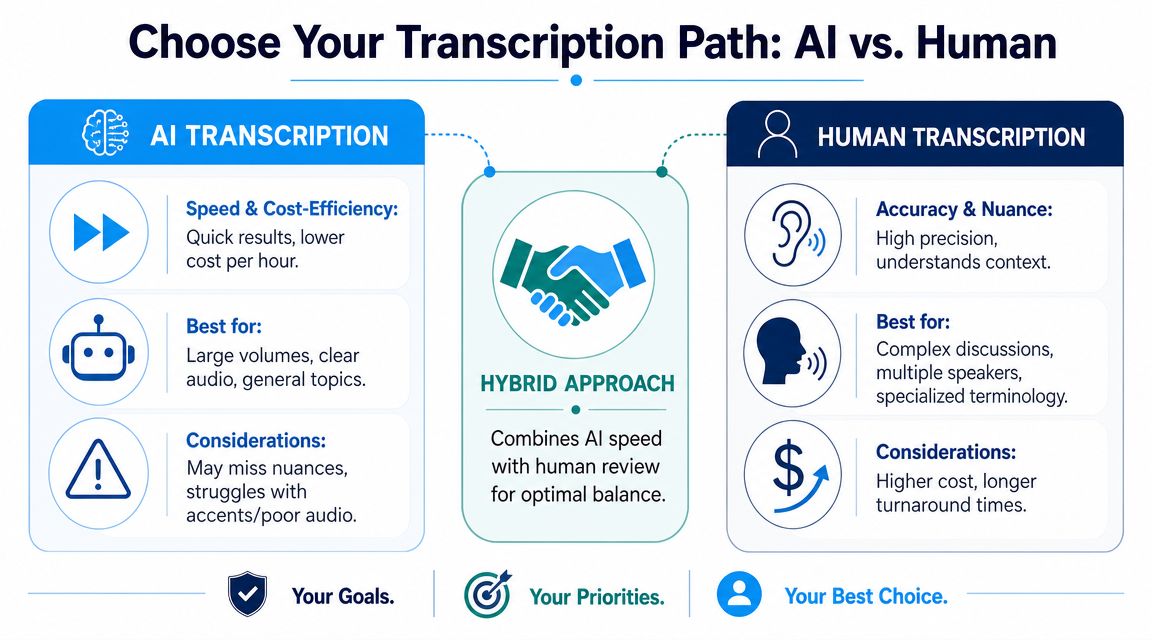
Automated transcription is a good fit when the transcript is mainly a working draft. That includes internal notes, content research, rough quote extraction, and first-pass captions that will still get edited.
For Spanish production use, professional human transcription is commonly positioned around 99% accuracy, while automated transcription is typically cited in the 85% to 99% range depending on audio quality and service. The same guidance notes that strong regional accents can reduce accuracy by 5% to 15% in some cases (Brass Transcripts on Spanish transcription accuracy).
That range tells you something important. AI can be very good, but its weakest moments aren't random. They show up in exactly the recordings most media teams deal with: accents, slang, noisy rooms, and crosstalk.
When human transcription is worth it
Human transcription makes sense when errors carry real cost.
If the file is going into legal review, medical documentation, final brand publishing, or anything where names and terminology must be exact, full manual transcription or intensive human review is the safer call. A human transcriber can use context in ways automated systems still miss, especially when a speaker trails off, restarts a sentence, or uses regional shorthand.
A transcript can be readable and still be wrong in the places that matter most.
The hybrid workflow most teams should use
For most creators and production teams, the best option is AI first, human last.
Use AI to generate the draft quickly. Then review only the parts that are likely to fail: introductions, names, technical phrases, quoted lines, and moments with overlap. That approach gives you speed without pretending the first pass is final.
A simple decision table helps:
| Workflow | Best use | Main limitation |
|---|---|---|
| AI only | Internal summaries, rough research, low-risk captions | Misses nuance in messy audio |
| Human only | High-stakes transcripts | Slower and more expensive |
| Hybrid | Most podcast, interview, and media work | Still needs active review |
If you're shaping a transcript into polished copy afterward, a cleanup step with tools like Humanize AI Text can help smooth stiff phrasing in derivative content. It doesn't replace transcript verification, but it can help when turning raw notes into publishable prose.
For a broader look at service options, this guide to Spanish transcription services is useful when you're comparing workflows instead of just comparing features.
How to Prepare Spanish Audio for Flawless Transcription
You record a solid Spanish interview, upload it, and the transcript still comes back with the wrong names, dropped endings, and speaker turns in the wrong places. In practice, that usually starts with the audio, not the tool.
Spanish is less forgiving than many teams expect. Regional accents can blur consonants. Code-switching can throw off language detection. Background noise hides the short function words that make a sentence readable. If the source file is messy, the transcript will be messy in the places that matter.
Start with file hygiene
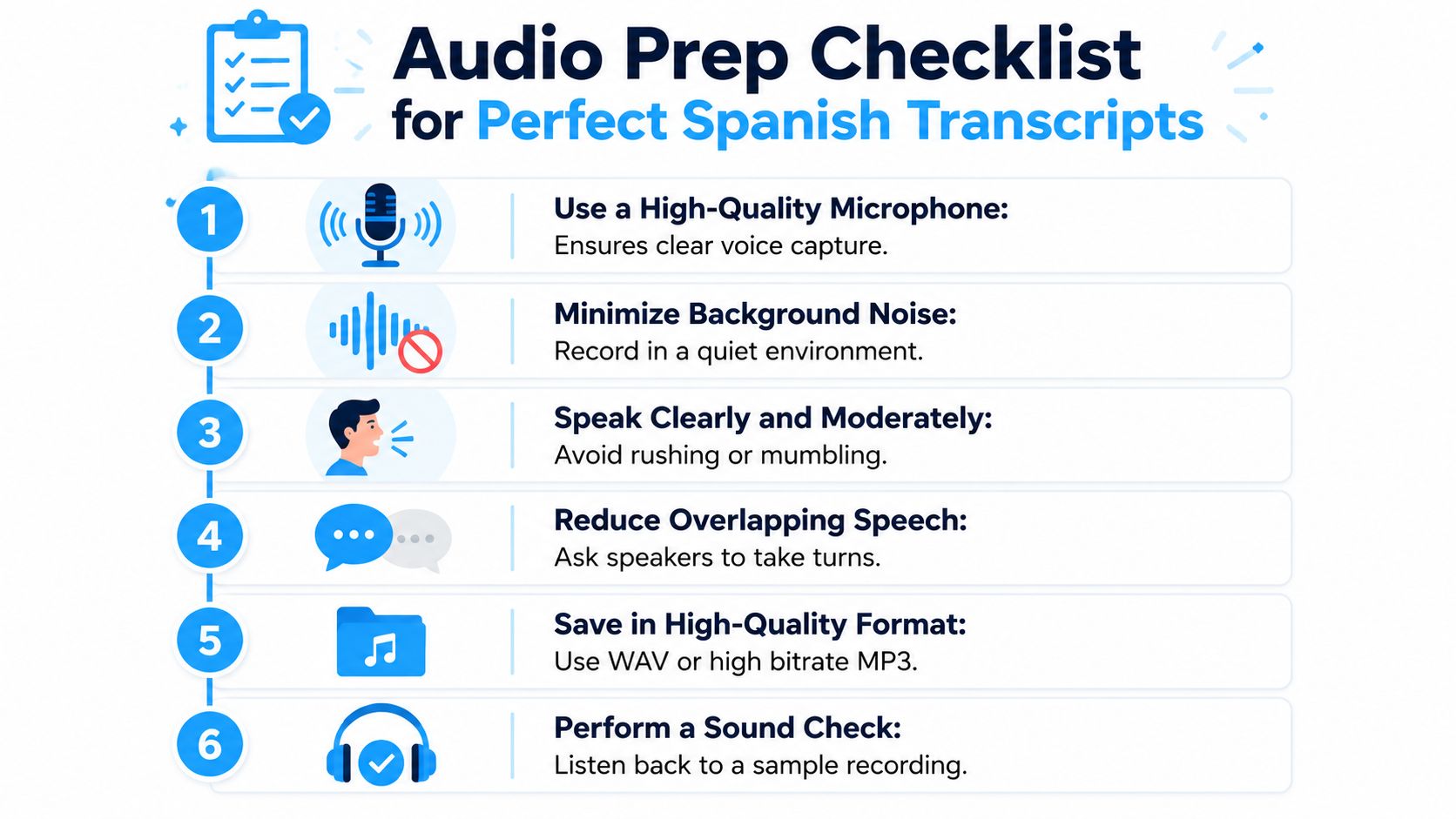
Use a standard export first. WAV is the safest choice if you have it. MP3 or M4A are usually fine if the bitrate is decent and the file has not been heavily compressed by a social app or messaging platform.
Then listen before you upload. I do not mean skimming waveforms. I mean playing the first minute on headphones and checking for three things: constant hum, clipped peaks, and buried low-volume speech. Those are the problems that force extra review later.
If you need a simple baseline process, this guide on creating a transcript from audio step by step covers the handoff cleanly.
Prep choices that improve accuracy fastest
A few adjustments produce better drafts without adding much time:
- Convert to one clean master file: Avoid sending odd container formats or exports pulled straight from chat apps.
- Reduce steady background noise: Fan noise, HVAC rumble, and electrical hum confuse word boundaries.
- Even out speaker levels: A guest recorded at a low level will generate more misses than a loud host on the same track.
- Keep separate channels if you have them: Dual-mono interview recordings are much easier to review than a mixed single track.
- Trim obvious dead space: Long silences, countdowns, and handling noise add junk without adding meaning.
- Split long sessions into sections: A 90-minute raw interview is harder to review than labeled segments such as intro, interview, and wrap-up.
Spanish-specific checks people skip
Real-world audio typically breaks the first pass.
If one speaker shifts between Spanish and English, do not assume auto-detection will handle it well. It may, but mixed-language sections often get worse punctuation and weaker speaker labeling. The same goes for dialect-heavy speech. Caribbean Spanish, Rioplatense pronunciation, Mexican regional slang, and rapid Castilian delivery do not fail in the same way, so the prep goal is not "perfect audio." The goal is audio where those differences are still intelligible.
Names, brands, and place references also deserve a quick note before transcription. I keep a short reference list in the project folder for guest names, company names, product terms, and any phrase I already know the model is likely to miss. That does not clean the audio, but it cuts review time.
Know when cleanup is enough
Light cleanup is usually worth it. Heavy restoration is not always.
Remove noise if it improves speech clarity without creating artifacts. If denoising makes the voice metallic or smears consonants, stop there and work from the cleaner original. Overprocessed audio can be harder to transcribe than mildly noisy audio. This is one of those trade-offs that only shows up after you have reviewed a lot of transcripts.
A good rule is simple. If you can follow the speech comfortably at normal speed, AI will often give you a usable first draft. If you have to replay lines to catch words, plan for more manual correction from the start.
My preflight checklist
Before I send a Spanish interview into transcription, I check:
- file format is standard and opens cleanly
- speech is louder than room noise
- no speaker is buried far below the others
- separate channels are preserved if available
- long recordings are split into workable sections
- known names and terms are written down for review
- I have listened to at least one representative sample, not just the opening
That last step matters most. A polished intro can hide a noisy interview segment recorded ten minutes later. Review the part where the actual conversation happens.
Preparation does not guarantee a flawless transcript. It gives the model a fair chance and makes it obvious when AI is good enough for a fast draft versus when human review is required because the audio itself is doing damage.
Your Step-by-Step Transcription Workflow
Once the audio is ready, the goal is to produce the strongest possible first draft, not just the fastest one.

Set the job up correctly
Start by uploading the cleaned file to your transcription tool. If you're using a platform such as Whisper AI, Sonix, Trint, or another editor with language controls, don't leave everything on auto unless you have a reason to.
Use these settings deliberately:
Choose Spanish as the source language
Auto-detect is convenient, but mixed audio can confuse it. If the interview is primarily Spanish, tell the tool that upfront.Turn on speaker labels
This matters for interviews, roundtables, and reaction content. Even imperfect diarization is better than a transcript with no speaker structure.Enable timestamps
Timestamps make review practical. Without them, every correction becomes a hunt.Keep transcription and translation separate
First get the Spanish text right. Translate only after that if you need English output.
What the first pass should produce
A good draft transcript should give you:
- recognizable speaker turns
- readable sentence boundaries
- enough timestamp detail to jump back into the audio
- export options that match your next step
If you want a walkthrough of transcript generation from upload through export, this guide on creating a transcript is a useful reference.
Don't rely on auto-everything
The most common setup mistake is asking one pass to do too much.
If the recording contains code-switching, the model may try to normalize everything into one language. If the accents are heavy, it may overcorrect words into more familiar spellings. If two people interrupt each other, speaker labels may drift.
That's why the first pass should be optimized for structure and recoverability, not perfection.
A visual walkthrough helps if you want to compare that setup against your own process:
A working rule for interviews
For single-speaker narration, you can often move quickly from transcript to edit.
For interviews, assume the draft still needs intervention. Mark uncertain passages during review rather than trying to fix everything from memory. A transcript is easiest to repair when the timestamps, speaker breaks, and original-language text are still intact.
Reviewing and Refining Your Spanish Transcript
Here, a decent transcript becomes professional.
Automated output can look polished because punctuation is present and the sentences flow. That surface polish hides the errors that matter most, especially in Spanish interviews where names, local expressions, and quoted lines carry the whole value of the piece.

What to check first
Don't start by rereading every line slowly. That takes too long.
Scan the transcript for high-risk zones first:
- Proper nouns: guest names, brands, places, organizations
- Technical vocabulary: product terms, medical language, legal phrasing
- Quote-worthy moments: the lines likely to appear in captions, articles, or clips
- Speaker transitions: anywhere one voice hands off to another
For higher-stakes uses, that review isn't optional. Guidance for Spanish transcription warns that in legal, medical, or branded material, even a few misheard names or technical terms can be costly, which is why the right level of review depends on risk tolerance, turnaround, and whether the transcript is for private use or public publication (SpeakWrite on AI review versus full human transcription).
Use timestamps like an editor
Timestamps turn cleanup from brute force into targeted correction.
Jump only to suspect segments. Listen to five or ten seconds before and after the questionable phrase. That extra context usually reveals whether the issue is a vocabulary miss, a punctuation problem, or a speaker assignment error.
Review speed comes from navigation, not from reading faster.
If you want a systematic editing checklist, this resource on proofreading in transcription is a practical companion for final-pass cleanup.
Export based on the actual job
Different outputs need different transcript shapes.
| Format | Best use |
|---|---|
| SRT or VTT | Video captions and subtitle workflows |
| TXT | Search, analysis, and raw archival use |
| DOCX or PDF | Editorial review, client delivery, annotated drafts |
One more thing often gets skipped: formatting for readability. Add paragraph breaks at natural topic changes. Fix obvious filler clutter if the transcript is meant for publication. Keep verbatim phrasing only when verbatim matters.
Troubleshooting Accents Code-Switching and Noise
This is the part most tool pages avoid. It's also where the actual work is.
Spanish audio in the wild often includes speakers from different regions, casual slang, borrowed English, interruptions, and rooms that were never meant to be recording spaces. A major user challenge is exactly this kind of messy material. Spanish clips often include code-switching and heavy dialect variation, and guidance aimed at journalists and podcasters has pointed out that many platforms don't explain clearly how performance degrades in those conditions (Sonix on real-world Spanish transcription challenges).
When accents throw off the transcript
A strong regional accent doesn't mean the model will fail across the whole file. It usually means error patterns become concentrated.
Watch for:
- dropped word endings
- substituted common words for local ones
- rewritten names into more familiar spellings
The fix is rarely “start over from scratch.” It's usually smarter to re-run the problem segment, then compare versions while listening to the source.
When speakers mix Spanish and English
Code-switching creates a different kind of error. The model may hear the English phrase correctly but force the surrounding syntax into something unnatural. Or it may convert a brand term, software term, or phrase from U.S. bilingual speech into a wrong Spanish equivalent.
For these clips, keep the edit policy simple:
- Preserve the language as spoken
- Don't normalize bilingual phrasing unless the final use requires it
- Flag ambiguous moments instead of guessing
If your work includes multilingual publishing, this article on scaling podcasts globally with AI is a helpful companion because it looks at the broader production implications once transcripts move into translation and localization.
When noise and overlap won't go away
Sometimes cleanup can only do so much.
If a guest speaks over the host while music is playing under the track, no model is going to give you a perfect result. In those cases, the professional move is to document uncertainty clearly. Add a marker, re-listen on headphones, and decide whether the line needs manual reconstruction, omission, or a direct check against the speaker if that's possible.
Messy Spanish audio doesn't need magic. It needs triage. Re-run what can be recovered, correct what matters most, and stop pretending every transcript should be perfect on the first pass.
If you want a practical tool for this workflow, Whisper AI can handle Spanish transcription with speaker detection, timestamps, summaries, and export options that fit editing and captioning workflows. It's most useful when you treat it as a fast first draft system, then apply the review process that makes the transcript publishable.


























































































