
Crafting Invitations for Meetings That Get Results
Your calendar already tells you which meetings are going to fail.
The invite arrives with a vague title, no decision owner, no agenda, and a guest list that looks copied from the org chart. Half the attendees accept because they don't want to seem unavailable. A few decline because they can't tell whether they're needed. Everyone else shows up late, multitasks, or asks the same basic question in the first five minutes: “What are we trying to get done here?”
That's not a meeting problem. It's an invitation problem.
Experienced coordinators know this instinctively. The invite is where you decide whether the meeting deserves to exist, who needs to be in the room, what preparation is required, and what “done” looks like. If you get that right, attendance improves, preparation improves, and the meeting has a chance. If you get it wrong, the calendar entry becomes administrative clutter.
Why Most Meeting Invitations Fail
Bad invitations for meetings usually fail before anyone clicks Accept. They ask for time without making a case for why that time matters. In a crowded calendar, that's fatal.
Workplace overload is a large part of the reason. Recent workplace research highlighted by Prialto's discussion of effective meeting invitations says employees spend over 60% of their time in meetings or email. When attention is already fragmented, a weak invite doesn't just look sloppy. It gets treated like noise.

What a failing invite looks like
You can spot the pattern quickly:
- The subject line is generic: “Catch-up,” “Quick sync,” or “Discussion” tells people nothing.
- The purpose is implied, not stated: Attendees have to guess whether the meeting is for input, approval, or status.
- The attendee list is bloated: People are invited “just in case,” which weakens accountability.
- Preparation is invisible: Files exist somewhere, but not in the invite.
- No outcome is named: People don't know whether they're leaving with a decision, a list of actions, or another meeting.
The result is predictable. The wrong people attend. The right people attend unprepared. The organizer spends the opening minutes explaining why everyone is there.
Why etiquette advice isn't enough
A lot of guidance about invitations for meetings stays at the etiquette level. Add a date. Add a time. Be polite. Send a reminder. That's useful, but it doesn't solve the core issue.
A strong invite has to answer a harder question: why should a busy person accept this meeting and prepare for it?
A meeting invite should reduce uncertainty, not create it.
That's why the best organizers start with the meeting goal, not the calendar slot. If the purpose isn't clear, the invite can't be clear either. A useful way to sharpen that thinking is to define the goals of a meeting before you draft a single line.
The hidden cost of weak invites
Poor invitations don't only waste the scheduled block. They create follow-up waste too. Decisions get postponed. Action items stay fuzzy. People leave with different interpretations of what happened.
That's why skilled executive assistants and project managers treat the invite as an operational document, not a courtesy email. The invite is where the meeting either gains structure or loses it.
The Anatomy of a Perfect Meeting Invite
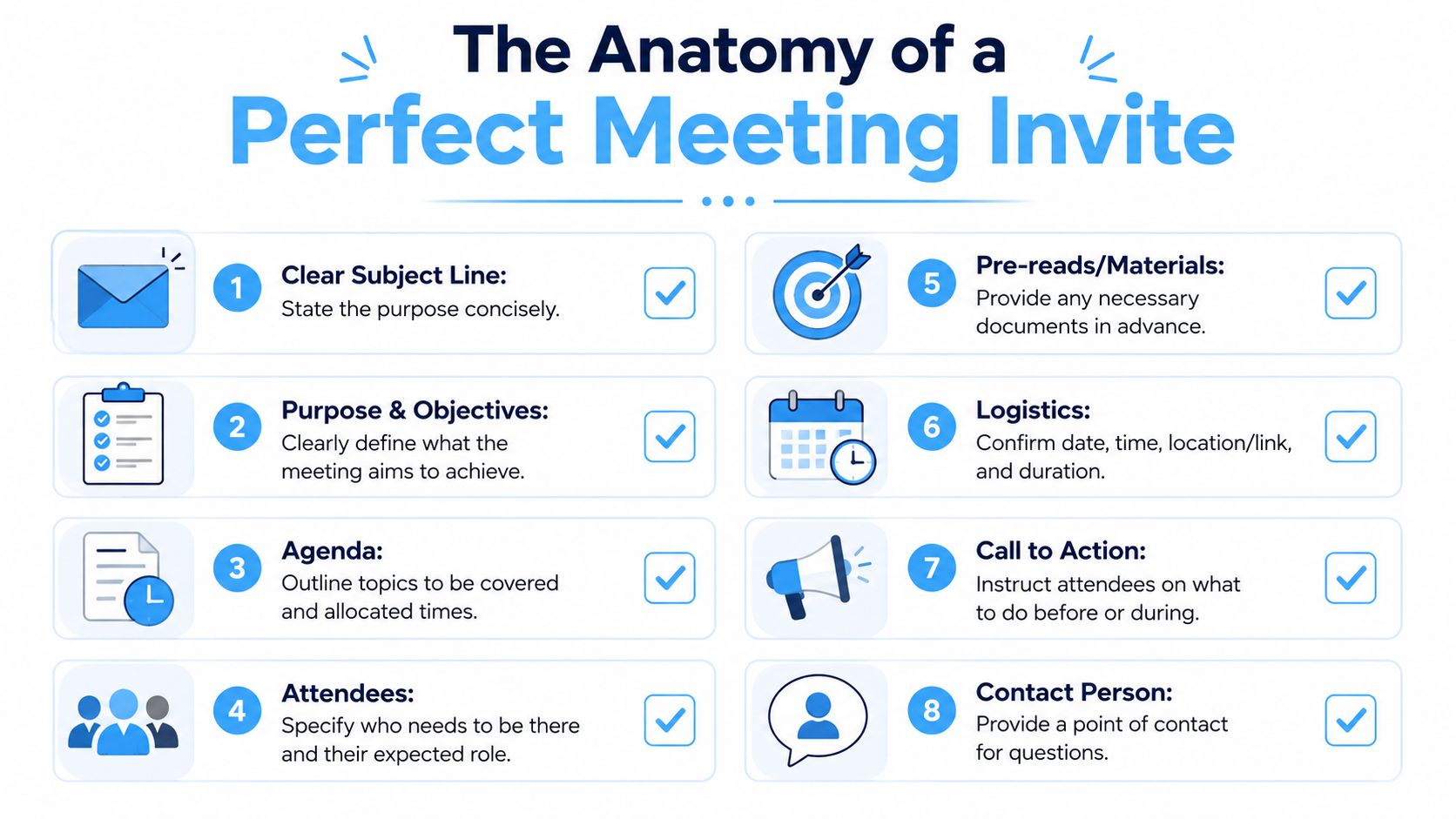
The cleanest invitation starts with three things in this order: purpose, outcome, agenda.
That sequence comes directly from MIT's internal meeting norms guidance, which recommends defining the purpose and intended outcome first, then building the agenda and participant list. The same guidance advises stating how decisions will be made and attaching pre-reading to reduce ambiguity.
Start with purpose and outcome
If you can't write the purpose in one or two plain sentences, the meeting probably isn't ready to be scheduled.
A good purpose statement tells attendees why the meeting exists now. A good outcome tells them what should be true by the end. Those are related, but they're not the same.
Compare these:
Weak: Discuss product launch
Better: Review launch blockers and decide whether to keep the current release date
The second version does two jobs. It names the topic and signals the expected result.
Build an agenda people can actually use
An agenda is not a list of themes. It's a sequence of decisions, updates, and discussion blocks with enough detail for people to prepare.
Use a structure like this:
- Opening context: Why this meeting is happening now
- Agenda item one: Topic plus owner
- Agenda item two: Topic plus owner
- Decision point: What needs approval or alignment
- Next steps: Actions, owners, deadlines
Timed agendas work best when they're realistic. If the meeting is short, keep the number of items short. Trying to cram six substantial discussions into a brief meeting tells attendees that the organizer isn't managing scope.
Choose attendees by role, not politics
MIT's guidance also points to participant selection as part of invite design. That matters more than is often acknowledged.
Invite people because they have one of these roles:
- Decision-maker: They can approve, reject, or choose a direction.
- Contributor: They hold information needed for the decision.
- Executor: They will own work that comes out of the meeting.
- Observer by exception: They need visibility, but don't need airtime.
If someone doesn't fit one of those roles, they probably don't need the invite. They may need the notes afterward instead.
Include the details that remove friction
The most effective invitations for meetings also handle practical execution. Don't make attendees hunt for basics.
Include:
- Location or link: Put the correct room or video link in the event itself.
- Pre-reading: Attach documents directly to the invite.
- Decision method: State whether the meeting ends with a recommendation, a manager call, or group agreement.
- Meeting roles: If useful, name a note-taker and timekeeper.
- Language clarity: Spell out acronyms, especially in cross-functional meetings.
Practical rule: If someone opens your invite two minutes before the meeting, they should still know why they're there and what they're expected to do.
Invitation Templates for Any Situation
Templates help most when they reflect real working situations, not generic etiquette examples. The wording should change depending on who you're inviting, what you need from them, and how much context they already have.
Here's a quick reference you can scan before writing.
| Meeting Type | Subject Line Example | Body Snippet |
|---|---|---|
| Executive decision meeting | Decision needed on Q3 vendor shortlist | We need your decision on the final shortlist. Please review the attached summary before the meeting. |
| Team stand-up | Weekly operations stand-up | Short sync on blockers, priorities, and handoffs for the week. Add updates to the shared doc before we meet. |
| Client meeting | Review of implementation timeline | I'd like to confirm milestones, open questions, and owners so we leave with a clear next-step plan. |
| Expert outreach | Request for a short meeting on onboarding workflow | I'm working on improving our onboarding process and would value your perspective on where teams usually get stuck. |
For a busy executive
Senior leaders respond best to clarity and compression. They don't need throat-clearing. They need the decision, the stakes, and the prep.
Subject: Approval needed for revised hiring plan
We need your approval on the revised hiring plan for the next phase.
In this meeting, we'll review the updated headcount request, open risks, and the recommendation from finance.
Outcome: leave with a go or no-go decision.
Prep: please review the attached one-page summary before the meeting.
This works because it respects executive attention. It doesn't pretend the meeting is exploratory when it's really a decision meeting.
For a recurring team sync
Recurring meetings become lazy very quickly. The fix is to make the purpose stable and the content variable.
If you run daily or weekly team meetings, a focused agenda for stand-up meeting can keep the invitation from becoming wallpaper.
Subject: Weekly team sync on delivery priorities
We'll use this meeting to confirm priorities, surface blockers, and assign support where work is stuck.
Please add your updates to the shared notes before the meeting.
We will cover: current priorities, blockers, cross-team dependencies, and this week's ownership changes.
For an external client or partner
External invitations need a little more polish and a little less jargon.
Subject: Meeting to review implementation milestones
I'd like to meet to review the current implementation timeline, confirm ownership for the remaining tasks, and resolve any open questions.
I've attached the latest project summary for reference.
Outcome: agree on next steps and confirm the timeline for the upcoming handoff.
For a cold or low-context request
Most invites fail because they ask for time before earning interest.
Subject: Request for a short meeting on approval workflows
I'm mapping our current approval workflow and noticed your team has solved a similar issue.
I'd value a short conversation to understand what worked, what didn't, and what you'd do differently.
If you're open to it, I'll send a brief agenda in advance so the discussion stays focused.
The key move here is specificity. “Can we connect?” is easy to ignore. A concrete reason is much harder to dismiss.
Mastering Your Calendar and Scheduling Tools
A strong message can still fail if the calendar setup is messy. The mechanics matter.
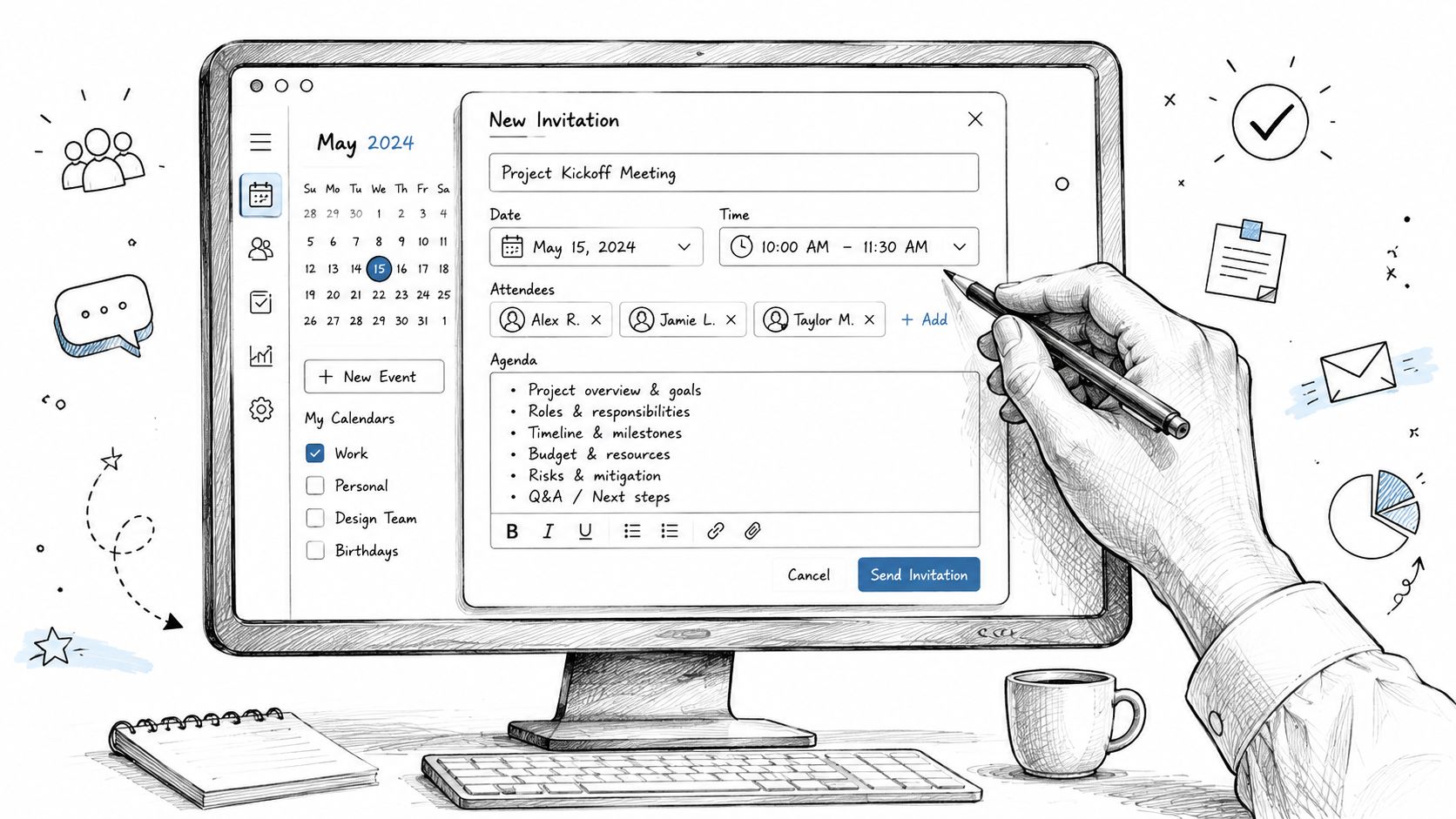
People judge invitations for meetings by what happens when they click them. If the time zone is wrong, the video link is missing, the attachments are buried in a separate email, or the room isn't updated, confidence drops fast.
Set up the event like an operator
Whether you're using Google Calendar or Outlook, the checklist is similar:
- Title the event clearly: Put the actual purpose in the event name.
- Add the meeting link inside the invite: Don't rely on a follow-up message.
- Attach key files directly: Decks, pre-reads, briefs, and decision docs should live with the event.
- Check the time zone setting: Especially important for distributed teams.
- Use availability tools properly: Send a hold only when you expect attendance.
Good organizers also use built-in features people forget about. “Propose new time” can save a high-value attendee without restarting the scheduling process. Room booking and conferencing integrations reduce the risk of duplicate logistics messages. Guest permissions should match the meeting type, especially if documents are sensitive.
When to use scheduling links
Scheduling tools such as Calendly can remove the back-and-forth that slows down simple meetings. They work best when the meeting is straightforward, one-on-one, and doesn't require complicated attendee coordination.
They work poorly for high-stakes internal meetings that need a curated attendee list, pre-reading, and a defined decision path. In those cases, the organizer should control the event manually.
The more important the outcome, the less you should outsource the invite design to a default booking page.
Small details that prevent big problems
Calendar discipline often looks boring, but it saves meetings.
A few habits make a difference:
- Use the description field well: Put the agenda, prep notes, and contact point there.
- Update the event instead of sending scattered emails: One source of truth lowers confusion.
- Shorten default durations when possible: A focused meeting often needs less time than the platform suggests.
- Prepare attendees in advance: Thoughtful preparation of meetings starts before the event opens.
If you manage scheduling for a leader or a team, consistency matters even more than style. People learn quickly whether your calendar invites can be trusted. Once they trust them, acceptance and preparation get easier.
Managing RSVPs and Reminders to Maximize Attendance
Hitting Send isn't the finish line. It's the start of attendance management.
A surprising number of organizers assume weak attendance means people are too busy or too disengaged. Sometimes that's true. Often it isn't. Lucid Meetings' guidance on meeting metrics recommends tracking invitees versus actual attendance and late arrivals, and notes that when attendance is weak or meetings start late, the invitation design and RSVP process are often the root cause.
What to watch after the invite goes out
If you want better turnout, monitor the invite like any other workflow.
Pay attention to:
- Non-responses: Silence usually means the invite didn't create enough clarity or urgency.
- Tentative replies: These often signal that the attendee doesn't know whether they're truly needed.
- Late arrivals: Repeated lateness can point to unclear logistics, poor timing, or low perceived value.
- Early departures: That's often a clue that the attendee's role wasn't defined correctly.
These patterns tell you more than polite feedback ever will.
How to remind without nagging
Reminders work best when they add value, not pressure. A good reminder restates the purpose, confirms the logistics, and highlights any prep.
Reminder example
Looking forward to tomorrow's meeting. We'll use the session to finalize the handoff plan and confirm owners for the remaining tasks. The latest draft is attached in the event for quick review before we meet.
For teams that need a cleaner follow-up system, these appointment reminder email templates from Recepta.ai are useful examples of concise reminder language that doesn't sound robotic.
Treat RSVP management as part of meeting quality
Strong organizers don't chase replies out of habit. They chase them because attendance quality affects outcomes.
If a decision-maker hasn't responded, that's not a minor admin issue. If half the group arrives cold, the meeting will drift into recap mode. If recurring meetings attract passive accepts and weak attendance, the invite needs redesign.
A calendar response is feedback. Read it that way.
Writing Invitations for Your Future AI Assistant
A meeting invite now serves two audiences: the humans attending the meeting and the systems processing what happens afterward.
That changes how smart organizers write invitations for meetings. The goal is no longer limited to getting people into the room. The invite also needs to give transcription, summarization, and action-capture tools enough context to produce useful output.
A discussion of AI-related invitation gaps and downstream action capture notes a key challenge for organizations: standardizing what belongs in an invite so AI tools can auto-summarize and assign actions effectively. The quality of the invite directly affects the usefulness of AI-generated summaries, timestamps, and action items.
What AI needs from your invite
AI tools work better when the meeting context is explicit before anyone speaks.
That means your invite should include:
- A clear meeting purpose: So the summary reflects the actual objective.
- Expected outputs: Decision, recommendation, status update, or action plan.
- Named roles: Who is presenting, deciding, or providing input.
- Pre-reading references: So post-meeting notes can be interpreted against the right documents.
- Agenda order: So the transcript can be understood in segments, not as one long block of speech.
If the invite says only “team sync,” the transcript system has to infer everything from the conversation. If the invite says “review blockers, decide launch timing, assign owners,” the resulting notes become far more usable.
Why this matters after the meeting
The difference shows up in the follow-up.
A vague invite tends to produce vague summaries. Action items blur together. Decisions are hard to identify. Search becomes less useful because the meeting wasn't framed well in the first place.
A structured invite creates cleaner downstream records. That matters for internal accountability, but it also matters if you repurpose conversations. Teams that turn discussions into written output often benefit from guidance like ProdShort on turning calls into content, because the meeting can only become strong content if the original discussion had a defined purpose and shape.
Write the invite so a new team member, a note-taker, and an AI system would all understand the meeting the same way.
The old view treated the invitation as disposable admin. The current view should treat it as the first artifact in the meeting record. When you write it that way, every step after the meeting gets easier.
If you want cleaner transcripts, sharper summaries, and action items that reflect what the meeting was for, start with the source material. Whisper AI helps teams turn meetings, recordings, and video into searchable text with summaries, timestamps, and follow-up insights, so the work done in a strong invite carries through to the final record.


























































































